

Sooner or later a design involves something big and binary: profile photos, video uploads, PDF attachments, device backups, model weights. These blobs (binary large objects) are measured in megabytes or gigabytes, not kilobytes, and they break the assumptions behind a normal API. You cannot put a 2 GB video in a database row, and you cannot stream it through your application servers without melting them. This lesson is the standard pattern for handling blobs, and it is one of the most reusable tools in the kit — it shows up in Dropbox, YouTube, Instagram, email attachments, and almost any “upload a file” feature.
In the interview: the moment a problem involves files, images, or video, say the words “object storage and presigned URLs” early. Candidates who route the bytes through their own servers immediately look junior; the whole point is that your servers never touch the payload.
Why the bytes must not flow through your app servers
The naive design has the client POST the file to your API, which then writes it to storage. This is a trap. Your application servers are tuned for many small, fast requests; forcing gigabytes of upload and download traffic through them wastes their memory and bandwidth, blocks request threads for the duration of a slow mobile upload, and turns a fleet sized for API traffic into an undersized file proxy. A single large upload can occupy a connection for minutes.
The fix is to get your servers out of the data path entirely. Blobs live in object storage — Amazon S3, Google Cloud Storage, Azure Blob Storage — a service purpose-built to store enormous numbers of large objects durably and cheaply, with its own massive bandwidth. Your database stores only a small metadata record describing the object:
files
  id            uuid         primary key
  owner_id      uuid
  s3_key        text         location in the bucket
  content_type  text         image/jpeg, video/mp4, ...
  size_bytes    bigint
  status        text         pending | uploaded | processed
  created_at    timestamptz
The metadata is small and relational; the bytes are large and go to object storage. Keeping them separate is the core of the pattern.
Presigned URLs: direct, authorized transfer
If clients talk to object storage directly, how do you keep it secure? You do not make the bucket public. Instead your server generates a presigned URL — a time-limited, cryptographically signed URL that grants permission to do exactly one operation (PUT this key, or GET this key) for a few minutes. The client uses it to transfer bytes straight to or from object storage; your server only signed the request.
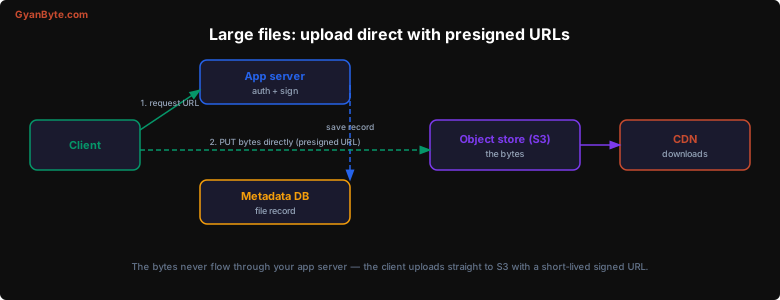
The upload flow becomes:
- Client asks the API to start an upload. The server authenticates the user, creates a
pendingmetadata row, and returns a presigned PUT URL. - Client uploads the bytes directly to S3 using that URL. Your servers see none of it.
- S3 notifies your backend (via an event / webhook) that the object landed, or the client calls a small “complete” endpoint; the server flips the row to
uploaded.
Downloads work the same way in reverse: the server checks authorization and returns a presigned GET URL (or a CDN URL), and the client fetches the bytes directly. Your app server handled two tiny JSON requests and moved zero gigabytes.
Chunked, resumable uploads
A single presigned PUT is fine for a few megabytes. For large files — a 4 GB video over a flaky phone connection — one dropped connection near the end means starting over, which is miserable. The answer is multipart (chunked) upload: split the file into parts (for example 5–10 MB each), upload the parts independently, and have storage reassemble them.
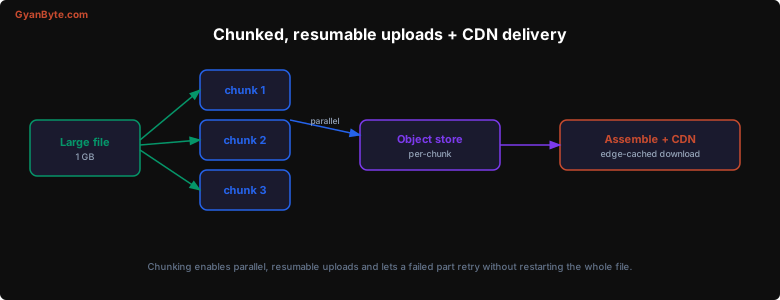
Chunking buys three things:
- Resumability — only a failed part is retried, not the whole file. The client tracks which parts succeeded and re-requests presigned URLs for the rest.
- Parallelism — parts upload concurrently, saturating available bandwidth and finishing faster.
- Progress and integrity — the client can show a real progress bar, and each part carries a checksum so corruption is caught per chunk.
Object storage services support this natively (S3 multipart upload), so in an interview you can say “multipart upload with per-part presigned URLs” and move on. The same chunk boundaries are also what enable deduplication and delta sync — if a client re-uploads a file where only one chunk changed, only that chunk moves (the trick behind Dropbox, covered in its own design lesson).
Serving downloads: CDN and byte ranges
Reads of blobs are usually far more frequent than writes — a photo is uploaded once and viewed thousands of times — so put a CDN in front of object storage. The CDN caches objects at edge locations near users, cutting latency and offloading the origin. For private content, use signed CDN URLs so only authorized users can fetch, and set sensible Cache-Control headers.
Video adds one more requirement: byte-range requests. A player should be able to seek to the middle of a two-hour film without downloading the first hour, and should stream progressively rather than waiting for the whole file. Object storage and CDNs support HTTP range requests for exactly this, and streaming formats (HLS/DASH) go further by splitting the video into small time-segment files the player fetches on demand — which is really just the chunking idea applied to playback.
Processing blobs asynchronously
Uploaded blobs usually need work done on them: transcode a video into multiple resolutions, generate thumbnails, scan for malware, extract text, run moderation. None of that belongs in the upload request. The pattern is to do it asynchronously: when an object finishes uploading, enqueue a job; a pool of workers picks it up, processes the blob (reading and writing directly to object storage), and flips the metadata status to processed when done. Clients see the file as “processing” until it is ready.
This is the long-running task pattern, which is the subject of the next lesson — blobs and async jobs almost always appear together.
Key Takeaways
-
Keep large bytes out of your app servers. Store blobs in object storage (S3) and only metadata (id, owner, content-type, size, status) in your database. Your servers are sized for API traffic, not for proxying gigabytes.
-
Use presigned URLs for direct transfer. The server authorizes and signs a short-lived, single-operation URL; the client uploads or downloads straight to/from object storage. Buckets stay private and your servers stay out of the data path.
-
Chunk large uploads. Multipart upload makes transfers resumable (retry one failed part), parallel (saturate bandwidth), and verifiable (per-chunk checksums). The same chunk boundaries enable dedup and delta sync.
-
Serve through a CDN with signed URLs. Blobs are read-heavy, so cache them at the edge; use signed URLs for private content and byte-range requests for video seeking and streaming.
-
Process asynchronously. Transcoding, thumbnails, and scanning happen off a job queue after upload, not in the request — which leads directly into managing long-running tasks.