

“Design WhatsApp” is one of the most popular system design interview questions. It tests your understanding of real-time communication, message delivery guarantees, presence management, and handling millions of concurrent connections. Let’s work through it methodically.
1. Understanding the Problem
Before drawing a single box, clarify the scope with your interviewer. Here’s what you should establish:
Functional Requirements
- 1:1 messaging — Send and receive text messages between two users
- Group chat — Groups of up to 500 members
- Online/offline status — Show when contacts are online
- Read receipts — Single check (sent), double check (delivered), blue check (read)
- Media sharing — Images, videos, voice messages
- Message history — Persist messages and sync across devices
Non-Functional Requirements
- Low latency — Messages delivered in under 100ms for online users
- High availability — The system should never go down (99.99% uptime)
- Message ordering — Messages within a conversation appear in the correct order
- At-least-once delivery — No messages are lost, though duplicates are acceptable (clients deduplicate)
- End-to-end encryption — Server cannot read message contents
- Scale — Support 2 billion users, 100 billion messages per day
Back-of-the-envelope Estimation
Daily active users:     500M
Messages per user/day:  40
Total messages/day:     20B
Messages/second:        ~230K (avg), ~700K (peak)
Average message size:   100 bytes
Daily storage:          20B × 100B = 2TB/day
5-year storage:         2TB × 365 × 5 = ~3.6PB
Concurrent connections: ~10M WebSocket connections at peak
2. Core Entities and APIs
Data Model
-- Users
CREATE TABLE users (
    user_id     UUID PRIMARY KEY,
    username    VARCHAR(50) UNIQUE,
    phone       VARCHAR(20) UNIQUE,
    public_key  BLOB,         -- For E2E encryption
    created_at  TIMESTAMP
);

-- Conversations (1:1 or group)
CREATE TABLE conversations (
    conversation_id  UUID PRIMARY KEY,
    type             ENUM('direct', 'group'),
    group_name       VARCHAR(100),
    created_at       TIMESTAMP
);

-- Group membership
CREATE TABLE group_members (
    conversation_id  UUID,
    user_id          UUID,
    role             ENUM('admin', 'member'),
    joined_at        TIMESTAMP,
    PRIMARY KEY (conversation_id, user_id)
);

-- Messages (Cassandra - partitioned by conversation_id)
CREATE TABLE messages (
    conversation_id  UUID,
    message_id       TIMEUUID,   -- Time-ordered UUID
    sender_id        UUID,
    content          BLOB,       -- Encrypted content
    type             ENUM('text', 'image', 'video', 'voice'),
    media_url        VARCHAR(500),
    created_at       TIMESTAMP,
    PRIMARY KEY (conversation_id, message_id)
) WITH CLUSTERING ORDER BY (message_id DESC);
The messages table uses conversation_id as the partition key. This means all messages in a conversation are stored together on the same Cassandra node, making pagination queries fast.
API Design
# Send a message
POST /api/v1/messages
Body:
  conversation_id: UUID
  content: encrypted_bytes
  type: "text" | "image" | "video" | "voice"
  media_url: string (optional)
  client_message_id: UUID  # Client-generated for deduplication
Response: { message_id, timestamp, status: "sent" }

# Get messages (paginated)
GET /api/v1/messages?conversation_id={id}&before={message_id}&limit=50
Response: { messages: [...], has_more: boolean }

# Create a group
POST /api/v1/groups
Body:
  name: string
  member_ids: [UUID]
Response: { conversation_id, group_name }

# Get online status
GET /api/v1/presence?user_ids={id1,id2,id3}
Response: { statuses: { user_id: "online" | "last_seen: timestamp" } }

# Upload media (pre-signed URL)
POST /api/v1/media/upload
Body:
  content_type: "image/jpeg"
  size_bytes: 2048000
Response: { upload_url: "https://s3...", media_id: UUID }
Note: In practice, most message sending happens over WebSocket, not REST. The REST API is used for history loading, group management, and media uploads.
3. High-Level Design
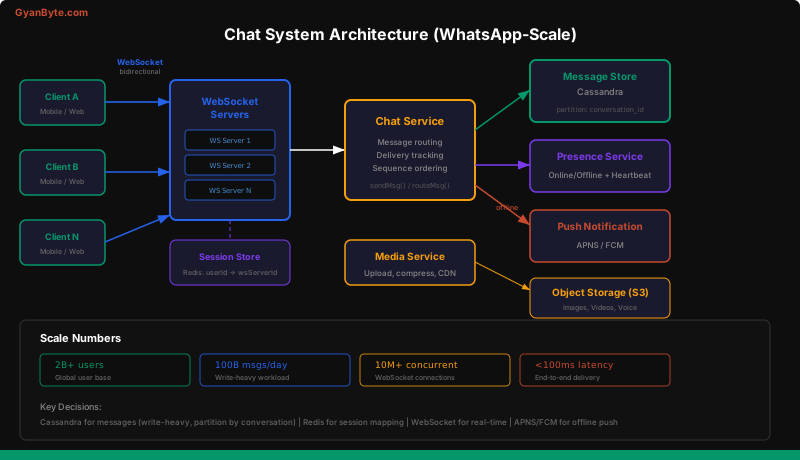
Component Breakdown
WebSocket Servers — Maintain persistent bidirectional connections with clients. Each server handles ~65K concurrent connections. We need hundreds of these servers.
Chat Service — The brain of the system. Routes messages from sender to recipient. Looks up which WebSocket server the recipient is connected to.
Session Store (Redis) — Maps user_id → ws_server_id. When User A sends a message to User B, the chat service checks Redis to find which WebSocket server User B is connected to.
Message Store (Cassandra) — Persists all messages. Cassandra is chosen because the workload is write-heavy (230K writes/sec) and the access pattern (fetch messages by conversation, ordered by time) maps perfectly to Cassandra’s clustering columns.
Presence Service — Tracks online/offline status using heartbeats. Backed by Redis with TTL-based expiry.
Push Notification Service — Sends APNS (iOS) or FCM (Android) notifications when the recipient is offline.
Media Service — Handles image/video uploads. Compresses media, generates thumbnails, and stores in S3. Returns a CDN URL that’s embedded in the message.
4. Deep Dives
Message Delivery Flow
Let’s trace what happens when Alice sends “Hello” to Bob:
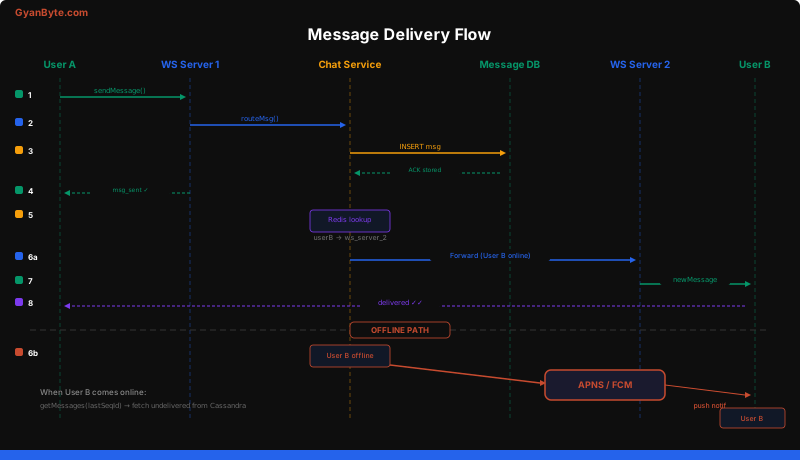
Step-by-step:
- Alice’s client sends the message over its WebSocket connection to WS Server 1
- WS Server 1 forwards the message to the Chat Service
- Chat Service persists the message to Cassandra (this is the commit point — once stored, the message won’t be lost)
- Chat Service sends an acknowledgment back to Alice (“sent” checkmark)
- Chat Service looks up Bob’s WebSocket server in Redis
- If Bob is online: Forward the message to Bob’s WS Server, which pushes it to Bob’s client. Bob’s client sends a “delivered” ACK, which propagates back to Alice (double checkmark)
- If Bob is offline: Send a push notification via APNS/FCM. When Bob comes back online, his client calls
getMessages(lastSeqId)to fetch all undelivered messages
Message Ordering
Messages must appear in the correct order within a conversation. We achieve this with sequence IDs per conversation.
# Each conversation has a monotonically increasing sequence counter
# Stored in Redis for speed, backed by Cassandra

def assign_sequence(conversation_id, message):
    seq = redis.incr(f"seq:{conversation_id}")
    message.sequence_id = seq
    return message
Why not use timestamps? Because clocks across servers are never perfectly synchronized. Two messages sent 1ms apart might get the same timestamp, or even inverted timestamps. Sequence IDs within a conversation are monotonic and unambiguous.
Client-side ordering: The client displays messages sorted by sequence_id within each conversation. If a message arrives out of order (e.g., message 5 arrives before message 4), the client buffers it and inserts it in the correct position when message 4 arrives.
Group Messaging Fan-Out
When Alice sends a message to a group of 200 members, how do we deliver it to everyone?
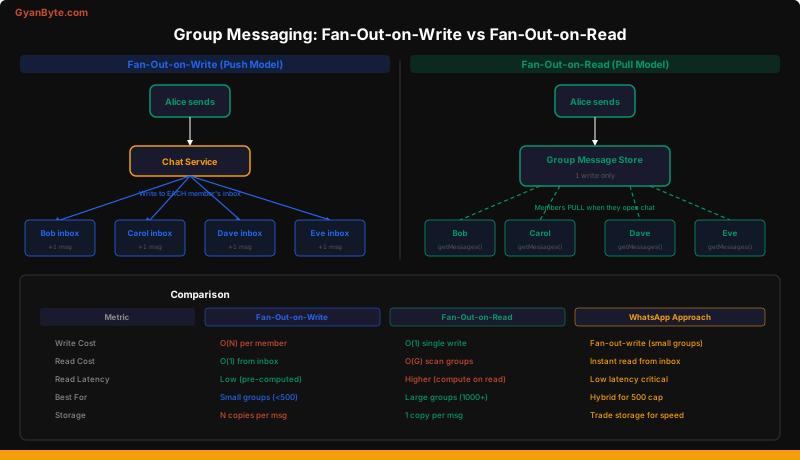
Fan-out-on-write (WhatsApp’s approach for small groups):
When Alice sends a message, the chat service writes a copy to each member’s inbox. When Bob opens the app, his inbox already has the message — instant load.
def send_group_message(conversation_id, message):
    # Store the canonical message
    store_message(conversation_id, message)

    # Fan out to each member's inbox
    members = get_group_members(conversation_id)
    for member in members:
        if member.id != message.sender_id:
            # Write to member's personal inbox
            write_to_inbox(member.id, message)
            # Try real-time delivery
            deliver_to_user(member.id, message)
Fan-out-on-read (better for large groups):
The message is stored once in the group’s message log. When a member opens the group chat, they read from the shared log. This saves write amplification but increases read latency.
WhatsApp’s hybrid approach: Fan-out-on-write for groups up to 500 members (the cap). The write amplification is bounded (max 500 writes per message), and the read latency advantage is worth the storage cost. For a broadcast-style system like Twitter, fan-out-on-read is better because a single tweet might go to millions of followers.
Online Presence at Scale
Showing online/offline status for 500M daily active users is surprisingly challenging.
Naive approach: Client sends a heartbeat every 5 seconds. Server updates last_seen in Redis. Any user with last_seen within the last 30 seconds is “online.”
# Heartbeat handler
def handle_heartbeat(user_id):
    redis.setex(f"presence:{user_id}", 30, "online")
    # Key auto-expires after 30s if no heartbeat

# Check status
def get_status(user_id):
    if redis.get(f"presence:{user_id}"):
        return "online"
    return f"last_seen: {get_last_seen(user_id)}"
Problem: 500M users × heartbeat every 5 seconds = 100M writes/second to Redis. That’s too much.
Optimization — Lazy presence:
- Only track presence for users whose contacts are currently online
- When Alice opens the app, subscribe to presence updates only for her contacts who are currently in her chat list (not all 300 contacts)
- Use a pub/sub model: when Bob’s status changes, publish to a channel that only Bob’s active viewers are subscribed to
Alice opens app → Subscribe to presence:bob, presence:carol
Bob sends heartbeat → Publish to presence:bob → Alice gets update
Alice closes app → Unsubscribe from all presence channels
This reduces the fan-out dramatically. Most users only care about 5-10 contacts at any given time.
End-to-End Encryption
WhatsApp uses the Signal Protocol. Here’s the simplified flow:
- Each user generates a public/private key pair on their device. The public key is uploaded to the server.
- When Alice wants to message Bob, she fetches Bob’s public key from the server.
- Alice encrypts the message with Bob’s public key. Only Bob’s private key (which never leaves his device) can decrypt it.
- The server stores and routes the encrypted blob without ever being able to read it.
Alice's device:
  plaintext = "Hello Bob"
  ciphertext = encrypt(plaintext, bob_public_key)
  → Send ciphertext to server

Server:
  → Stores and routes ciphertext (cannot read it)

Bob's device:
  plaintext = decrypt(ciphertext, bob_private_key)
  → "Hello Bob"
Group encryption is more complex. Each group member has a shared group key. When a member leaves, the group key is rotated so the departed member can’t read future messages.
Handling Millions of WebSocket Connections
A single server can handle ~65K TCP connections (limited by file descriptors, though this can be tuned higher). To support 10M concurrent connections:
10M connections / 65K per server = ~154 servers minimum
With overhead: ~200-300 WebSocket servers
Connection management:
- When a client connects, the WS server registers the mapping
user_id → ws_server_idin Redis - When a client disconnects (or the WS server detects a broken connection via missed heartbeats), it removes the mapping
- If a WS server crashes, all its connections are lost. Clients reconnect to a different server via the load balancer. The new server re-registers the mapping.
Sticky sessions are NOT needed. The WebSocket server is stateless beyond the connection itself. All state (messages, presence, session mapping) lives in external stores.
5. Final Architecture Summary
┌──────────────────────────────────────────────────────────────┐
│                        Clients                                │
│  (Mobile: iOS/Android, Web)                                   │
│  - E2E encryption on device                                  │
│  - Local message cache (SQLite)                              │
│  - Sequence-based sync                                       │
└──────────────┬───────────────────────────────────────────────┘
               │ WebSocket (persistent, bidirectional)
               ▼
┌──────────────────────────────────────────────────────────────┐
│  WebSocket Servers (200+ instances)                           │
│  - Maintain connections                                      │
│  - Register user → server mapping in Redis                   │
│  - Forward messages to Chat Service                          │
└──────────────┬───────────────────────────────────────────────┘
               │
               ▼
┌──────────────────────────────────────────────────────────────┐
│  Chat Service                                                 │
│  - Message routing (1:1 and group)                           │
│  - Sequence ID assignment                                    │
│  - Delivery tracking (sent → delivered → read)               │
│  - Fan-out for group messages                                │
└──────┬───────┬──────────┬────────────┬───────────────────────┘
       │       │          │            │
       ▼       ▼          ▼            ▼
   Cassandra  Redis    Push Notif   Media Service
   (messages) (session  (APNS/FCM)  (compress →
              + presence             S3 + CDN)
              + sequences)
Key Design Decisions Recap
| Decision | Choice | Rationale |
|---|---|---|
| Real-time protocol | WebSocket | Bidirectional, low overhead vs polling |
| Message store | Cassandra | Write-heavy, partition by conversation |
| Session store | Redis | Sub-ms lookups, TTL for presence |
| Group fan-out | Fan-out-on-write | Bounded by 500 member cap, instant reads |
| Message ordering | Per-conversation sequence IDs | Server clocks are unreliable |
| Offline delivery | Push notification + sync on reconnect | Users may be offline for hours |
| Media storage | S3 + CDN | Never store blobs in the database |
| Encryption | Signal Protocol (E2E) | Server never sees plaintext |
Common Follow-Up Questions
Q: How do you handle message editing/deletion? Send a “tombstone” message with the original message ID. Clients replace the original with “This message was deleted.” Don’t actually delete from Cassandra — append-only is more efficient.
Q: How do you prevent spam? Rate limiting at the API Gateway (messages per minute per user), phone number verification, and ML-based content moderation on the server side (though E2E encryption limits server-side moderation).
Q: How do you handle multi-device sync?
Each device maintains a last_synced_sequence_id per conversation. On reconnect, it fetches messages with sequence_id > last_synced. All devices for the same user receive the same messages via the fan-out mechanism.
Q: What about message search? Since messages are E2E encrypted, server-side search is impossible. Search happens locally on the client device using a local database (SQLite with FTS5 extension).
Key Takeaways
- WebSockets are essential for real-time chat — polling wastes bandwidth and adds latency
- Cassandra is the right choice for message storage due to write-heavy workloads and time-series access patterns
- Sequence IDs per conversation solve the ordering problem better than timestamps
- Fan-out-on-write works for WhatsApp-scale groups (capped at 500) but not for Twitter-scale followers
- Presence is harder than it looks — naive heartbeats don’t scale; use lazy presence with pub/sub
- Always design for the offline case — push notifications and sync-on-reconnect are critical paths, not edge cases