

Every system you design in an interview is assembled from a small set of well-known components. Think of them as LEGO bricks — you don’t invent new ones each time, you combine them in different ways. The interviewer isn’t testing whether you know these exist; they’re testing whether you know when to use each one and what trade-offs they carry.
This lesson is your component toolbox. By the end, you’ll have a mental decision framework for picking the right component for any requirement.
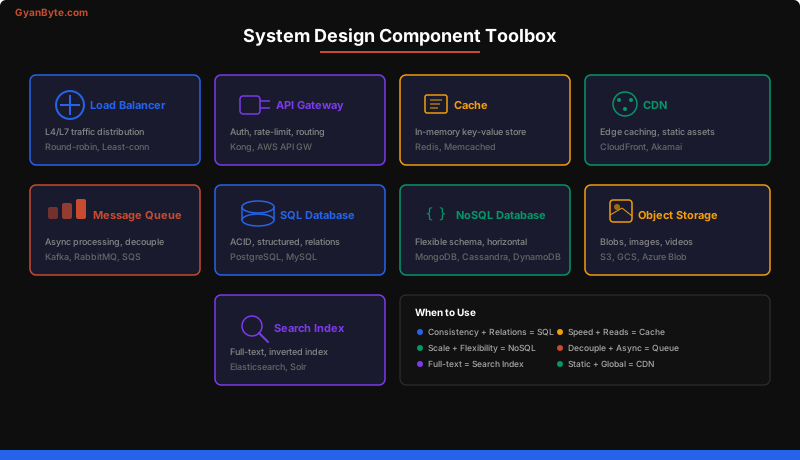
Load Balancers
A load balancer distributes incoming traffic across multiple servers so no single machine becomes a bottleneck. It’s the first component after your DNS entry point.
L4 vs L7
Layer 4 (Transport) load balancers operate at the TCP/UDP level. They see IP addresses and port numbers but not HTTP headers, paths, or cookies. They’re fast because they don’t inspect packet contents.
Layer 7 (Application) load balancers understand HTTP. They can route based on URL path, headers, cookies, or request body. This enables smarter routing — send /api/search to search servers and /api/upload to upload servers.
L4 Load Balancer:
  Client → [TCP connection] → LB picks backend by IP hash → Server

L7 Load Balancer:
  Client → [HTTP request] → LB reads path/headers → Routes to correct pool
  /api/v1/users  → user-service pool
  /api/v1/search → search-service pool
Algorithms
| Algorithm | How It Works | Best For |
|---|---|---|
| Round-robin | Cycle through servers 1, 2, 3, 1, 2, 3… | Equal-capacity servers |
| Weighted round-robin | Server A gets 3x traffic of Server B | Mixed hardware |
| Least connections | Route to server with fewest active connections | Variable request duration |
| IP hash | Hash client IP to pick server | Session stickiness |
| Consistent hashing | Minimize redistribution when servers change | Cache layers |
Health Checks
Load balancers periodically ping backends with health checks. If a server fails to respond, the LB removes it from the pool. This is how you get automatic failover without manual intervention.
LB → GET /health → Server returns 200 OK
LB → GET /health → Server returns 503 or timeout → Remove from pool
Interview tip: When you draw a load balancer, mention which algorithm you’d pick and why. “I’ll use least-connections here because upload requests take variable time” shows deeper thinking than just drawing a box.
Caches
Caching is the single most impactful optimization in system design. A cache stores the result of an expensive computation or database query in memory so subsequent requests are served in microseconds instead of milliseconds.
Redis vs Memcached
| Feature | Redis | Memcached |
|---|---|---|
| Data structures | Strings, lists, sets, sorted sets, hashes | Strings only |
| Persistence | Optional RDB/AOF snapshots | None |
| Replication | Built-in primary-replica | None |
| Memory efficiency | Higher overhead per key | More memory-efficient |
| Use case | Feature-rich caching + data store | Simple, high-throughput caching |
Default choice: Redis. Unless you specifically need Memcached’s multi-threaded performance for simple key-value caching at extreme scale, Redis gives you more flexibility.
Caching Strategies
Cache-aside (Lazy Loading) — The application checks the cache first. On a miss, it reads from the database, writes the result to the cache, then returns it. This is the most common pattern.
def get_user(user_id):
    # 1. Check cache
    cached = redis.get(f"user:{user_id}")
    if cached:
        return deserialize(cached)

    # 2. Cache miss → read from DB
    user = db.query("SELECT * FROM users WHERE id = ?", user_id)

    # 3. Populate cache
    redis.setex(f"user:{user_id}", TTL_5_MIN, serialize(user))
    return user
Write-through — Every write goes to both the cache and database simultaneously. Data in cache is always fresh, but writes are slower.
Write-back (Write-behind) — Writes go to the cache only. The cache asynchronously flushes to the database. Fast writes, but risk of data loss if the cache node fails before flushing.
Eviction Policies
When the cache is full, which entry do you remove?
- LRU (Least Recently Used) — Evict the entry that hasn’t been accessed for the longest time. Best default.
- LFU (Least Frequently Used) — Evict the entry accessed the fewest times. Good when access patterns are stable.
- TTL (Time-to-Live) — Entries expire after a fixed duration regardless of access. Essential for data freshness.
Interview tip: Always mention your cache invalidation strategy. “I’ll use cache-aside with a 5-minute TTL, and we’ll invalidate on writes” is a complete answer. Just saying “we’ll add a cache” is not.
Message Queues
Message queues decouple producers from consumers, enabling asynchronous processing. The producer sends a message to the queue and immediately returns. A consumer picks it up later and processes it.
When to Use Async Processing
Use a queue when the operation doesn’t need to complete before responding to the user:
- Sending emails or push notifications
- Processing uploaded images/videos
- Updating search indices
- Generating reports
- Any task that takes > 1 second
Kafka vs RabbitMQ
| Feature | Kafka | RabbitMQ |
|---|---|---|
| Model | Distributed log (append-only) | Message broker (queue) |
| Ordering | Guaranteed within partition | Guaranteed within queue |
| Throughput | Millions of msgs/sec | Thousands of msgs/sec |
| Retention | Configurable (days/weeks) | Deleted after consumption |
| Consumer model | Pull-based (consumer groups) | Push-based |
| Best for | Event streaming, high throughput | Task queues, RPC |
Kafka is the right choice when you need high throughput, replay capability, or multiple consumers processing the same events. Think analytics pipelines, activity feeds, and change data capture.
RabbitMQ is better for task distribution where each message should be processed exactly once by one worker. Think email sending, image resizing, and background jobs.
Kafka Architecture:
  Producer → Topic (partitioned) → Consumer Group
                                    ├── Consumer 1 (partition 0, 1)
                                    └── Consumer 2 (partition 2, 3)

  Key insight: Consumers in the same group split partitions.
               Different groups each get ALL messages (fan-out).
Interview tip: When you add a queue to your design, explain what happens if the consumer crashes. “Messages stay in the queue and are reprocessed” shows you understand durability guarantees.
Databases
The database decision is one of the most important in any system design. Getting it wrong leads to scaling nightmares.
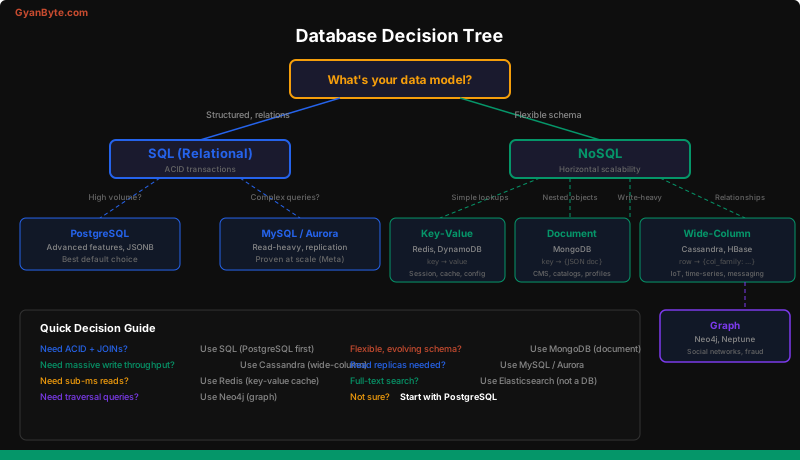
SQL vs NoSQL Decision Framework
Choose SQL when:
- You need ACID transactions (financial systems, inventory)
- Your data has strong relationships (JOINs are essential)
- Schema is well-defined and stable
- You need complex queries (aggregations, GROUP BY, window functions)
Choose NoSQL when:
- You need horizontal scalability (massive write throughput)
- Schema is flexible or evolving rapidly
- Data is denormalized or hierarchical
- Access patterns are simple (key-value lookups, document retrieval)
Sharding
Sharding splits your database horizontally across multiple machines. Each shard holds a subset of the data.
Shard by user_id:
  Shard 0: user_id % 3 == 0  → Users 0, 3, 6, 9...
  Shard 1: user_id % 3 == 1  → Users 1, 4, 7, 10...
  Shard 2: user_id % 3 == 2  → Users 2, 5, 8, 11...
Shard key selection is critical. A bad shard key creates hot spots. For a social media app, sharding by user_id works because most queries are user-scoped. Sharding by country would create massive imbalance.
Replication
Replication creates copies of your database for read scaling and fault tolerance.
- Primary-replica: One primary handles writes; replicas handle reads. Read-heavy workloads benefit enormously.
- Multi-primary: Multiple nodes accept writes. Complex conflict resolution. Use only when you need multi-region write capability.
Interview tip: When the interviewer asks how to scale the database, don’t jump to sharding. Start with read replicas (simpler), then vertical scaling, then sharding as a last resort. Sharding adds significant operational complexity.
CDN (Content Delivery Network)
A CDN caches static and semi-static content at edge servers close to users. Instead of every user fetching images from your origin server in us-east-1, a user in Tokyo gets the image from an edge server in Tokyo.
What to Put on a CDN
- Static assets: images, CSS, JavaScript, fonts
- Video content (entire streaming platforms rely on CDNs)
- API responses that don’t change often (with appropriate cache headers)
Cache Invalidation
CDN caches are distributed globally, making invalidation non-trivial:
- TTL-based: Set
Cache-Control: max-age=86400. Content refreshes every 24 hours. - Versioned URLs:
/static/app.v2.3.js. Deploy a new version = new URL = instant update. - Purge API: CloudFront/Akamai let you explicitly purge specific paths.
Best practice: Use versioned URLs for deployable assets and TTL for user-generated content. Never rely on purge APIs for routine cache busting — they’re slow and expensive.
Object / Blob Storage
Object storage (S3, GCS, Azure Blob) is purpose-built for storing large, unstructured files: images, videos, backups, logs, and static assets.
Key Properties
- Virtually unlimited capacity — no disk management
- 99.999999999% durability (11 nines for S3 Standard)
- HTTP-accessible — every object has a URL
- Cheap at scale — pennies per GB per month
Access Patterns
# Upload flow (typical)
def upload_image(user_id, image_data):
    key = f"images/{user_id}/{uuid4()}.jpg"
    s3.put_object(Bucket="media", Key=key, Body=image_data)
    # Store the key in your database, serve via CDN
    return f"https://cdn.example.com/{key}"
Interview tip: Never store large files (images, videos) in your database. Always use object storage + CDN. Store only the reference (URL or key) in the database.
Search Index (Elasticsearch)
When users need to search by keywords, full-text, or fuzzy matching, a dedicated search index dramatically outperforms database LIKE queries.
How It Works
Elasticsearch uses an inverted index — a mapping from every word to the documents containing that word. This is the same data structure Google uses.
Forward Index:
  Doc 1: "distributed systems are fascinating"
  Doc 2: "system design interview preparation"

Inverted Index:
  "distributed" → [Doc 1]
  "systems"     → [Doc 1]
  "system"      → [Doc 2]
  "design"      → [Doc 2]
  "interview"   → [Doc 2]
  "fascinating" → [Doc 1]
  "preparation" → [Doc 2]
Searching for “system design” instantly returns Doc 2 by intersecting the posting lists for both terms.
When to Use
- Full-text search (product catalog, articles)
- Autocomplete and typeahead
- Log aggregation and analysis (ELK stack)
- Faceted search (filter by category, price range, rating)
Important: Elasticsearch is not a primary database. It’s an index that you populate from your source of truth (PostgreSQL, etc.). Accept eventual consistency between the two.
API Gateway
An API Gateway sits between clients and your backend services, handling cross-cutting concerns so your services don’t have to.
Responsibilities
| Concern | What the Gateway Does |
|---|---|
| Authentication | Validate JWT tokens, API keys |
| Rate limiting | 100 req/min per user, 1000 req/min per IP |
| Routing | /api/v1/users → user-service, /api/v1/orders → order-service |
| Request transformation | Add headers, rewrite paths |
| Response caching | Cache GET responses for semi-static data |
| Logging & metrics | Centralized request logging |
Client → API Gateway → [ Auth check → Rate limit → Route ] → Backend ServiceInterview tip: When designing a system with multiple backend services, always include an API Gateway. It shows you understand operational concerns beyond just the happy path.
Putting It All Together
Here’s how all these components connect in a typical web application architecture:
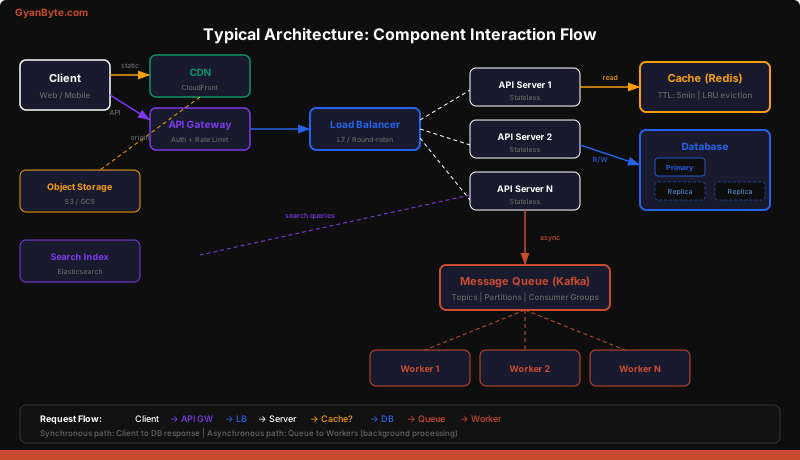
The Decision Framework
When you encounter a requirement in a system design interview, map it to a component:
| Requirement | Component | Example |
|---|---|---|
| “Users need to search for products” | Search Index | Elasticsearch |
| “System must handle 100K requests/sec” | Load Balancer + Horizontal Scaling | L7 LB + Auto-scaling group |
| “Responses should be fast” | Cache | Redis cache-aside |
| “Process uploaded videos in background” | Message Queue | Kafka + Worker pool |
| “Store user profiles and orders” | Database | PostgreSQL (relational data) |
| “Store uploaded images” | Object Storage + CDN | S3 + CloudFront |
| “Support multiple client types” | API Gateway | Kong / AWS API Gateway |
| “Global users, low latency” | CDN | CloudFront edge caching |
Anti-Patterns to Avoid
- Using a database as a queue. Polling a table for new rows is inefficient. Use a proper message queue.
- Caching without invalidation strategy. A cache without TTL or explicit invalidation serves stale data forever.
- Sharding before you need to. Read replicas and caching solve most scaling problems. Shard only when you truly need write scaling.
- Storing blobs in a database. PostgreSQL can store binary data, but shouldn’t. Use object storage.
- Using Elasticsearch as your primary database. It’s an index, not a database. Data can be lost during split-brain scenarios.
Key Takeaways
- Start with the simplest architecture that meets requirements. Add components only when you can articulate why.
- Every component adds operational complexity. More services = more things that can fail. Justify each addition.
- Know the trade-offs. SQL gives consistency; NoSQL gives scalability. Caching gives speed; it adds invalidation complexity. Queues give decoupling; they add eventual consistency.
- Default choices matter. When in doubt: PostgreSQL for the database, Redis for caching, Kafka for event streaming, S3 for blob storage, CloudFront for CDN.
- The interviewer cares about your reasoning, not your memorization. Explain WHY you picked each component for THIS specific system.
In the next lessons, we’ll apply these components to real system design problems — starting with designing a chat system like WhatsApp.