

When an interviewer asks you to estimate the storage requirements for a messaging app or the QPS for a social media feed, they are not testing your arithmetic. They are testing whether you can break down an ambiguous problem into concrete numbers, make reasonable assumptions, and arrive at an order-of-magnitude answer that informs your design decisions.
Back-of-envelope estimation is the bridge between vague requirements and concrete architecture choices. It answers questions like: “Do we need one database or ten?”, “Can we fit this in memory?”, and “Is this feasible with current technology?”
This lesson covers the numbers you should have memorized, the estimation framework you should follow, and worked examples you can practice with.
Why Estimation Matters in Interviews
Estimation serves three purposes in a system design interview:
1. It drives design decisions. If your system needs to handle 100K writes/second, you need a different architecture than if it handles 100 writes/second. You cannot make good design decisions without understanding the scale.
2. It demonstrates quantitative thinking. Interviewers want to see that you can reason about numbers, not just draw boxes. An engineer who says “we’ll need about 50TB of storage” is more credible than one who says “we’ll need a lot of storage.”
3. It reveals your understanding of real systems. Knowing that a single MySQL instance handles ~10K QPS, or that a Redis instance handles ~100K operations/second, shows you have operational experience.
Important caveat: You do not need exact numbers. If the real answer is 47TB and you estimate 50TB, nobody cares. If the real answer is 47TB and you estimate 500GB, that is a problem. The goal is the right order of magnitude.
Numbers Everyone Should Know
Memorize these. They are the building blocks of every estimation.
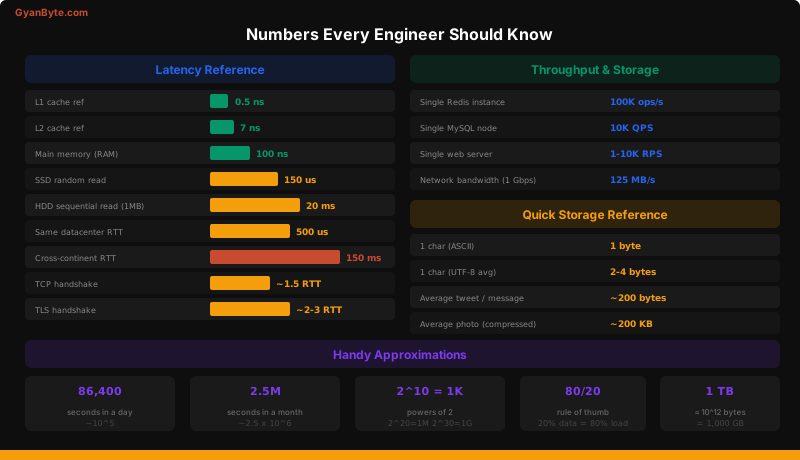
Latency Numbers
These are approximate and vary by hardware, but the relative magnitudes are what matter:
Operation                          Time
─────────────────────────────────────────
L1 cache reference                 0.5 ns
L2 cache reference                   7 ns
Main memory (RAM) reference        100 ns
SSD random read                    150 μs     (150,000 ns)
HDD sequential read (1 MB)         20 ms      (20,000,000 ns)
Same-datacenter round trip        500 μs
Cross-continent round trip        150 ms
The key insight: there are roughly 1,000x gaps at each layer. RAM is 1,000x slower than L1 cache. SSD is 1,000x slower than RAM. Network is another order of magnitude on top.
Throughput Numbers
Component                     Approximate Throughput
──────────────────────────────────────────────────────
Single Redis instance         100,000 ops/second
Single MySQL/PostgreSQL       5,000-10,000 QPS
Single web server             1,000-10,000 RPS (depends on work)
Kafka single partition        10,000-100,000 msgs/second
Single HDD sequential write   100 MB/s
Single SSD sequential write   500 MB/s
1 Gbps network link           125 MB/s
10 Gbps network link          1.25 GB/s
Storage Quick Reference
Item                          Size
──────────────────────────────────────────
1 ASCII character             1 byte
1 UTF-8 character             1-4 bytes (avg ~2)
A UUID                        16 bytes (128 bits)
A typical tweet / message     ~200 bytes
A metadata row (user record)  ~1 KB
A compressed photo            ~200 KB
A 1-minute video (compressed) ~10 MB
Handy Approximations
These save you time during calculations:
Seconds in a day:     86,400  ≈ 10^5 (use 100,000 for easy math)
Seconds in a month:   2.6M    ≈ 2.5 × 10^6
Seconds in a year:    31.5M   ≈ 3 × 10^7

Powers of 2:
  2^10  = 1,024        ≈ 1 thousand (1 KB)
  2^20  = 1,048,576    ≈ 1 million (1 MB)
  2^30  = 1,073,741,824 ≈ 1 billion (1 GB)
  2^40                  ≈ 1 trillion (1 TB)

80/20 rule: 20% of data generates 80% of traffic
  → Cache the top 20% and you handle 80% of reads

Daily active users: Typically 20-40% of total registered users
Peak traffic: Usually 2-3x the average
The Estimation Framework
Every capacity estimation follows the same chain. Master this flow and you can estimate anything.
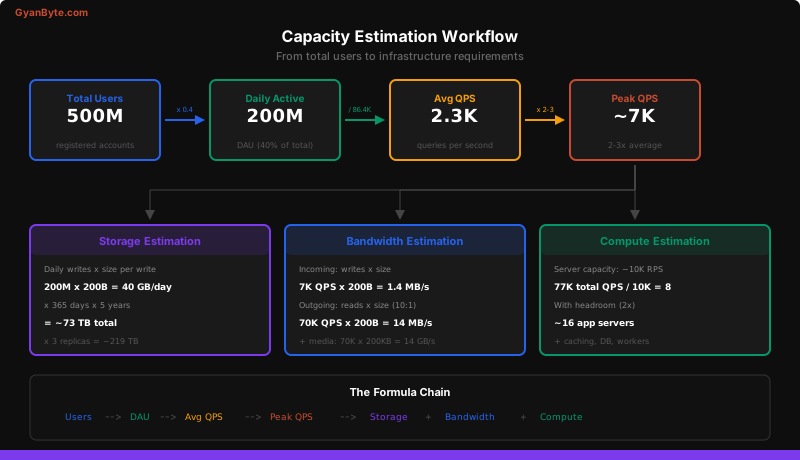
The chain is:
Total Users
  → Daily Active Users (DAU)
    → Average QPS (queries per second)
      → Peak QPS (2-3x average)
        → Storage requirements
        → Bandwidth requirements
        → Compute requirements
Let us work through each step.
Step 1: Users → DAU
Total users:  500M
DAU ratio:    ~40% (typical for a mature social platform)
DAU:          500M × 0.4 = 200M
The DAU ratio varies by platform type:
- Social media (daily habit): 40-60% DAU/MAU
- Messaging: 50-70%
- E-commerce: 10-20%
- Enterprise SaaS: 30-50%
Step 2: DAU → QPS
DAU:                 200M
Actions per user:    varies by feature

For a Twitter-like app:
  Feed views:     200M × 5 views/day = 1B reads/day
  Posts:          200M × 0.5 posts/day = 100M writes/day

Read QPS:  1B / 100K seconds ≈ 10,000 QPS
Write QPS: 100M / 100K seconds ≈ 1,000 QPS

(Using 100K seconds/day instead of 86,400 for easy math)
Step 3: Average QPS → Peak QPS
Average Read QPS:   10,000
Peak multiplier:    2-3x (traffic is not uniformly distributed)
Peak Read QPS:      ~25,000

Average Write QPS:  1,000
Peak Write QPS:     ~2,500
Step 4: QPS → Storage
Write QPS:            1,000
Average post size:    200 bytes (text) + 1 KB metadata = ~1.2 KB

Daily storage:
  1,000 QPS × 86,400 seconds × 1.2 KB
  = 100M × 1.2 KB
  = 120 GB/day

Annual storage:
  120 GB × 365 = ~44 TB/year

5-year storage:
  44 TB × 5 = ~220 TB

With replication (3x):
  220 TB × 3 = ~660 TB
Step 5: QPS → Bandwidth
Incoming (writes):
  1,000 QPS × 1.2 KB = 1.2 MB/s (negligible)

Outgoing (reads):
  10,000 QPS × 1.2 KB = 12 MB/s (text only)

If 20% of feed items include a cached image thumbnail (50 KB):
  10,000 × 0.2 × 50 KB = 100 MB/s

Total outgoing: ~112 MB/s
→ Needs roughly 1 Gbps network capacity (with headroom)
Step 6: QPS → Compute
Peak Read QPS:     25,000
Server capacity:   ~5,000 RPS per server (with database calls)
Servers needed:    25,000 / 5,000 = 5

With 2x headroom: 10 application servers

Cache layer (Redis):
  25,000 QPS is well within a single Redis instance (100K ops/s)
  But: use 2-3 replicas for availability

Database:
  Write QPS of 2,500 is within a single PostgreSQL instance
  But: read QPS of 25,000 needs read replicas
  → 1 primary + 3 read replicas
Worked Examples
Let us apply the framework to three real-world problems.
Example 1: Twitter QPS and Storage
Problem: Estimate the QPS and storage for Twitter’s tweet storage system.
Assumptions:
  - 400M DAU
  - Average user views their feed 5 times/day
  - Average user posts 0.5 tweets/day
  - Average tweet: 140 chars × 2 bytes = 280 bytes
  - Metadata per tweet: ~500 bytes (timestamp, user_id, indexes)
  - 30% of tweets include media (stored separately)

QPS Calculation:
  Read QPS:  400M × 5 / 100K = 20,000 QPS
  Write QPS: 400M × 0.5 / 100K = 2,000 QPS
  Peak Read: 20,000 × 3 = 60,000 QPS
  Peak Write: 2,000 × 3 = 6,000 QPS

Storage Calculation:
  Daily tweets:  400M × 0.5 = 200M tweets/day
  Size per tweet: 280 + 500 = 780 bytes ≈ 1 KB
  Daily storage: 200M × 1 KB = 200 GB/day
  Annual:        200 GB × 365 = 73 TB/year
  5-year:        73 TB × 5 = 365 TB
  With 3x replication: ~1.1 PB

Media storage (separate):
  200M × 30% × 200 KB = 12 TB/day (media)
  Annual: 12 TB × 365 = 4.4 PB/year
Design implication: Text storage is manageable in a traditional database. Media storage requires a blob store (S3) and a CDN. These are fundamentally different storage problems.
Example 2: YouTube Storage
Problem: Estimate daily storage growth for YouTube.
Assumptions:
  - 500 hours of video uploaded per minute (YouTube's stated figure)
  - Average video stored at 3 quality levels (360p, 720p, 1080p)
  - Average bitrate: 360p = 1 Mbps, 720p = 3 Mbps, 1080p = 8 Mbps
  - Total average bitrate across quality levels: ~12 Mbps = 1.5 MB/s

Calculation:
  Video per minute:  500 hours = 30,000 minutes
  Minutes per day:   30,000 × 60 × 24 = 43.2M minutes/day

  Storage per minute of video (all qualities):
    1.5 MB/s × 60 seconds = 90 MB

  Daily storage growth:
    43.2M minutes × 90 MB = 3.9 PB/day

  Annual: 3.9 PB × 365 ≈ 1.4 EB/year
Design implication: At this scale, you need a distributed file system purpose-built for large sequential writes and reads. This is why YouTube built Colossus (successor to GFS).
Example 3: WhatsApp Bandwidth
Problem: Estimate the peak bandwidth for WhatsApp message delivery.
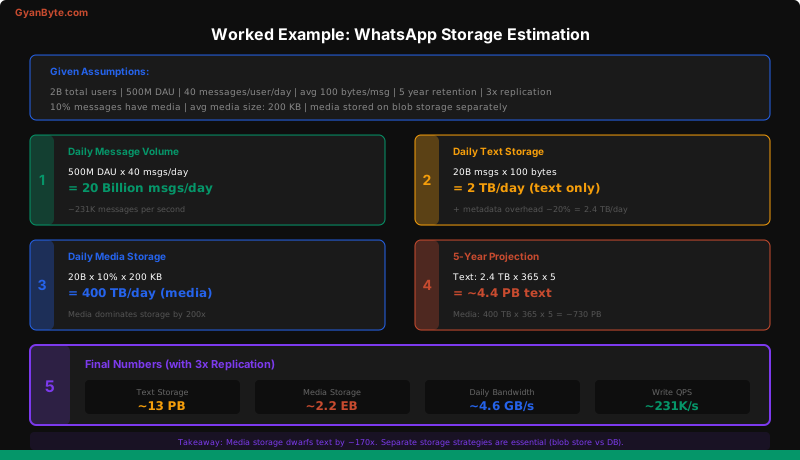
Assumptions:
  - 500M DAU
  - 40 messages sent per user per day
  - Average message: 100 bytes (text)
  - 10% of messages have media: average 200 KB
  - Messages are delivered to 1 recipient (average, ignoring groups)
  - Peak traffic: 3x average

Message QPS:
  Total daily messages: 500M × 40 = 20B messages/day
  Average QPS: 20B / 100K = 200,000 QPS
  Peak QPS: 200,000 × 3 = 600,000 QPS

Bandwidth (text messages):
  600K QPS × 100 bytes = 60 MB/s
  Both directions (send + deliver): 120 MB/s

Bandwidth (media):
  600K × 10% × 200 KB = 12 GB/s
  Both directions: 24 GB/s

Total peak bandwidth: ~24 GB/s ≈ 192 Gbps
Design implication: Media bandwidth dominates by 200x. You need a CDN and efficient media routing. Text messages can go through a real-time messaging protocol, but media should be uploaded/downloaded separately via HTTP with CDN acceleration.
Common Approximation Tricks
These shortcuts help you do math quickly during an interview:
Trick 1: Round to Powers of 10
Instead of:  86,400 seconds/day
Use:         100,000 (10^5)

Instead of:  2,592,000 seconds/month
Use:         2.5 million (2.5 × 10^6)

The error is ~15%, which is negligible for estimation.
Trick 2: The “Divide by a Million” Shortcut
When converting daily totals to per-second rates:

Daily total / seconds per day
= Daily total / ~10^5
= Move the decimal 5 places left

Example: 500M actions/day → 5,000 per second
Example: 10B messages/day → 100,000 per second
Trick 3: Storage Unit Conversions
Keep everything in the same unit. Convert early:

1 KB = 10^3 bytes
1 MB = 10^6 bytes
1 GB = 10^9 bytes
1 TB = 10^12 bytes
1 PB = 10^15 bytes

When multiplying:
100M things × 1 KB each = 100 × 10^6 × 10^3 = 10^11 = 100 GB
Trick 4: The “Can It Fit in Memory?” Test
A modern server has 256-512 GB of RAM.

Can you fit your hot dataset in memory?
  1 billion × 100 bytes = 100 GB → Yes, single server
  1 billion × 1 KB = 1 TB → No, need ~4 servers or use SSD
  1 billion × 1 MB = 1 PB → Definitely not, need disk/distributed
Trick 5: The “Single Machine” Limit Test
Quick checks for whether you need distributed systems:

QPS > 10K         → Likely need multiple app servers
QPS > 100K        → Definitely need multiple servers + caching
Storage > 1 TB    → Consider sharding or distributed storage
Storage > 100 TB  → Definitely need distributed storage
Bandwidth > 1 Gbps → Need multiple NICs or CDN
How to Present Estimations in an Interview
Structure matters as much as accuracy. Here is how to present your calculations:
1. State your assumptions explicitly:
"Let me estimate the storage requirements. I'll assume:
- 200M DAU
- Each user sends 10 messages per day
- Average message is 200 bytes including metadata"
2. Show your work step by step:
"Daily messages: 200M × 10 = 2B messages/day
Daily storage: 2B × 200 bytes = 400 GB/day
Monthly: 400 GB × 30 = 12 TB/month
Annual: 12 TB × 12 = 144 TB/year
With 3x replication: ~430 TB"
3. Sanity-check your result:
"430 TB over 5 years... that's about 86 servers with 10 TB SSDs each,
which seems reasonable for a service at this scale."
4. State the design implication:
"At 430 TB, we definitely need a distributed database with sharding.
A single-node database won't work. I'd use Cassandra or DynamoDB
with partition keys based on chat_id for even distribution."
The interviewer does not care if your answer is 430 TB or 500 TB. They care that you demonstrated a structured approach, stated your assumptions, and connected the numbers to design decisions.
Practice Problems
Try these on your own before looking at the hints.
Problem 1: Instagram Storage
Question: How much storage does Instagram need per year for photos?
Hints:
- 500M DAU, 100M photos uploaded daily
- Average photo: 2 MB (original), stored at 3 sizes
- Calculate raw storage, then with replication
Answer sketch:
100M photos/day × 2 MB × 3 sizes = 600 TB/day
Annual: 600 TB × 365 = 219 PB/year
With 3x replication: ~657 PB/year ≈ 0.66 EB/year
Problem 2: Slack Message QPS
Question: Estimate the peak QPS for Slack’s message delivery system.
Hints:
- 30M DAU (enterprise)
- Average user sends 30 messages/workday (8 hours)
- Messages are concentrated in work hours
- Average message goes to a channel with 20 members
Answer sketch:
Total messages/day: 30M × 30 = 900M
During work hours (8h = 28,800s ≈ 30K seconds):
  Average QPS: 900M / 30K = 30,000 QPS
  Peak (3x): 90,000 QPS

Delivery fan-out: 90K × 20 recipients = 1.8M deliveries/second
Problem 3: Google Maps Tile Storage
Question: Estimate the storage for Google Maps’ map tiles.
Hints:
- Earth surface: ~510M km² (but ~30% is land, focus on populated areas)
- ~20 zoom levels
- Each tile: 256×256 pixels = ~20 KB (compressed PNG)
- At zoom 0: 1 tile covers the whole world
- At each zoom level, tiles quadruple (4^zoom)
Answer sketch:
Total tiles across all zoom levels:
  Sum of 4^0 + 4^1 + ... + 4^20 ≈ 4^20 = ~1.1 trillion tiles

But most deep zoom levels only exist for populated areas (~10%):
  Effective tiles: ~100 billion

Storage: 100B × 20 KB = 2 PB

With satellite imagery at multiple quality levels: ~10-20 PB
What To Do Next
You now have the quantitative foundation for system design. Every time you estimate capacity in an interview, you are demonstrating that you understand the real-world constraints that drive architecture decisions.
In the upcoming lessons, we will start applying all three skills — understanding what interviewers want, using the framework, and doing quick estimation — to actual system design problems.
Key takeaways:
- Estimation is about structured thinking and correct order of magnitude, not exact numbers
- Memorize the key latency numbers, throughput benchmarks, and storage sizes
- Follow the estimation chain: Users → DAU → QPS → Storage → Bandwidth → Compute
- Always state your assumptions, show your work, and connect numbers to design decisions
- Use approximation tricks: round to powers of 10, seconds-in-a-day is roughly 100K, the 80/20 rule for caching
- Practice until estimations feel natural — you should be able to do them in 2-3 minutes during an interview