

“Design YouTube” is the quintessential system design interview question. It covers a wide surface area — upload pipelines, video processing, adaptive streaming, CDN architecture, recommendations, and handling viral content. The interviewer wants to see how you decompose a massive problem into manageable subsystems.
1. Understanding the Problem
Functional Requirements
- Upload video — Creators upload videos of varying length and quality
- Stream video — Viewers watch videos with minimal buffering
- Search — Find videos by title, description, tags
- Recommendations — Personalized video suggestions
- Engagement — Comments, likes, subscriptions, view counts
- Channels — Creator profiles with video catalogs
Non-Functional Requirements
- Low buffering — Video should start playing within 2 seconds, no stalling during playback
- Global availability — Low latency for users worldwide
- Cost-effective storage — Smart tiering for hot vs cold content
- Multiple resolutions — Support 360p through 4K to accommodate varying bandwidth
- High availability — 99.99% uptime for streaming (uploads can tolerate slightly lower)
Back-of-the-envelope Estimation
Video uploads:          500 hours of video per minute
Average video length:   5 minutes
Videos uploaded/day:    ~144K videos
Average raw file size:  500 MB (before transcoding)
Daily upload storage:   144K × 500MB = 72 TB/day
After transcoding:      72TB × 4 resolutions × 0.7 (compression) = ~200 TB/day

Daily watch hours:      1 billion hours
Concurrent viewers:     ~5M at any moment
Bandwidth per viewer:   5 Mbps average (1080p)
Peak bandwidth:         5M × 5 Mbps = 25 Pbps (served from CDN)

Total video catalog:    800M+ videos
Total storage:          Exabytes (across resolutions + backups)
2. Core Entities and APIs
Data Model
-- Video metadata (PostgreSQL)
CREATE TABLE videos (
    video_id        UUID PRIMARY KEY,
    channel_id      UUID REFERENCES channels(channel_id),
    title           VARCHAR(200),
    description     TEXT,
    duration_sec    INT,
    status          ENUM('uploading', 'processing', 'ready', 'failed'),
    upload_url      VARCHAR(500),      -- S3 key for original
    manifest_url    VARCHAR(500),      -- HLS/DASH manifest
    thumbnail_url   VARCHAR(500),
    view_count      BIGINT DEFAULT 0,
    created_at      TIMESTAMP,
    published_at    TIMESTAMP
);

-- Video resolutions (available after transcoding)
CREATE TABLE video_renditions (
    video_id        UUID REFERENCES videos(video_id),
    resolution      VARCHAR(10),       -- '360p', '720p', '1080p', '4k'
    bitrate_kbps    INT,
    codec           VARCHAR(20),       -- 'h264', 'h265', 'vp9', 'av1'
    segment_count   INT,
    storage_url     VARCHAR(500),
    PRIMARY KEY (video_id, resolution)
);

-- Channels
CREATE TABLE channels (
    channel_id      UUID PRIMARY KEY,
    user_id         UUID REFERENCES users(user_id),
    name            VARCHAR(100),
    subscriber_count BIGINT DEFAULT 0,
    created_at      TIMESTAMP
);

-- Comments (Cassandra - high write volume)
CREATE TABLE comments (
    video_id        UUID,
    comment_id      TIMEUUID,
    user_id         UUID,
    content         TEXT,
    likes           INT,
    created_at      TIMESTAMP,
    PRIMARY KEY (video_id, comment_id)
) WITH CLUSTERING ORDER BY (comment_id DESC);
API Design
# Upload a video (returns pre-signed URL for direct S3 upload)
POST /api/v1/videos/upload
Headers: Authorization: Bearer {token}
Body:
  title: "My Video"
  description: "Description here"
  content_type: "video/mp4"
  file_size_bytes: 524288000
Response:
  video_id: UUID
  upload_url: "https://s3.../upload/{video_id}?X-Amz-Signature=..."
  # Client uploads directly to S3 using this pre-signed URL

# Stream a video (returns manifest for adaptive streaming)
GET /api/v1/videos/{video_id}/stream
Response:
  manifest_url: "https://cdn.example.com/v/{video_id}/master.m3u8"
  # Client player fetches manifest, then individual chunks from CDN

# Search videos
GET /api/v1/search?q=system+design&page=1&limit=20
Response:
  results: [{ video_id, title, thumbnail_url, duration, views, channel }]
  total_count: 1523

# Get recommendations
GET /api/v1/recommendations?user_id={id}&limit=20
Response:
  videos: [{ video_id, title, thumbnail_url, score, reason }]

# Add a comment
POST /api/v1/videos/{video_id}/comments
Body: { content: "Great video!" }
Response: { comment_id, created_at }
3. High-Level Design
The architecture splits into two major paths: the upload pipeline (write path) and the streaming path (read path).
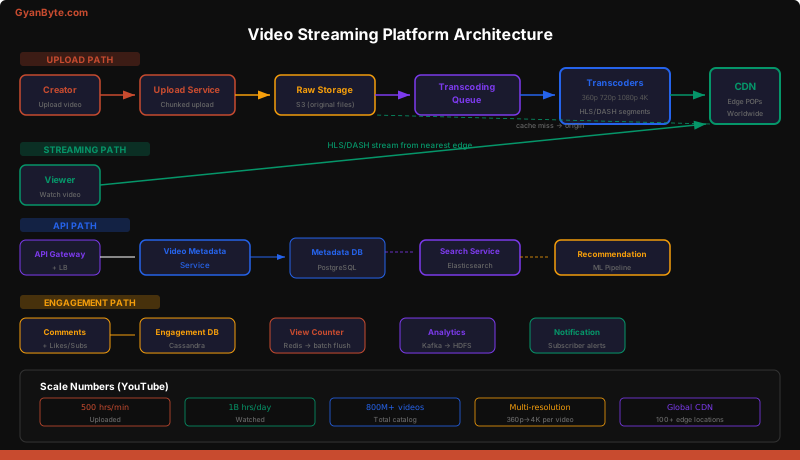
Upload Pipeline (Write Path)
Creator → Upload Service → S3 (raw) → Transcoding Queue → Transcoders
                                                              ↓
                                                        Multiple resolutions
                                                              ↓
                                                        Package (HLS/DASH)
                                                              ↓
CDN Push (edge servers)- Creator requests an upload URL via the API
- Client uploads the raw video file directly to S3 using a pre-signed URL (bypasses our servers entirely)
- S3 triggers an event that enqueues a transcoding job
- Transcoders process the video into multiple resolutions in parallel
- The packager creates HLS/DASH manifests and segments
- Transcoded segments are pushed to CDN edge servers
- Video status is updated to “ready” and the creator is notified
Streaming Path (Read Path)
Viewer → CDN edge (cache hit: serve directly)
              ↓ (cache miss)
         CDN origin → S3 (transcoded segments)
The viewer’s player fetches the HLS/DASH manifest file, which lists available quality levels. Based on network conditions, the player selects an appropriate quality and fetches video segments (2-10 seconds each) from the nearest CDN edge server. This is where 99% of streaming bandwidth is served.
4. Deep Dives
Video Transcoding Pipeline
Transcoding is the most computationally expensive part of the system. A single 10-minute 4K video might take 20+ minutes to transcode. At 500 hours of uploads per minute, we need a massive, parallelized pipeline.
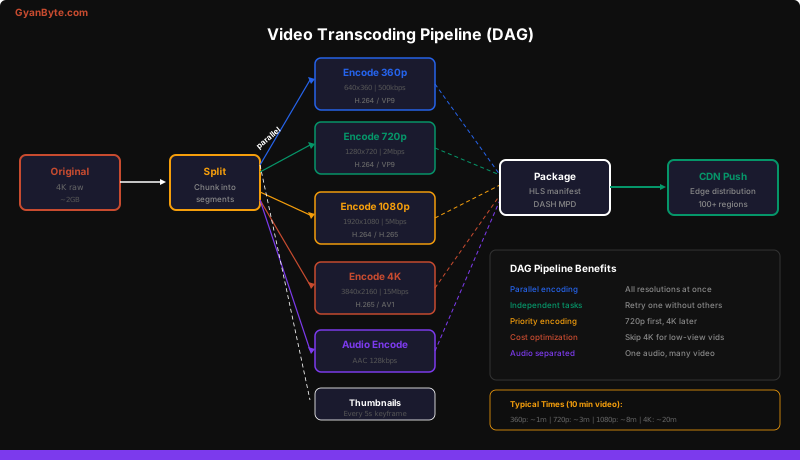
Why a DAG (Directed Acyclic Graph)?
The transcoding pipeline isn’t a simple linear process. Multiple tasks run in parallel, and some tasks have dependencies:
# Transcoding DAG definition
class TranscodingDAG:
    def build(self, video_id, raw_url):
        # Step 1: Split video into segments
        split = SplitTask(raw_url, segment_duration=10)

        # Step 2: Parallel encoding (independent tasks)
        encode_360p  = EncodeTask(split.output, "360p",  "h264", 500)
        encode_720p  = EncodeTask(split.output, "720p",  "h264", 2000)
        encode_1080p = EncodeTask(split.output, "1080p", "h265", 5000)
        encode_4k    = EncodeTask(split.output, "4k",    "h265", 15000)

        # Step 2b: Audio encoding (parallel with video)
        encode_audio = AudioEncodeTask(split.output, "aac", 128)

        # Step 2c: Thumbnail generation (parallel)
        thumbnails = ThumbnailTask(split.output, interval=5)

        # Step 3: Package into HLS/DASH (waits for ALL encodes)
        package = PackageTask(
            video_tracks=[encode_360p, encode_720p, encode_1080p, encode_4k],
            audio_track=encode_audio,
            thumbnails=thumbnails
        )

        # Step 4: Push to CDN
        cdn_push = CDNPushTask(package.output)

        return cdn_push
Key optimizations:
- Priority encoding — Encode 720p first since that’s the most common viewing resolution. Users can start watching in 720p while 1080p and 4K are still processing.
- Skip unnecessary resolutions — If the uploaded video is 720p, don’t create a 4K rendition. If the video gets very few views, skip 4K encoding entirely and only transcode on demand.
- Spot instances — Transcoding is batch work. Use AWS Spot Instances (or GCP Preemptible VMs) for 60-80% cost savings. If a spot instance is reclaimed, retry the task on another instance.
- Codec selection — H.264 for broad compatibility (360p, 720p), H.265 or AV1 for higher resolutions (50% better compression, but slower encoding).
Adaptive Bitrate Streaming
Adaptive bitrate streaming is how modern video players ensure smooth playback despite varying network conditions. The client dynamically switches between quality levels mid-stream.
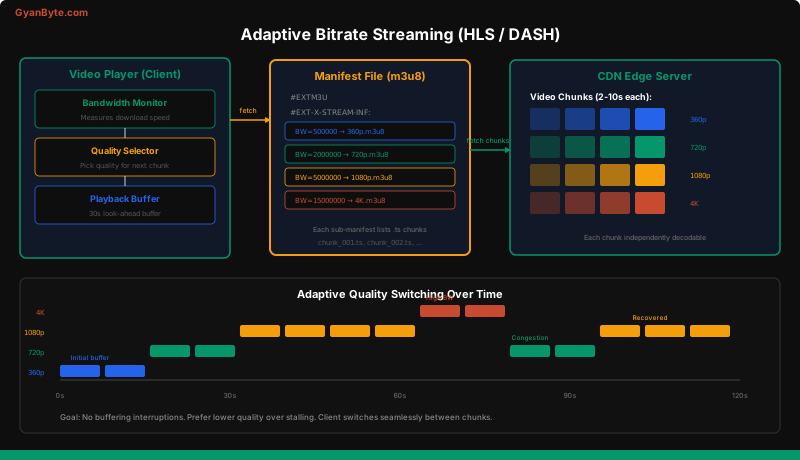
How HLS (HTTP Live Streaming) works:
- The server creates a master manifest (
.m3u8) listing all available quality levels and their bandwidth requirements - Each quality level has its own media manifest listing individual video segments (
.tsfiles, 2-10 seconds each) - The client player fetches the master manifest, measures its download bandwidth, and selects an appropriate quality
- As the user watches, the player continuously measures bandwidth and can switch quality at any segment boundary
master.m3u8:
  #EXTM3U
  #EXT-X-STREAM-INF:BANDWIDTH=500000,RESOLUTION=640x360
  360p/playlist.m3u8
  #EXT-X-STREAM-INF:BANDWIDTH=2000000,RESOLUTION=1280x720
  720p/playlist.m3u8
  #EXT-X-STREAM-INF:BANDWIDTH=5000000,RESOLUTION=1920x1080
  1080p/playlist.m3u8
  #EXT-X-STREAM-INF:BANDWIDTH=15000000,RESOLUTION=3840x2160
  4k/playlist.m3u8

720p/playlist.m3u8:
  #EXTM3U
  #EXTINF:10.0,
  segment_001.ts
  #EXTINF:10.0,
  segment_002.ts
  #EXTINF:10.0,
  segment_003.ts
  ...
DASH (Dynamic Adaptive Streaming over HTTP) works similarly but uses an XML-based MPD (Media Presentation Description) instead of M3U8. YouTube uses DASH. Netflix uses both.
Client-side algorithm (simplified):
class AdaptiveBitratePlayer:
    def select_quality(self, available_qualities, measured_bandwidth):
        # Pick the highest quality that fits within 80% of measured bandwidth
        # The 20% buffer prevents constant quality oscillation
        target_bandwidth = measured_bandwidth * 0.8

        best_quality = available_qualities[0]  # lowest
        for quality in available_qualities:
            if quality.bandwidth <= target_bandwidth:
                best_quality = quality
            else:
                break
        return best_quality

    def play_loop(self):
        while not self.is_finished():
            bandwidth = self.measure_bandwidth()
            quality = self.select_quality(self.qualities, bandwidth)
            segment = self.fetch_segment(quality, self.current_segment_index)
            self.buffer.add(segment)
            self.current_segment_index += 1
CDN Architecture and Cost Optimization
YouTube serves over 1 billion hours of video per day. Without a CDN, this would be physically impossible — the bandwidth would overwhelm any single data center.
CDN tier structure:
Tier 1: Edge POPs (100+ locations worldwide)
  - Closest to users, serve 95%+ of traffic
  - Limited storage, cache most popular content
  - Miss → fetch from Tier 2

Tier 2: Regional caches (10-20 locations)
  - Larger storage, cache long-tail content
  - Miss → fetch from Origin

Tier 3: Origin (2-3 data centers)
  - Complete video catalog
  - Only serves cache misses (~1% of traffic)
Cost optimization strategies:
- Hot/cold storage tiering — Recently uploaded and popular videos on SSD-backed CDN nodes. Old, rarely-watched videos on cheaper HDD storage or S3 Glacier.
- Off-peak pre-warming — Push predicted popular content to CDN edges during off-peak hours (3-6 AM local time) to avoid origin stampedes during peak viewing.
- Regional encoding — A video popular only in Japan doesn’t need to be cached in every European edge server.
- Codec efficiency — AV1 provides ~30% better compression than H.265, reducing bandwidth costs. But it requires more CPU for encoding and client-side decoding support.
Handling Viral Videos
When a video goes viral, it creates a thundering herd problem — millions of users simultaneously request the same video.
class ViralVideoHandler:
    def detect_viral(self, video_id):
        """Monitor view velocity. Trigger pre-warming if spike detected."""
        views_last_5min = redis.get(f"views:5min:{video_id}")
        views_last_hour = redis.get(f"views:1hr:{video_id}")

        # If 5-min view rate is 10x the hourly average, it's going viral
        if views_last_5min > (views_last_hour / 12) * 10:
            self.pre_warm_cdn(video_id)
            self.scale_origin_replicas(video_id)

    def pre_warm_cdn(self, video_id):
        """Push all resolutions to ALL edge POPs, not just popular ones."""
        for resolution in ['360p', '720p', '1080p', '4k']:
            for edge_pop in get_all_edge_pops():
                cdn.push(video_id, resolution, edge_pop)
Additional viral mitigation:
- Request coalescing — If 1000 requests arrive at a CDN edge for the same uncached segment simultaneously, only one request goes to the origin. The other 999 wait for the first response and are served from the freshly populated cache.
- Consistent hashing for CDN nodes — Ensures the same video segment is always cached on the same CDN node, preventing duplicate caching and maximizing cache hit rate.
Video Deduplication and Copyright Detection
YouTube processes 500 hours of video per minute. Detecting duplicates and copyrighted content is essential.
Content ID system (simplified):
- When a video is uploaded, generate a fingerprint — a compact representation of the video’s audio and visual content
- Compare the fingerprint against a database of known copyrighted content
- If a match is found, apply the copyright holder’s policy (block, monetize for the rights holder, or allow with ads)
Upload → Extract fingerprint → Compare against Content ID database
                                         ↓
                              Match found? → Apply policy (block/monetize/allow)
                              No match    → Proceed with normal processing
Deduplication uses a similar fingerprinting approach. If two uploads produce nearly identical fingerprints, the system can store the video once and create a reference, saving storage costs.
5. Search and Recommendations
Search (Elasticsearch)
Video search uses Elasticsearch with an inverted index over video metadata:
{
  "video_id": "abc123",
  "title": "System Design Interview - Chat System",
  "description": "Learn how to design WhatsApp...",
  "tags": ["system design", "chat", "whatsapp", "interview"],
  "channel_name": "Tech Prep",
  "transcript": "Today we're going to design a chat system...",
  "view_count": 250000,
  "upload_date": "2026-04-01"
}
Search ranking combines text relevance (TF-IDF / BM25) with engagement signals (view count, watch time, click-through rate). A video with 1M views and a good title match ranks higher than a video with 100 views and a perfect title match.
Recommendations
The recommendation engine is a deep topic on its own, but at a high level:
Input signals:
  - Watch history (what videos the user has watched)
  - Search history
  - Likes, subscriptions
  - Demographics (age, location)
  - Video features (category, tags, duration)
  - Collaborative filtering (users similar to you watched X)

Pipeline:
  Candidate Generation (100K → 500 candidates)
    → Ranking Model (500 → 20 ranked results)
    → Filtering (remove watched, blocked, age-restricted)
    → Serve
The candidate generation stage uses two approaches:
- Content-based filtering — If you watched “System Design: Chat,” recommend “System Design: YouTube”
- Collaborative filtering — Users who watched A also watched B
The ranking model (typically a deep neural network) scores each candidate and the top results are served.
6. View Counting at Scale
Accurate view counts at YouTube’s scale require careful engineering. You can’t simply UPDATE videos SET view_count = view_count + 1 — that creates a hot row in the database.
class ViewCounter:
    def record_view(self, video_id, user_id):
        # 1. Deduplicate (don't count reloads within 30s)
        dedup_key = f"viewed:{video_id}:{user_id}"
        if redis.exists(dedup_key):
            return
        redis.setex(dedup_key, 30, 1)

        # 2. Increment in-memory counter (Redis)
        redis.incr(f"views:{video_id}")
        redis.incr(f"views:5min:{video_id}")  # For viral detection

        # 3. Batch flush to database every 60 seconds
        # A background worker reads Redis counters and updates PostgreSQL
Why not write directly to the database? A viral video might get 100K views per second. That’s 100K write transactions per second to a single row — even PostgreSQL would struggle. Redis handles this effortlessly in memory, and a background worker periodically flushes the accumulated count to the database.
7. Final Architecture Summary
UPLOAD PATH:
  Creator → API → Pre-signed URL → S3 (raw)
                                     ↓
                              Transcoding Queue (Kafka)
                                     ↓
                              Transcoder Workers (DAG)
                              ├── 360p (H.264)
                              ├── 720p (H.264)
                              ├── 1080p (H.265)
                              ├── 4K (H.265/AV1)
                              ├── Audio (AAC)
                              └── Thumbnails
                                     ↓
                              HLS/DASH Packager
                                     ↓
                              CDN Push (global edges)

STREAMING PATH:
  Viewer → CDN Edge → (hit: serve) / (miss: regional cache → origin)
  Player → Fetch manifest → Select quality → Fetch segments → Adaptive switch

METADATA PATH:
  Client → API Gateway → LB → Video Service → PostgreSQL
                                             → Redis (cache)
                                             → Elasticsearch (search)
                                             → Recommendation Engine (ML)

ENGAGEMENT PATH:
  Comments   → Cassandra (write-heavy)
  Views      → Redis (count) → batch flush → PostgreSQL
  Likes/Subs → PostgreSQL (transactional)
  Analytics  → Kafka → Data Warehouse (HDFS/BigQuery)
Key Design Decisions
| Decision | Choice | Rationale |
|---|---|---|
| Upload mechanism | Pre-signed S3 URLs | Bypass our servers for large files |
| Transcoding | DAG-based parallel pipeline | Independent tasks, retry granularity |
| Streaming protocol | HLS/DASH adaptive | Smooth playback across bandwidth conditions |
| Video storage | S3 + CDN tiering | Cost-effective at exabyte scale |
| Metadata DB | PostgreSQL | Relational data, complex queries |
| Comments | Cassandra | Write-heavy, time-ordered |
| View counting | Redis → batch flush | Handle 100K+ increments/sec per video |
| Search | Elasticsearch | Full-text + engagement-weighted ranking |
| Viral handling | CDN pre-warming + request coalescing | Prevent origin stampede |
Common Follow-Up Questions
Q: How do you handle live streaming? Live streaming replaces the transcoding pipeline with real-time ingest servers that segment the stream on the fly. The creator’s encoder pushes RTMP to an ingest server, which immediately produces HLS/DASH segments and pushes them to the CDN. Latency target: 3-10 seconds (standard) or < 1 second (low-latency mode using CMAF).
Q: How do you reduce storage costs? Tiered storage: hot videos on SSD-backed S3, videos with no views in 90 days moved to S3 Infrequent Access (50% cheaper), and videos with no views in a year moved to S3 Glacier (90% cheaper). Re-transcode only on demand if accessed from cold storage.
Q: How do you handle subtitles and multiple audio tracks? Subtitles are WebVTT files referenced in the HLS/DASH manifest. Multiple audio tracks (different languages) are separate audio segments also listed in the manifest. The player lets the user select their preferred language.
Q: What about DRM (Digital Rights Management)? For premium content (YouTube Premium, rentals), use Widevine (Google), FairPlay (Apple), or PlayReady (Microsoft). The decryption key is fetched from a license server after authentication. Content segments are AES-encrypted.
Key Takeaways
- Separate the upload path from the streaming path — They have completely different performance characteristics (write-heavy vs read-heavy) and should scale independently
- Transcoding is a DAG, not a pipeline — Parallel encoding of multiple resolutions with independent retry is essential for throughput and resilience
- Adaptive bitrate streaming is non-negotiable — Users on 3G and users on fiber should both have a smooth experience; the client picks the right quality per segment
- The CDN IS the system — 95%+ of bandwidth is served from CDN edges, not your origin servers; invest in CDN architecture
- View counting needs special treatment — Don’t hammer your database with per-view writes; aggregate in Redis and batch-flush
- Pre-warming beats reacting — Detect viral trends early and push content to CDN edges before the traffic spike hits your origin