

Every public API needs a rate limiter. Without one, a single misbehaving client — whether malicious or just buggy — can consume all your server resources and take down the service for everyone. GitHub limits API calls to 5,000 per hour. Stripe allows 100 requests per second. Twitter caps tweet creation at 300 per 3 hours. Rate limiting is not just a nice-to-have — it is infrastructure.
In this lesson, we will design a distributed rate limiter that adds less than 1ms of overhead per request, supports multiple algorithms, and works correctly across a fleet of API gateway instances.
Understanding the Problem
Functional Requirements
- Limit requests per user, IP address, or API key
- Configurable limits per endpoint (e.g.,
/api/searchgets 30 req/min,/api/usersgets 100 req/min) - Rate limit headers in every response:
X-RateLimit-Limit,X-RateLimit-Remaining,X-RateLimit-Reset - Multiple time windows: Per second, per minute, per hour, per day
- Graceful rejection: Return HTTP 429 with
Retry-Afterheader
Non-Functional Requirements
- Low latency overhead: < 1ms added to each request
- Distributed: Rate limits enforced consistently across multiple API gateway instances
- Accurate counting: No significant over-counting or under-counting
- Graceful degradation: If the rate limiter is down, requests should still flow (fail open)
- High availability: Rate limiter failure should not block legitimate traffic
Core Entities and APIs
Entities
interface RateLimitRule {
  id: string;
  endpoint: string;           // "/api/v1/search" or "*" for global
  limitBy: 'user_id' | 'ip' | 'api_key';
  maxRequests: number;        // Max allowed in the window
  windowSize: number;         // In seconds (60 = per minute)
  burstSize?: number;         // For token bucket: max burst
  priority: number;           // Higher priority rules override
}

interface RateLimitCounter {
  key: string;                // "user:123:/api/search:minute"
  count: number;              // Current request count
  windowStart: number;        // Unix timestamp of window start
  ttl: number;                // Auto-expiry in seconds
}

interface RateLimitResult {
  allowed: boolean;
  limit: number;              // Max requests allowed
  remaining: number;          // Requests remaining in window
  resetAt: number;            // Unix timestamp when window resets
  retryAfter?: number;        // Seconds to wait (if rejected)
}
APIs
# Internal APIs (used by gateway middleware)
POST /rate-limit/check     — Check if request is allowed
GET  /rate-limit/status    — Get current rate limit status for a key

# Admin APIs (for configuration)
POST   /rate-limit/rules   — Create a new rate limit rule
PUT    /rate-limit/rules/:id — Update an existing rule
DELETE /rate-limit/rules/:id — Delete a rule
GET    /rate-limit/rules    — List all rules
High-Level Design
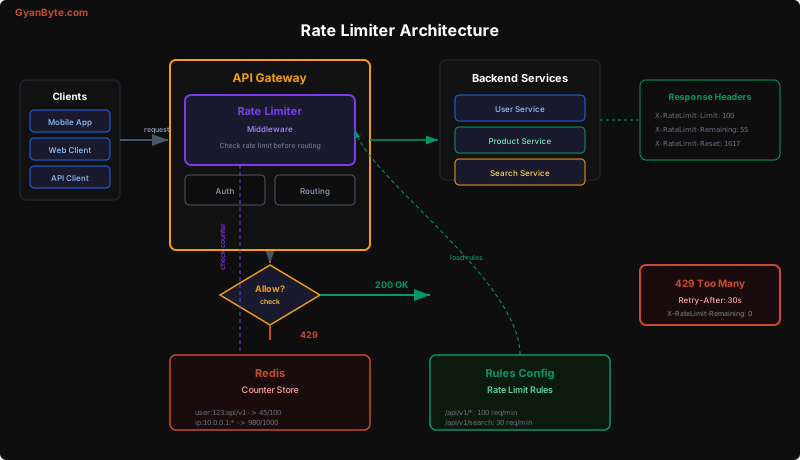
The rate limiter runs as middleware in the API gateway, sitting in the request path before any backend service is invoked. The flow:
- Request arrives at the API gateway
- Rate limiter middleware extracts the client identifier (user ID, IP, API key)
- Rules engine determines which rate limit rule applies to this request
- Counter check against Redis: is the client under the limit?
- Decision: Allow (forward to backend) or Reject (return 429)
- Response headers attached with rate limit information
The architecture has three components:
- Rate Limiter Middleware: Runs in every API gateway instance. Stateless — all state is in Redis.
- Redis Counter Store: Centralized counters shared across all gateway instances. Each counter has a TTL matching the rate limit window.
- Rules Config Store: Rate limit rules stored in a database, loaded into memory at gateway startup and refreshed periodically.
Deep Dive: Rate Limiting Algorithms
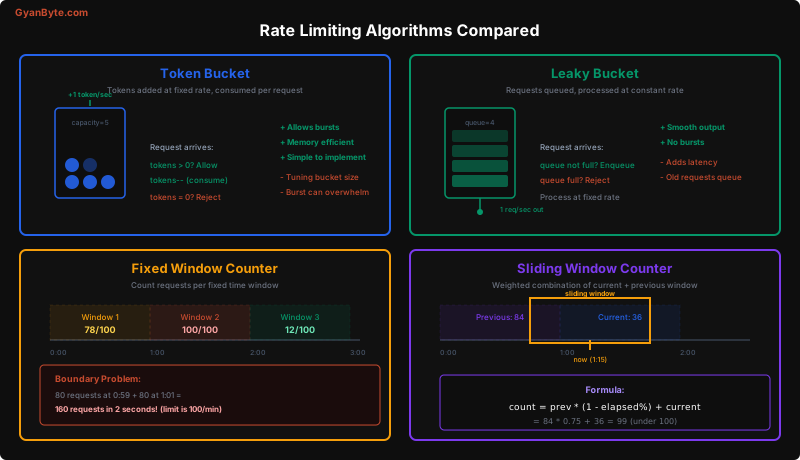
There are four major algorithms, each with different trade-offs. Understanding when to use which is key to a strong interview answer.
Algorithm 1: Token Bucket
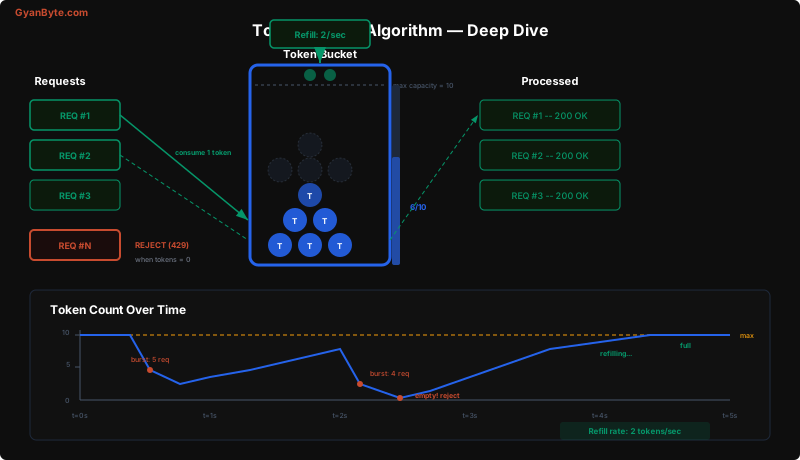
The most widely used algorithm. A bucket holds tokens, refilled at a constant rate. Each request consumes one token. When the bucket is empty, requests are rejected.
class TokenBucket:
    def __init__(self, capacity: int, refill_rate: float):
        """
        capacity: Maximum tokens (burst size)
        refill_rate: Tokens added per second
        """
        self.capacity = capacity
        self.refill_rate = refill_rate
        self.tokens = capacity
        self.last_refill = time.time()

    def allow(self, tokens_needed: int = 1) -> bool:
        self._refill()

        if self.tokens >= tokens_needed:
            self.tokens -= tokens_needed
            return True
        return False

    def _refill(self):
        now = time.time()
        elapsed = now - self.last_refill
        new_tokens = elapsed * self.refill_rate
        self.tokens = min(self.capacity, self.tokens + new_tokens)
        self.last_refill = now
Why token bucket? It naturally handles bursty traffic. A client that has been idle accumulates tokens and can send a burst of requests up to the bucket’s capacity. After the burst, they are limited to the refill rate. This matches real-world API usage patterns where clients make several requests in quick succession, then go quiet.
Parameters:
capacity(bucket size): Controls the maximum burst. Set to 2x the per-second rate for reasonable bursts.refill_rate: The sustained request rate. For “100 requests per minute”, refill_rate = 100/60 = 1.67 tokens/sec.
Algorithm 2: Leaky Bucket
Requests enter a FIFO queue. The queue drains at a constant rate. If the queue is full, new requests are dropped. This produces perfectly smooth output regardless of input burstiness.
class LeakyBucket:
    def __init__(self, capacity: int, drain_rate: float):
        self.capacity = capacity
        self.drain_rate = drain_rate
        self.queue = collections.deque()
        self.last_drain = time.time()

    def allow(self, request) -> bool:
        self._drain()

        if len(self.queue) < self.capacity:
            self.queue.append(request)
            return True
        return False  # Queue full, reject

    def _drain(self):
        now = time.time()
        elapsed = now - self.last_drain
        to_drain = int(elapsed * self.drain_rate)
        for _ in range(min(to_drain, len(self.queue))):
            self.queue.popleft()  # Process request
        self.last_drain = now
Trade-off vs. token bucket: The leaky bucket smooths output (no bursts), which is great for protecting downstream services. But it adds latency — requests sit in the queue waiting to be processed. Token bucket is usually preferred for API rate limiting because clients want immediate feedback, not queuing.
Algorithm 3: Fixed Window Counter
The simplest algorithm. Divide time into fixed windows (e.g., each minute). Count requests in the current window. If the count exceeds the limit, reject.
def fixed_window_check(key: str, limit: int, window_seconds: int) -> bool:
    """
    Redis implementation using INCR with TTL.
    """
    # Window key includes the time window
    window = int(time.time() / window_seconds)
    counter_key = f"rate:{key}:{window}"

    # Atomic increment + set TTL
    pipe = redis.pipeline()
    pipe.incr(counter_key)
    pipe.expire(counter_key, window_seconds)
    count, _ = pipe.execute()

    return count <= limit
The boundary problem: A client can send limit requests at the end of one window and limit requests at the start of the next, effectively doubling their rate for a short period. For a 100 req/min limit, they could send 200 requests in a 2-second span straddling the window boundary.
Algorithm 4: Sliding Window Counter
The sweet spot between accuracy and efficiency. It uses a weighted combination of the previous and current window counts to approximate a true sliding window.
def sliding_window_check(key: str, limit: int, window_seconds: int) -> bool:
    """
    Sliding window counter — weighted average of two windows.
    """
    now = time.time()
    current_window = int(now / window_seconds)
    previous_window = current_window - 1

    # How far into the current window are we? (0.0 to 1.0)
    elapsed_ratio = (now % window_seconds) / window_seconds

    # Get counts for both windows
    current_count = int(redis.get(f"rate:{key}:{current_window}") or 0)
    previous_count = int(redis.get(f"rate:{key}:{previous_window}") or 0)

    # Weighted count: previous * remaining_ratio + current
    weighted_count = previous_count * (1 - elapsed_ratio) + current_count

    if weighted_count >= limit:
        return False

    # Increment current window
    counter_key = f"rate:{key}:{current_window}"
    pipe = redis.pipeline()
    pipe.incr(counter_key)
    pipe.expire(counter_key, window_seconds * 2)  # Keep for overlap
    pipe.execute()

return TrueExample: With a 100 req/min limit, if the previous window had 84 requests and we are 15 seconds into the current window (25% elapsed) with 36 requests so far:
weighted_count = 84 * (1 - 0.25) + 36 = 84 * 0.75 + 36 = 63 + 36 = 99The next request would push us to 100, which equals the limit. This smooths out the boundary problem of fixed windows with minimal additional complexity.
Algorithm Comparison
| Algorithm | Memory | Accuracy | Burst Handling | Complexity |
|---|---|---|---|---|
| Token Bucket | O(1) per key | High | Allows controlled bursts | Low |
| Leaky Bucket | O(N) queue | High | No bursts (smooth) | Medium |
| Fixed Window | O(1) per key | Low (boundary issue) | No burst control | Very Low |
| Sliding Window | O(1) per key | High | No bursts | Low |
Recommendation: Use token bucket for user-facing APIs (natural burst support) and sliding window counter for backend service-to-service limits (no boundary issues, low memory).
Deep Dive: Distributed Rate Limiting with Redis
The critical challenge: your rate limiter runs on 20 API gateway instances. Each instance must see the same counters. Redis provides the centralized state.
Atomic Operations with Lua Scripts
The check-and-increment must be atomic. If two gateway instances read the counter at the same time (both see “99 of 100”), both will allow the request, resulting in 101 requests passing through. Redis Lua scripts solve this:
-- rate_limit.lua
-- KEYS[1] = counter key
-- ARGV[1] = limit
-- ARGV[2] = window size in seconds

local key = KEYS[1]
local limit = tonumber(ARGV[1])
local window = tonumber(ARGV[2])

local current = tonumber(redis.call('GET', key) or '0')

if current >= limit then
    -- Rejected
    local ttl = redis.call('TTL', key)
    return {0, limit, 0, ttl}  -- allowed=false, limit, remaining=0, retry_after
end

-- Allowed: increment
local new_count = redis.call('INCR', key)
if new_count == 1 then
    redis.call('EXPIRE', key, window)
end

local remaining = limit - new_count
local ttl = redis.call('TTL', key)
return {1, limit, remaining, ttl}  -- allowed=true, limit, remaining, reset_in
This entire script executes atomically on the Redis server. No race conditions, no matter how many gateway instances are checking simultaneously.
Python Gateway Integration
class DistributedRateLimiter:
    def __init__(self, redis_client):
        self.redis = redis_client
        self.lua_script = self.redis.register_script(LUA_RATE_LIMIT_SCRIPT)
        self.rules = {}  # Loaded from config store

    def check(self, client_id: str, endpoint: str) -> RateLimitResult:
        """Check rate limit for a client + endpoint combination."""
        rule = self._match_rule(endpoint)
        if not rule:
            return RateLimitResult(allowed=True)  # No rule = no limit

        # Build the counter key
        window = int(time.time() / rule.window_size)
        key = f"rl:{client_id}:{endpoint}:{window}"

        # Execute atomic Lua script
        result = self.lua_script(
            keys=[key],
            args=[rule.max_requests, rule.window_size]
        )

        allowed, limit, remaining, reset_in = result

        return RateLimitResult(
            allowed=bool(allowed),
            limit=limit,
            remaining=max(0, remaining),
            resetAt=int(time.time()) + reset_in,
            retryAfter=reset_in if not allowed else None
        )

    def _match_rule(self, endpoint: str) -> RateLimitRule:
        """Find the highest priority rule matching this endpoint."""
        matching = [
            r for r in self.rules.values()
            if fnmatch.fnmatch(endpoint, r.endpoint)
        ]
        if not matching:
            return None
        return max(matching, key=lambda r: r.priority)
Response Headers
Every response from the API gateway includes rate limit headers, whether the request was allowed or not:
def add_rate_limit_headers(response, result: RateLimitResult):
    """Attach rate limit headers to the HTTP response."""
    response.headers['X-RateLimit-Limit'] = str(result.limit)
    response.headers['X-RateLimit-Remaining'] = str(result.remaining)
    response.headers['X-RateLimit-Reset'] = str(result.resetAt)

    if not result.allowed:
        response.status_code = 429
        response.headers['Retry-After'] = str(result.retryAfter)
        response.body = {
            'error': 'rate_limit_exceeded',
            'message': f'Rate limit of {result.limit} requests exceeded. '
                       f'Retry after {result.retryAfter} seconds.',
            'retry_after': result.retryAfter
        }

    return response
Deep Dive: Race Conditions
In a distributed environment, race conditions are the primary threat to rate limiting accuracy.
Race Condition 1: Read-Then-Write
Without atomic operations, two gateway instances can read the same counter value before either writes the increment:
Gateway A: GET counter → 99
Gateway B: GET counter → 99       (reads before A writes)
Gateway A: SET counter → 100      (allows request #100)
Gateway B: SET counter → 100 (allows request #101 — BUG!)Solution: Use Redis INCR (atomic increment) or Lua scripts. Never read-then-write in separate commands.
Race Condition 2: Multiple Windows
When using sliding window, both the previous and current window counters must be read atomically. If the window rolls over between the two reads, the calculation is wrong.
Solution: Read both counters in a single Lua script or Redis pipeline:
def sliding_window_atomic(key, limit, window):
    """Atomic sliding window using Redis pipeline."""
    now = time.time()
    current_window = int(now / window)
    previous_window = current_window - 1
    elapsed_ratio = (now % window) / window

    pipe = redis.pipeline()
    pipe.get(f"rl:{key}:{previous_window}")
    pipe.get(f"rl:{key}:{current_window}")
    prev_count, curr_count = pipe.execute()

    prev_count = int(prev_count or 0)
    curr_count = int(curr_count or 0)

    weighted = prev_count * (1 - elapsed_ratio) + curr_count

    if weighted >= limit:
        return False

    redis.incr(f"rl:{key}:{current_window}")
    redis.expire(f"rl:{key}:{current_window}", window * 2)
    return True
Race Condition 3: Clock Skew
Different gateway instances may have slightly different system clocks, causing them to compute different window identifiers for the same moment in time.
Solution: Use Redis server time (TIME command) instead of the local system clock, or use NTP to keep all servers synchronized within a few milliseconds.
Deep Dive: Rate Limiting at Different Layers
A production system applies rate limiting at multiple layers, each serving a different purpose:
Layer 1: Edge / CDN
Cloudflare / AWS WAF / nginx
- IP-based rate limiting
- DDoS protection
- Coarse-grained: 1000 req/min per IP
- No application context (no user ID)
Layer 2: API Gateway
Kong / Envoy / Custom middleware
- User/API-key based rate limiting
- Endpoint-specific limits
- Fine-grained: 30 req/min for /search, 100 req/min for /users
- Returns proper 429 with headers
Layer 3: Application / Per-Service
In-process rate limiter (e.g., Guava RateLimiter)
- Service-to-service rate limiting
- Protects downstream dependencies
- Example: "My service calls Payment API at max 50 req/sec"
# Layer 3 example: in-process rate limiter for downstream calls
from ratelimit import limits, sleep_and_retry
@sleep_and_retry
@limits(calls=50, period=1) # 50 calls per second
def call_payment_service(payment_id):
"""Rate-limited call to downstream payment service."""
return requests.post(
f"http://payment-service/v1/payments/{payment_id}/capture"
)Each layer has a different failure mode and different latency characteristics. Edge rate limiting is the cheapest (no application logic) but the least precise. Application-level rate limiting is the most precise but the most expensive.
Deep Dive: Graceful Degradation
What happens when Redis (the counter store) is down? You have two options:
Fail Open (Recommended for most APIs)
If Redis is unavailable, allow all requests through. This means rate limiting is temporarily disabled, but legitimate users are not blocked.
def check_rate_limit_safe(client_id, endpoint):
    """Fail-open rate limiting — Redis failure allows all traffic."""
    try:
        return rate_limiter.check(client_id, endpoint)
    except RedisConnectionError:
        logger.warning("Redis unavailable, rate limiting disabled")
        return RateLimitResult(
            allowed=True,
            limit=0,
            remaining=0,
            resetAt=0
        )
Fail Closed (For sensitive endpoints)
For endpoints like login or payment creation, you may want to block all requests when the rate limiter is unavailable, to prevent abuse.
FAIL_CLOSED_ENDPOINTS = ['/api/v1/auth/login', '/api/v1/payments']

def check_rate_limit_strict(client_id, endpoint):
    """Fail-closed for sensitive endpoints."""
    try:
        return rate_limiter.check(client_id, endpoint)
    except RedisConnectionError:
        if endpoint in FAIL_CLOSED_ENDPOINTS:
            logger.error("Redis unavailable, blocking sensitive endpoint")
            return RateLimitResult(
                allowed=False,
                retryAfter=30
            )
        return RateLimitResult(allowed=True)
Key Takeaways
-
Token bucket is the default choice for API rate limiting. It handles bursty traffic naturally, uses O(1) memory per key, and is simple to implement in Redis with a Lua script.
-
Sliding window counter fixes the boundary problem of fixed windows. The weighted formula
previous * (1 - elapsed%) + currentprovides high accuracy with minimal additional complexity. -
Atomicity is non-negotiable. Every check-and-increment must be atomic. Use Redis Lua scripts or MULTI/EXEC pipelines. Never do read-then-write in separate commands.
-
Rate limit at multiple layers. Edge (IP-based DDoS protection), gateway (user-based API limits), and application (downstream service protection) each serve different purposes.
-
Always return rate limit headers.
X-RateLimit-Limit,X-RateLimit-Remaining, andX-RateLimit-Resetlet clients self-regulate.Retry-Afteron 429 responses tells them exactly when to try again. -
Fail open by default. A rate limiter outage should not take down your entire API. Disable rate limiting gracefully when Redis is unavailable, except for security-critical endpoints.
Rate limiting looks simple on the surface, but the distributed coordination, race condition handling, and multi-layer enforcement make it a rich system design topic. The interviewer is looking for your understanding of these nuances — not just “use a counter in Redis.”