Database Internals for Backend Engineers — PostgreSQL in Depth
Understand what your database is really doing. How PostgreSQL stores rows, how indexes work, how to read EXPLAIN, why the planner picks bad plans, MVCC, VACUUM, isolation levels, locks, WAL, replication and scaling. Every example runs on a real 20 lakh row table.


Most backend engineers use a database every single day, and treat it like a black box. You write a query, an ORM turns it into SQL, and rows come back. When it’s fast, nobody thinks about it. When it’s slow, people try random things: add an index, add another index, increase the instance size, add a cache. Sometimes it works. Often it doesn’t, and nobody knows why.
I spent my early years exactly like this. What changed things for me was not memorising tuning tips. It was understanding how the database works inside: how a row is stored on disk, what an index actually looks like, why an UPDATE creates a new row, why a long-running transaction can slow down the whole database. Once you know these things, most “mysterious” database problems become obvious.
This course explains those internals in simple language, using PostgreSQL, the database most new Indian startups and many large companies use today. Most ideas apply to MySQL and other databases too, and I’ll point out differences where they matter.
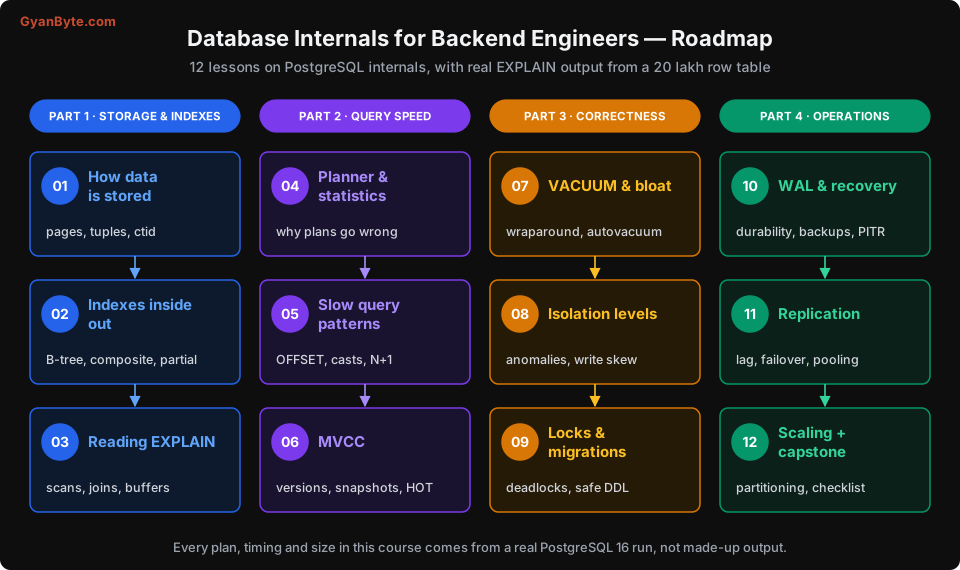
Real Data, Real Output
Every query plan, timing and size in this course comes from a real PostgreSQL 16 database, not from made-up output. I created a small food-delivery app called Tiffin Express (imaginary) with:
customers: 2 lakh rowsorders: 20 lakh rows (169 MB of data)
The setup script is in Lesson 1, so you can create the same database on your laptop and run every example yourself. Your timings will be different from mine (different machine, different cache), but the plans and the patterns will be the same.
What This Course Covers
| # | Lesson | What you will learn |
|---|---|---|
| 1 | How a Database Stores Your Data | Pages, tuples, ctid, and why everything is about pages |
| 2 | Indexes From the Inside | B-trees, composite column order, covering, partial and expression indexes |
| 3 | Reading EXPLAIN Like a Pro | Scan types, join algorithms, buffers, and what to look at first |
| 4 | The Planner and Statistics | Why the planner picks bad plans, and how to help it |
| 5 | Query Patterns That Kill Performance | OFFSET pagination, implicit casts, functions on columns, N+1, and fixes |
| 6 | MVCC — How Postgres Handles Concurrency | Row versions, snapshots, visibility, HOT updates |
| 7 | VACUUM, Bloat and Wraparound | Why dead rows pile up, and how to keep autovacuum healthy |
| 8 | Transactions and Isolation Levels | Read committed, repeatable read, serializable, and real anomalies |
| 9 | Locks, Deadlocks and Safe Migrations | Lock modes, lock queues, and changing schemas without downtime |
| 10 | WAL, Durability and Recovery | How Postgres survives crashes, backups and point-in-time recovery |
| 11 | Replication and Connection Pooling | Read replicas, replication lag, failover, PgBouncer |
| 12 | Scaling Postgres + Capstone | Partitioning, monitoring, a real debugging walkthrough, and a checklist |
Who Is This For?
- Backend engineers who write SQL (directly or through an ORM) and want to understand why queries are slow
- Engineers who have been paged for a “database issue” and didn’t know where to start
- Anyone preparing for senior backend or system design interviews, where these topics come up a lot
Prerequisites
- Comfortable writing basic SQL:
SELECT,JOIN,GROUP BY,INSERT,UPDATE - A PostgreSQL installation (local, Docker, or any cloud) if you want to run the examples. Version 14 or newer is fine; I used 16
- No knowledge of database internals needed. That’s what we’re here for
Let’s start with the most basic question: when you insert a row, where does it actually go?