A few years back, a team I was helping had a reports query that took 40 seconds. Someone had already added three indexes, and it was still slow. When we finally looked at what the query was doing, it was reading 1.8 GB of data to return 200 rows. The indexes didn’t help because of the way the query was written, and nobody had checked how much data it was actually touching.
That experience taught me the single most useful idea in database performance:
A query’s speed depends mostly on how many pages it has to read.
To understand what a “page” is and why it matters, we need to look at how PostgreSQL actually stores data. That’s this lesson.
Set Up the Sample Database
Every example in this course uses the same database. If you want to follow along, here’s the setup script. It creates 2 lakh customers and 20 lakh orders for an imaginary food delivery app. It takes a minute or two on a laptop.
CREATE DATABASE tiffin;
\c tiffin

SELECT setseed(0.42);   -- makes random() repeatable

CREATE TABLE customers (
  id          BIGSERIAL PRIMARY KEY,
  name        TEXT NOT NULL,
  phone       TEXT NOT NULL,
  city        TEXT NOT NULL,
  created_at  TIMESTAMPTZ NOT NULL
);

INSERT INTO customers (name, phone, city, created_at)
SELECT 'Customer ' || g,
       '9' || lpad((floor(random()*1e9))::bigint::text, 9, '0'),
       (ARRAY['Bengaluru','Mumbai','Delhi','Pune','Hyderabad',
              'Chennai','Kolkata','Jaipur','Indore','Kochi'])[1 + floor(random()*10)::int],
       now() - (random() * interval '900 days')
FROM generate_series(1, 200000) g;

CREATE TABLE orders (
  id            BIGSERIAL PRIMARY KEY,
  customer_id   BIGINT NOT NULL REFERENCES customers(id),
  restaurant_id INT NOT NULL,
  status        TEXT NOT NULL,
  amount_paise  BIGINT NOT NULL,
  city          TEXT NOT NULL,
  created_at    TIMESTAMPTZ NOT NULL,
  notes         TEXT
);

INSERT INTO orders (customer_id, restaurant_id, status, amount_paise, city, created_at, notes)
SELECT 1 + floor(random()*200000)::bigint,
       1 + floor(random()*5000)::int,
       CASE WHEN r < 0.90 THEN 'delivered' WHEN r < 0.96 THEN 'cancelled'
            WHEN r < 0.995 THEN 'refunded' ELSE 'pending' END,
       (9900 + floor(random()*90000))::bigint,
       (ARRAY['Bengaluru','Mumbai','Delhi','Pune','Hyderabad',
              'Chennai','Kolkata','Jaipur','Indore','Kochi'])[1 + floor(random()*10)::int],
       now() - (g::float / 2000000) * interval '730 days',
       CASE WHEN random() < 0.1 THEN 'extra spicy, no onion' ELSE NULL END
FROM (SELECT g, random() r FROM generate_series(1, 2000000) g) s;

VACUUM ANALYZE;
Notice: 90% of orders are delivered, only 0.5% are pending, and orders are spread over two years with newer orders getting higher ids. These details will matter in later lessons.
A Table Is a File of 8 KB Pages
When you create a table, PostgreSQL creates a file on disk for it (split into 1 GB segment files once it gets big). That file is divided into fixed-size blocks called pages, 8 KB each by default.
Let’s see our tables:
SELECT relname, relpages, reltuples::bigint,
       pg_size_pretty(pg_relation_size(oid)) AS size
FROM pg_class
WHERE relname IN ('orders', 'customers', 'orders_pkey');
relname | relpages | reltuples | size
-------------+----------+-----------+--------
orders_pkey | 5486 | 2000000 | 43 MB
customers | 2024 | 200000 | 16 MB
orders | 21660 | 2000000 | 169 MBSo our 20 lakh orders live in 21,660 pages, about 92 rows per page. The primary key index is a separate file with its own pages (we’ll open it up in the next lesson).
Everything in PostgreSQL happens at page level. It never reads “one row” from disk. To read one row, it reads the whole 8 KB page that contains it. To change one row, it changes the page in memory and later writes the whole page back. So when you think about how expensive a query is, think: how many pages will it touch?
Inside a Page
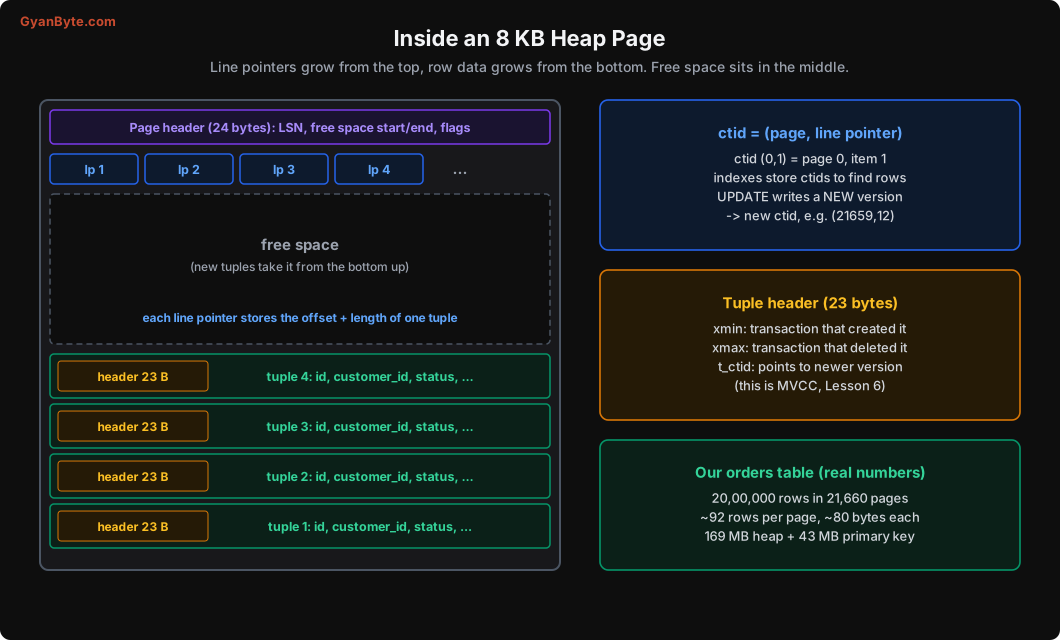
Each page has:
- A page header (24 bytes): bookkeeping like where free space starts and ends.
- Line pointers: a small array, one entry per row, saying where in the page that row starts and how long it is. This array grows from the top.
- Tuples (the actual rows), which grow from the bottom of the page upward.
- Free space in between. When it runs out, new rows go to another page.
“Tuple” is just the database word for a stored row version. Each tuple has a 23-byte header before the column data. That header has some important fields we’ll come back to:
xmin: the transaction that created this version of the row.xmax: the transaction that deleted (or replaced) it, if any.t_ctid: a pointer to a newer version of the row, if one exists.
These three fields are the heart of MVCC, which we’ll cover in Lesson 6.
Peeking inside with pageinspect
You don’t have to take my word for it. The pageinspect extension lets you look at a raw page:
CREATE EXTENSION pageinspect;

SELECT lp, lp_off, lp_len, t_xmin, t_xmax, t_ctid
FROM heap_page_items(get_raw_page('orders', 0))
LIMIT 4;
lp | lp_off | lp_len | t_xmin | t_xmax | t_ctid
----+--------+--------+--------+--------+--------
1 | 8112 | 80 | 734 | 0 | (0,1)
2 | 8032 | 80 | 734 | 0 | (0,2)
3 | 7952 | 80 | 734 | 0 | (0,3)
4 | 7872 | 80 | 734 | 0 | (0,4)Line pointer 1 says “the tuple starts at byte 8112 and is 80 bytes long”. Tuple 2 starts at 8032, just before it. Exactly the “grows from the bottom” picture. All four rows were created by transaction 734 (our big INSERT), and none have been deleted (t_xmax = 0).
ctid: The Physical Address of a Row
Every row version has a ctid: (page number, line pointer number). You can select it like a column:
SELECT ctid, id, status FROM orders ORDER BY id LIMIT 3; ctid | id | status
-------+----+-----------
(0,1) | 1 | delivered
(0,2) | 2 | delivered
(0,3) | 3 | cancelledOrder 1 is the first row on page 0. This ctid is what indexes store: an index entry says “key 4471 is at ctid (812, 44)”, and Postgres goes to page 812, line pointer 44 to get the row.
Now a small surprise. Let’s update a row:
UPDATE orders SET status = 'delivered' WHERE id = 1;
SELECT ctid, id, status FROM orders WHERE id = 1;
ctid | id | status
------------+----+-----------
(21659,12) | 1 | deliveredThe row moved from page 0 to page 21,659, the last page of the table! That’s because PostgreSQL doesn’t update rows in place. An UPDATE writes a brand new version of the row and marks the old one as dead. Page 0 was full, so the new version went to a page with free space.
This one fact explains a lot of Postgres behaviour you’ll see later: why updates are more expensive than you’d expect, why tables “bloat”, why VACUUM exists. We’ll go deep on it in Lessons 6 and 7. (Also, never store ctids in your application. They change.)
From Query to Disk: The Two Caches
When Postgres needs a page, it doesn’t go straight to disk.
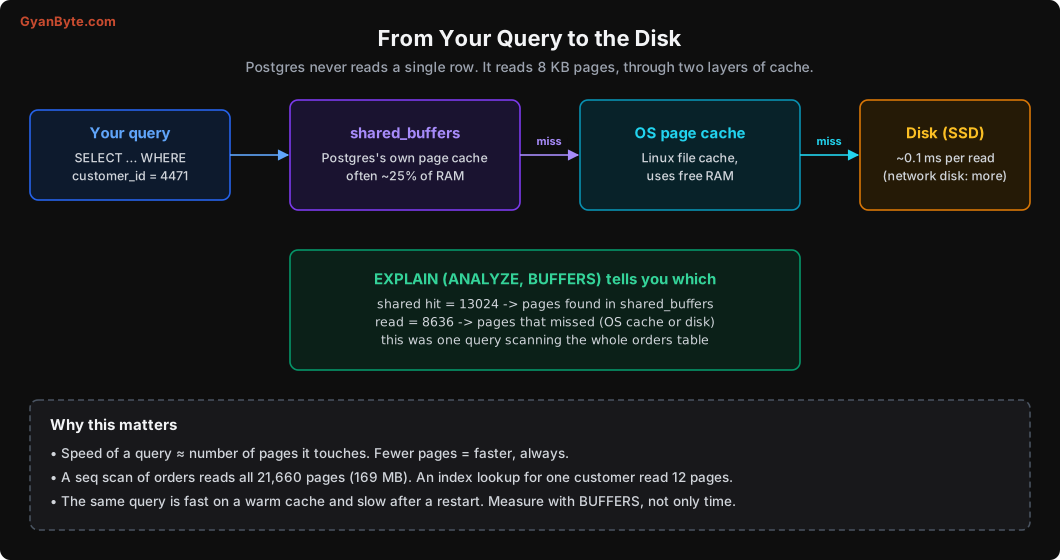
- shared_buffers: Postgres’s own cache of pages in memory. Commonly set to about 25% of the server’s RAM.
- OS page cache: if the page isn’t in shared buffers, Postgres asks the operating system, which may have it cached in RAM.
- Disk: only if both miss.
EXPLAIN (ANALYZE, BUFFERS) tells you how many pages a query touched and where they came from. Here’s a query that scans the whole orders table, looking for one customer (we don’t have an index on customer_id yet):
EXPLAIN (ANALYZE, BUFFERS) SELECT * FROM orders WHERE customer_id = 4471; Gather (actual time=13.474..70.761 rows=9 loops=1)
Workers Planned: 2
Buffers: shared hit=13024 read=8636
-> Parallel Seq Scan on orders (actual time=8.529..54.592 rows=3 loops=3)
Filter: (customer_id = 4471)
Rows Removed by Filter: 666664
Execution Time: 70.794 ms(I’ve trimmed the cost numbers to keep it readable; Lesson 3 explains every part.)
To find 9 orders, Postgres read all 21,660 pages (13,024 from shared buffers + 8,636 from outside) and threw away about 20 lakh rows. 70 ms doesn’t sound bad on a laptop. But run it 100 times a second on a busy production server and it will eat the whole machine.
In the next lesson, an index brings this down to 12 pages and 0.09 ms. Same data, same result. The only difference is how many pages are touched.
A practical note: the same query can be fast or slow depending on whether the pages are cached. After a restart or a big batch job that pushes pages out of the cache, things are slower until the cache warms up again. That’s why BUFFERS (pages touched) is often a better measure than time alone.
Column Order and Alignment Padding
Here’s something most people never notice. The order of columns in your CREATE TABLE affects how much space each row takes.
The reason is alignment: an 8-byte value like bigint or timestamptz must start at a position that’s a multiple of 8. If a 1-byte boolean sits before it, Postgres adds 7 bytes of padding.
I created two tables with the same six columns in different orders, and inserted 10 lakh rows into each:
CREATE TABLE pad_bad  (a boolean, b bigint, c boolean, d bigint, e boolean, f bigint);
CREATE TABLE pad_good (b bigint, d bigint, f bigint, a boolean, c boolean, e boolean);
-- insert 10 lakh rows into each ...
t | size
----------+-------
pad_bad | 73 MB
pad_good | 57 MBSame data, 22% smaller, just by putting the 8-byte columns first. (pg_column_size shows 72 bytes vs 51 bytes for one row.)
Should you reorder all your tables? Usually not worth the effort for existing tables. But for new, big tables (events, logs, orders), it’s a free win: put fixed-width 8-byte columns first (bigint, timestamptz, double precision), then 4-byte (int, date), then 2 and 1 byte (smallint, boolean), and variable-length columns (text, jsonb, numeric) last.
TOAST: When a Value Is Too Big
A row must fit in one 8 KB page. So what happens when you store a 50 KB product description or a large JSON document?
PostgreSQL uses TOAST (The Oversized-Attribute Storage Technique). When a row is larger than about 2 KB:
- First, it tries to compress the large values.
- If still too big, it moves them out of line into a separate TOAST table, leaving a small pointer in the main row.
This happens automatically. In a quick test, a 9,800-character menu description that repeated the same text was stored in just 169 bytes after compression, inside the main table.
What this means for you:
SELECT *on a table with big text or JSON columns can be much slower than selecting only the columns you need, because Postgres has to fetch and decompress the TOASTed values.- Updating a row with a big TOASTed value can be expensive. If a big JSON blob changes often, consider keeping it in a separate table.
What About MySQL?
MySQL’s InnoDB engine also uses pages (16 KB by default), but with one big difference: tables are stored clustered by primary key. The table itself is a B-tree sorted by the primary key, and secondary indexes store the primary key value instead of a physical address. That’s why in MySQL, a random UUID primary key causes much worse write performance (inserts land all over the tree) than an auto-increment id. Postgres stores rows in a heap (in insert order, roughly), so it’s less sensitive to this, though random UUIDs still make indexes bigger and less cache-friendly.
Pitfalls to Avoid
- Thinking in rows instead of pages. Cost is mostly about pages touched. Use
EXPLAIN (ANALYZE, BUFFERS). - Judging a query by one timing. Cached and uncached runs differ a lot. Look at buffers too.
- Assuming UPDATE is cheap. It writes a new row version, possibly on another page, and updates indexes.
- Storing ctids in your app. They change on update and vacuum.
- Ignoring column order for big new tables. Alignment padding can waste 20%+ of space.
SELECT *on tables with big text or JSON columns. Fetching and decompressing TOAST data costs time.- Frequently updated big blobs in hot tables. Move them to a separate table.
Quick Recap
- A table is a file of 8 KB pages. Each page has a header, line pointers, and tuples.
- Each row version has a 23-byte header and a physical address called ctid.
- Postgres reads and writes whole pages, through shared_buffers and the OS cache.
- An UPDATE writes a new row version; the old one becomes dead.
- Column order affects size through alignment; big values are compressed or moved by TOAST.
Next lesson: we open up an index, see exactly what it looks like inside, and understand why one index makes a query 700 times faster while another index on the same table does nothing.