An engineer once showed me a table with 23 indexes. The table had 14 columns. Most of those indexes had been added one at a time, each during some performance firefight, by someone who saw a slow query and thought “add an index on the column in the WHERE clause”. Half of them were never used. Several were duplicates of each other in a different column order. Inserts into that table were painfully slow, because every insert had to update 23 indexes.
Indexes are the most powerful tool you have for query speed. But to use them well, you need to know what they actually are. Let’s open one up.
Before and After
Last lesson, finding one customer’s orders scanned the whole table:
Parallel Seq Scan on orders  (actual time=8.529..54.592 rows=3 loops=3)
  Filter: (customer_id = 4471)
  Rows Removed by Filter: 666664
Buffers: shared hit=13024 read=8636
Execution Time: 70.794 ms
Let’s add an index:
CREATE INDEX idx_orders_customer ON orders (customer_id);   -- took 1.6 seconds

EXPLAIN (ANALYZE, BUFFERS) SELECT * FROM orders WHERE customer_id = 4471;
Bitmap Heap Scan on orders (actual time=0.039..0.070 rows=9 loops=1)
Recheck Cond: (customer_id = 4471)
Heap Blocks: exact=9
Buffers: shared hit=4 read=8
-> Bitmap Index Scan on idx_orders_customer (actual time=0.024..0.024 rows=9 loops=1)
Index Cond: (customer_id = 4471)
Buffers: shared read=3
Execution Time: 0.090 msFrom 21,660 pages to 12 pages. From 70 ms to 0.09 ms, about 780 times faster. Let’s see why.
What a B-tree Looks Like
The default index type in PostgreSQL (and most databases) is the B-tree. Despite the name, it’s not a binary tree. It’s a wide, shallow tree where each node is an 8 KB page holding hundreds of keys.
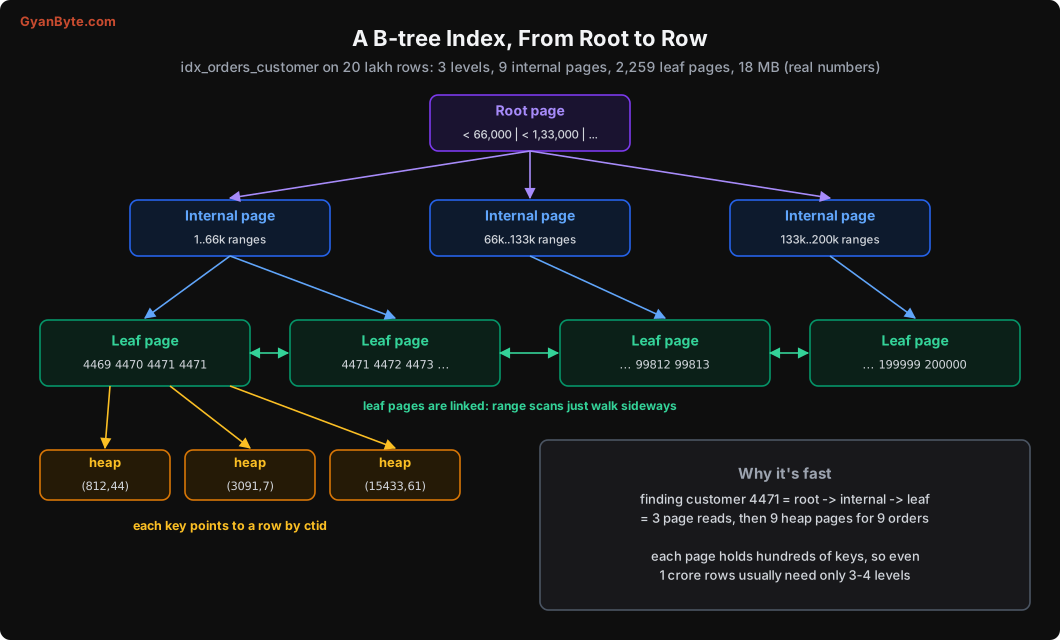
- Leaf pages hold the actual index entries: the key value (
customer_id) and the ctid of the row. Keys are sorted. - Internal pages hold separator keys that say which child page covers which range.
- The root is the single top page.
- Leaf pages are linked to their neighbours, so a range scan (
BETWEEN 4000 AND 5000) finds the first leaf and then just walks sideways.
The pgstattuple extension shows the real shape of our index:
CREATE EXTENSION pgstattuple;
SELECT tree_level, index_size, leaf_pages, internal_pages, avg_leaf_density
FROM pgstatindex('idx_orders_customer');
tree_level | index_size | leaf_pages | internal_pages | avg_leaf_density
------------+------------+------------+----------------+------------------
2 | 18587648 | 2259 | 9 | 90.43tree_level = 2 means three levels: root, one level of internal pages, then leaves. To find customer 4471, Postgres reads the root, one internal page, and one leaf page. That’s the Buffers: shared read=3 on the Bitmap Index Scan line. Then it fetches the 9 heap pages that hold the 9 matching orders.
Because each page holds hundreds of entries, B-trees stay shallow even for huge tables. Even 1 crore or 10 crore rows usually need only 3 or 4 levels. That’s why index lookups are fast regardless of table size.
The cost of an index
An index is not free:
- Space: this one is 18 MB. The bigger index we’ll create below is 64 MB.
- Writes: every
INSERT, and everyUPDATEthat changes an indexed column (or can’t use the HOT optimisation, Lesson 6), must also update every index. Ten indexes means ten extra writes per insert. - Cache: indexes compete with table pages for space in shared_buffers.
So the goal isn’t “index everything”. It’s “index for the queries you actually run”.
Composite Indexes: Column Order Is Everything
Most real queries filter on more than one column. A composite index covers several columns, sorted by the first column, then by the second inside each value of the first, and so on. Exactly like a phone directory sorted by city, then by name.
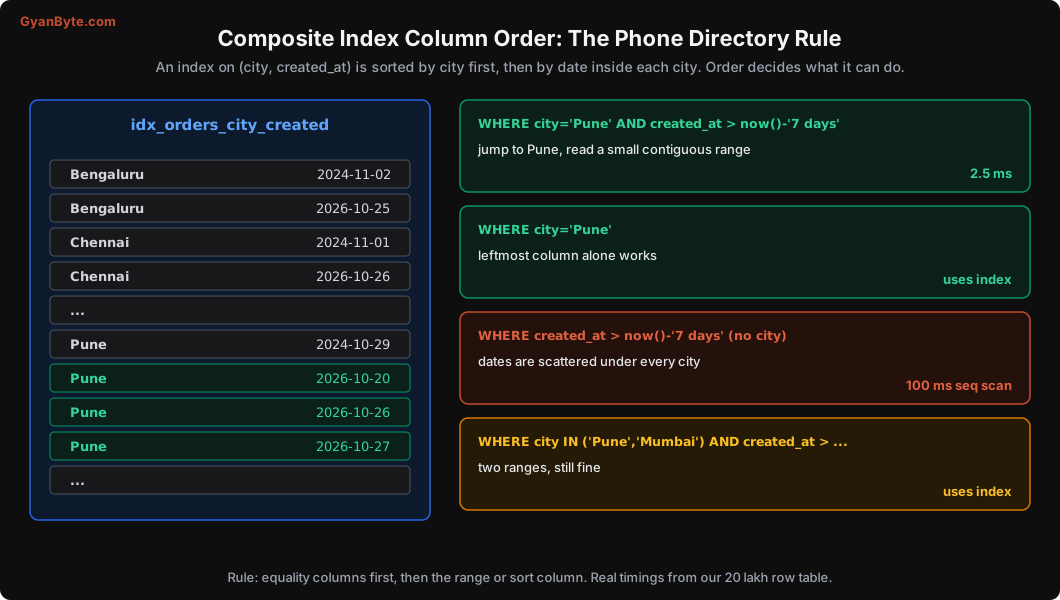
Let’s create one and test it:
CREATE INDEX idx_orders_city_created ON orders (city, created_at);

EXPLAIN ANALYZE
SELECT id, amount_paise FROM orders
WHERE city = 'Pune' AND created_at > now() - interval '7 days';
Bitmap Heap Scan on orders (actual time=0.275..2.399 rows=1876 loops=1)
Recheck Cond: ((city = 'Pune'::text) AND (created_at > (now() - '7 days'::interval)))
Heap Blocks: exact=208
-> Bitmap Index Scan on idx_orders_city_created (actual time=0.241..0.242 rows=1876 loops=1)
Execution Time: 2.512 msThe index jumps straight to “Pune”, then to the start of the last 7 days within Pune, and reads one small, contiguous range. 2.5 ms for 1,876 rows.
Now a query that filters only on date and status:
EXPLAIN ANALYZE
SELECT id FROM orders
WHERE created_at > now() - interval '7 days' AND status = 'pending';
Parallel Seq Scan on orders (actual time=60.601..92.667 rows=29 loops=3)
Filter: ((status = 'pending'::text) AND (created_at > (now() - '7 days'::interval)))
Rows Removed by Filter: 666637
Execution Time: 100.493 msThe (city, created_at) index is useless here. In the phone directory, recent dates are scattered under every city; there’s no single range to read. So Postgres scans the whole table.
The rule for column order
- Columns you filter with
=go first. (city = 'Pune') - Then the column you filter with a range or sort by. (
created_at > ...,ORDER BY created_at) - A query must use the leftmost column(s) to use the index efficiently. An index on
(a, b, c)helps queries ona, ona, b, and ona, b, c. It doesn’t help much with queries on onlybor onlyc.
Two practical corollaries:
- An index on
(a, b)makes a separate index on(a)redundant. Drop the single-column one. - Putting a range column first (
(created_at, city)) is usually worse: the index can use the date range, but then has to check every city inside that range.
(Postgres 18 added “skip scan” for B-trees, which can sometimes use a composite index even without the leftmost column, when that column has few distinct values. It helps, but designing the order correctly is still the right default.)
Covering Indexes and Index-Only Scans
In the first example, Postgres used the index to find ctids, then still had to visit 9 heap pages to get the actual row data. What if the index already had all the columns the query needs?
That’s a covering index. In PostgreSQL you add extra, non-key columns with INCLUDE:
CREATE INDEX idx_orders_cust_cover
  ON orders (customer_id, created_at DESC)
  INCLUDE (status, amount_paise);

VACUUM ANALYZE orders;

EXPLAIN (ANALYZE, BUFFERS)
SELECT created_at, status, amount_paise
FROM orders WHERE customer_id = 4471
ORDER BY created_at DESC LIMIT 10;
Limit (actual time=0.061..0.066 rows=9 loops=1)
Buffers: shared hit=1 read=3
-> Index Only Scan using idx_orders_cust_cover on orders (actual time=0.060..0.063 rows=9 loops=1)
Index Cond: (customer_id = 4471)
Heap Fetches: 0
Execution Time: 0.093 msIndex Only Scan, Heap Fetches: 0. The table wasn’t touched at all. Only 4 pages read in total. This is the shape of a typical “show my last 10 orders” screen, and this index serves it perfectly: filter by customer, already sorted by date descending, all displayed columns included.
One catch: index-only scans depend on the table’s visibility map being up to date (Lesson 7 explains why). That’s why I ran VACUUM before testing. On a table with lots of recent changes, you’ll see Heap Fetches go up, and the benefit shrinks.
Partial Indexes: Index Only What You Need
Only 0.5% of our orders are pending. But the ops team constantly runs “show pending orders from the last hour”. A full index on (status, created_at) would index all 20 lakh rows to serve a query about 10,000 of them.
A partial index only includes rows that match a condition:
CREATE INDEX idx_orders_pending ON orders (created_at) WHERE status = 'pending'; partial_size | full_size (city, created_at)
--------------+-----------
240 kB | 64 MB240 KB versus 64 MB for a full index. And the query:
EXPLAIN ANALYZE
SELECT id FROM orders WHERE status = 'pending' AND created_at > now() - interval '1 day';
Index Scan using idx_orders_pending on orders (actual time=0.022..0.041 rows=17 loops=1)
Index Cond: (created_at > (now() - '1 day'::interval))
Execution Time: 0.051 msPartial indexes are perfect for “queue-like” queries: pending jobs, unread notifications, active subscriptions, non-deleted rows (WHERE deleted_at IS NULL). The query’s WHERE must include the index’s condition for Postgres to use it.
Expression Indexes
A very common mistake: wrapping an indexed column in a function.
EXPLAIN ANALYZE
SELECT id FROM orders
WHERE date(created_at AT TIME ZONE 'Asia/Kolkata') = '2026-10-20';
Parallel Seq Scan on orders (actual time=2.226..221.673 rows=913 loops=3)
Filter: (date((created_at AT TIME ZONE 'Asia/Kolkata'::text)) = '2026-10-20'::date)
Rows Removed by Filter: 665753
Execution Time: 232.848 msThe index on created_at can’t help, because the query isn’t asking about created_at. It’s asking about date(created_at AT TIME ZONE ...), which is a different value. Two fixes:
Rewrite the query as a range on the raw column (usually the best fix):
WHERE created_at >= '2026-10-20 00:00:00+05:30'
  AND created_at <  '2026-10-21 00:00:00+05:30'
Or create an expression index if you really need to filter on the computed value:
CREATE INDEX idx_orders_ist_date ON orders ((date(created_at AT TIME ZONE 'Asia/Kolkata')));The classic example is case-insensitive email lookup: CREATE INDEX ON users (lower(email)) and query with WHERE lower(email) = lower($1).
Other Index Types, Briefly
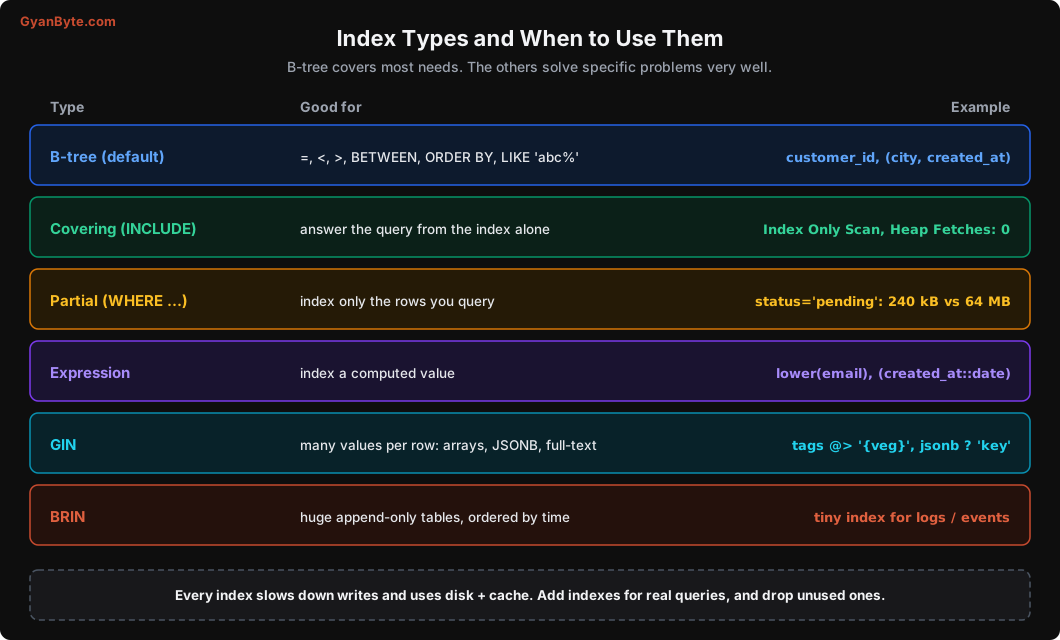
- GIN is for columns that contain many values: arrays (
tags @> '{veg}'), JSONB (attributes ? 'spicy'), and full-text search. If you query inside JSONB a lot, you need GIN. - BRIN (Block Range INdex) stores the min and max value for each range of pages. For huge, append-only tables where values follow insert order (time-series events, logs), a BRIN index on the timestamp can be a few KB instead of GBs, and still skip most of the table.
- Hash indexes support only equality. Rarely better than B-tree in practice.
Finding Unused and Missing Indexes
Unused indexes cost writes and space for nothing. Postgres tracks how often each index is used:
SELECT relname AS table, indexrelname AS index, idx_scan,
       pg_size_pretty(pg_relation_size(indexrelid)) AS size
FROM pg_stat_user_indexes
ORDER BY idx_scan ASC, pg_relation_size(indexrelid) DESC
LIMIT 10;
Indexes with idx_scan = 0 over a few weeks (check replicas too, since stats are per server) are candidates for dropping. Keep indexes that enforce constraints (primary key, unique).
Missing indexes show up as sequential scans on big tables in your slow query logs and in pg_stat_statements (Lesson 12). Add indexes for specific slow queries, check the plan before and after, and keep the change if it helps.
Creating indexes in production
CREATE INDEX blocks writes to the table while it builds. On a big production table, that can mean minutes of failed inserts. Use:
CREATE INDEX CONCURRENTLY idx_orders_restaurant ON orders (restaurant_id);It takes longer and can’t run inside a transaction, but it doesn’t block writes. If it fails halfway, it leaves an INVALID index behind that you must drop and retry. Lesson 9 covers safe migrations in detail.
Pitfalls to Avoid
- Adding an index for every slow query without checking the plan. Confirm with
EXPLAIN ANALYZEbefore and after. - Wrong composite column order. Equality columns first, then range or sort.
- Redundant indexes.
(a, b)makes(a)unnecessary. - Functions on indexed columns (
date(created_at),lower(email),phone::bigint). Rewrite as ranges or add expression indexes. - Full indexes for queue-like queries. Use partial indexes.
- Forgetting that index-only scans need a fresh visibility map. Busy tables need healthy autovacuum.
- Too many indexes on write-heavy tables. Every index slows every insert.
- Plain
CREATE INDEXon big production tables. UseCONCURRENTLY. - Never dropping unused indexes. Check
pg_stat_user_indexesregularly, on all servers.
Quick Recap
- A B-tree is a shallow tree of sorted pages; leaves point to rows by ctid and are linked for range scans.
- Our index turned a 21,660-page scan into a 12-page lookup: 70 ms to 0.09 ms.
- Composite index order: equality columns first, then range/sort; queries must use the leftmost column.
- Covering indexes enable index-only scans; partial indexes can be hundreds of times smaller; expression indexes serve computed filters.
- Indexes cost space and write speed. Add them for real queries and remove unused ones.
Next lesson: we’ve been reading EXPLAIN output informally. Let’s learn to read it properly, including the different scan types and the three join algorithms.