The most common database outage I’ve seen is not a hardware failure or a bad query. It’s a migration.
Someone adds a column to the orders table. In staging it took 40 milliseconds. In production, it was deployed at 7 PM, the busiest hour. The ALTER TABLE needed a lock it couldn’t get immediately, because a long analytics query was reading the table. So it waited. And while it waited, every single query on orders lined up behind it: order placement, order tracking, the restaurant dashboard. The app’s connection pool filled up in seconds and requests started failing. The ALTER TABLE itself, once it got its turn, still took 40 milliseconds.
Understanding locks turns this from a mystery into something you can prevent with one line of configuration.
Table Locks: Light and Heavy
Every statement takes a lock on the tables it touches. There are eight table lock modes in Postgres, but you only need to remember the common ones and what they block:
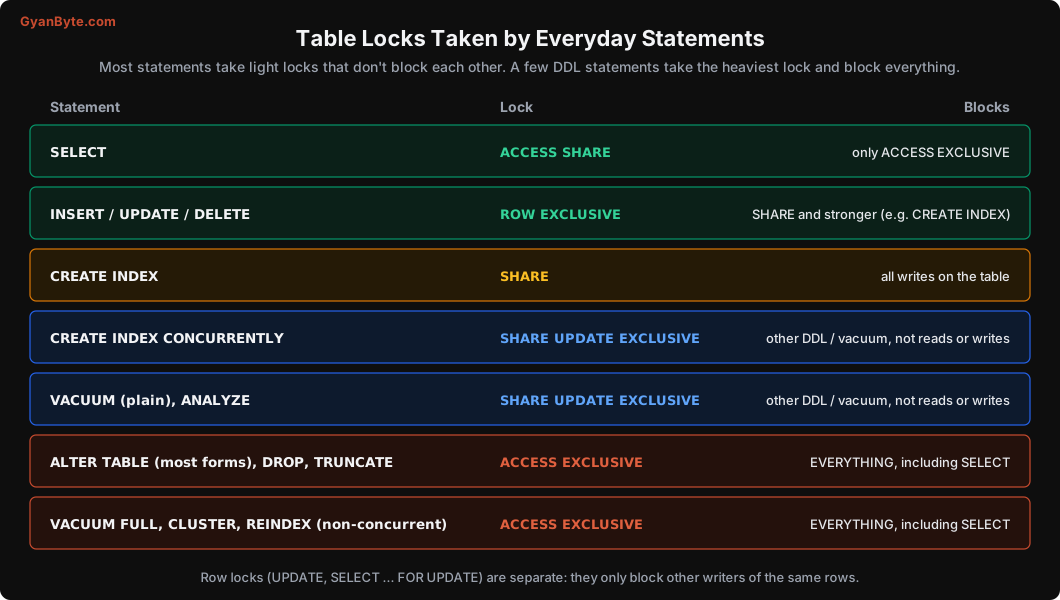
The important takeaways:
- Normal reads and writes don’t block each other at the table level.
SELECT,INSERT,UPDATEandDELETEall take compatible locks. - Plain
CREATE INDEXblocks writes for the entire build. On a big table, that’s minutes of failed inserts. - Most
ALTER TABLEforms takeACCESS EXCLUSIVE, the strongest lock. It conflicts with everything, including plainSELECT. Even if the change itself is instant (like adding a nullable column), it needs this lock for a moment.
Row-level locks (taken by UPDATE, DELETE, SELECT ... FOR UPDATE) are separate. They only block other transactions trying to modify or lock the same rows.
The Lock Queue: How One ALTER Freezes Everything
Here’s the part most people don’t know: locks are granted in queue order. If a request for a strong lock is waiting, new requests for conflicting locks queue up behind it, even if they would be compatible with the locks currently held.
I reproduced the outage from the story above:
- Report query at 0s:
BEGIN; SELECT ... FROM orders ...and holds the transaction open for 6 seconds. It holdsACCESS SHARE. - Migration at 1s:
ALTER TABLE orders ADD COLUMN coupon_code text;It needsACCESS EXCLUSIVE, which conflicts with the report’s lock. It waits. - App query at 2s:
SELECT id FROM orders WHERE id = 11;A primary key lookup that normally takes 0.05 ms. It needs onlyACCESS SHARE, which is compatible with the report’s lock, but it’s behind the waitingALTERin the queue.
pg_stat_activity and pg_locks while this was happening:
 pid  | wait_event_type | wait_event |                       query                        |     waiting
------+-----------------+------------+----------------------------------------------------+-----------------
 1238 | Timeout         | PgSleep    | BEGIN; SELECT id FROM orders WHERE id = 10; SELECT | 00:00:03.502478
 1243 | Lock            | relation   | ALTER TABLE orders ADD COLUMN coupon_code text;    | 00:00:02.510943
 1249 | Lock            | relation   | SELECT id FROM orders WHERE id = 11;               | 00:00:01.516945

 pid  |        mode         | granted
------+---------------------+---------
 1238 | AccessShareLock     | t
 1243 | AccessExclusiveLock | f
 1249 | AccessShareLock     | f
The app’s SELECT was granted only after the report finished and the ALTER ran: 4,026 ms for a query that normally takes 0.05 ms.
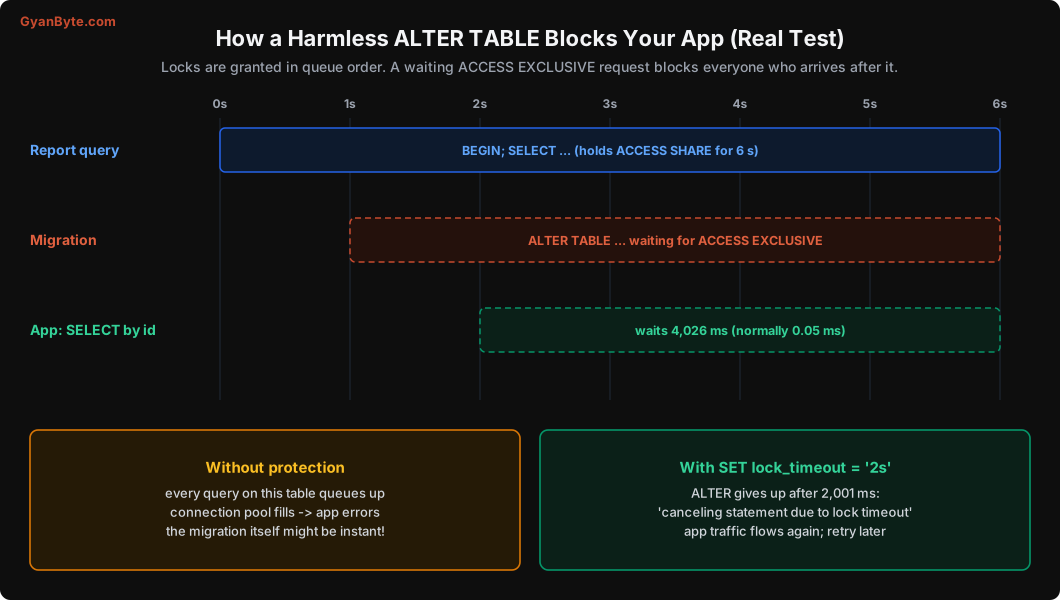
In a real app, it’s not one SELECT waiting. It’s every request touching orders, and they keep arriving. The connection pool fills, the app returns errors, and it looks like the database is down.
The fix: lock_timeout
Tell the migration to give up quickly if it can’t get its lock, instead of waiting forever and holding the queue:
SET lock_timeout = '2s';
ALTER TABLE orders ADD COLUMN coupon_code text;
Same test, with the report query still running:
ERROR:  canceling statement due to lock timeout
Time: 2000.829 ms (00:02.001)
The migration failed after 2 seconds, the queue cleared, and the app recovered. Then you retry the migration a few times with a short pause. Most of the time it gets its lock on the second or third attempt, in a gap between long queries.
Many migration tools support this directly. If yours doesn’t, put SET lock_timeout at the top of every migration file. Some teams also set statement_timeout for migrations, so a migration that unexpectedly rewrites a big table gets cancelled instead of locking the table for 20 minutes.
Finding Who Is Blocking Whom
When things are stuck in production, this query shows waiting sessions and what’s blocking them:
SELECT waiting.pid AS waiting_pid,
       left(waiting.query, 50) AS waiting_query,
       now() - waiting.query_start AS waiting_for,
       blocker.pid AS blocking_pid,
       left(blocker.query, 50) AS blocking_query,
       blocker.state AS blocker_state,
       now() - blocker.xact_start AS blocker_xact_age
FROM pg_stat_activity waiting
JOIN LATERAL unnest(pg_blocking_pids(waiting.pid)) AS b(pid) ON true
JOIN pg_stat_activity blocker ON blocker.pid = b.pid
ORDER BY waiting_for DESC;
Very often the blocker is idle in transaction: an app or a person that started a transaction and never finished it. You can end it with:
SELECT pg_cancel_backend(<pid>);     -- cancels the current query
SELECT pg_terminate_backend(<pid>);  -- ends the whole session (rolls back its transaction)
Deadlocks
A deadlock is when two transactions each hold a lock the other one needs. Neither can continue. Postgres checks for this after waiting deadlock_timeout (1 second by default), and kills one of them.
The classic case is two money transfers between the same two wallets, in opposite directions:
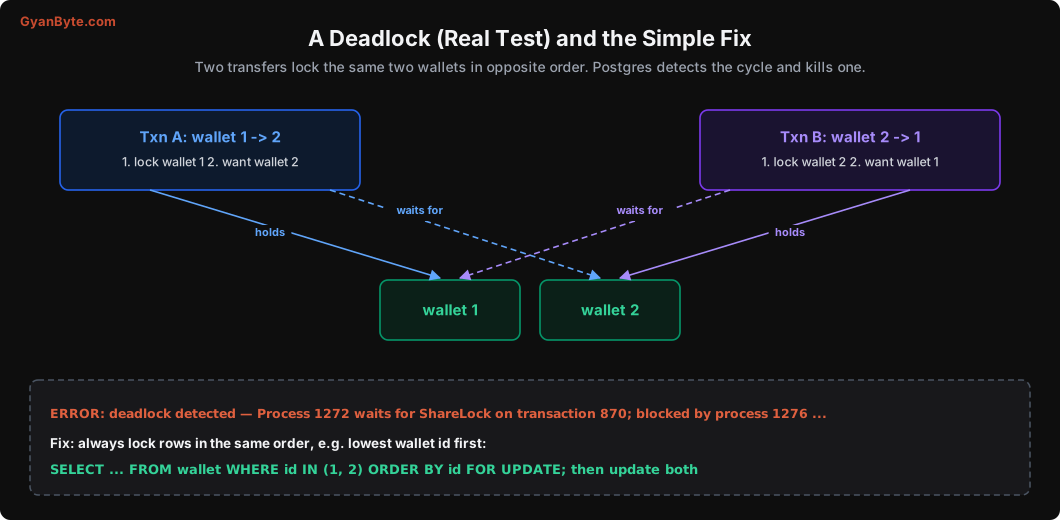
Real test:
[txn A] ERROR:  deadlock detected
[txn A] DETAIL:  Process 1272 waits for ShareLock on transaction 870; blocked by process 1276.
               Process 1276 waits for ShareLock on transaction 869; blocked by process 1272.
Transaction A was rolled back; B completed. No data was corrupted, but A’s transfer failed.
The fix is almost always consistent ordering. If every transaction locks rows in the same order (for example, by ascending id), a cycle can’t form:
BEGIN;
SELECT id FROM wallet WHERE id IN (1, 2) ORDER BY id FOR UPDATE;   -- lock both, lowest id first
UPDATE wallet SET balance_paise = balance_paise - 1000 WHERE id = 1;
UPDATE wallet SET balance_paise = balance_paise + 1000 WHERE id = 2;
COMMIT;
Other common sources of deadlocks:
- Bulk updates in different orders: two jobs updating overlapping sets of rows. Sort by primary key before updating.
- Foreign keys: inserting a child row takes a
FOR KEY SHARElock on the parent row. Two transactions inserting children and updating parents in different orders can deadlock.
Treat deadlock errors (SQLSTATE 40P01) like serialization errors: retry the whole transaction (Lesson 8). If you see them often, look for the inconsistent order in your code; it’s always there somewhere.
Safe Schema Migrations: A Recipe
With locks understood, here’s how to make common changes on a busy table without downtime. Always combine these with lock_timeout and retries.
Add a nullable column: safe and instant.
ALTER TABLE orders ADD COLUMN coupon_code text;Add a column with a default: instant since Postgres 11, as long as the default is a constant or a non-volatile expression. (A volatile default like random() or clock_timestamp() rewrites the whole table.)
ALTER TABLE orders ADD COLUMN is_gift boolean NOT NULL DEFAULT false;Create an index: always concurrently on live tables.
CREATE INDEX CONCURRENTLY idx_orders_coupon ON orders (coupon_code);It can’t run inside a transaction block, and if it fails, drop the leftover INVALID index and retry.
Add a foreign key: in two steps, so the long validation doesn’t hold a strong lock.
ALTER TABLE orders ADD CONSTRAINT orders_restaurant_fk
  FOREIGN KEY (restaurant_id) REFERENCES restaurants(id) NOT VALID;   -- quick
ALTER TABLE orders VALIDATE CONSTRAINT orders_restaurant_fk;          -- scans, but with a lighter lock
Make an existing column NOT NULL: SET NOT NULL scans the whole table under ACCESS EXCLUSIVE. Instead, add a CHECK constraint as NOT VALID, validate it, then set NOT NULL (Postgres 12+ uses the validated check to skip the scan):
ALTER TABLE orders ADD CONSTRAINT orders_city_not_null CHECK (city IS NOT NULL) NOT VALID;
ALTER TABLE orders VALIDATE CONSTRAINT orders_city_not_null;
ALTER TABLE orders ALTER COLUMN city SET NOT NULL;
ALTER TABLE orders DROP CONSTRAINT orders_city_not_null;
Change a column’s type: most type changes (for example int to bigint) rewrite the whole table under ACCESS EXCLUSIVE. On a big table, that’s an outage. Use expand-and-contract instead:
- Add a new column (
amount_paise_big bigint). - Write to both columns in the app (or with a trigger).
- Backfill old rows in small batches.
- Switch reads to the new column.
- Drop the old column later.
Rename a column or table: the rename itself is instant, but your running app still uses the old name and will break immediately. Use expand-and-contract here too, or deploy app code that handles both names first.
Backfill data: never UPDATE big_table SET new_col = ... in one statement. It holds row locks on everything, creates huge numbers of dead rows (Lesson 7), and generates a burst of WAL that can make replicas lag (Lessons 10-11). Update in batches of a few thousand rows by primary key range, with a short pause between batches.
Drop a column: instant (Postgres just marks it dropped). But first deploy app code that no longer reads or writes it, and make sure your ORM isn’t doing SELECT * with a cached column list.
Pitfalls to Avoid
- Migrations without
lock_timeout. One waitingALTERcan block every query on the table. - Running migrations at peak traffic or while long reports are running.
- Plain
CREATE INDEXon live tables. UseCONCURRENTLY. - Adding constraints in one step on big tables. Use
NOT VALIDthenVALIDATE. - Type changes that rewrite the table. Use expand-and-contract.
- Renaming columns used by running code. Deploy compatible code first.
- Single giant
UPDATEbackfills. Batch them. - Locking rows in inconsistent orders. That’s where deadlocks come from.
- Not knowing how to find blockers. Keep the
pg_blocking_pidsquery handy.
Quick Recap
- Normal reads and writes rarely block each other; most
ALTER TABLE,DROP,TRUNCATEandVACUUM FULLblock everything. - Locks are granted in queue order: a waiting DDL blocks everyone behind it. Real test: 0.05 ms became 4 seconds.
lock_timeoutplus retries makes migrations safe to run on busy tables.- Deadlocks come from inconsistent lock order; sort and lock in a fixed order, and retry 40P01 errors.
- Use concurrent indexes,
NOT VALIDconstraints, expand-and-contract and batched backfills for zero-downtime changes.
Next lesson: how Postgres makes sure committed data survives crashes. The write-ahead log, checkpoints, synchronous_commit, and backups you can actually restore.