A few years back, a friend’s team ran their Postgres on a self-managed VM. One night the VM was restarted by the cloud provider for host maintenance. No graceful shutdown, just power off. The on-call engineer panicked: “We had thousands of orders in flight. Did we lose them?”
The database came back in about 20 seconds. The log said database system was not properly shut down; automatic recovery in progress, then redo done, then it accepted connections. Every order that had been acknowledged to a customer was there. Nobody had to do anything.
That’s the write-ahead log at work. In this lesson we’ll see how it works, what it costs, and the knobs that trade safety for speed. Then we’ll cover the part teams most often get wrong: backups you can actually restore.
The Core Idea: Write the Log First
Writing a changed table page to disk at every commit would be slow. A single UPDATE might touch a table page and three index pages in different places on disk. Random writes like that are expensive, and you’d do them for every transaction.
So Postgres does something smarter. When you change data:
- The change is made to the page in memory (
shared_buffers). The page is now “dirty”. - A small record describing the change (“on page Y of this file, this row changed like this”) is added to the write-ahead log (WAL).
- At
COMMIT, Postgres writes the WAL to disk and callsfsync()to make sure it’s really on disk, not in some OS cache. - Only then does the client get “COMMIT ok”.
The dirty table page is written to its file later, in the background.
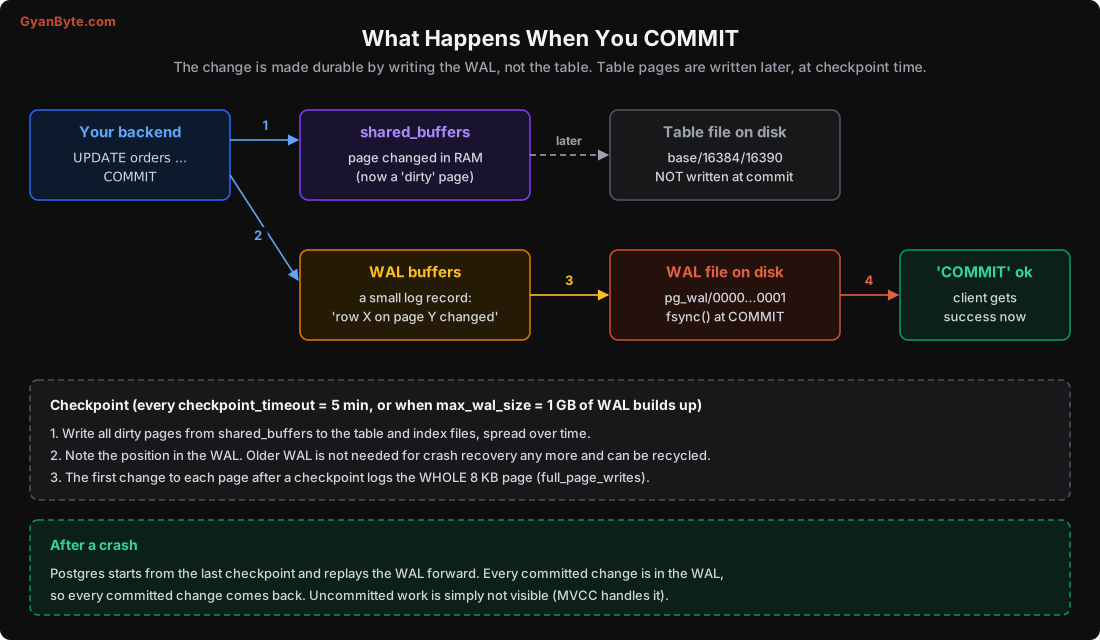
The WAL is append-only: one sequential write at the end of a file. That’s much cheaper than scattered random writes. And it’s enough, because if the server crashes, the WAL has every committed change. Postgres can replay it to rebuild any table page that hadn’t been written yet.
This is why it’s called write-ahead: the log record always reaches disk before the data page it describes.
You can see the WAL files yourself in the pg_wal directory. Each segment is 16 MB, named like 000000010000000100000005. Every change gets a position in the WAL called an LSN (log sequence number), like 0/DA000060. You’ll see LSNs again in replication.
SELECT pg_current_wal_lsn();          -- where the WAL is right now
SELECT pg_walfile_name(pg_current_wal_lsn());  -- which file that is
Checkpoints
If the WAL keeps growing forever and recovery replays all of it, a restart after a month would take hours. Checkpoints solve this.
At a checkpoint, Postgres writes all dirty pages from memory to the table and index files, and records the WAL position. After that, WAL older than the checkpoint isn’t needed for crash recovery any more and those segment files can be recycled.
A checkpoint happens when either of these comes first:
checkpoint_timeouthas passed (default 5 minutes), ormax_wal_sizeworth of WAL has been written since the last one (default 1 GB).
To avoid a big burst of disk writes, Postgres spreads the checkpoint writes over time (checkpoint_completion_target, default 0.9 = spread over 90% of the interval).
After a crash, recovery starts at the last checkpoint and replays WAL forward. More time between checkpoints means more WAL to replay, so recovery takes longer. Less time means more checkpoint work and, as we’ll see now, a lot more WAL.
Full Page Writes: The Hidden WAL Multiplier
Disks write in sectors (often 4 KB) while Postgres pages are 8 KB. If power fails halfway through writing a page, you can end up with a “torn page”: half old, half new. A small WAL record saying “change row 5” can’t fix a page that’s half garbage.
So Postgres protects against this: the first time a page is modified after a checkpoint, the WAL record includes the full 8 KB page image. Later changes to the same page (until the next checkpoint) log only the small change. This is full_page_writes, and it’s on by default. Leave it on.
The cost is real. I tested it on a table wal_test with about 1 lakh rows. I updated 500 rows spread across about 500 different pages, measuring WAL with pg_current_wal_lsn() before and after:
CHECKPOINT;
SELECT pg_current_wal_lsn() AS a \gset
UPDATE wal_test SET amt = amt + 1 WHERE id % 200 = 0;   -- 500 rows
SELECT pg_current_wal_lsn() AS b \gset
UPDATE wal_test SET amt = amt + 1 WHERE id % 200 = 0;   -- same 500 rows again
SELECT pg_current_wal_lsn() AS c \gset

SELECT pg_size_pretty(pg_wal_lsn_diff(:'b', :'a')) AS first_after_checkpoint,
       pg_size_pretty(pg_wal_lsn_diff(:'c', :'b')) AS second;
first_after_checkpoint | second
------------------------+--------
6113 kB | 144 kB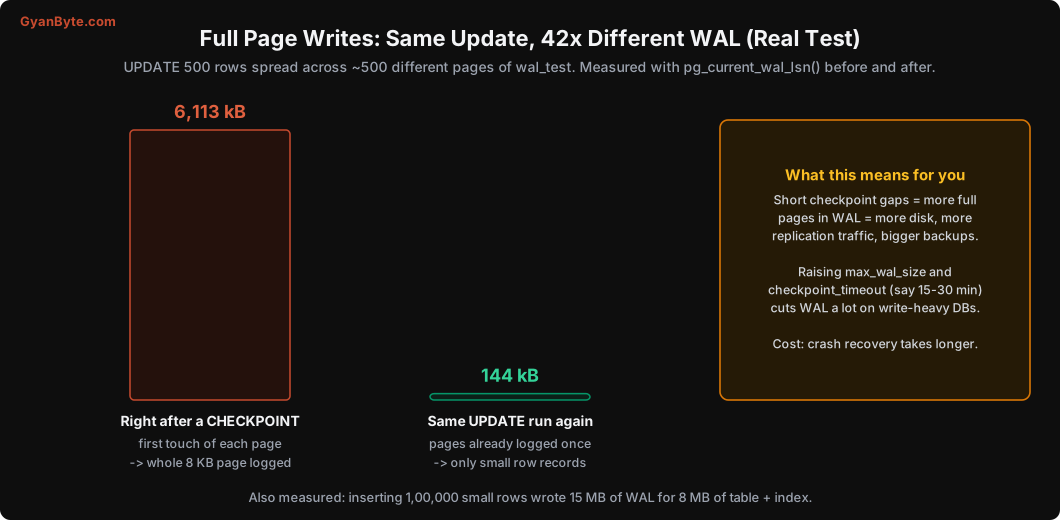
Same statement, same rows, 42 times more WAL, just because a checkpoint had happened in between. Another number from the same test: inserting 1,00,000 small rows wrote 15 MB of WAL for 8 MB of table plus index.
Why should a backend engineer care? Because WAL volume drives:
- Disk usage in
pg_waland in your WAL archive. - Replication traffic (Lesson 11): replicas receive every byte of WAL. Cross-region transfer is billed per GB.
- Backup size and restore time.
- Write I/O, which on cloud disks is often the thing you are paying for.
On write-heavy databases, increasing max_wal_size (say to 8-16 GB) and checkpoint_timeout (15-30 minutes) means fewer checkpoints, so fewer full page images. Check the logs or pg_stat_bgwriter: if checkpoints_req (triggered by WAL size) is much higher than checkpoints_timed, your max_wal_size is too small.
SELECT checkpoints_timed, checkpoints_req FROM pg_stat_bgwriter;
-- Postgres 17+: SELECT num_timed, num_requested FROM pg_stat_checkpointer;
Crash Recovery, Tested
I wanted to see this with my own eyes, so I ran a simple test. A shell loop inserted one row per transaction (id = 1, 2, 3 …) and wrote each id to a file only after Postgres returned success. After 4 seconds, I killed the Postgres server with kill -9, which is as close to pulling the power plug as you can get without a real plug.
Then I started it again. The log showed:
LOG:  database system was not properly shut down; automatic recovery in progress
LOG:  redo starts at 1/5D3A7C48
LOG:  redo done at 1/5D3CC828 ... elapsed: 0.00 s
The client had received success for 86 inserts. After recovery, the table had exactly 86 rows, max id 86. Every acknowledged commit survived.
Note what recovery doesn’t need to do: undo uncommitted work. Transactions that were running at the time of the crash never committed, so (thanks to MVCC from Lesson 6) their row versions are simply invisible. VACUUM cleans them up later. This is one reason Postgres recovery is simple and fast.
synchronous_commit: Trading Durability for Speed
That fsync() at every commit is the price of durability. On a laptop SSD it’s well under a millisecond. On cloud network disks it’s often 1-3 ms. And it happens for every transaction.
The setting synchronous_commit controls whether COMMIT waits for it. With off, COMMIT returns as soon as the WAL record is in memory, and a background process (the WAL writer) flushes it shortly after.
I measured single-row insert transactions with pgbench, 4 clients for 15 seconds:
synchronous_commit = on   ->  4,293 tps   (0.93 ms average latency)
synchronous_commit = off  -> 36,066 tps   (0.11 ms average latency)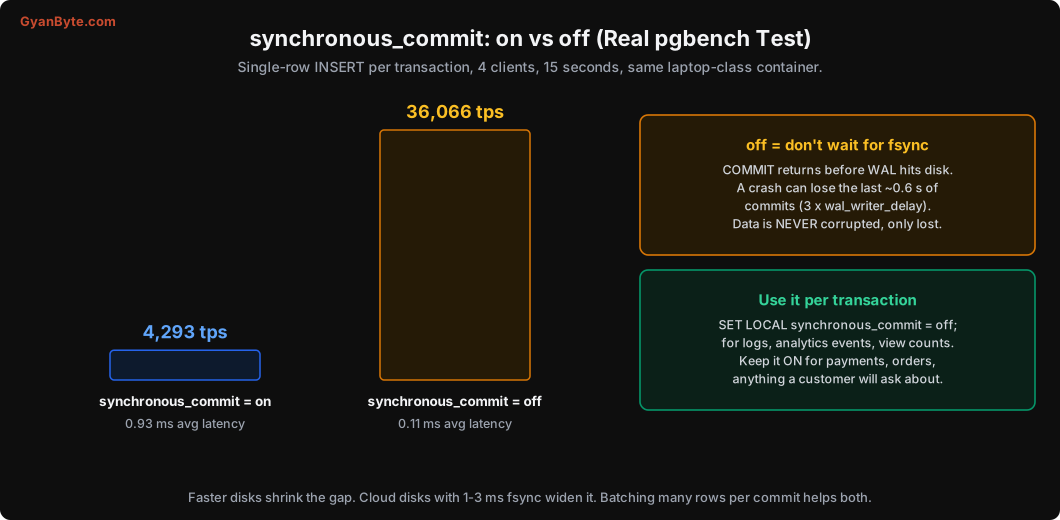
More than 8x faster. So why not always turn it off?
With off, if the server crashes, you can lose the last few hundred milliseconds of commits (up to about 3 × wal_writer_delay, which is 200 ms by default). The client was told “success”, but the data is gone. The database is not corrupted. It just comes back to a slightly earlier, consistent point. That’s very different from fsync = off, which can corrupt your whole database and should never be used on data you care about.
The nice part: synchronous_commit can be set per transaction. So you don’t have to choose one setting for the whole database:
BEGIN;
SET LOCAL synchronous_commit = off;
INSERT INTO page_views (user_id, page, viewed_at) VALUES (42, '/menu', now());
COMMIT;
Good candidates for off: analytics events, page views, activity logs, cache-like tables. Keep it on for payments, orders, wallet balances, KYC, anything a customer or auditor might ask about.
A second, often better, way to cut fsync cost: batch. Inserting 500 rows in one transaction does one fsync instead of 500. If you’re writing events from a queue consumer, commit every few hundred rows rather than every row.
Backups: A Replica Is Not a Backup
Now the part that actually loses companies their data.
Crash recovery protects you from crashes. It does nothing for:
- A developer running
DELETE FROM orderswithout aWHEREon production. - A buggy deploy that overwrites the
phonecolumn for all customers. - A disk or cloud volume that’s lost completely.
- Ransomware, or a compromised credential dropping tables.
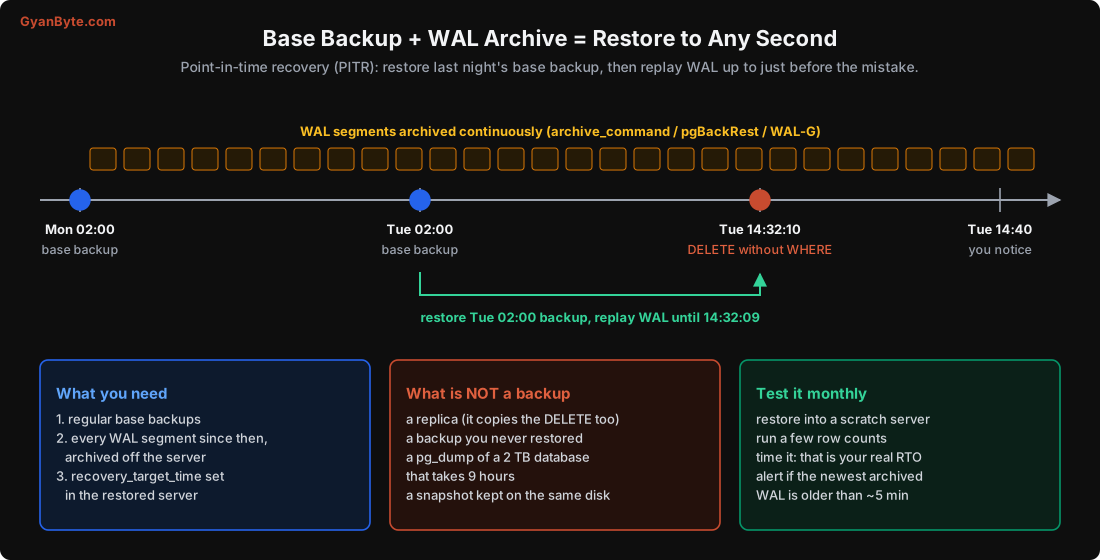
And a replica doesn’t help with the first two either. A replica replays the WAL, so it faithfully deletes the same rows within milliseconds.
There are two kinds of backup:
Logical backups (pg_dump): SQL or a custom-format dump of the data. Simple, portable across versions, good for small databases and for copying one table. But on a big database, dump and especially restore are slow: restore has to rebuild every index. A few hundred GB can take many hours. And you only get the moment the dump ran.
Physical backups + WAL archiving: a copy of the data files (a “base backup”), plus every WAL segment since then, stored somewhere safe. To restore, you put the base backup back and replay WAL. Because you can stop replaying at any point, you get point-in-time recovery (PITR): “give me the database as it was at 14:32:09, one second before the bad DELETE.”
Setting it up
If you’re on RDS, Cloud SQL, Azure, or similar managed Postgres, automated backups with PITR are built in. Check that they’re enabled, check the retention period (7 days default on many; set 14-35 for production), and know where the “restore to point in time” button is. It always creates a new instance; you then copy the data you need back or switch the app over.
If you run Postgres yourself, don’t write your own scripts with archive_command = 'cp ...'. Use a proven tool:
- pgBackRest: full, differential and incremental backups, parallel restore, encryption, S3/GCS/Azure support. My default choice.
- WAL-G: simpler, also cloud-storage friendly, popular in Kubernetes setups.
- Barman: also solid, common in some enterprises.
The building blocks underneath are the same:
# postgresql.conf
wal_level = replica
archive_mode = on
archive_command = 'pgbackrest --stanza=main archive-push %p'
A restore to a point in time then looks like this (pgBackRest writes the recovery settings for you):
pgbackrest --stanza=main --type=time \
  --target="2026-10-20 14:32:09+05:30" --target-action=promote restore
A small pg_basebackup gotcha I hit while writing this course
To set up a replica for the next lesson, I ran pg_basebackup. It sat at 0 bytes for minutes with no progress. Was it broken? No. pg_basebackup starts by asking for a checkpoint, and by default it’s a spread checkpoint, which takes up to 90% of checkpoint_timeout (4.5 minutes here). pg_stat_activity showed the backup waiting on CheckpointDone. Running a manual CHECKPOINT got it moving immediately. Next time, use pg_basebackup --checkpoint=fast and save yourself the confusion.
Test your restores
A backup you’ve never restored is a hope, not a backup. I’ve seen teams find out during an incident that:
- WAL archiving had been failing silently for three weeks (
archive_commandreturned an error, andpg_walslowly filled the disk). - Backups were in the same cloud account that got compromised.
- The restore worked, but took 11 hours, while everyone had assumed “a few minutes”.
So:
- Automate a monthly restore into a scratch server. Run a few row counts and a sanity query. Then delete it.
- Measure how long it takes. That’s your real recovery time (RTO), not the number in a slide deck.
- Monitor archiving:
pg_stat_archivershowsfailed_countandlast_archived_time. Alert if the newest archived WAL is older than ~5 minutes. - Keep a copy in another region or account, with deletion protection.
SELECT archived_count, failed_count, last_archived_time, last_failed_time
FROM pg_stat_archiver;
Settings Cheat Sheet
| Setting | Default | What I usually do |
|---|---|---|
fsync |
on | Never turn off |
full_page_writes |
on | Keep on |
synchronous_commit |
on | Keep on; set off per transaction for low-value writes |
wal_level |
replica | replica (or logical if you need CDC/Debezium) |
max_wal_size |
1 GB | 4-16 GB on write-heavy systems |
checkpoint_timeout |
5 min | 15-30 min, if recovery time is acceptable |
wal_compression |
off | lz4 or on: smaller full page images, a bit of CPU |
archive_mode |
off | on with pgBackRest / WAL-G for self-managed |
Pitfalls to Avoid
- Treating a replica as a backup. It copies your mistakes in milliseconds.
- Never restoring a backup. You don’t know it works, or how long it takes.
- Silent WAL archive failures. They fill the disk and leave holes in your PITR window. Monitor
pg_stat_archiver. fsync = offfor “performance”. It’s how databases get corrupted. Usesynchronous_commit = offper transaction instead.- Tiny
max_wal_sizeon a busy database. Constant checkpoints, full-page-image WAL bloat, extra I/O. - One-row-per-transaction bulk writes. One fsync per row. Batch them.
- Relying on
pg_dumpalone for a large database. Fine for small ones; for hundreds of GB, restore takes too long and you lose everything since the dump. - Backups in the same account and region as production. One bad credential or one regional outage takes both.
Quick Recap
COMMITis durable once its WAL record is fsynced. Table pages are written later at checkpoints.- After a crash, Postgres replays WAL from the last checkpoint. Real test: all 86 acknowledged inserts survived a
kill -9. - The first change to a page after a checkpoint logs the full page. Real test: 6,113 kB vs 144 kB of WAL for the same update.
synchronous_commit = offwas 8x faster for tiny transactions but can lose the last fraction of a second. Use it per transaction, only for data you can afford to lose.- Real backups = base backups + archived WAL, stored elsewhere, restored and timed every month.
Next lesson: using that same WAL to keep replicas in sync, the problems replicas bring (stale reads, cancelled queries, full disks), and why connection pooling matters so much in Postgres.