Last lesson, we saw that every change in Postgres is first written to the WAL. Here’s the neat consequence: if you send that same WAL stream to another server and replay it there, you get an exact copy of the database. That’s streaming replication, and it’s how almost every production Postgres gets read replicas and high availability.
Replicas solve real problems. They also bring new ones that surprise teams the first time. In this lesson I set up a real replica next to our Tiffin Express database and broke it in a few different ways, so you can see these problems before production shows them to you.
The second half covers something that causes even more incidents than replication: connections.
How Streaming Replication Works
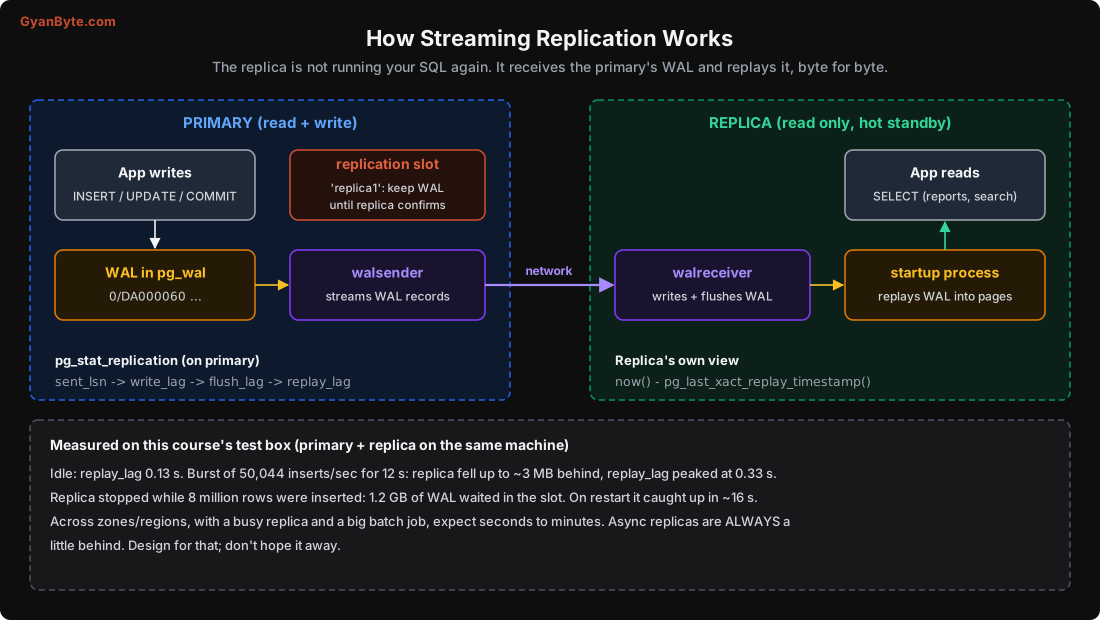
The pieces:
- On the primary, a walsender process reads WAL and streams it to each replica.
- On the replica, a walreceiver writes it to the replica’s own
pg_waland flushes it. - The replica’s startup process replays the WAL into its data pages, exactly like crash recovery, except it never finishes. It keeps replaying as new WAL arrives.
- With
hot_standby = on(the default), the replica accepts read-only queries while it replays.
The replica isn’t running your INSERT statements again. It applies the physical changes: “this page, this offset, these bytes”. So the replica is a byte-for-byte copy: same indexes, same bloat, same everything. It also means the replica must run the same major Postgres version and can’t have its own extra tables or indexes. (If you need that, look at logical replication, which sends row changes instead of WAL bytes. It’s used for upgrades, CDC, and partial copies.)
Setting one up is short. On a self-managed server:
# on the replica machine; -R writes the replication settings, -S uses a slot
pg_basebackup -h primary.internal -U replicator -D /var/lib/postgresql/16/main \
  -R -S replica1 -X stream --checkpoint=fast -P
On RDS or Cloud SQL, it’s a “create read replica” button.
Measuring lag
On the primary:
SELECT application_name, state, sync_state,
       pg_size_pretty(pg_wal_lsn_diff(pg_current_wal_lsn(), replay_lsn)) AS behind,
       write_lag, flush_lag, replay_lag
FROM pg_stat_replication;
On the replica:
SELECT now() - pg_last_xact_replay_timestamp() AS replay_delay;
-- careful: on an idle primary this keeps growing even though nothing is missing
On my test box (primary and replica on the same machine), lag at rest was about 0.13 s. I then ran a burst of 50,044 inserts per second for 12 seconds. The replica fell up to about 3 MB behind and replay_lag peaked at 0.33 s.
That’s a best case: no network, no other load on the replica. In production, across availability zones, with a reporting query hammering the replica’s disk and a batch job writing 20 GB on the primary, lag of several seconds is normal and minutes is possible. Async replicas are always a little behind. Your design must accept that.
Three Replica Problems You Will Meet
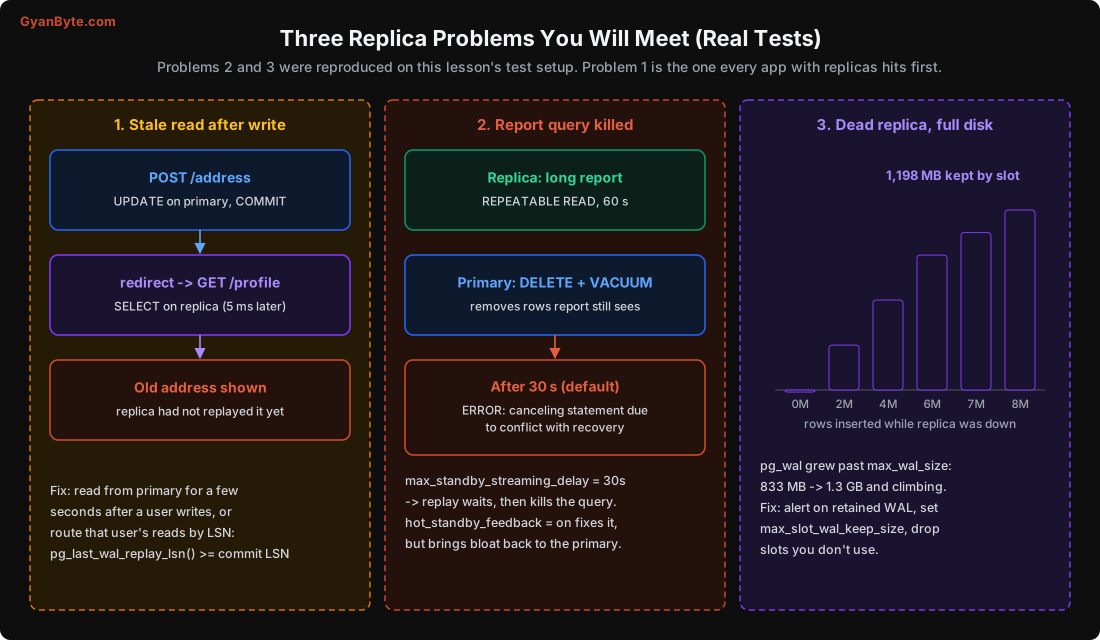
1. Stale reads right after a write
The classic. A user updates their delivery address. The API writes to the primary and redirects to the profile page. The profile page reads from a replica, which hasn’t replayed the update yet. The user sees the old address, assumes the save failed, and does it again. Or worse, the order goes to the old address.
This is the most common replica bug, and it doesn’t show up in testing because local lag is close to zero.
Fixes, from simplest to fanciest:
- Read your own writes from the primary. After a user writes, route that user’s reads to the primary for a few seconds (a flag in the session or a short-lived cookie works).
- Send only “tolerant” reads to replicas: reports, search, dashboards, recommendation lists, anything where being a few seconds old is fine. Keep checkout, payments, and “my orders” on the primary.
- LSN-based routing: after a write, note
pg_current_wal_lsn(). Before reading from a replica, checkpg_last_wal_replay_lsn()on it is at least that LSN; if not, use the primary.
Many ORMs make it too easy to “just send all SELECTs to the replica”. Don’t do that blindly.
2. Long queries on the replica get cancelled
I tested this one for real. On the replica, I started a report that held a snapshot for 60 seconds (REPEATABLE READ, counting wal_test). On the primary, I deleted half the rows of wal_test and ran VACUUM.
VACUUM on the primary removed the dead rows and wrote that into the WAL. When the replica tried to replay that removal, it had a problem: the report on the replica could still see those rows. Replay can’t skip the change, and it can’t remove rows a running query needs. So it waits, up to max_standby_streaming_delay (default 30 seconds), and then cancels the query:
ERROR:  canceling statement due to conflict with recovery
DETAIL:  User query might have needed to see row versions that must be removed.
You have three options, each with a cost:
hot_standby_feedback = onon the replica: the replica tells the primary about its oldest snapshot, and the primary’s VACUUM won’t remove rows that snapshot needs. Queries stop getting cancelled, but now a long query on the replica causes bloat on the primary, exactly the long-transaction problem from Lesson 7.- Increase
max_standby_streaming_delay: queries get more time, but replay pauses while they run, so lag grows. Fine for a dedicated reporting replica, bad for one serving user reads. - Keep replica queries short, and send truly long analytics to a separate system (a warehouse, or a replica configured for it).
A common setup: one or two replicas for app reads with default settings, plus a separate “analytics” replica with a large delay that nobody expects to be fresh.
3. A dead replica fills the primary’s disk
Replication slots are useful: a slot makes the primary keep WAL until the replica has received it, so a replica that disconnects for a while can catch up instead of needing a fresh copy.
But the primary will keep that WAL forever if the replica never comes back. I tested this too. I stopped the replica, then inserted 8 million rows on the primary in batches, checking the slot after each:
SELECT slot_name, active,
       pg_size_pretty(pg_wal_lsn_diff(pg_current_wal_lsn(), restart_lsn)) AS retained,
       wal_status
FROM pg_replication_slots;
slot_name | active | retained | wal_status
-----------+--------+----------+-----------
replica1 | f | 1198 MB | extendedpg_wal grew from 833 MB to 1.3 GB and kept growing past max_wal_size, because the slot wouldn’t let go. On a real system, that ends with the primary’s disk full and the primary stopping, which is a much bigger outage than a dead replica. I’ve seen this happen with a decommissioned replica whose slot nobody dropped, and with a CDC tool (Debezium) that was paused for a weekend.
When I started my replica again, it caught up 1.2 GB in about 16 seconds (same machine, so very fast), and the retained WAL dropped to 0.
Protect yourself:
- Set
max_slot_wal_keep_size(Postgres 13+), for example to 50-100 GB depending on disk. If a slot falls further behind, the primary gives up on it (wal_status = lost) instead of dying. The replica then needs to be rebuilt, which is a much better problem to have. - Alert on retained WAL per slot, and on inactive slots.
- Drop slots you don’t use:
SELECT pg_drop_replication_slot('old_replica');
Failover and Synchronous Replication
Replicas also give you high availability: if the primary dies, promote a replica to be the new primary.
On managed services (RDS Multi-AZ, Cloud SQL HA, Azure), this is automatic and usually takes 30-120 seconds. Self-managed setups typically use Patroni (with etcd/Consul) to detect failure, promote a replica safely and avoid two primaries (“split brain”). Don’t write your own failover scripts. Getting it wrong is how you end up with two primaries accepting different writes.
There’s a catch with async replicas: when the primary dies, the replica may be a little behind. Promote it, and whatever it hadn’t received is lost. For most data that’s a few hundred milliseconds of commits. For a payments ledger, that might not be acceptable.
Synchronous replication fixes this. With synchronous_standby_names set, COMMIT on the primary waits until a replica has confirmed it received (and flushed) the WAL:
synchronous_standby_names = 'ANY 1 (replica_a, replica_b)'
synchronous_commit = on        # wait for replica to flush
# remote_apply = also wait until replica has replayed it (read-your-writes on replica)
The cost: every commit now includes a network round trip. Within one region, across zones, that’s often 1-2 ms extra per commit. Across regions, it can be 30-100 ms, which most apps can’t afford. Also, if you list only one sync replica and it goes down, commits on the primary hang until it comes back. Use ANY 1 (a, b) with two replicas so one can fail.
And like last lesson, this can be set per transaction. You can keep sync replication for ledger writes and use SET LOCAL synchronous_commit = local for unimportant ones.
Connections Are Expensive in Postgres
Now, the other half of this lesson. Postgres creates a separate operating system process for every connection. Each one:
- Takes time to start (fork, authentication, loading catalog caches).
- Uses memory: a few MB at idle, much more after it runs queries (catalog caches,
work_memfor sorts). - Takes a slot in shared structures that every query has to look at when it takes a snapshot.
I measured the cost of connecting with the same primary-key lookup on customers:
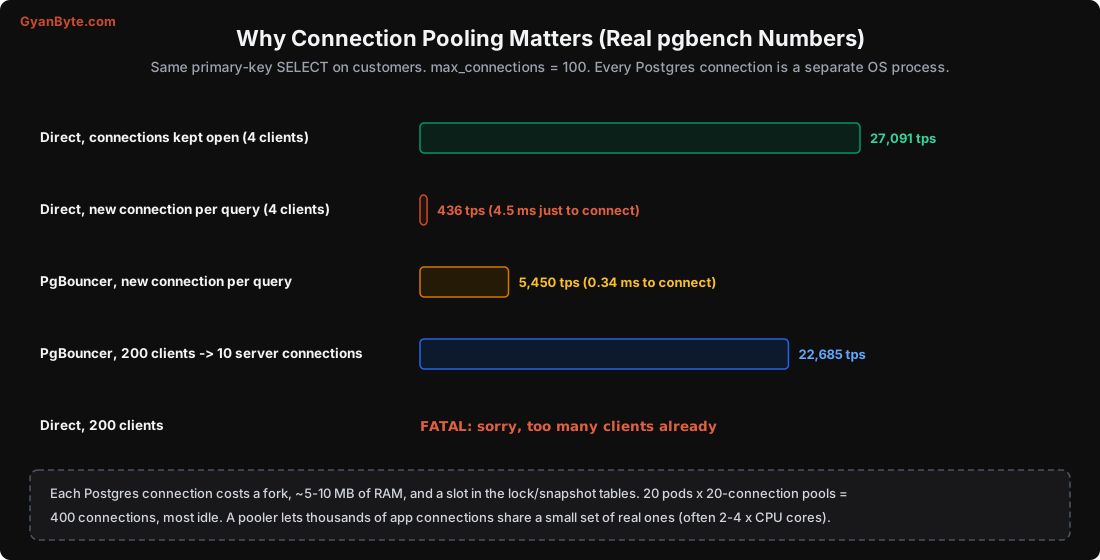
Direct, connections kept open (4 clients)          27,091 tps
Direct, new connection per query (TCP, 4 clients)      436 tps   (4.5 ms to connect)
PgBouncer, new connection per query                  5,450 tps   (0.34 ms to connect)
Direct, 200 clients (max_connections = 100)          FATAL: sorry, too many clients already
PgBouncer, 200 clients -> 10 server connections     22,685 tps
Two lessons from this:
- Opening a connection per request is a 60x slowdown for a simple query. Serverless functions and PHP-style “connect, query, disconnect” apps hit this all the time.
max_connectionsruns out fast. Do the maths for a typical microservice setup: 20 pods × a connection pool of 20 each = 400 connections. Add a few cron jobs, an admin panel, and a deploy that briefly doubles the pods, and you’re at 800. Most of them are idle, but each one still costs memory, and Postgres starts slowing down with thousands of connections even when they’re idle.
Raising max_connections to 5,000 is not the fix. The usual healthy number of active connections for a Postgres server is around 2-4 × the number of CPU cores. The fix is a pooler.
PgBouncer
PgBouncer is a small, very efficient proxy that sits between your app and Postgres. Your app opens as many connections as it likes to PgBouncer, which are cheap. PgBouncer keeps a small pool of real Postgres connections and hands them out as needed.
On managed services, the equivalents are RDS Proxy, Cloud SQL’s managed connection pooling, or Supabase’s Supavisor. Some teams run PgBouncer as a sidecar next to each app pod; others run a central PgBouncer service. Both work.
The key setting is the pool mode:
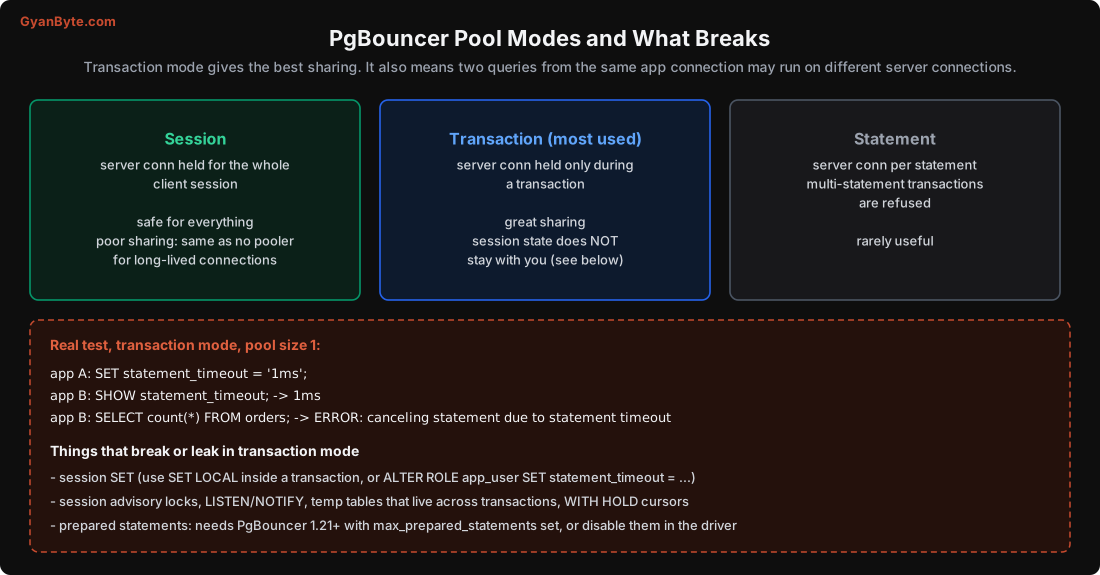
Transaction mode is what most people use, because that’s where the real sharing happens: a server connection is only yours while you’re inside a transaction. Between transactions, someone else uses it.
That’s also the catch. Anything you set at the session level stays on the server connection, not with you. I tested this with a pool size of 1 to make it obvious:
app A:  SET statement_timeout = '1ms';
app B:  SHOW statement_timeout;          -- 1ms   (A's setting!)
app B:  SELECT count(*) FROM orders;     -- ERROR: canceling statement due to statement timeout
App A’s setting leaked into app B’s connection. With a real pool size of 20, this shows up as random, unreproducible timeouts on some requests and not others. Fun to debug at 2 AM.
Things to avoid or change in transaction mode:
- Session
SET: useSET LOCALinside a transaction, or set defaults on the role:ALTER ROLE app_user SET statement_timeout = '5s'; - Session advisory locks (
pg_advisory_lock): usepg_advisory_xact_lockinstead, which is released at transaction end. LISTEN/NOTIFY, temp tables that live across transactions,WITH HOLDcursors: use a direct connection (or a session-mode pool) for these.- Prepared statements: older PgBouncer versions break them in transaction mode. PgBouncer 1.21+ supports protocol-level prepared statements if you set
max_prepared_statements. Otherwise, disable server-side prepared statements in your driver (for exampleprepareThreshold=0in JDBC, orstatement_cache_size=0in asyncpg).
Also note: migrations (which may need session-level lock_timeout, advisory locks, or long transactions) should usually connect to Postgres directly, not through the transaction-mode pool.
Sizing pools
A simple way to think about it:
- Server side (PgBouncer → Postgres):
default_pool_sizearound 2-4 × the DB’s CPU cores, total across all PgBouncers. Start small; more active connections than cores just means more context switching and lock contention. - Client side (app → PgBouncer): can be large;
max_client_connof a few thousand is fine. - App-side pools (HikariCP, SQLAlchemy, Prisma) still matter: keep them modest per pod, so one runaway pod can’t hog everything.
If queries queue up in PgBouncer (SHOW POOLS; shows cl_waiting > 0 for a while), the fix is usually faster queries, not a bigger pool. A bigger pool just moves the queue into Postgres, where it’s more expensive.
Pitfalls to Avoid
- Sending all reads to replicas. Read-after-write paths will show stale data.
- Long reports on a user-facing replica. They get cancelled, or with
hot_standby_feedbackthey bloat the primary. - Forgotten replication slots. They keep WAL until the primary’s disk fills. Set
max_slot_wal_keep_sizeand alert. - Assuming failover loses nothing. Async replicas can be behind. Use synchronous replication where losing a second of commits isn’t acceptable.
- A single synchronous replica. If it goes down, commits hang. Use
ANY 1over two. - Home-made failover scripts. Use your cloud’s HA or Patroni.
- A new connection per request, especially from serverless functions. Use a pooler.
- Raising
max_connectionsinto the thousands instead of pooling. - Session state through a transaction-mode pooler.
SET, advisory locks and prepared statements leak or break.
Quick Recap
- Streaming replication ships WAL to replicas, which replay it. Replicas are exact physical copies and always slightly behind.
- Real tests: lag under 0.33 s locally at 50k inserts/sec; a report cancelled by a recovery conflict after 30 s; an inactive slot holding 1.2 GB of WAL.
- Design for stale reads; keep read-after-write on the primary.
- Synchronous replication avoids data loss on failover but adds a round trip to every commit.
- Postgres connections are processes: new connection per query was 60x slower, and 200 direct clients hit
max_connections. PgBouncer in transaction mode fixes both, as long as you avoid session state.
Next lesson, the last one: scaling Postgres step by step, partitioning, a real “the database is slow” debugging walkthrough with pg_stat_statements, and a production checklist.