We’ve reached the last lesson. We started with pages and tuples and worked up through indexes, plans, MVCC, vacuum, locks, WAL and replication. Now let’s put it together and answer the two questions every backend team eventually asks:
- “The database is slow. What do we do right now?”
- “We’re growing fast. How do we make sure Postgres keeps up?”
I’ll answer the first with a real walkthrough on our Tiffin Express database, and the second with a ladder of steps, in the order you should actually climb them.
The Scaling Ladder
When a database starts struggling, teams often jump straight to the most exciting fix: “let’s shard”, “let’s move to a distributed database”, “let’s put everything in Redis”. In my experience, the boring steps at the bottom solve 90% of problems, and each step up adds cost and complexity that stays with you forever.
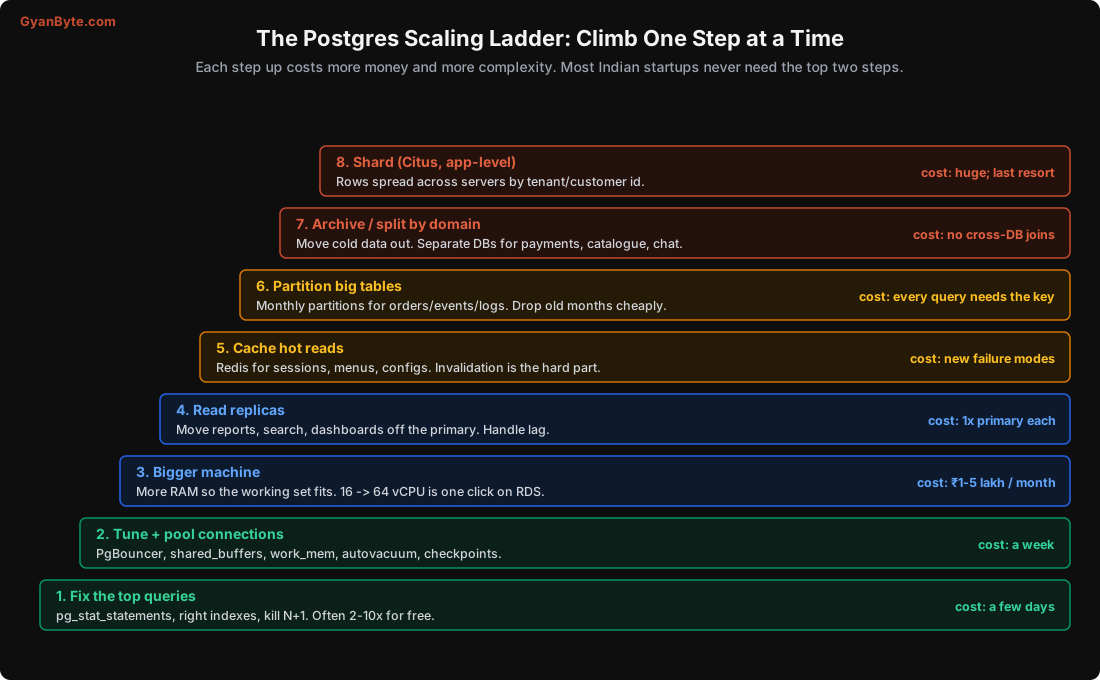
A single well-tuned Postgres server on a modern machine (say 32-64 vCPU, 256 GB RAM, fast NVMe or provisioned-IOPS disks) can handle tens of thousands of transactions per second and several terabytes of data. Many large Indian companies run big parts of their business on setups like this, with a few replicas. Don’t skip steps because sharding sounds more impressive in a design review.
Let’s walk up the ladder, starting with the step that gives the biggest win for the least money.
Capstone: “The Database Is Slow”
Here’s the scenario. Tiffin Express gets a complaint from the operations team: dashboards are slow, and the app’s p99 latency is up. CPU on the database is high. No recent deploys (as far as anyone remembers).
To reproduce this, I ran a realistic mix of four queries against our database with pgbench for 20 seconds, 4 clients:
| Share of calls | Query | Who runs it |
|---|---|---|
| 60% | a customer’s last 10 orders | the app, on every “My Orders” screen |
| 25% | mark an order as seen | the app |
| 14% | count delivered orders for a restaurant with no notes | the restaurant dashboard |
| 1% | find customers whose phone ends with 4 digits | the support team’s search box |
Total throughput: 3,427 transactions per second. Which query should we fix?
Most people would guess the 60% one, because it’s called the most. Let’s not guess.
Step 1: pg_stat_statements
pg_stat_statements is an extension that records statistics for every distinct query shape: how many times it ran, total and mean time, rows, buffers. It’s the single most useful tool for database performance, and it’s available on every managed Postgres. Enable it if it’s not already on:
# postgresql.conf (needs a restart; on RDS use the parameter group)
shared_preload_libraries = 'pg_stat_statements'
CREATE EXTENSION IF NOT EXISTS pg_stat_statements;Then the query I run first in every incident:
SELECT left(regexp_replace(query, '\s+', ' ', 'g'), 70) AS query,
       calls,
       round(total_exec_time::numeric) AS total_ms,
       round(mean_exec_time::numeric, 2) AS mean_ms,
       round((100 * total_exec_time / sum(total_exec_time) OVER ())::numeric, 1) AS pct,
       shared_blks_hit + shared_blks_read AS blocks
FROM pg_stat_statements
ORDER BY total_exec_time DESC
LIMIT 10;
Real output after the 20-second run:
                                 query                                  | calls | total_ms | mean_ms | pct  |  blocks
------------------------------------------------------------------------+-------+----------+---------+------+---------
 select count(*) from orders where restaurant_id = $1 and status = $2 a |  9619 |    20166 |    2.10 | 45.6 | 3863235
 select id, name from customers where phone like $1 || $2               |   650 |    18780 |   28.89 | 42.5 | 1315600
 select id, status, amount_paise from orders where customer_id = $1 ord | 41207 |     3111 |    0.08 |  7.0 |  488137
 update orders set state = $1 where id = $2                             | 17130 |     2153 |    0.13 |  4.9 |  353340
Look at that. The support team’s phone search is only 1% of calls, but it takes 42.5% of all database time. The query called most often (customer’s orders) takes just 7%, because it’s already well indexed (we built that covering index in Lesson 2). The restaurant dashboard count is the other big one, at 45.6%.
This is why you sort by total time, not by calls and not by mean. Two queries out of four are eating 88% of the database.
Step 2: EXPLAIN the top offenders
The phone search:
EXPLAIN (ANALYZE, BUFFERS) SELECT id, name FROM customers WHERE phone LIKE '%' || '4321'; Seq Scan on customers (actual time=0.569..55.506 rows=21 loops=1)
Filter: (phone ~~ '%4321'::text)
Rows Removed by Filter: 199979
Buffers: shared read=2024A sequential scan of all 2 lakh customers to find 21. We saw this exact pattern in Lesson 5: a leading wildcard can’t use a normal B-tree index. The fix from that lesson is to index the reversed phone number, which turns “ends with 4321” into “starts with 1234”.
The restaurant count:
 Bitmap Heap Scan on orders (actual time=0.159..3.486 rows=313 loops=1)
   Buffers: shared hit=183 read=205
   ->  Bitmap Index Scan on idx_orders_restaurant (rows=392 loops=1)
It uses the index on restaurant_id, then visits about 390 table pages to check status and notes for each row. A partial composite index that matches the whole condition lets it answer from the index alone (an index-only scan, Lesson 2).
Step 3: Fix, without locking the table
Both fixes are indexes, built with CONCURRENTLY so writes keep flowing (Lesson 9):
CREATE INDEX CONCURRENTLY idx_orders_rest_status
    ON orders (restaurant_id, status) WHERE notes IS NULL;          -- 13 MB

CREATE INDEX CONCURRENTLY idx_customers_phone_rev
    ON customers (reverse(phone) text_pattern_ops);                 -- 6 MB
And the support search query changes to:
SELECT id, name FROM customers WHERE reverse(phone) LIKE reverse('4321') || '%';
-- Bitmap Index Scan on idx_customers_phone_rev ... Execution Time: 0.336 ms
Step 4: Measure again
I reset the stats (SELECT pg_stat_statements_reset();) and ran the same mix for the same 20 seconds:
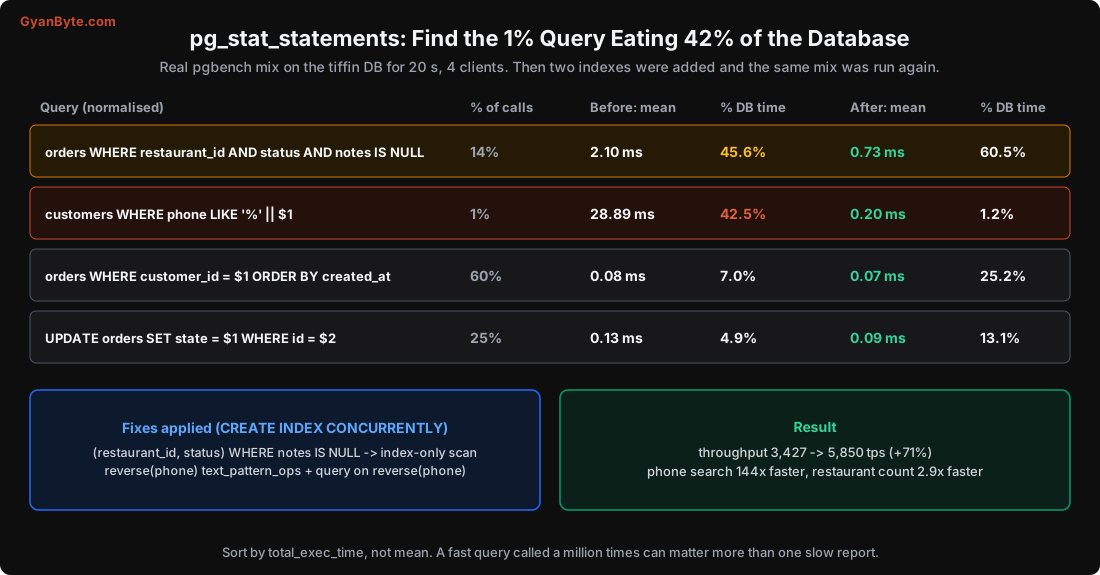
- Throughput: 3,427 → 5,850 tps (+71%), on the same hardware.
- Phone search: 28.89 ms → 0.20 ms, 144x faster. Now 1.2% of DB time.
- Restaurant count: 2.10 ms → 0.73 ms, about 2.9x faster.
Two indexes, about 20 MB of disk, and an hour of work. That’s step 1 of the ladder. Before anyone talks about bigger machines or sharding, this is where you start.
The restaurant count is still the top query (60.5% now). That’s normal; something is always at the top. Whether to keep going depends on whether it’s still a problem. A 0.73 ms query running 800 times a second could be cached for a few seconds, since a dashboard doesn’t need a count accurate to the millisecond.
The full debugging flow
pg_stat_statements is step 4 in my usual flow, because sometimes the problem isn’t a slow query at all. Here’s the order I go in when someone says “the database is slow”:
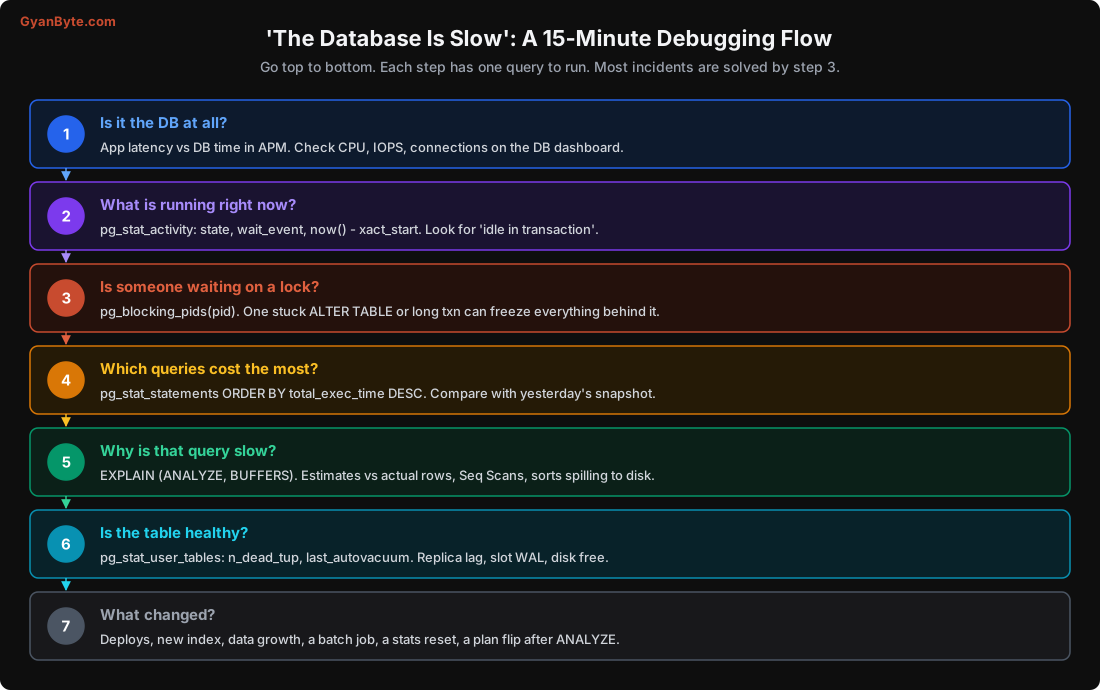
Here are the queries for steps 2, 3 and 6. Save them somewhere you can find at 2 AM.
What is running right now, longest first:
SELECT pid, usename, state, wait_event_type, wait_event,
       now() - xact_start  AS txn_age,
       now() - query_start AS query_age,
       left(query, 80)     AS query
FROM pg_stat_activity
WHERE backend_type = 'client backend' AND state <> 'idle'
ORDER BY xact_start NULLS LAST;
Look for: idle in transaction with a big txn_age (an app that opened a transaction and forgot it: blocks vacuum, may hold locks), many sessions with the same wait_event (Lock, LWLock, IO), and anything running for minutes that shouldn’t.
Who is blocking whom (from Lesson 9):
SELECT pid, pg_blocking_pids(pid) AS blocked_by, now() - query_start AS waiting,
       left(query, 60) AS query
FROM pg_stat_activity
WHERE cardinality(pg_blocking_pids(pid)) > 0;
Table health (Lesson 7):
SELECT relname, n_live_tup, n_dead_tup,
       round(100.0 * n_dead_tup / greatest(n_live_tup, 1), 1) AS dead_pct,
       last_autovacuum, last_autoanalyze
FROM pg_stat_user_tables
ORDER BY n_dead_tup DESC LIMIT 10;
And step 7, “what changed”, is the one people skip. A plan can flip after an ANALYZE sees new data. A marketing campaign can triple traffic on one endpoint. A new cron job can start a big batch update at 7 PM. Keep a daily snapshot of pg_stat_statements (copy it into a table, or use your monitoring tool) so you can compare today with yesterday.
Tuning and a Bigger Machine
After queries, check the basic settings. Managed services set sensible defaults, but self-managed installs often run with defaults meant for a tiny machine. (My test server here has shared_buffers = 128MB, the default, which is far too small for real use.)
The ones that matter most:
| Setting | Rule of thumb |
|---|---|
shared_buffers |
~25% of RAM |
effective_cache_size |
~50-75% of RAM (just a hint to the planner, allocates nothing) |
work_mem |
16-64 MB; it’s per sort/hash per query, so 200 connections × 3 sorts × 64 MB can exhaust RAM |
maintenance_work_mem |
1-2 GB, for faster vacuum and index builds |
random_page_cost |
1.1 on SSDs (default 4 assumes spinning disks) |
max_wal_size, checkpoint_timeout |
larger on write-heavy systems (Lesson 10) |
| autovacuum settings | more aggressive on big, busy tables (Lesson 7) |
Then, a bigger machine is a perfectly good engineering decision. The goal is that your working set (the data and indexes your queries touch regularly) fits in RAM. Check the cache hit ratio:
SELECT round(100.0 * sum(blks_hit) / nullif(sum(blks_hit) + sum(blks_read), 0), 2) AS cache_hit_pct
FROM pg_stat_database;
For an OLTP app, you want this above 99%. If it’s 95% and dropping as data grows, more RAM will help more than almost anything else. On AWS Mumbai, going from a 16 vCPU to a 64 vCPU memory-optimised instance moves you from roughly ₹1 lakh to ₹4-5 lakh a month. That sounds like a lot, until you compare it with three engineers spending a quarter on sharding.
Read Replicas and Caching
We covered replicas in detail last lesson. Use them for reports, dashboards, search and exports, not for read-after-write paths.
Caching (Redis, Memcached, or just an in-process cache) is the next step for data that’s read far more than it changes: restaurant menus, city configs, feature flags, a user’s profile. A few rules from experience:
- Cache things that can be slightly stale. If the business can’t accept 30 seconds of staleness, think twice.
- Set a TTL on everything, even if you also invalidate on write. Invalidation bugs are guaranteed; a TTL limits how long they last.
- Watch for stampedes: when a hot key expires, a thousand requests can hit the database at once. Use a lock or “refresh before expiry”.
- Don’t cache to hide a slow query that an index would fix. You’ll have a slow query and a cache to maintain.
Partitioning
When a table gets really big, say hundreds of GB or billions of rows, you can split it into partitions: separate physical tables that look like one table to your queries. Time-based partitioning (one partition per month) is the most common, for orders, events, logs, payments history.
I copied our 20 lakh orders into a table partitioned by month on created_at:
CREATE TABLE orders_p (LIKE orders INCLUDING DEFAULTS) PARTITION BY RANGE (created_at);

CREATE TABLE orders_p_2026_09 PARTITION OF orders_p
    FOR VALUES FROM ('2026-09-01') TO ('2026-10-01');
-- ... one per month, 25 in total
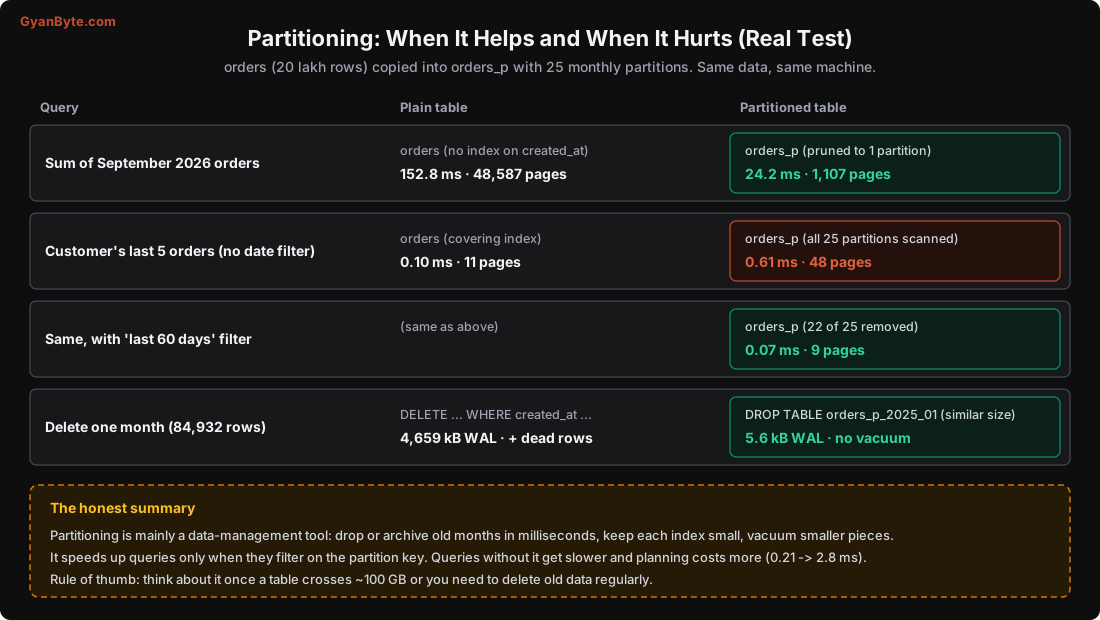
Then I compared the same queries on both tables:
Where it helps:
-
A query filtering on the partition key only reads the relevant partitions. Summing September’s orders went from 152.8 ms (scanning all 48,587 pages) to 24.2 ms (1,107 pages of one partition). The plan says it clearly:
Seq Scan on orders_p_2026_09 orders_p (actual time=0.011..17.106 rows=82192 loops=1)To be fair, an index on
created_atwould also have helped the plain table. The bigger wins are the next ones. -
Removing old data. Deleting one month (84,932 rows) with
DELETEwrote 4,659 kB of WAL and left 84,932 dead rows for vacuum to clean up. Dropping a partition of similar size wrote 5.6 kB, instantly, with nothing to vacuum. For a table where you keep 13 months of data, this alone justifies partitioning. -
Smaller pieces for maintenance: vacuum, index builds and
REINDEXwork on one partition at a time. Old partitions that never change stay frozen and vacuum skips them.
Where it hurts:
- Queries without the partition key must check every partition. A customer’s last 5 orders, with no date in the query, scanned all 25 partitions: 0.61 ms and 48 pages, against 0.10 ms and 11 pages on the plain table. Planning time also went from 0.21 ms to 2.8 ms. Add a date range to the query (
created_at >= now() - interval '60 days') and Postgres removed 22 of 25 partitions (Subplans Removed: 22), back to 0.07 ms. So with partitioning, every important query should include the partition key. - Unique constraints and primary keys must include the partition key. You can’t have
PRIMARY KEY (id)alone onorders_p; it has to be(id, created_at). Global uniqueness ofidis then up to your sequence. - You must create future partitions before data arrives (otherwise inserts fail, or land in a
DEFAULTpartition you then have to split). Usepg_partmanor a scheduled job, and alert if next month’s partition doesn’t exist. - Too many partitions (thousands) slow down planning and use lots of memory. Monthly or weekly is usually right; daily only for very high-volume event data.
My rule of thumb: think about partitioning when a table crosses about 100 GB, or as soon as you have a regular “delete data older than N months” job.
Splitting and Sharding
Above partitioning, things get expensive.
Archiving cold data: move orders older than 2 years to cheaper storage (a separate archive database, or Parquet files on S3 queried with Athena/BigQuery). Your hot database stays small and fast. This is often the cheapest of the “big” steps.
Splitting by domain: payments, catalogue, chat and orders in separate databases, each owned by one team. Each database is smaller and can be scaled on its own. The cost: no more joins or transactions across them. You’ll need events, outbox patterns and eventual consistency between services.
Sharding: the same table spread across many servers by a key, usually tenant_id or customer_id. Citus (an open-source extension, also offered as a managed service on Azure) does this inside Postgres; some teams shard in the application. You get near-unlimited write scale. You also get: cross-shard queries that are slow or impossible, rebalancing when shards get uneven, schema migrations across N databases, and harder backups and debugging. Do it when a single machine truly can’t handle the write load, not before.
The Production Checklist
Here’s everything from this course in one place:
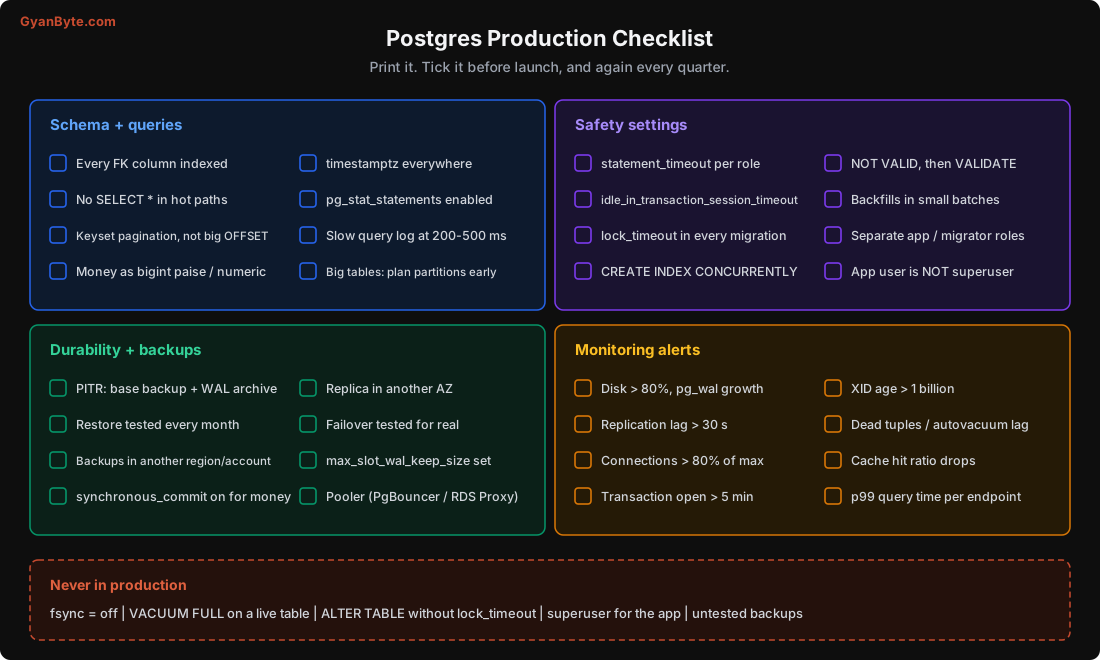
Two settings from it that I’d add to every production database today, because they prevent whole classes of incidents:
ALTER ROLE app_user SET statement_timeout = '5s';                     -- no runaway queries
ALTER ROLE app_user SET idle_in_transaction_session_timeout = '30s';  -- no forgotten transactions
Set a longer statement_timeout for the reporting role and for migrations, and lock_timeout in every migration (Lesson 9).
Pitfalls to Avoid
- Jumping up the ladder. Sharding or a new database before fixing the top 5 queries.
- Sorting
pg_stat_statementsby mean time. Total time is what the database actually spends. - Debugging without a baseline. Snapshot
pg_stat_statementsand key metrics daily so you can see what changed. - Huge
work_memset globally. It’s per operation; with many connections it can run the server out of memory. Raise it per role or per query instead. - Caching to hide a missing index. Fix the query first.
- Partitioning when queries don’t use the partition key. Everything gets slower.
- Forgetting future partitions. Inserts fail on the 1st of the month at midnight.
- No
statement_timeoutoridle_in_transaction_session_timeout. One bad query or one forgotten transaction can hurt everyone.
Quick Recap
- Climb the scaling ladder one step at a time: queries, tuning and pooling, bigger machine, replicas, caching, partitioning, splitting, sharding.
pg_stat_statementssorted by total time is the starting point. Real test: a 1%-of-calls query used 42.5% of DB time; two indexes raised throughput by 71%.- Debug top-down: is it the DB, what’s running, who’s blocked, which queries cost most, why that plan, is the table healthy, what changed.
- Partitioning is mainly a data-management tool: dropping a month wrote 5.6 kB of WAL vs 4.6 MB for
DELETE. It speeds up queries that use the partition key and slows those that don’t.
Course Wrap-Up
Over these twelve lessons, we went from how a single row sits on an 8 KB page all the way to replication, pooling and scaling. If I had to boil it all down to a few ideas to carry with you:
- Everything is pages. Performance is about how many pages a query touches, and whether they’re in memory.
EXPLAIN (ANALYZE, BUFFERS)tells you exactly that. - Indexes are sorted copies with costs. Design them for your actual queries, and drop the ones nobody uses.
- The planner is only as good as its statistics. When it’s wrong, find out why before forcing it.
- An UPDATE is an INSERT plus a dead row. MVCC is why reads don’t block writes, and why vacuum and long transactions matter so much.
- Locks queue. One waiting
ALTER TABLEcan stop everything.lock_timeoutis your friend. - The WAL is the source of truth. Durability, crash recovery, backups and replication all come from it.
- Measure, don’t guess. Every number in this course came from a real database, and your own database will tell you just as much if you ask it the right questions.
Thank you for going through the whole course. Set up the Tiffin Express database from Lesson 1 if you haven’t, break it in all the ways we did, and the next time someone says “the database is slow”, you’ll know exactly where to look.