A fintech team once called me in because their main Postgres database had become slow over three weeks. CPU was fine. Queries hadn’t changed. But the transactions table had grown from 40 GB to 180 GB, while the number of rows had barely changed, and every query on it was reading far more pages than before.
The cause was a reporting tool that an analyst had connected directly to the production database. It opened a transaction when it started in the morning and only closed it when the analyst shut their laptop in the evening. For about nine hours a day, autovacuum couldn’t clean up a single dead row in any table. Every update to the busy transactions table left garbage behind.
They killed the session, added a timeout, and ran pg_repack over a weekend to get the space back. The fix took a day. Finding the problem took three weeks, because nobody on the team knew what to look for. This lesson is about knowing what to look for.
What VACUUM Does
From Lesson 6: UPDATE and DELETE leave dead row versions behind. VACUUM is the process that cleans them up. Plain VACUUM (and autovacuum, which runs it automatically):
- Removes dead row versions that no running transaction can see any more, and their index entries.
- Marks the freed space as reusable for new rows (in the free space map).
- Updates the visibility map, which makes index-only scans work (Lesson 2).
- Freezes old rows to prevent transaction ID wraparound (later in this lesson).
Plain VACUUM runs alongside normal traffic. It doesn’t block reads or writes.
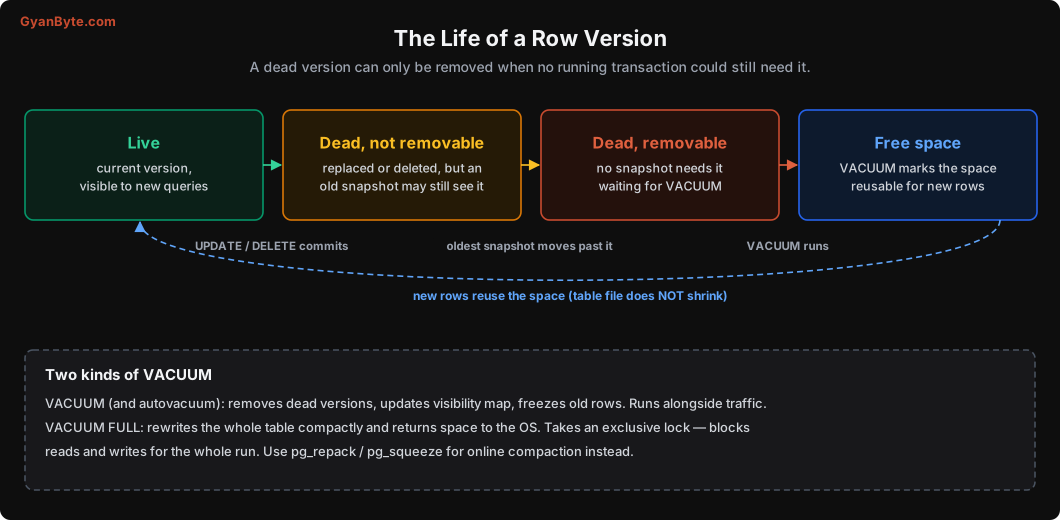
Two important things to notice:
- A dead version can only be removed when no running transaction could still need it. “Dead” and “removable” are not the same.
- VACUUM makes space reusable, but the table file doesn’t shrink. New rows fill the free space over time.
A Real Test: One Long Transaction
I created a sessions_demo table with 2 lakh rows (28 MB), with autovacuum off so I could control it. Then:
- In one session, I started a transaction, read something from a different table (
customers), and left it open for 20 seconds. Nothing touchedsessions_demo. - In another session, I updated every row of
sessions_demotwice, then ranVACUUM VERBOSE.
INFO:  vacuuming "tiffin.public.sessions_demo"
tuples: 0 removed, 600000 remain, 400000 are dead but not yet removable
removable cutoff: 846, which was 2 XIDs old when operation ended
Zero rows removed. 4 lakh dead versions, all “not yet removable”, because the open transaction’s snapshot (from txid 846) might still need to see the old versions. It doesn’t matter that the transaction never touched this table. Postgres can’t know what it might read next.
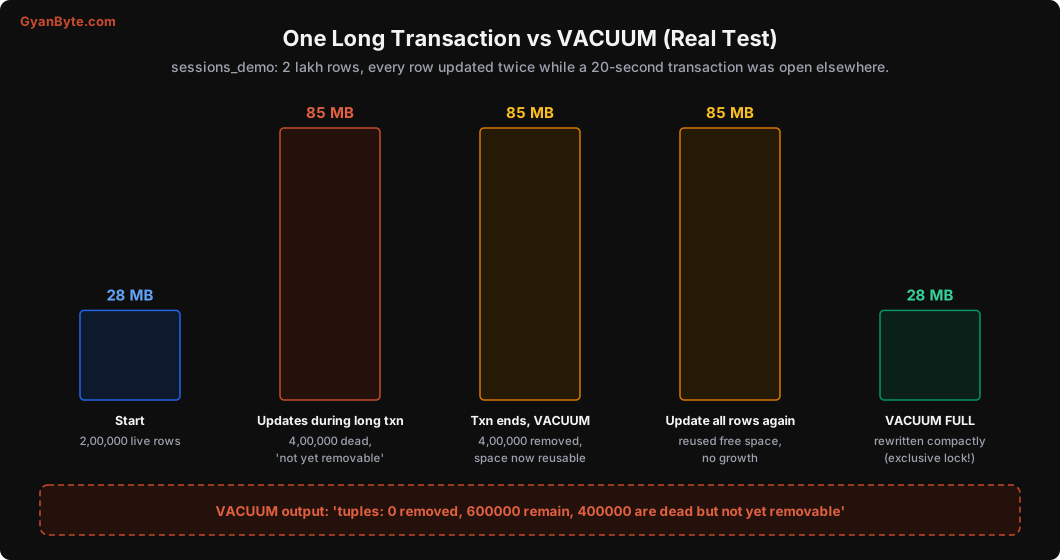
What happened next:
- Table size: 28 MB → 85 MB. Three times bigger for the same 2 lakh rows.
- After the long transaction ended,
VACUUMremoved all 4 lakh dead versions (tuples: 400000 removed). Size: still 85 MB. - I updated every row again. Size: still 85 MB. The new versions reused the free space. This is VACUUM working as designed.
VACUUM FULLrewrote the table: 28 MB. ButVACUUM FULLtakes anACCESS EXCLUSIVElock for the whole run, blocking all reads and writes. On a big production table that means downtime.
So the lessons are:
- One long transaction blocks cleanup for every table in the database.
- Bloat that builds up stays as allocated space until you rewrite the table.
- Prevent it; don’t plan to fix it with
VACUUM FULL.
What keeps old snapshots alive
Watch for all of these:
- Long-running queries (big reports, analytics, data exports on the primary).
- Idle-in-transaction sessions: someone ran
BEGINand then… nothing. Common from app bugs (an exception path that skipsCOMMIT/ROLLBACK), and from people’s psql or GUI windows. - Abandoned replication slots: a logical replication slot or a CDC tool (like Debezium) that stopped consuming keeps the oldest needed transaction pinned.
- Replicas with
hot_standby_feedback = onrunning long queries: they ask the primary to keep old versions for them. - Forgotten prepared transactions (
PREPARE TRANSACTION), if you use two-phase commit.
Find the oldest snapshots:
SELECT pid, usename, application_name, state,
       now() - xact_start AS xact_age, left(query, 60) AS query
FROM pg_stat_activity
WHERE backend_xmin IS NOT NULL
ORDER BY xact_start
LIMIT 5;

SELECT slot_name, active, xmin, catalog_xmin, restart_lsn FROM pg_replication_slots;
And prevent the most common ones with timeouts:
ALTER SYSTEM SET idle_in_transaction_session_timeout = '60s';
ALTER ROLE reporting_user SET statement_timeout = '15min';
SELECT pg_reload_conf();
Send analytics and reporting to a read replica (Lesson 11) or a separate warehouse, not to the primary.
Autovacuum: When Does It Run?
Autovacuum wakes up regularly and vacuums a table when its dead rows cross a threshold:
vacuum threshold = autovacuum_vacuum_threshold + autovacuum_vacuum_scale_factor × number of rows
                 = 50 + 0.2 × rows        (defaults)
For a 1,000-row table: 250 dead rows. Fine. For a 10 crore row table: 2 crore dead rows before autovacuum even starts. By then, queries are already scanning lots of garbage, and the vacuum itself is huge and slow.
For big, busy tables, lower the scale factor per table:
ALTER TABLE orders SET (
  autovacuum_vacuum_scale_factor = 0.01,     -- 1% instead of 20%
  autovacuum_analyze_scale_factor = 0.02
);
(Since Postgres 13, inserts alone also trigger autovacuum through a separate insert threshold, which helps append-only tables keep their visibility map fresh for index-only scans.)
Autovacuum is too slow by default
Autovacuum deliberately runs slowly so it doesn’t hurt your queries. It does a bit of work, pauses, and repeats (cost-based delay). On modern SSD servers, the defaults are often too gentle, and autovacuum can’t keep up with a busy table. Signs:
n_dead_tupkeeps climbing on a table even though autovacuum is running on it.- Autovacuum on one table takes hours.
Settings commonly raised on busy servers (test and adjust for your workload):
ALTER SYSTEM SET autovacuum_vacuum_cost_limit = 2000;   -- default effectively 200
ALTER SYSTEM SET autovacuum_max_workers = 5;            -- default 3 (needs restart)
ALTER SYSTEM SET maintenance_work_mem = '1GB';          -- vacuum's memory for dead tuple ids
SELECT pg_reload_conf();
Managed services (RDS, Cloud SQL, Azure) have their own defaults and parameter groups. Check what you actually have with SHOW.
Measuring Dead Rows and Bloat
Dead rows and last vacuum per table:
SELECT relname, n_live_tup, n_dead_tup,
       round(100.0 * n_dead_tup / nullif(n_live_tup + n_dead_tup, 0), 1) AS dead_pct,
       last_autovacuum, last_autoanalyze
FROM pg_stat_user_tables
ORDER BY n_dead_tup DESC
LIMIT 10;
Actual bloat (how much of the file is free or dead space) using the pgstattuple extension. It reads the whole table, so run it carefully on big tables, or use pgstattuple_approx:
SELECT table_len, tuple_percent, dead_tuple_percent, free_percent
FROM pgstattuple('orders');
A table with 60% free space is using roughly 2.5 times the space it needs, and sequential scans read 2.5 times more pages than necessary.
Getting space back without downtime
If a table is badly bloated:
pg_repack(extension) rebuilds the table and its indexes online, holding the heavy lock only for a short moment at the end. It’s the standard tool and available on most managed services.REINDEX CONCURRENTLYrebuilds bloated indexes without blocking writes (indexes often bloat more than tables).VACUUM FULLonly if you can afford the table being completely unavailable for the duration.
Transaction ID Wraparound
Now the scary one. It has caused multi-hour outages at well-known companies, and it’s completely preventable.
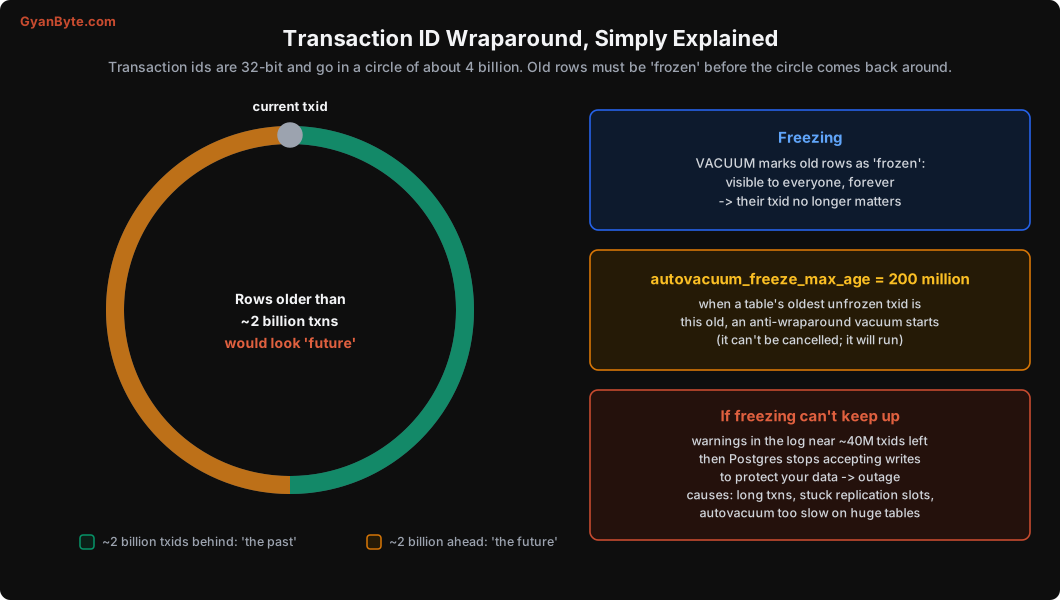
Transaction ids are 32-bit numbers, about 4 billion values, and they wrap around like a clock. Postgres compares them in a circle: roughly 2 billion ids “behind” the current one are in the past, and 2 billion “ahead” are in the future. A row created by a transaction more than ~2 billion transactions ago would suddenly look like it was created in the future, and become invisible. That would be data loss.
To prevent this, VACUUM freezes old rows: it marks them as “visible to everyone, forever”, so their transaction id no longer matters.
- When any table’s oldest unfrozen transaction id gets older than
autovacuum_freeze_max_age(200 million by default), autovacuum starts an anti-wraparound vacuum on it. This one runs even if autovacuum is otherwise off, and it can’t be cancelled by normal means. - If freezing still can’t keep up (blocked by long transactions or replication slots, or a huge table that takes days to vacuum), Postgres starts logging warnings as you get close to the limit.
- Close to the limit, Postgres refuses to start new transactions that write, to protect your data. Getting out of that state means running a (possibly very long) VACUUM while the application is down.
Busy systems burn through transaction ids fast. 1,000 write transactions per second is 8.6 crore a day; 200 million is reached in about two and a half days. So this isn’t a theoretical problem for any busy database.
Monitor this and alert well before it gets dangerous:
-- per database
SELECT datname, age(datfrozenxid) AS xid_age FROM pg_database ORDER BY 2 DESC;

-- per table, the worst ones
SELECT relname, age(relfrozenxid) AS xid_age, pg_size_pretty(pg_total_relation_size(oid)) AS size
FROM pg_class WHERE relkind = 'r'
ORDER BY age(relfrozenxid) DESC LIMIT 10;
A common alerting rule: warn when age(datfrozenxid) passes 50% of the hard limit (about 1 billion), page when it passes 75%. If it keeps rising past 200 million, something is blocking freezing, usually one of the “keeps old snapshots alive” causes from earlier.
Pitfalls to Avoid
- Long-running or idle-in-transaction sessions on the primary. They block cleanup everywhere. Set timeouts.
- Analytics and BI tools pointed at the production primary. Use a replica or a warehouse.
- Abandoned replication slots. They pin old transactions and WAL. Monitor and drop unused slots.
- Default autovacuum thresholds on big tables. 20% is far too late; set per-table scale factors.
- Autovacuum too slow for your write rate. Raise cost limits and workers on capable hardware.
- Turning autovacuum off “for performance”. You’ll pay much more later.
VACUUM FULLon a live production table. It locks everything. Usepg_repack.- No monitoring of
age(datfrozenxid). Wraparound gives you weeks of warning if you’re watching.
Quick Recap
- VACUUM removes dead versions no snapshot needs, makes space reusable, updates the visibility map, and freezes old rows.
- One long transaction blocks removal everywhere; in our test the table tripled in size.
- Free space is reused, not returned; use
pg_repackto compact online. - Tune autovacuum per table for big tables, and give it enough throughput.
- Freeze old rows to avoid wraparound, and monitor transaction id age.
Next lesson: transactions and isolation levels. What can go wrong when two requests change related data at the same time, with real tests of lost updates and write skew.