When I explain MVCC to new engineers, I start with a question: “When you UPDATE a row in Postgres, what happens to the old value?”
Most people say it’s overwritten. It isn’t. The old value is still there, on disk, until much later. In Lesson 1 we saw an UPDATE move order 1 from page 0 to page 21,659. That wasn’t a move; it was a new copy. This lesson explains why Postgres works this way, what it gives you, and what it costs.
The Problem MVCC Solves
Many users read and write the same tables at the same time. A customer is viewing their order while the restaurant updates its status and a background job calculates daily totals. Two simple approaches:
- Lock everything: readers wait for writers, writers wait for readers. Correct, but slow under load.
- No coordination: readers see half-written data. Fast, but wrong.
MVCC (Multi-Version Concurrency Control) is the clever middle path: keep multiple versions of each row, and show each transaction the version that was valid at the right moment. Readers never wait for writers, and writers never wait for readers. Writers only wait for other writers changing the same row.
Row Versions: xmin and xmax
Remember the tuple header from Lesson 1. Two fields matter here:
- xmin: the id of the transaction that created this version.
- xmax: the id of the transaction that deleted or replaced it (0 if nobody has).
Every transaction gets an increasing transaction id (txid). Let’s watch a row change. I created a small wallet table, inserted one row, and updated it twice:
CREATE TABLE wallet (id int PRIMARY KEY, balance_paise bigint);
INSERT INTO wallet VALUES (1, 50000);                       -- txid 837
UPDATE wallet SET balance_paise = 45000 WHERE id = 1;       -- txid 839
UPDATE wallet SET balance_paise = 30000 WHERE id = 1;       -- txid 840

SELECT lp, t_xmin, t_xmax, t_ctid FROM heap_page_items(get_raw_page('wallet', 0));
lp | t_xmin | t_xmax | t_ctid
----+--------+--------+--------
1 | 837 | 839 | (0,2)
2 | 839 | 840 | (0,3)
3 | 840 | 0 | (0,3)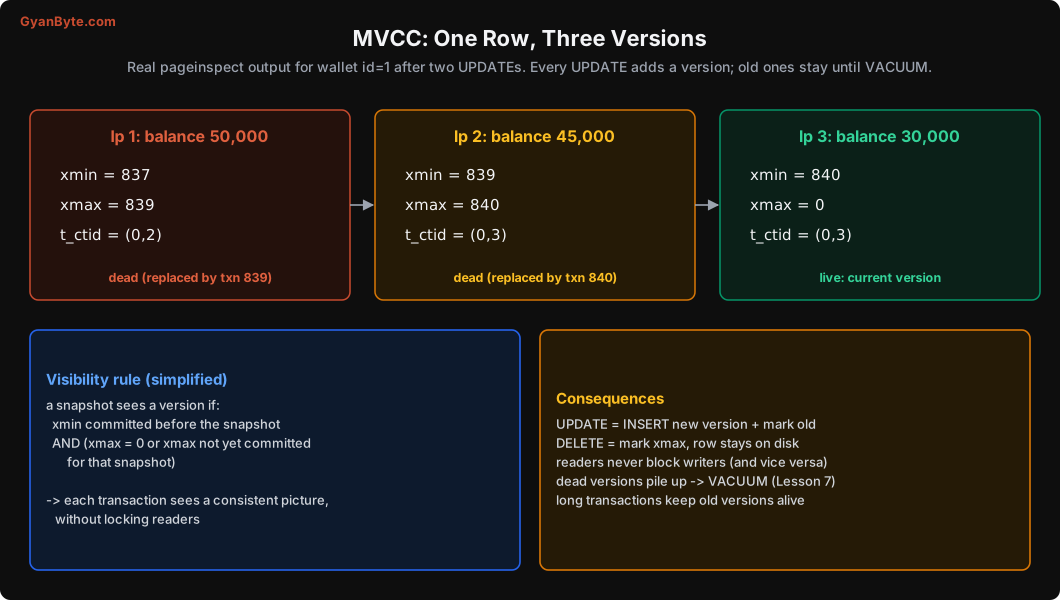
One logical row, three physical versions on the page:
- Version 1 (₹500): created by txn 837, replaced by txn 839, points to the next version at (0,2).
- Version 2 (₹450): created by 839, replaced by 840, points to (0,3).
- Version 3 (₹300): created by 840, not replaced. This is the current version.
A normal SELECT shows only one of them. Which one depends on who is asking.
Snapshots and Visibility
When a transaction (or a statement) starts reading, Postgres takes a snapshot: a note of which transactions had committed at that moment. Then, for every row version it finds, it applies a rule (simplified):
A version is visible if the transaction that created it (xmin) had committed before my snapshot, and the transaction that deleted it (xmax), if any, had not committed before my snapshot.
So a transaction that started before txn 840 committed will still see ₹450 (version 2), even after 840 commits. A transaction that starts later sees ₹300. Both are consistent. Neither had to wait.
A real two-session test
I ran three sessions against order 2 at the same time:
- Session A:
BEGIN ISOLATION LEVEL REPEATABLE READ, read order 2, wait 3 seconds, read again. - Session C:
BEGIN(default read committed), read order 2, wait 3 seconds, read again. - Session B: after 1 second,
UPDATE orders SET status = 'refunded' WHERE id = 2and commit.
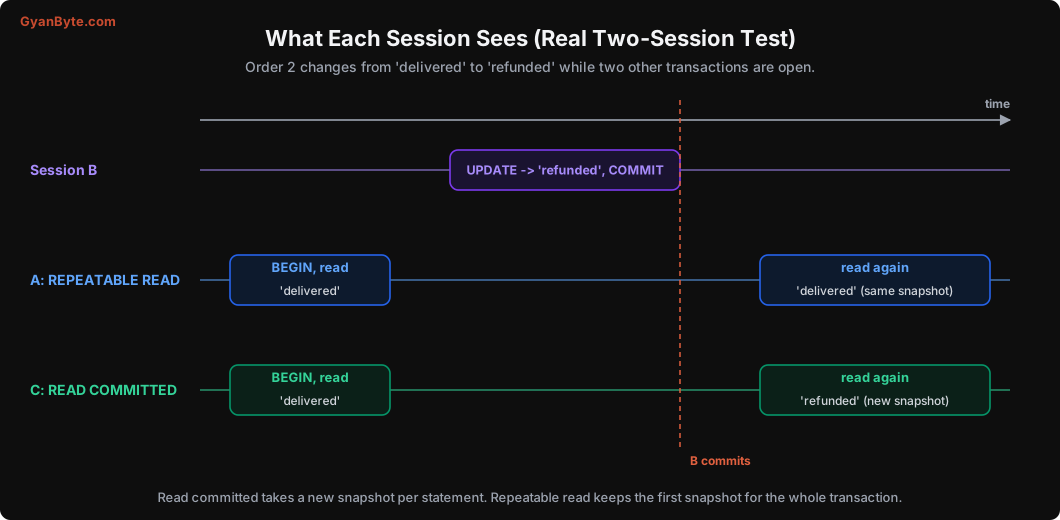
The real output:
--- session A (REPEATABLE READ) ---
 status: delivered
after B committed:
 status: delivered
after A commits, new snapshot:
 status: refunded

--- session C (READ COMMITTED) ---
 status: delivered
after B committed:
status: refunded- Read committed (Postgres’s default) takes a new snapshot for every statement. Each query sees everything committed before that query started.
- Repeatable read takes one snapshot for the whole transaction. Every query in it sees the database as it was at the start, even if others commit changes meanwhile.
And notice: session B’s UPDATE didn’t wait for A or C, even though they were reading the same row. That’s MVCC’s main gift. Lesson 8 covers isolation levels and the anomalies each allows.
What UPDATE and DELETE Really Do
Now the costs. Because old versions must stay available for transactions that might still need them:
INSERTcreates a version withxmin = my txid.DELETEdoesn’t remove anything. It just setsxmax = my txidon the current version. The row stays on disk.UPDATE= setxmaxon the old version plus insert a complete new version (all columns, not just the changed one), usually with new index entries pointing to it.
This has real consequences:
- Dead versions pile up. Once no transaction can see an old version any more, it’s “dead”, but it still takes space in the table and in indexes. Something has to clean it up. That’s VACUUM, the subject of the next lesson.
- Updates are more expensive than they look. Updating one
statuscolumn on an 80-byte row writes a new 80-byte row plus an entry in every index (unless the update is HOT, below). - Long transactions are dangerous. A transaction (or a forgotten
BEGINin a psql window) that stays open for hours keeps its snapshot alive. Every row version that snapshot might need can’t be cleaned up, across the whole database. Tables and indexes grow and queries slow down. We’ll measure this in Lesson 7. - Index-only scans need help. An index entry doesn’t know if the row version it points to is visible to you. That’s why index-only scans check the visibility map (a bitmap of pages where all rows are visible to everyone), which VACUUM maintains.
After running VACUUM wallet, the page looked like this:
 lp |   flag   | t_xmin | t_xmax | t_ctid
----+----------+--------+--------+--------
  1 | redirect |        |        |
  2 | unused   |        |        |
  3 | normal   |    840 |      0 | (0,3)
The two dead versions are gone. Line pointer 1 became a redirect to line pointer 3. Why a redirect, and not just removed? Because of HOT.
HOT Updates: Skipping the Indexes
The expensive part of an update is often the index writes. If a table has 6 indexes, every update writes 6 index entries, even if you only changed a column that isn’t indexed at all.
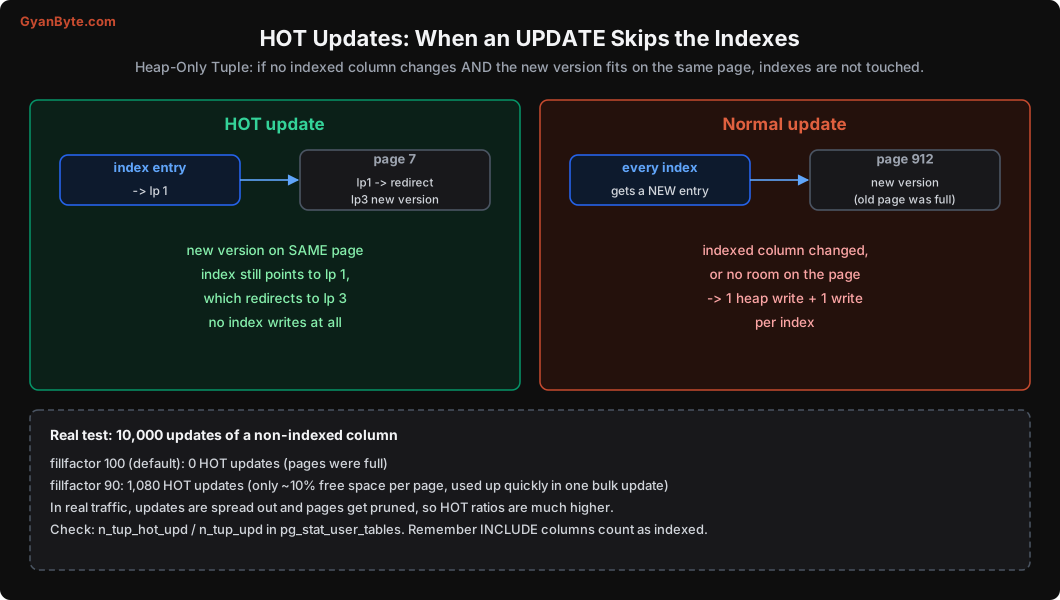
HOT (Heap-Only Tuple) updates avoid that. If:
- No indexed column changes (this includes
INCLUDEcolumns of covering indexes), and - The new version fits on the same page as the old one,
then Postgres puts the new version on the same page and doesn’t touch any index. The index still points to the old line pointer, which leads (via the version chain, and later a redirect) to the new version. That’s exactly what happened in our wallet table: balance_paise isn’t indexed, so the updates were HOT, and after VACUUM line pointer 1 redirects to line pointer 3.
Fillfactor: leave room for HOT
Condition 2 needs free space on the page. By default, Postgres fills pages to 100% (fillfactor = 100), so there’s often no room. I tested 10,000 updates of a non-indexed column on two tables with 1 lakh rows each:
 relname  | n_tup_upd | n_tup_hot_upd
----------+-----------+---------------
 hot_full |     10000 |             0      -- fillfactor 100
 hot_demo |     20000 |          1080      -- fillfactor 90 (10,000 of these updated an indexed column)
With full pages: zero HOT updates. With fillfactor = 90 (10% free on each page): 1,080 of the 10,000 eligible updates were HOT. Why not all? My test updated 10,000 consecutive rows in one statement, so the same pages filled up quickly. In real traffic, updates are spread out over time and Postgres also cleans up dead versions within a page as it goes (“page pruning”), so HOT ratios on update-heavy tables are usually much higher.
For tables with lots of updates to non-indexed columns (order status tables, session tables, counters), consider:
ALTER TABLE orders SET (fillfactor = 85); -- affects new pages; VACUUM FULL / repack to apply to existing onesAnd check your HOT ratio:
SELECT relname, n_tup_upd, n_tup_hot_upd,
       round(100.0 * n_tup_hot_upd / nullif(n_tup_upd, 0), 1) AS hot_pct
FROM pg_stat_user_tables
ORDER BY n_tup_upd DESC LIMIT 10;
A low HOT percentage on an update-heavy table is a hint: maybe an index on a frequently-updated column (like updated_at or status) isn’t really needed, or the table needs a lower fillfactor.
This is also a good reason to be careful with “index every column you filter on”. An index on status makes every status change a non-HOT update.
How MySQL Does It Differently
MySQL’s InnoDB also uses MVCC, but differently. It updates rows in place and writes the old values to a separate undo log. Readers that need an old version reconstruct it from the undo log. So InnoDB tables don’t bloat with dead versions the same way, but long transactions make the undo log (history list) grow, and old reads get slower. Different design, similar lesson: long transactions are expensive in every MVCC database.
Practical Takeaways for Application Code
- Keep transactions short. Do your network calls (payment APIs, emails, S3 uploads) outside the transaction.
- Don’t leave connections “idle in transaction”. Set
idle_in_transaction_session_timeout(for example 60 seconds) so forgotten transactions get killed. - Avoid unnecessary updates.
UPDATE ... SET status = 'delivered' WHERE id = $1on a row that’s alreadydeliveredstill creates a new version. AddAND status <> 'delivered', or check first. - Be careful with “touch” patterns. Updating
last_seen_aton every request for every user creates huge numbers of dead versions. Batch these updates, or store them somewhere else (like Redis) and write periodically. - Separate hot and cold columns. If one column changes constantly (like a counter or
last_seen_at) and the rest of the row is large and stable, keep the hot column in its own small table.
Pitfalls to Avoid
- Thinking UPDATE overwrites. It writes a full new version and usually new index entries.
- Long or idle-in-transaction sessions. They prevent cleanup across the whole database.
- Indexes on frequently updated columns that nobody queries. They block HOT updates.
- Default fillfactor on update-heavy tables. Leave room for HOT.
- No-op updates. Filter them out; each one creates a dead version.
- High-frequency “touch” updates in the main table. Batch them or move them.
- Assuming repeatable read and read committed behave the same. They take snapshots differently.
Quick Recap
- Postgres keeps multiple versions of each row, marked with xmin and xmax.
- Snapshots decide which version each transaction sees; readers and writers don’t block each other.
- Read committed: new snapshot per statement. Repeatable read: one snapshot per transaction.
- UPDATE and DELETE leave dead versions behind; long transactions keep them alive.
- HOT updates skip index writes when no indexed column changes and there’s room on the page.
Next lesson: the cleanup crew. How VACUUM removes dead versions, why tables bloat anyway, and the transaction ID wraparound problem that has taken down big production databases.