After the last few lessons, you know how to read a plan and why the planner chooses what it chooses. Now the practical part. In my experience, the large majority of slow queries in real applications come from a small set of patterns. Not exotic database problems; just ordinary code written without knowing how the database will run it.
Here they are, each with real timings from our 20 lakh row orders table.
1. OFFSET Pagination
Every admin panel and list API starts with this:
SELECT id, amount_paise FROM orders ORDER BY id LIMIT 20 OFFSET 1500000;It looks innocent. Here’s what happens:
 Limit  (actual time=428.923..428.933 rows=20 loops=1)
   ->  Index Scan using orders_pkey on orders  (actual time=0.032..382.462 rows=1500020 loops=1)
 Execution Time: 428.946 ms
To return 20 rows, Postgres read 15,00,020 rows from the index and threw away the first 15 lakh. OFFSET can’t jump; it has to count. Page 1 is fast, page 75,000 is slow, and it gets slower as the table grows. Bots and scrapers love to request deep pages.
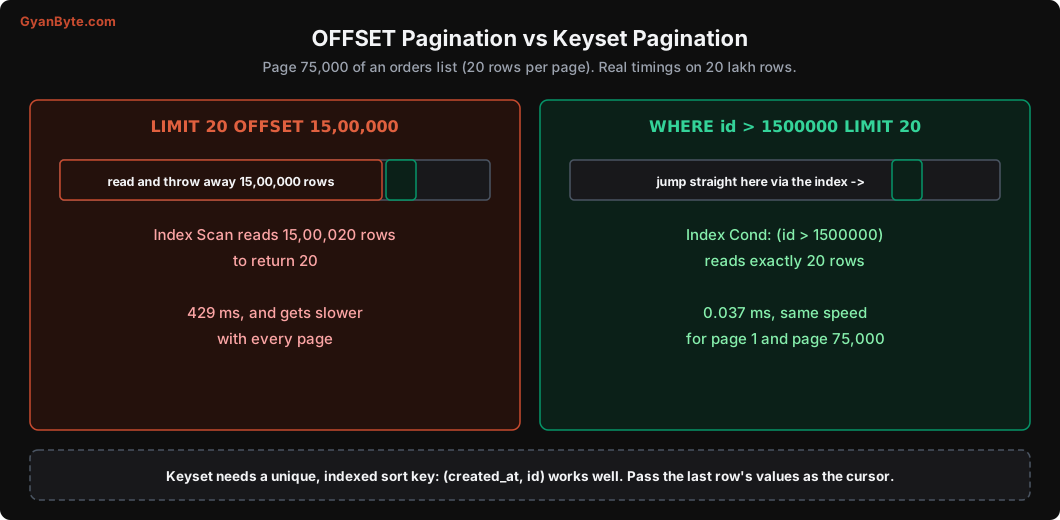
Fix: keyset (cursor) pagination. Instead of “skip N rows”, say “give me rows after the last one I saw”:
SELECT id, amount_paise FROM orders WHERE id > 1500000 ORDER BY id LIMIT 20; Limit (actual time=0.020..0.025 rows=20 loops=1)
-> Index Scan using orders_pkey on orders (actual time=0.019..0.023 rows=20 loops=1)
Index Cond: (id > 1500000)
Execution Time: 0.037 ms0.037 ms, and the same speed on every page.
For real lists, you usually sort by something like created_at DESC, which isn’t unique. Use a pair of columns as the cursor, with a matching index:
-- index: CREATE INDEX ON orders (customer_id, created_at DESC, id DESC);
SELECT id, created_at, amount_paise
FROM orders
WHERE customer_id = $1
  AND (created_at, id) < ($2, $3)        -- last row from the previous page
ORDER BY created_at DESC, id DESC
LIMIT 20;
The API returns an opaque next_cursor (for example base64 of created_at and id) instead of a page number.
The trade-off: you can’t jump to “page 437” directly. For infinite scroll, feeds, and APIs, that’s fine. For admin tables where people really want page numbers, cap the maximum page, or use keyset for deep pages.
2. Casts and Functions on Indexed Columns
We have an index on customers.phone, a text column. Someone writes:
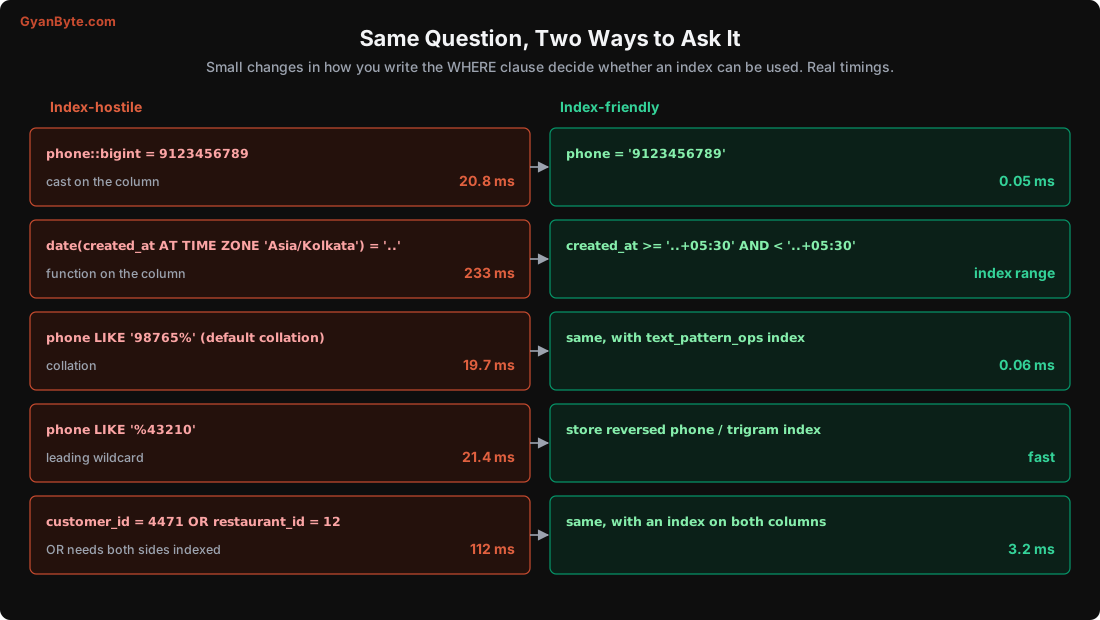
SELECT id FROM customers WHERE phone::bigint = 9123456789; Parallel Seq Scan on customers (actual time=14.665..14.666 rows=0 loops=2)
Filter: ((phone)::bigint = '9123456789'::bigint)
Rows Removed by Filter: 100000
Execution Time: 20.798 msFull scan. The index is on phone, not on phone::bigint. Compare the column to a value of the same type instead:
SELECT id FROM customers WHERE phone = '9123456789'; Index Scan using idx_customers_phone on customers (actual time=0.027..0.028 rows=0 loops=1)
Index Cond: (phone = '9123456789'::text)
Execution Time: 0.046 msSame rule for functions: date(created_at), lower(email), extract(month from ...), coalesce(col, ''). Either rewrite as a condition on the raw column (ranges for dates), or create an expression index on exactly that expression (Lesson 2).
This one is very common with ORMs and query builders, which sometimes add casts when the parameter type in your code doesn’t match the column type (for example, passing an integer for a text column, or a UUID string where the column is uuid without the driver knowing). If a query is unexpectedly slow, look at the actual SQL and its plan for :: casts on the column side.
3. LIKE and Collations
Searching customers by the start of a phone number:
SELECT id FROM customers WHERE phone LIKE '98765%'; Seq Scan on customers (actual time=3.915..19.659 rows=16 loops=1)
Filter: (phone ~~ '98765%'::text)
Rows Removed by Filter: 199984
Execution Time: 19.677 msWe have an index on phone, so why a seq scan? Because the database uses a language-aware collation (like en_US.UTF-8), and a normal B-tree index under such a collation can’t be used for LIKE prefix matching. You need an index with the pattern operator class:
CREATE INDEX idx_customers_phone_pattern ON customers (phone text_pattern_ops); Index Scan using idx_customers_phone_pattern on customers (actual time=0.024..0.045 rows=16 loops=1)
Index Cond: ((phone ~>=~ '98765'::text) AND (phone ~<~ '98766'::text))
Execution Time: 0.060 msPostgres turned LIKE '98765%' into a range: from 98765 up to (not including) 98766. 0.06 ms.
A leading wildcard is a different story:
SELECT id FROM customers WHERE phone LIKE '%43210'; -- 21.4 ms, Seq ScanNo B-tree can help, because the index is sorted by the beginning of the string. Options:
- For “ends with” searches, store a reversed copy (
reverse(phone)) and index that, then searchreverse(phone) LIKE '01234%'. - For general “contains” search, use the
pg_trgmextension with a GIN trigram index:CREATE INDEX ON customers USING gin (name gin_trgm_ops);. It supportsLIKE '%sharma%'andILIKEefficiently. - For real search (relevance, typos, multiple languages), use full-text search or a search engine. Don’t build a search bar on
LIKE '%...%'.
4. OR Across Different Columns
SELECT id FROM orders WHERE customer_id = 4471 OR restaurant_id = 12;With an index only on customer_id:
 Parallel Seq Scan on orders  (actual time=22.318..103.736 rows=127 loops=3)
   Filter: ((customer_id = 4471) OR (restaurant_id = 12))
 Execution Time: 112.375 ms
An index on one side of an OR is useless, because rows matching the other side could be anywhere. Add an index for restaurant_id too, and Postgres combines both with a BitmapOr:
 Bitmap Heap Scan on orders  (actual time=0.124..3.148 rows=382 loops=1)
   Recheck Cond: ((customer_id = 4471) OR (restaurant_id = 12))
   ->  BitmapOr
         ->  Bitmap Index Scan on idx_orders_cust_cover  (rows=9)
         ->  Bitmap Index Scan on idx_orders_restaurant  (rows=373)
 Execution Time: 3.190 ms
From 112 ms to 3.2 ms. If adding the second index isn’t an option, rewriting as a UNION of two indexed queries can also work.
5. N+1 Queries
This one doesn’t show up in any single slow query log, which is why it survives so long. A page shows 50 orders with customer names:
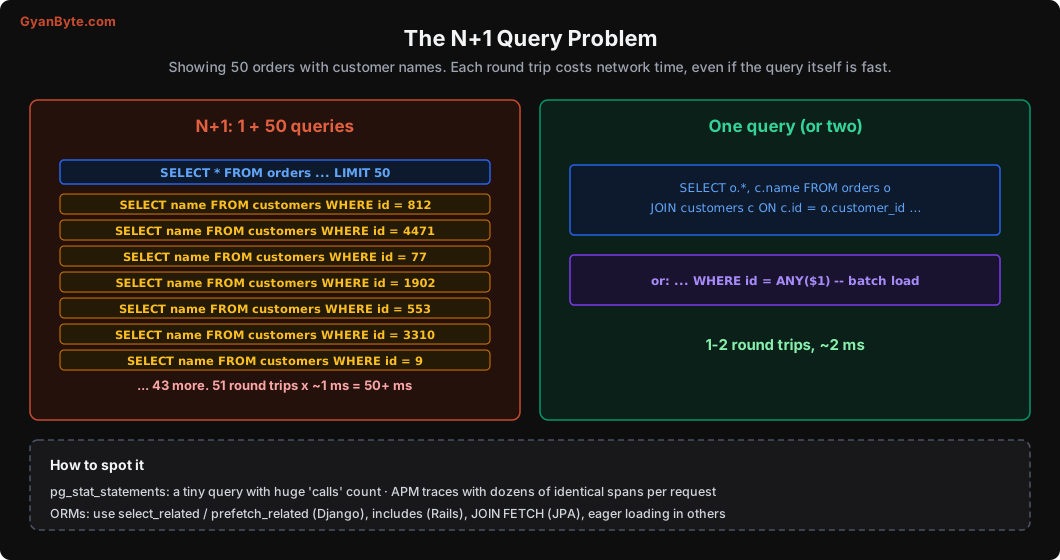
orders = Order.objects.filter(city="Pune").order_by("-created_at")[:50]
for o in orders:
    print(o.customer.name)          # each access runs: SELECT ... FROM customers WHERE id = ?
1 query for orders + 50 queries for customers = 51 round trips. Each query is fast (0.05 ms in the database), but each round trip between your app server and the database costs something like 0.5-2 ms in a typical cloud setup. 51 round trips is 50+ ms, for a page that needed 2 queries.
It gets worse in nested loops: 50 orders × 3 items each × 1 product lookup = 200 queries.
Fix: tell the ORM to load related data together.
- Django:
select_related("customer")(JOIN) orprefetch_related("items")(second query withIN) - Rails:
includes(:customer) - SQLAlchemy:
joinedload/selectinload - Hibernate/JPA:
JOIN FETCHor entity graphs - Plain SQL: a
JOIN, or one batch queryWHERE id = ANY($1)with all the ids
How to find it: in pg_stat_statements, look for simple queries with a huge number of calls relative to their neighbours. In APM tools (Datadog, New Relic, OpenTelemetry traces), look for requests with dozens of identical database spans. Some teams add a test that fails if a request makes more than N queries.
6. COUNT(*) on Big Tables
“Showing 1-20 of 19,98,918 orders.” That total costs:
SELECT count(*) FROM orders; Parallel Index Only Scan using idx_orders_customer on orders (actual time=0.053..178.450 rows=666667 loops=3)
Execution Time: 219.381 msPostgres has no stored row count. Because of MVCC (next lesson), different transactions can see different numbers of rows, so an exact count means visiting every row (or every index entry). 219 ms here, many seconds on bigger tables, on every page load.
Options:
- Don’t show exact totals on big lists. “20 of many”, or “1,000+” (count with a
LIMIT 1001in a subquery). - Use the planner’s estimate when approximate is fine:
SELECT reltuples::bigint FROM pg_class WHERE relname = 'orders'; -- 2002580 - Keep a counter in a separate table, updated by your code or a trigger, for counts that matter (like “pending orders in Pune”). Be careful: a single counter row updated by every insert becomes a lock hotspot.
7. Other Usual Suspects
SELECT * fetches columns you don’t use, including large TOASTed text and JSON (Lesson 1), and prevents index-only scans. Select what you need, especially in list endpoints.
Huge IN lists (WHERE id IN (...10,000 values...)) are slow to parse and plan. Use = ANY($1) with an array parameter, or join against a temporary table or VALUES list.
NOT IN with a subquery has a nasty surprise: if the subquery returns any NULL, NOT IN returns no rows at all. Use NOT EXISTS instead. It’s both correct and usually faster.
ORDER BY random() LIMIT 1 sorts the entire table to pick one row. For random sampling on big tables, use TABLESAMPLE or pick a random id range.
DISTINCT to hide duplicate rows from a bad join is a sign the join is wrong. Fix the join, don’t sort away its mistakes.
Transactions held open across network calls (call a payment API inside a DB transaction) aren’t slow queries, but they hold locks and block VACUUM. Lessons 7 and 9 explain why that hurts.
How to Find These in Your Own System
- Enable
pg_stat_statementsand look at the top queries by total time (total_exec_time), not just the slowest single query. A 5 ms query called 20 lakh times a day costs more than a 10 second report run once. - Set
log_min_duration_statement(for example 500 ms) to log slow queries, and considerauto_explainfor plans. - For each top query, get the plan with
EXPLAIN (ANALYZE, BUFFERS)using realistic parameters, and match it to the patterns above.
Lesson 12 has a full debugging walkthrough using these tools.
Pitfalls to Avoid
- OFFSET pagination on big tables. Use keyset pagination.
- Casts or functions on indexed columns. Match types; use ranges or expression indexes.
LIKE 'prefix%'withouttext_pattern_opsunder a non-C collation.- Leading-wildcard
LIKEfor search. Use trigram indexes or real search. ORacross columns with an index on only one side.- N+1 queries from ORMs. Eager-load or batch.
- Exact
COUNT(*)on every page load. Estimate, cap, or maintain counters. SELECT *on list endpoints.NOT INwith nullable subqueries. UseNOT EXISTS.- Looking only at the slowest query. Total time in
pg_stat_statementsshows what really costs you.
Quick Recap
- OFFSET reads everything it skips; keyset pagination is constant-time.
- Write conditions on raw columns with matching types; use ranges for dates.
LIKEprefixes need the right index; leading wildcards need trigram indexes or real search.ORneeds indexes on both sides; N+1 needs eager loading; exact counts need a strategy.- Find these patterns with
pg_stat_statementsand slow query logs.
Next lesson: we go back inside the database to understand MVCC: how Postgres lets many transactions read and write at the same time, and why that creates the “dead rows” we saw in Lesson 1.