A support team at a logistics company once told me, “The shipment search was fine for months. On Monday morning it became 50 times slower. Nobody changed any code.” The plan had changed. Over the weekend, a data migration had inserted 30 lakh rows into the shipments table. Autovacuum hadn’t run ANALYZE yet, so the planner still believed the table was small and that a nested loop was the cheapest way to join it. A manual ANALYZE fixed it in a few seconds.
“Nobody changed anything, but the query got slow” is almost always a planner story. This lesson explains how the planner thinks, so you can tell what went wrong.
How a Query Becomes a Plan
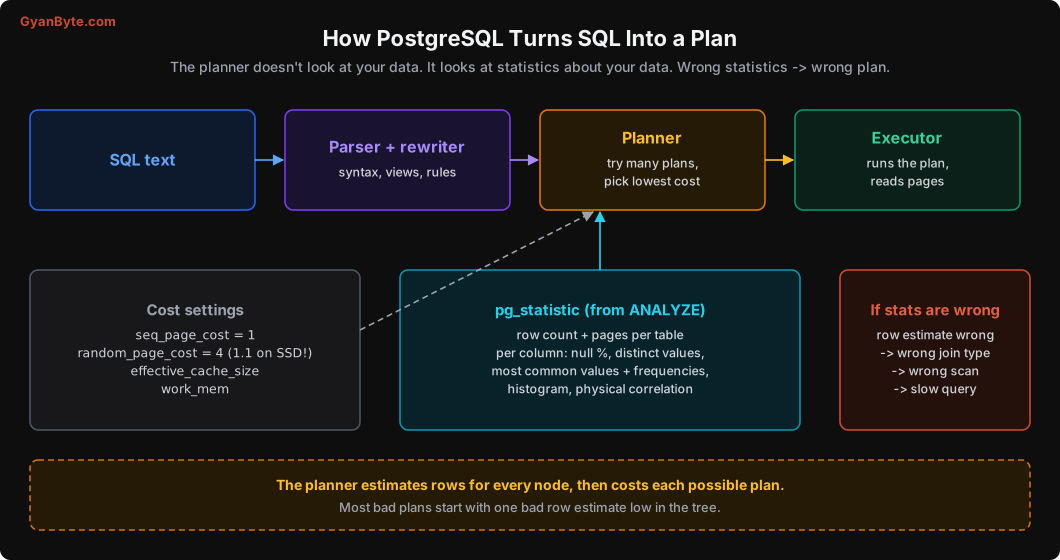
- Parser and rewriter check the syntax and expand views.
- The planner considers different ways to run the query: which scan for each table, which join order, which join algorithm. For each option it estimates the number of rows at each step and calculates a cost. It picks the cheapest.
- The executor runs the chosen plan.
The planner doesn’t run anything to make its decision. It works from statistics: a summary of what your data looks like. If that summary is wrong or missing something, the row estimates are wrong, the costs are wrong, and the “cheapest” plan isn’t actually cheap.
What Statistics Look Like
ANALYZE (run by autovacuum, or manually) reads a random sample of each table (30,000 rows by default, not the whole table) and stores a summary per column. You can see it in the pg_stats view:
SELECT attname, null_frac, n_distinct, most_common_freqs, correlation
FROM pg_stats
WHERE tablename = 'orders' AND attname IN ('status', 'city', 'created_at', 'notes');
attname | null_frac | n_distinct | most_common_freqs | correlation
------------+------------+------------+-----------------------------------------------+-------------
status | 0 | 4 | {0.9004,0.05996667,0.034366667,0.005266667} | 0.81487954
city | 0 | 10 | {0.10136667,0.101333335,...} | 0.09315219
created_at | 0 | -1 | | -1
notes | 0.89856666 | 1 | {0.10143334} | 1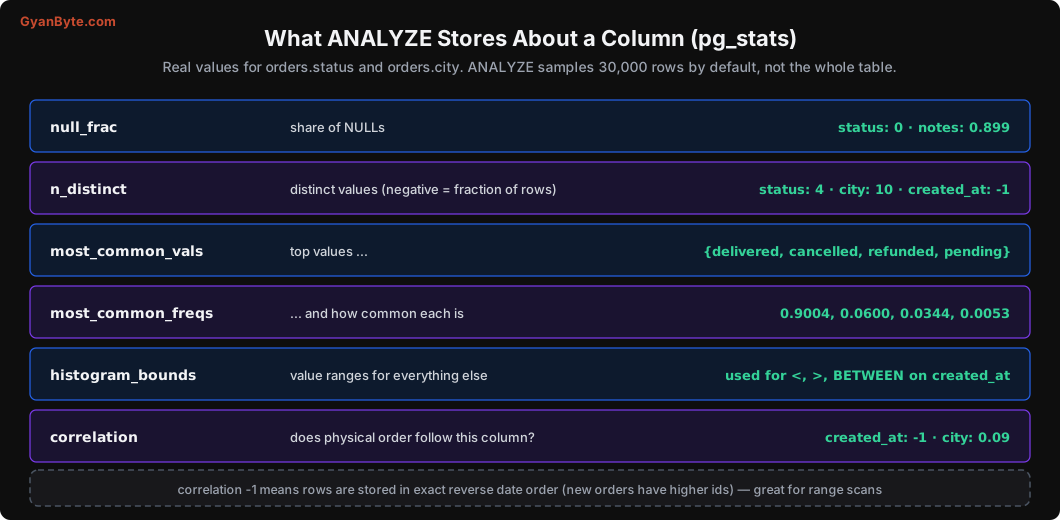
What each one tells the planner:
- null_frac: 90% of
notesare NULL. SoWHERE notes IS NOT NULLreturns about 10% of rows. - n_distinct: 4 statuses, 10 cities. A negative number means “a fraction of rows”:
-1forcreated_atmeans every value is unique. - most_common_vals / freqs:
status = 'delivered'matches 90% of rows;status = 'pending'matches 0.5%. This is how the planner knowspendingis rare and worth using an index for, whiledeliveredisn’t. - histogram_bounds: for values not in the common list, the planner uses a histogram to estimate ranges like
created_at > now() - interval '7 days'. - correlation: does the physical order of rows on disk follow this column?
-1forcreated_atmeans rows are stored in perfect (reverse) date order, because new orders get higher ids and are appended. A range scan oncreated_atwill read neighbouring pages, which is cheap.cityhas near-zero correlation: Pune orders are scattered all over the table.
With these numbers and some multiplication, the planner estimates rows for every condition. Most of the time it does a good job. Let’s look at the cases where it doesn’t.
Four Real Estimate Errors
1. Stale statistics
I created a small events table with 1,000 rows, ran ANALYZE, then inserted 4.99 lakh more rows (all with kind = 7) with autovacuum turned off for that table. Then:
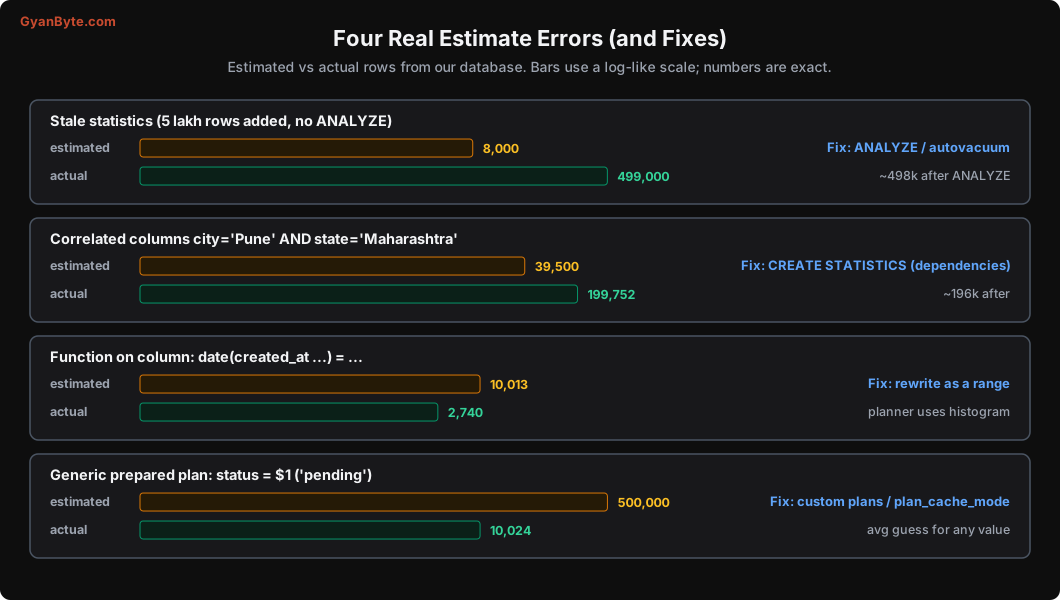
EXPLAIN ANALYZE SELECT count(*) FROM events WHERE kind = 7;-> Parallel Seq Scan on events (cost=0.00..5260.22 rows=3319 width=0) (actual time=0.021..24.969 rows=166340 loops=3)Estimated about 8,000 rows in total (3,319 per worker), actually 4.99 lakh. Off by 60x, because the statistics still described the old 1,000-row table. After ANALYZE events;:
-> Parallel Seq Scan on events (cost=0.00..5790.17 rows=207958 width=0) (actual time=0.014..18.153 rows=166340 loops=3)Spot on. In this simple query the plan didn’t change (there was no index anyway), but when this table is joined with others, a 60x underestimate is exactly how you get a nested loop that runs 5 lakh times instead of once.
When it happens: after bulk loads, big deletes, data migrations, or when a table grows quickly between autovacuum runs. Autovacuum runs ANALYZE when about 10% of a table has changed (autovacuum_analyze_scale_factor = 0.1), which for a 10 crore row table means 1 crore changes before stats refresh.
Fix: run ANALYZE table_name; after bulk loads and migrations (make it part of the migration). For very large tables, lower the per-table threshold:
ALTER TABLE orders SET (autovacuum_analyze_scale_factor = 0.02);2. Correlated columns
The planner assumes conditions on different columns are independent. Usually that’s fine. But not when one column depends on another. I added a state column to orders (Pune and Mumbai → Maharashtra, etc.):
EXPLAIN ANALYZE SELECT count(*) FROM orders WHERE city = 'Pune' AND state = 'Maharashtra';-> Parallel Bitmap Heap Scan on orders (cost=8003.44..57831.39 rows=16458 width=0) (actual time=26.320..118.673 rows=66584 loops=3)Estimated about 39,500 rows (16,458 per worker), actual 2 lakh. The planner calculated: Pune is 10% of rows, Maharashtra is 20% of rows, so both together must be 10% × 20% = 2%. But every Pune order is in Maharashtra, so the real answer is 10%.
Fix: tell Postgres about the relationship with extended statistics:
CREATE STATISTICS orders_city_state (dependencies) ON city, state FROM orders;
ANALYZE orders;
-> Parallel Bitmap Heap Scan on orders (cost=7899.84..57712.17 rows=81689 width=0) (actual time=34.394..145.983 rows=66584 loops=3)Now about 1.96 lakh estimated against 2 lakh actual. Common real-world cases: city and pincode, product and category, country and currency, status and paid_at IS NOT NULL.
3. Functions and casts on columns
The planner has statistics for created_at. It has no statistics for date(created_at AT TIME ZONE 'Asia/Kolkata'). So for this condition it falls back to a default guess:
EXPLAIN SELECT id FROM orders WHERE date(created_at AT TIME ZONE 'Asia/Kolkata') = '2026-10-20'; Gather (cost=1000.00..65190.45 rows=10013 width=8)10,013 rows is simply 0.5% of the table (the default for “equals something unknown”). The real answer was 2,740. Here the guess happens to be in the right range, but for other conditions it can be badly wrong, and you also lose index usage (Lesson 2).
Fix: rewrite as a range on the raw column, so the planner can use the histogram:
WHERE created_at >= '2026-10-20 00:00:00+05:30' AND created_at < '2026-10-21 00:00:00+05:30'Or create an expression index. A nice bonus: Postgres collects statistics on the expression of an expression index too, so estimates improve even when the index isn’t chosen.
4. Generic plans for prepared statements
Most drivers and ORMs use prepared statements: the query is parsed once and executed many times with different parameters. Postgres plans the first five executions with the actual parameter values (“custom plans”). After that, if a “generic” plan (one that ignores the specific values) looks about as cheap on average, it switches to the generic plan to save planning time.
On skewed data, that’s risky. Our status column is 90% delivered and 0.5% pending. With a generic plan, the planner can’t use the value, so it assumes an average status:
PREPARE by_status(text) AS SELECT count(*) FROM orders WHERE status = $1;
SET plan_cache_mode = force_generic_plan;   -- to see the generic plan immediately
EXPLAIN ANALYZE EXECUTE by_status('pending');
-> Parallel Index Only Scan using idx_orders_status on orders (cost=0.43..7554.61 rows=208221 width=0) (actual time=0.013..0.376 rows=3341 loops=3)
Index Cond: (status = $1)Estimated about 5 lakh, actual 10,024. In this case both values still got a reasonable plan, but on more complex queries (joins, sorts) this kind of mismatch is a classic cause of “the same query is fast from psql but slow from the application”. In psql you typed the literal value; the app used a prepared statement with a generic plan.
Fixes:
- Check whether the slow query uses a generic plan:
EXPLAIN (ANALYZE) EXECUTE ...shows$1in conditions for generic plans. - For queries on skewed columns, set
plan_cache_mode = force_custom_planfor that session or role, or for the specific connection pool used by those queries. - Sometimes a partial index for the rare value (like our
pendingindex) makes both plans good.
Cost Settings Worth Knowing
The planner converts estimated work into cost using a few settings. Two are worth checking on almost every server:
random_page_cost (default 4). It tells the planner a random page read is 4 times more expensive than a sequential one. That made sense for spinning hard disks. On SSDs and cloud block storage, random reads are nearly as cheap as sequential ones. With the default value, the planner avoids index scans more than it should. Most teams set it to around 1.1 on SSD.
ALTER SYSTEM SET random_page_cost = 1.1;
SELECT pg_reload_conf();effective_cache_size. Not an allocation, just a hint: how much memory is available for caching data (shared_buffers plus OS cache). Setting it to around 50-75% of RAM tells the planner that index pages are likely to be cached, which makes index scans look more attractive.
(Managed services like RDS or Cloud SQL sometimes set these for you. Check SHOW random_page_cost; before assuming.)
Don’t Force Plans; Fix the Estimate
When a plan is bad, it’s tempting to force a different one: SET enable_nestloop = off, rewriting a join into a CTE to “trick” the planner, or extensions like pg_hint_plan that let you add hints. These work today and break silently later, when the data changes and the forced plan becomes the wrong one.
The better habit:
- Run
EXPLAIN (ANALYZE, BUFFERS). - Find the lowest node where estimated rows and actual rows differ a lot.
- Ask why: stale stats? correlated columns? function on a column? generic plan? missing index?
- Fix that cause.
Sometimes you’ll also need to raise the statistics target for a column with many distinct values and an uneven distribution, so ANALYZE samples more:
ALTER TABLE orders ALTER COLUMN restaurant_id SET STATISTICS 1000;   -- default 100
ANALYZE orders;
A Note on Plan Changes After Upgrades
Major Postgres upgrades sometimes change planner behaviour. After pg_upgrade, statistics are not carried over (until very recent versions), so run ANALYZE on the whole database (vacuumdb --all --analyze-in-stages) right after an upgrade, before sending real traffic. Many “the database is slow after the upgrade” incidents are just missing statistics.
Pitfalls to Avoid
- Forgetting ANALYZE after bulk loads and migrations. Stale stats are the most common cause of sudden plan changes.
- Large tables with default autovacuum analyze thresholds. 10% of a huge table is a lot of change. Lower it per table.
- Ignoring correlated columns. Use
CREATE STATISTICSwhen filters combine related columns. - Functions and casts on filtered columns. You lose both index usage and good estimates.
- Assuming psql and the app run the same plan. Prepared statements can use generic plans.
- Default
random_page_coston SSDs. Lower it to about 1.1. - Forcing plans with
enable_*settings or hints. Fix the estimate instead. - No ANALYZE after a major upgrade. Run it before taking traffic.
Quick Recap
- The planner estimates rows from statistics and picks the lowest-cost plan.
- ANALYZE stores null fraction, distinct counts, common values, histograms and correlation per column.
- Bad plans usually start with one bad estimate: stale stats, correlated columns, functions on columns, or generic plans.
- Fix the estimate with ANALYZE, extended statistics, query rewrites, or plan cache settings.
- On SSDs, set
random_page_costaround 1.1 andeffective_cache_sizeto a realistic value.
Next lesson: the query patterns that cause most slow queries in real applications, from OFFSET pagination to N+1, with before-and-after timings.