Open LLMs in Production — Serving, Quantization, Fine-Tuning and Cost
Running open-weight language models yourself, properly. How inference uses your hardware, the memory maths of weights and KV cache, quantization, serving engines like vLLM and llama.cpp, batching and throughput, latency and prefix caching, the real cost in rupees vs an API, fine-tuning with LoRA and QLoRA, evaluation, scaling on Kubernetes, and security. Every number comes from a real measurement, a real model config, or a clearly-marked estimate.


Open-weight language models have become genuinely good. Llama, Qwen, Mistral, Gemma, DeepSeek and others are now strong enough that, for many tasks, you don’t need a frontier API. You can download the weights and run them on your own hardware, keep your data inside your network, fix the model version, and, at high enough volume, pay less per token.
But “download and run” hides a lot. The first time most teams try it, they hit a wall: the model doesn’t fit on the GPU, or it fits but runs at two tokens a second, or it works for one user and falls over at ten, or it’s somehow more expensive than the API they were trying to replace. None of this is magic. It all comes from a few concrete facts about how these models use memory and compute.
This course explains those facts, and backs them with real measurements. I ran experiments on a plain 4-core CPU box (no GPU in this environment), using real model architectures (Llama-3.1, Qwen2.5 and others, built from their published configs) and small models I could actually execute. Where a number needs a GPU I didn’t have, I say clearly that it’s an estimate and show the arithmetic. Everything is reproducible with PyTorch, Hugging Face transformers and peft.
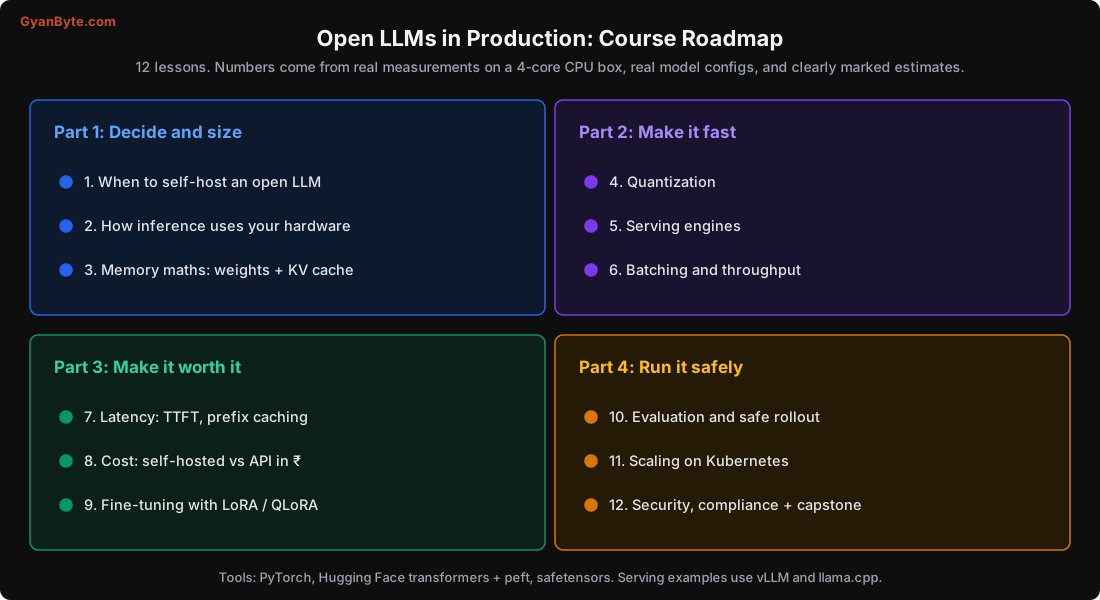
What This Course Covers
| # | Lesson | What you will learn |
|---|---|---|
| 1 | Should You Self-Host an Open LLM? | The honest decision: data rules, volume, control, cost |
| 2 | How LLM Inference Uses Your Hardware | Prefill vs decode, why decode is memory-bound |
| 3 | Memory Maths: Weights and KV Cache | Exact sizes, GQA, what decides how many users fit |
| 4 | Quantization | FP16 to INT4, measured error, formats (GGUF, AWQ, FP8) |
| 5 | Serving Engines | vLLM, llama.cpp, SGLang, and PagedAttention |
| 6 | Batching and Throughput | Continuous batching, throughput vs per-user latency |
| 7 | Latency: TTFT, TPOT and Prefix Caching | Making it feel fast, and a 12.5x TTFT win |
| 8 | The Real Cost in Rupees | Self-hosted cost formula vs API, break-even |
| 9 | Fine-Tuning with LoRA and QLoRA | What to fine-tune, a real training run, memory |
| 10 | Evaluation and Safe Rollout | Eval sets, shadow/canary, what silently breaks quality |
| 11 | Scaling on Kubernetes | GPU pods, autoscaling, cold starts, multi-LoRA |
| 12 | Security, Compliance + Capstone | Model supply chain, prompt injection, a full design |
How This Fits With the Other Courses
The site already has an LLM Engineering in Production course and an AI Engineer Practical Guide. Those are about building applications with LLMs: prompts, RAG, agents, mostly through APIs. This course is about the layer underneath: running the model itself on your own hardware, and the engineering and economics of doing that well. If those courses are about using the engine, this one is about the engine room.
Who Is This For?
- Backend and ML engineers asked to “self-host an open model” and unsure where to start
- Teams weighing an API bill against buying or renting GPUs
- Anyone who has run an open model and found it slow, too big, or expensive, and wants to know why
Prerequisites
- Comfortable with Python and the basic idea of what an LLM does (tokens in, tokens out)
- You don’t need a GPU to follow along: the experiments run on a CPU, and the GPU numbers are given as clearly-marked estimates with the arithmetic
- Helpful but not required: having called an LLM API before, and basic Docker/Kubernetes familiarity for the scaling lesson
Let’s start with the question you should answer before writing any code: should you self-host at all?