A team I knew wrote their first LLM service as a FastAPI endpoint that called Hugging Face model.generate() for each request. It worked in the demo. In production, it handled about one request at a time, the GPU sat mostly idle, and it fell over at ten concurrent users. They concluded their GPU “wasn’t powerful enough” and asked for a bigger one. The GPU was fine. They just weren’t using a serving engine, and so they were leaving 90% of it unused.
This lesson is about that missing layer: the software that takes model weights and turns them into a fast, concurrent API. You almost never write this yourself, but you must choose one and understand what it does, because it’s the difference between serving one user and serving fifty on the same hardware.
Why Not Just transformers?
Hugging Face transformers is wonderful for research and for loading models, but its generate() is built for correctness and flexibility, not serving. If you build a server around it naively, you get:
- One request at a time (or clumsy fixed batches). The GPU’s spare compute during decode (Lesson 2) is wasted.
- No smart KV-cache management, so memory is used inefficiently and you can serve far fewer concurrent requests.
- No continuous batching (Lesson 6), so short requests wait behind long ones.
- You reinvent streaming, cancellation, metrics, health checks, quantized-model loading.
A serving engine provides all of this. The good news: the serious ones all expose an OpenAI-compatible HTTP API, so switching from an API provider to a self-hosted model (or between engines) is often just changing a base URL and model name in your client.
The Engines
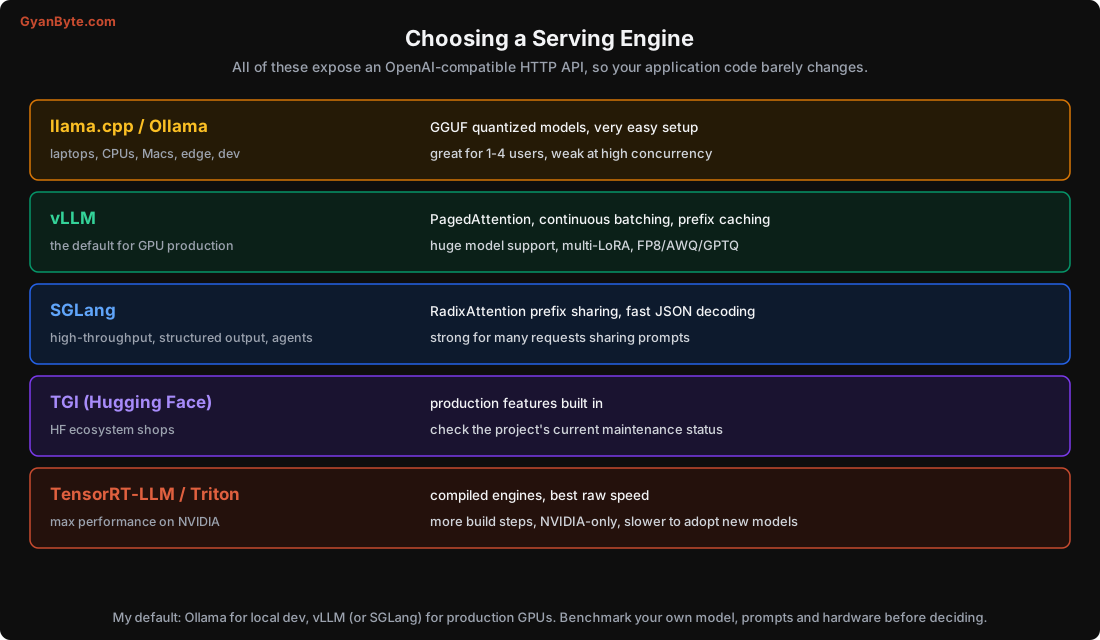
llama.cpp / Ollama — for laptops, CPUs, Macs, edge and development. llama.cpp is a C++ inference engine that runs GGUF-quantized models (Lesson 4) efficiently on CPUs and Apple Silicon, with optional GPU offload. Ollama wraps it with a dead-simple experience (ollama run qwen2.5). Perfect for local development, prototypes, edge devices, and low-concurrency internal tools. It can serve a few users well, but it’s not built for high-throughput GPU serving.
vLLM — the default choice for GPU production, and what I’d reach for first. It introduced PagedAttention (below), does continuous batching and prefix caching, supports a huge range of models and quantization formats (FP8, AWQ, GPTQ), and serves multiple LoRA adapters on one base model (Lesson 11). Mature, widely deployed, OpenAI-compatible server built in.
SGLang — a high-throughput engine with particular strengths in structured output (fast constrained JSON decoding) and workloads where many requests share a prefix (its RadixAttention shares KV cache across requests with common beginnings, great for agents and RAG with a shared system prompt). A strong alternative to vLLM, especially for agent-heavy or structured-output workloads.
TGI (Text Generation Inference) — Hugging Face’s serving engine, convenient if you live in the HF ecosystem. It has the production features you’d expect; check the project’s current activity and release cadence when you choose, as the serving landscape moves fast.
TensorRT-LLM / Triton — NVIDIA’s stack for maximum performance. It compiles model-specific engines for the best raw speed on NVIDIA GPUs. The trade-off is more build steps, NVIDIA-only, and slower to support brand-new models (you often wait for the compiled path). Reach for it when you’ve maxed out vLLM and need every last token/second on NVIDIA hardware.
My default recommendation: Ollama for local dev, vLLM (or SGLang) for production on GPUs. But benchmark your own model, your own prompt shapes, and your own hardware before committing; the “fastest” engine depends on all three.
A minimal vLLM server, for concreteness:
pip install vllm
python -m vllm.entrypoints.openai.api_server \
    --model Qwen/Qwen2.5-7B-Instruct \
    --quantization fp8 \
    --max-model-len 8192 \
    --gpu-memory-utilization 0.90 \
    --enable-prefix-caching
# now it speaks the OpenAI API on :8000; point your existing client at it
PagedAttention: The Idea That Made Serving Fast
The single most important advance in LLM serving was PagedAttention, introduced by vLLM in 2023. To see why it matters, recall from Lesson 3 that the number of concurrent requests you can serve is limited by KV-cache memory. So anything that wastes KV-cache memory directly cuts how many users you can serve.
Naive servers waste a lot of it.
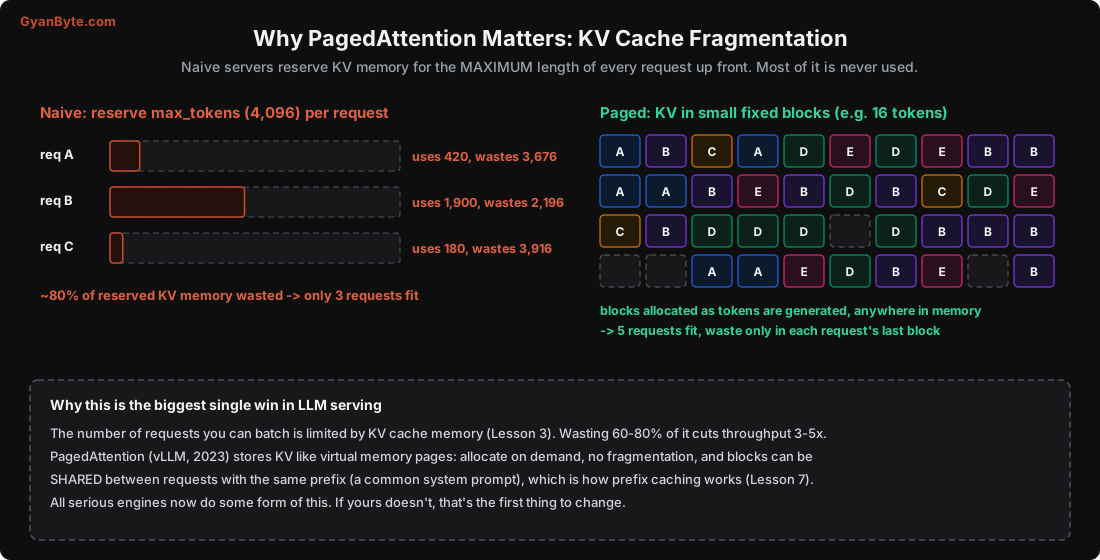
The problem: a request might generate up to max_tokens (say 4,096) tokens, but you don’t know how many it will actually use until it finishes. A naive engine reserves KV-cache memory for the maximum length of every request, up front. Most requests use a fraction of that. In the diagram, three requests reserve 4,096 tokens each but use 420, 1,900 and 180, wasting roughly 80% of the memory they hold. That wasted memory can’t be used by other requests, so far fewer requests fit, so the batch is small, so throughput is low.
PagedAttention borrows the idea of virtual memory from operating systems. Instead of one big contiguous reservation per request, it splits the KV cache into small fixed-size blocks (e.g. 16 tokens each). A request is given blocks on demand as it generates tokens, and the blocks can be anywhere in memory. The only waste is the unused part of each request’s last block, a few tokens at most. Fragmentation essentially disappears.
The payoff is big: with the waste gone, many more requests fit in the same memory, so the engine can batch far more of them together (Lesson 6), so throughput goes up several-fold. vLLM’s original paper reported 2-4x higher throughput than the previous best, almost entirely from this memory management.
And there’s a bonus that we’ll use in Lesson 7: because KV cache lives in blocks, two requests that share a prefix (the same system prompt, the same retrieved document) can share the same blocks instead of each storing their own copy. That’s how prefix caching works, and it saves both memory and the compute to rebuild that prefix.
Every serious engine now does some form of paged KV management. If you’re evaluating an engine and it doesn’t, that’s a red flag.
Beyond the Core: What Else Engines Give You
When you compare engines, look past raw speed for the production features you’ll need:
- Quantization support: which formats (FP8, AWQ, GPTQ, GGUF) your model and hardware need.
- Structured output: guided decoding against a JSON schema or grammar, so the model can’t emit invalid JSON. Vital for extraction and tool use.
- Prefix caching (Lesson 7): big win for RAG and agents with shared prompts.
- Multi-LoRA (Lesson 11): serve many fine-tuned adapters on one base model.
- Speculative decoding (Lesson 7): draft-model acceleration for latency.
- Metrics: Prometheus metrics for TTFT, TPOT, queue depth, KV-cache usage, essential for autoscaling (Lesson 11) and SLOs.
- Tensor/pipeline parallelism: splitting a model that doesn’t fit one GPU (like 70B fp16) across several.
- Tool/function calling and chat templates: correct handling of the model’s chat format (a common source of “the model is dumb” bugs, Lesson 10).
Pitfalls to Avoid
- Serving with a
transformers generate()loop. It’s one-at-a-time; the GPU sits idle. - Blaming the GPU for low throughput when the real issue is no batching / no paged KV.
- Choosing an engine on a single benchmark number. The winner depends on your model, prompts and hardware.
- Using a CPU/laptop engine (Ollama) for high-concurrency production. Great for dev, not for scale.
- Ignoring structured-output support and then fighting invalid JSON in your app.
- Skipping metrics. Without TTFT/TPOT/KV-usage metrics you can’t set SLOs or autoscale.
- Forgetting the chat template. The wrong template silently degrades every answer.
Quick Recap
- Serving needs a real engine, not a plain
transformersloop; a bad setup wastes most of the GPU. - llama.cpp/Ollama for dev and CPU/Mac; vLLM as the GPU-production default; SGLang for throughput and structured output; TGI for HF shops; TensorRT-LLM for max NVIDIA speed.
- They all expose an OpenAI-compatible API, so switching is mostly a URL change.
- PagedAttention cut KV-cache fragmentation from 60-80% waste to almost none, enabling large batches and 2-4x throughput, and it enables prefix caching.
- Compare engines on quantization support, structured output, prefix caching, multi-LoRA, metrics and parallelism, not just raw speed.
Next lesson: batching, where that paged memory pays off. How serving many users at once raises throughput several-fold, the trade-off with per-user latency (measured), and continuous batching.