“We quantized the model to 4-bit and it got dumb.” I’ve heard this many times, and it’s usually not because 4-bit is inherently bad. It’s because they used a naive method, or didn’t measure, or both. Done well, 4-bit quantization loses very little; done badly, it wrecks the model. The difference is a few specific techniques, and this lesson shows the error numbers for each, measured on a real matrix shape.
What Quantization Is
Model weights are usually trained in 16-bit floating point (FP16 or BF16). Quantization stores them in fewer bits: 8-bit integers, 4-bit integers, even fewer. The reasons, from Lessons 2 and 3:
- Less memory: 4-bit weights are a quarter the size of FP16. An 8B model drops from ~15 GiB to ~3.7 GiB.
- Faster decode: decode is memory-bandwidth-bound, so fewer bytes per weight means fewer bytes to read per token, so faster generation. (It helps prefill less, since prefill is compute-bound.)
- More room for KV cache: freed memory means more concurrent users.
The basic mechanism: take a group of weights, find their range, and map that range onto the integer values available. For 8-bit signed, you have 256 levels; for 4-bit, just 16. To reconstruct an approximate weight, you multiply the integer by a scale. The question is how to choose the groups and scales so the approximation stays close to the original.
Measuring the Error
I measured quantization error directly. I took a weight matrix shaped like a Llama-3.1-8B MLP projection (4096 × 14336), ran a realistic input through it, and compared the output of the quantized matrix to the FP32 output. The error is the relative difference in the result y = Wx, which is what actually propagates through the model.
I tested two cases: clean Gaussian weights, and weights with outliers (a small fraction of input channels scaled up 8x). Outliers matter because real trained LLM weights have exactly this: a few channels with much larger values than the rest, and they carry a lot of the signal.
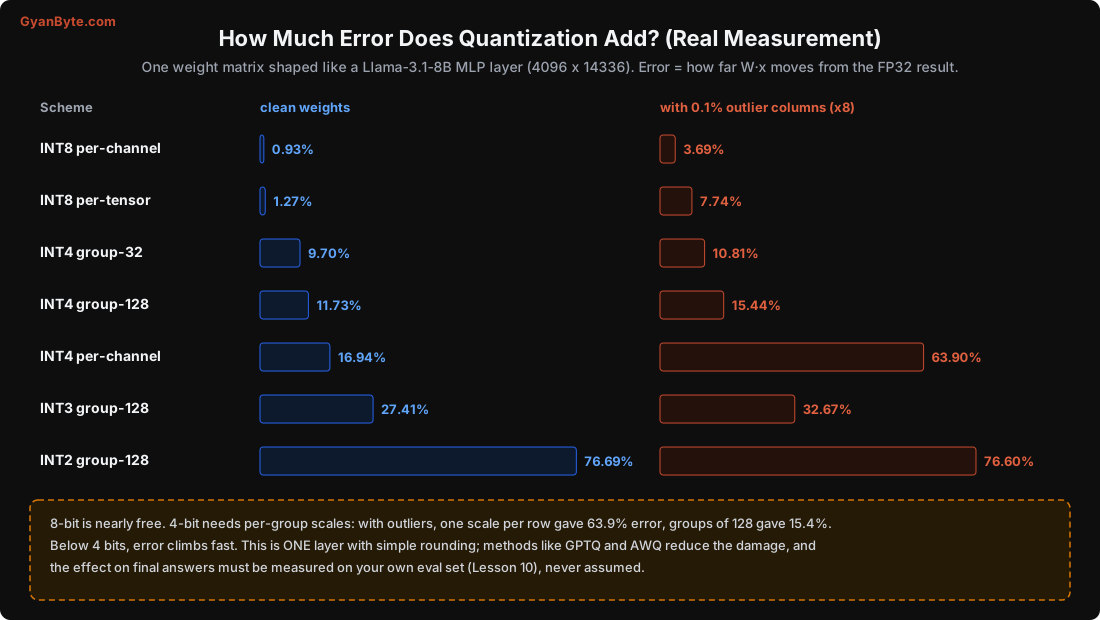
The numbers (output error, lower is better):
scheme              clean weights    with outliers
INT8 per-channel         0.93%           3.69%
INT8 per-tensor          1.27%           7.74%
INT4 group-32            9.70%          10.81%
INT4 group-128          11.73%          15.44%
INT4 per-channel        16.94%          63.90%     <- naive 4-bit
INT3 group-128          27.41%          32.67%
INT2 group-128          76.69%          76.60%
Read these top to bottom:
- INT8 is nearly free. 0.93% error per-channel on clean weights. This is why 8-bit is considered almost lossless and is a safe default.
- Naive INT4 is bad, especially with outliers. One scale per channel gave 17% error on clean weights and a disastrous 64% once outliers were present. One big outlier forces a large scale, which makes every other (small) weight in that channel round terribly.
- Group-wise scales rescue INT4. Using a separate scale for every 128 weights (a “group”) cut the error to 15.4% even with outliers; groups of 32 got it to 10.8%. Smaller groups = more scales = more memory but less error.
- Below 4 bits, quality falls off a cliff. INT3 is marginal; INT2 is mostly noise for straightforward rounding.
The lesson is clear: how you quantize matters more than the bit count. “4-bit” with per-channel scales and “4-bit” with group-128 scales are both “4-bit” but behave completely differently.
A caveat: this is one layer with simple round-to-nearest. Real quantization methods (next section) do much better, because they calibrate against real data and compensate for the error. So treat these numbers as showing the shape of the problem (outliers hurt, groups help, fewer bits are worse), not as the final quality of a properly-quantized model.
The Formats You’ll Actually Meet
You rarely implement quantization yourself. You download an already-quantized model, or run a tool. Here’s what the names mean:
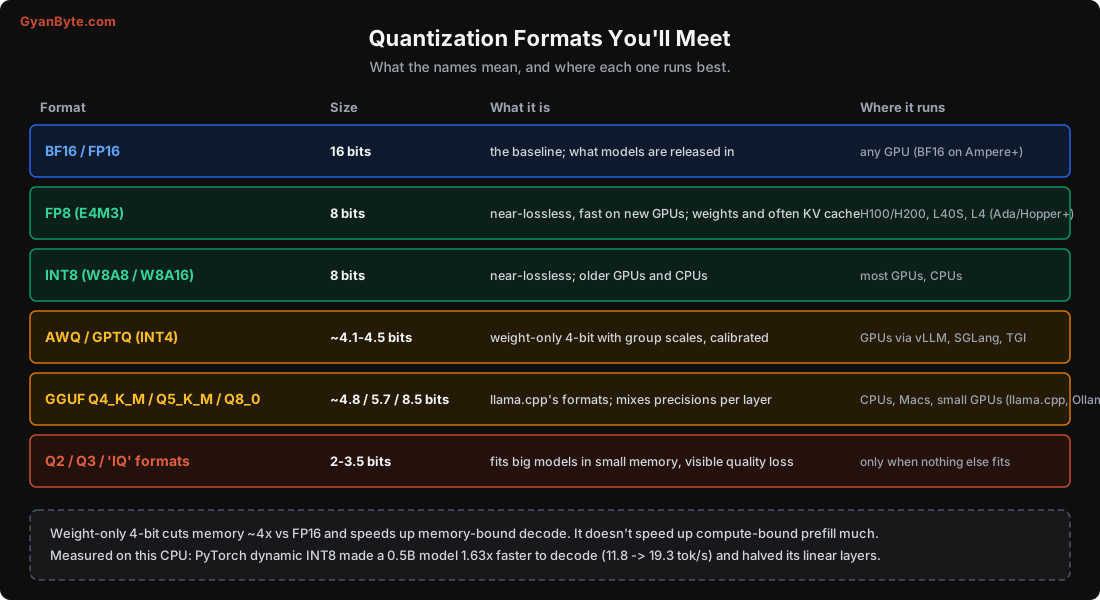
The practical guidance:
- FP8: on newer NVIDIA GPUs (H100, L40S, Ada-generation L4), FP8 is near-lossless and fast, and can quantize the KV cache too. If your hardware supports it, it’s often the best default for 7-70B serving.
- INT8: near-lossless everywhere, including older GPUs and CPUs. A safe choice when FP8 isn’t available.
- AWQ and GPTQ (4-bit): the two main calibrated weight-only 4-bit methods for GPUs. They look at a small calibration dataset and choose scales (AWQ) or adjust weights (GPTQ) to minimise the error, far better than the naive rounding I measured. Served by vLLM, SGLang, TGI. Use these when you want 4-bit on a GPU.
- GGUF (Q4_K_M, Q5_K_M, Q8_0, etc.): llama.cpp’s formats, for CPUs, Macs and small GPUs. The
_K_Mvariants mix precisions across layers (keeping sensitive layers higher). Q4_K_M (~4.8 bits) is the popular “good enough and small” choice; Q8_0 is near-lossless; Q5_K_M is a middle ground. Ollama uses these under the hood. - Q2/Q3 and the “IQ” formats: sub-4-bit. Use only to fit a model that otherwise wouldn’t, and expect visible quality loss. A larger model at Q4 usually beats a smaller model at the same memory.
A rule many people use: for a fixed memory budget, a bigger model at 4-bit usually beats a smaller model at 8-bit or 16-bit. A 70B at 4-bit (~33 GiB) is generally stronger than a 13B at 16-bit (~26 GiB). Within reason, parameters matter more than per-weight precision, down to about 4 bits.
Does It Actually Speed Things Up? (Measured)
Yes, for decode, because of the memory-bandwidth argument from Lesson 2. I quantized a 0.5B model to INT8 using PyTorch’s built-in dynamic quantization (a quick, no-calibration method) and measured on the CPU:
fp32:          1.84 GiB   11.83 tok/s decode   prefill 64 tokens: 565 ms
int8 dynamic:  0.97 GiB   19.26 tok/s decode   prefill 64 tokens: 262 ms
The INT8 model was half the size and decoded 1.63x faster. (Prefill also sped up here because this CPU path happens to use faster integer kernels; on GPUs the prefill gain from weight-only quantization is usually smaller, since prefill is compute-bound and the weights get converted back to a compute format anyway.)
On GPUs the decode speed-up from 4-bit is similar in spirit: roughly proportional to the reduction in bytes read per token, minus some overhead for de-quantizing on the fly. Real-world numbers vary by kernel and hardware; measure your own.
What to Quantize, and What Not To
- Weights: the main target. 8-bit near-free, 4-bit usually fine with AWQ/GPTQ/GGUF-K.
- KV cache: can also be quantized (FP8 or INT8 KV cache), which directly increases how many users fit (Lesson 3). Supported in vLLM and others. Slight quality cost; measure it.
- Activations: harder, because of those outliers. “W8A8” quantizes both weights and activations to 8-bit; “W4A16” keeps activations at 16-bit and only weights at 4-bit (the common case for decode).
- Some layers are usually kept higher: embeddings, the final output layer, and layer-norm parameters are small but sensitive, and are often left in 16-bit. This is part of why real 4-bit files are bigger than
params × 0.5.
Always Measure on Your Own Data
The single most important rule: quantization’s effect on quality must be measured on your task, not assumed. The 15% matrix-level error I measured does not translate to 15% worse answers, it might be unnoticeable, or it might break one specific capability. The only way to know is an eval set (Lesson 10). I’ve seen 4-bit quantization be invisible on summarisation but noticeably hurt structured JSON output or arithmetic for the same model. Run your evals at each precision and pick the smallest that passes.
Pitfalls to Avoid
- Judging quantization by bit count alone. Per-channel vs group-128 INT4 differ enormously (64% vs 15% error with outliers).
- Using naive round-to-nearest 4-bit when calibrated AWQ/GPTQ exists.
- Going below 4 bits to save memory when a smaller model at 4-bit would be better.
- Assuming “8-bit is lossy”. It’s near-free (0.9% in my test); use it freely.
- Not measuring on your own eval set. Matrix error isn’t answer quality; test the tasks you care about.
- Forgetting the KV cache. You can quantize it too, for more concurrent users.
- Expecting big prefill speed-ups from weight-only quantization on GPU. It mainly helps decode and memory fit.
Quick Recap
- Quantization trades bits for memory and decode speed; the method matters more than the bit count.
- Measured on a real matrix shape: INT8 per-channel 0.9% error (near-free); naive INT4 per-channel 17-64%; INT4 with group-128 scales 11-15%.
- Outlier channels are why naive 4-bit fails and why group-wise scales, GPTQ and AWQ exist.
- Formats: FP8/INT8 near-lossless; AWQ/GPTQ for 4-bit on GPUs; GGUF Q4_K_M/Q8_0 for CPUs and Macs; sub-4-bit only when forced.
- Measured 1.63x CPU decode speed-up from INT8. Always confirm quality on your own eval set.
Next lesson: the software that actually serves the model. vLLM, llama.cpp, SGLang and friends, and the one idea (PagedAttention) that made high-throughput LLM serving possible.