A team once told me their 8B model “needs 80 GB of GPU memory” because it kept running out. The weights are about 16 GB in fp16. Where did the other 64 GB go? The answer was the KV cache: they were serving long conversations to many users, and nobody had accounted for the memory that grows with every token. Once they understood the KV cache, they could actually plan capacity.
This lesson is the arithmetic of LLM memory. It’s not glamorous, but it’s the difference between “the model fits and serves 50 users” and “the model OOMs at 3 PM every day”. There are only two things taking up memory, and we’ll count both exactly.
Part 1: Weights
The weights are the model’s parameters, and their memory is simple:
weight memory = number of parameters × bytes per parameter
Bytes per parameter depends on precision: 2 for FP16/BF16, 1 for INT8/FP8, 0.5 for INT4. So you need the parameter count. People quote round numbers (“7B”, “8B”), but the exact count matters for fitting a GPU. I computed the exact counts by building each architecture from its published config on PyTorch’s meta device (which creates the structure without allocating weights):
import torch
from transformers import AutoModelForCausalLM, LlamaConfig

cfg = LlamaConfig(hidden_size=4096, num_hidden_layers=32, num_attention_heads=32,
                  num_key_value_heads=8, intermediate_size=14336,
                  vocab_size=128256, tie_word_embeddings=False)   # Llama-3.1-8B
with torch.device("meta"):
    model = AutoModelForCausalLM.from_config(cfg)
params = sum(p.numel() for p in model.parameters())
print(params / 1e9, "B")      # 8.03 B
The results, and what they weigh at each precision:
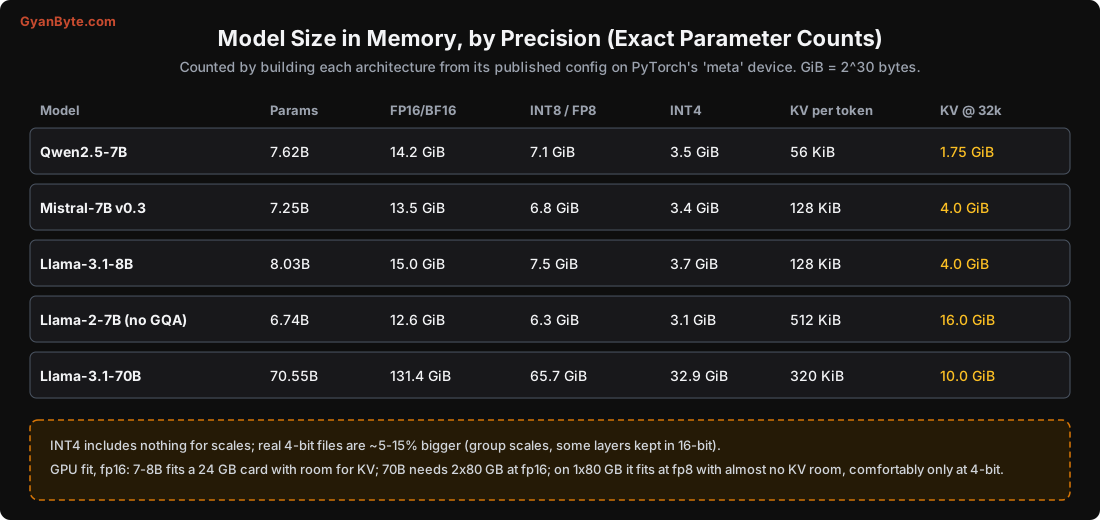
Qwen2.5-7B      7.62B   fp16 14.2 GiB   int8 7.1   int4 3.5 GiB
Llama-3.1-8B    8.03B   fp16 15.0 GiB   int8 7.5   int4 3.7 GiB
Llama-3.1-70B  70.55B   fp16 131.4 GiB  int8 65.7  int4 32.9 GiB
So the quick GPU-fit rule for weights:
- 7-8B fp16 (~14-15 GiB): fits a 24 GB card (L4, RTX 4090, A10) with room to spare for the KV cache.
- 70B fp16 (~131 GiB): needs two 80 GB GPUs. At 4-bit (~33 GiB) it fits one 80 GB card, but with little room for KV cache.
- INT4 7-8B (~3.5-3.7 GiB): fits comfortably on consumer GPUs, and even many laptops.
(A caveat: my INT4 figures are just params × 0.5 bytes. Real 4-bit files are 5-15% bigger because they store per-group scales and often keep some layers, like embeddings, in higher precision. Lesson 4 explains why.)
Part 2: The KV Cache
Now the part people forget. During decode, the model needs the keys and values of all previous tokens to attend to them. Rather than recompute those every step, it stores them: that’s the KV cache. It grows by one token’s worth of K and V every time a token is processed, for every active request.
The size per token:
KV bytes per token = 2 (K and V) × layers × KV-heads × head-size × bytes-per-element
The 2 is for keys and values. Let’s compute it for Llama-3.1-8B in fp16: 32 layers, 8 KV heads, head size 128 (= hidden 4096 ÷ 32 attention heads), 2 bytes:
2 × 32 × 8 × 128 × 2 bytes = 131,072 bytes = 128 KiB per tokenSo:
- An 8,000-token conversation holds
128 KiB × 8,000 ≈ 1 GiBof KV cache. For one request. - A 32,000-token context:
128 KiB × 32,768 = 4 GiB. For one request.
Multiply by the number of concurrent requests, and you see why the KV cache dominates. Ten users with 8k-token histories is ~10 GiB of KV cache, on top of the 15 GiB of weights.
I checked the formula against reality. On the 0.5B model, I ran 1,024 tokens through and measured the actual KV cache tensors:
measured KV for 1,024 tokens: 24.0 MiB
formula: 2 × 24 layers × 2 KV heads × 64 head-size × 4 bytes × 1,024 = 24.0 MiB
Exactly as predicted. (This model was in fp32, hence 4 bytes.)
Why GQA Changed Everything
Look again at the KV-per-token numbers in the table: Qwen2.5-7B is 56 KiB, but the older Llama-2-7B is 512 KiB, almost 10x more, for a similar-sized model. The difference is grouped-query attention (GQA).
In the original attention design (multi-head attention, MHA), every attention head has its own key and value. Llama-2-7B has 32 attention heads and 32 KV heads. GQA lets several attention heads share one key/value head. Llama-3.1-8B has 32 attention heads but only 8 KV heads (groups of 4 share). Qwen2.5-7B has 28 attention heads and just 4 KV heads (groups of 7).
Since the KV cache size depends on the number of KV heads, not attention heads, GQA shrinks it directly:
Llama-2-7B (32 KV heads):  512 KiB/token  ->  32k context = 16 GiB KV, for ONE request
Llama-3.1-8B (8 KV heads): 128 KiB/token  ->  32k context =  4 GiB
Qwen2.5-7B  (4 KV heads):   56 KiB/token  ->  32k context = 1.75 GiB
This is why modern models support long contexts and high concurrency on sensible hardware, and why the old ones struggled. It’s also a real selection criterion: if you serve long contexts to many users, a model with fewer KV heads (Qwen2.5, for example) will fit far more users in the same memory. Some newer models push this further with multi-head latent attention (MLA, in DeepSeek) and other KV-compression tricks.
Where the Memory Goes, All Together
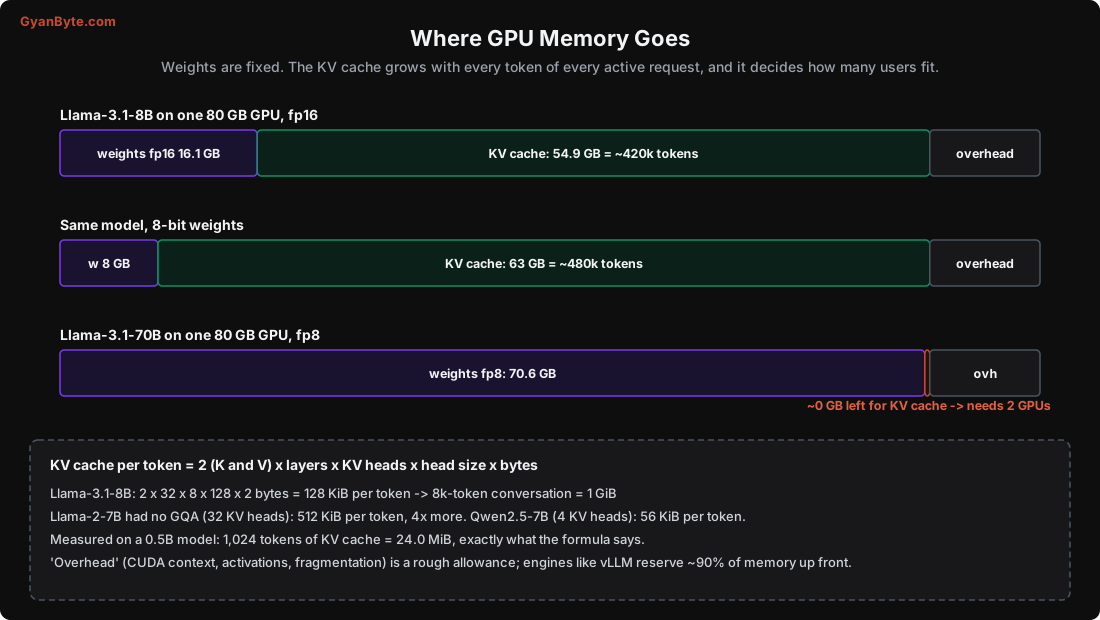
On a serving GPU, memory is divided roughly into:
- Weights (fixed): 16 GB for an 8B fp16 model.
- KV cache (grows with usage): whatever’s left after weights and overhead. This is your “token budget”. On an 80 GB GPU with a 16 GB model, maybe 55 GB of KV cache, which is about 4.2 lakh tokens total, shared across all active requests.
- Overhead: the CUDA context, activations during the forward pass, memory fragmentation, the engine’s own buffers. A few GB, and lumpy.
The key insight: quantizing the weights doesn’t just let a bigger model fit; it frees memory for more KV cache, which means more concurrent users. Dropping from fp16 to 8-bit weights on an 8B model frees ~8 GB, which is ~60k more tokens of KV cache, which could be several more concurrent conversations.
This is also why serving engines (Lesson 5) reserve almost all GPU memory up front and manage the KV cache themselves (vLLM grabs ~90% by default). They need to know the token budget to decide how many requests to batch.
Planning Capacity: A Worked Example
Say you want to serve Llama-3.1-8B on one 80 GB GPU, for a chat product where the average conversation is 4,000 tokens.
Weights (fp16):           16 GiB
Overhead (allowance):      6 GiB
Left for KV cache:        58 GiB
KV per token:            128 KiB
Token budget:    58 GiB / 128 KiB  ≈  475,000 tokens
Concurrent 4k convos:  475,000 / 4,000  ≈  118
So, very roughly, this setup could hold ~118 concurrent conversations’ worth of KV cache. Whether it can serve them fast enough is a separate question (throughput, Lesson 6), but memory is the hard ceiling: once the KV cache is full, new requests must wait (or be rejected, or an existing one evicted). Switch to 8-bit weights and the token budget rises to ~550k; switch to Qwen2.5-7B (56 KiB/token) and it more than doubles again.
Pitfalls to Avoid
- Budgeting only for weights. The KV cache often needs as much memory as the weights, or more.
- Ignoring context length. A 32k-token request can hold 4 GiB of KV cache by itself (Llama-3.1-8B).
- Ignoring concurrency. KV cache is per active request; 50 users is 50x one user’s cache.
- Picking a model without checking its KV-head count. GQA makes a 10x difference to how many users fit.
- Using
params × 0.5as the exact 4-bit size. Real files are 5-15% bigger (scales, mixed precision). - Forgetting overhead. Activations and the CUDA context take several GB before you serve anyone.
- Assuming “it fit in a quick test” means it fits in production. A test with short prompts and one user hides the KV cache growth.
Quick Recap
- GPU memory holds weights (fixed) and KV cache (grows with every token of every request).
- Weights = params × bytes/param: 8.03B is ~15 GiB fp16, 7.5 int8, 3.7 int4 (verified counts).
- KV cache per token = 2 × layers × KV-heads × head-size × bytes; 128 KiB/token for Llama-3.1-8B, matched by a measured 24 MiB for 1,024 tokens on a 0.5B model.
- GQA shrinks the KV cache a lot: 512 KiB/token (Llama-2) vs 56 KiB (Qwen2.5-7B). It decides how many users fit.
- On a serving GPU the KV cache, not the weights, usually sets the concurrent-user ceiling; quantizing weights frees room for more of it.
Next lesson: quantization. How shrinking the weights to 8, 4 or fewer bits works, how much error it really adds (measured), and which format to use where.