Here’s a fact that confuses people at first: a GPU serving one user and a GPU serving thirty users can take almost the same time per decode step. The thirty-user GPU produces thirty tokens in that step instead of one. It’s doing 30x the useful work in the same time. That’s not a trick, it falls straight out of the memory-bandwidth story from Lesson 2, and it’s the single most important fact for the economics of self-hosting. This lesson shows why, measures it, and explains the trade-off that limits it.
Why Batching Is Nearly Free (for Decode)
Recall from Lesson 2 that decode is memory-bandwidth-bound: each decode step reads all the model’s weights from memory to do a small matrix-by-vector multiplication for one token. The compute units are mostly idle, waiting for memory.
Now put several requests in a batch. The engine reads the weights once and does the multiplication for all the requests in the batch at the same time (a matrix-by-matrix multiplication instead of matrix-by-vector). The expensive part, reading the weights, is shared across every request in the batch. The extra compute to handle more requests is work the compute units had spare capacity for anyway.
So on hardware with lots of spare compute (a GPU), you can add requests to a decode batch and the step takes barely longer, while producing one token for each request. Throughput (total tokens per second across all users) climbs steeply. This is why one GPU serves dozens of users, and why the cost per token falls as you pack more users in.
Measuring It (on a CPU, the Hard Case)
I measured batching on the 4-core CPU, which is actually the unfavourable case: a CPU has little spare compute, so the gains are smaller than on a GPU. Even so:
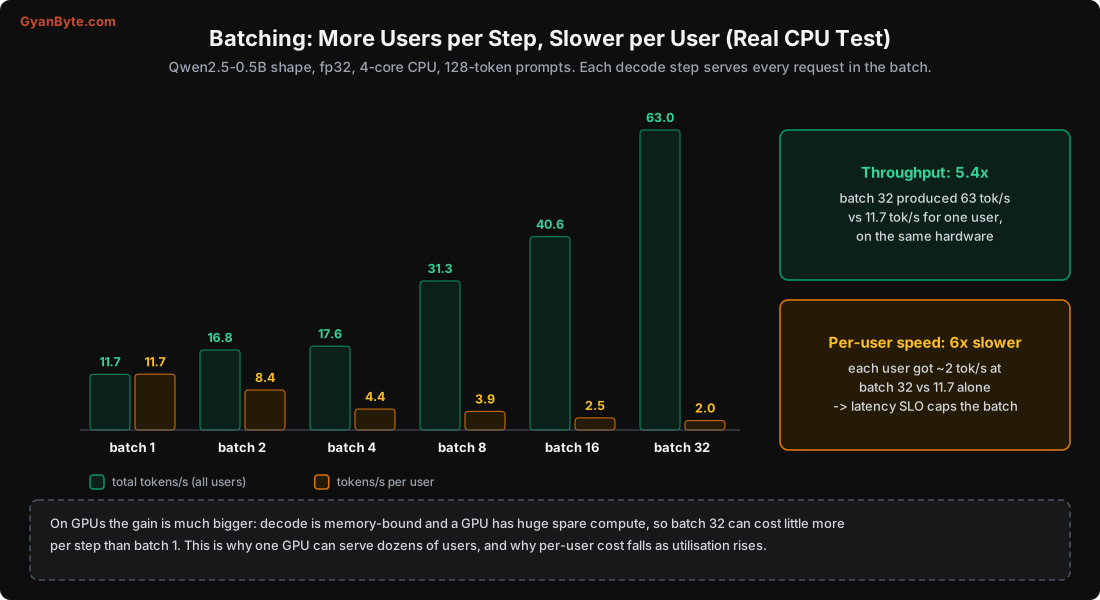
batch  1:  11.7 tokens/s total   11.7 tok/s per user
batch  2:  16.8 tokens/s total    8.4 tok/s per user
batch  4:  17.6 tokens/s total    4.4 tok/s per user
batch  8:  31.3 tokens/s total    3.9 tok/s per user
batch 16:  40.6 tokens/s total    2.5 tok/s per user
batch 32:  63.0 tokens/s total    2.0 tok/s per user
Two things to read here:
- Total throughput rose 5.4x (11.7 → 63 tokens/s) from batch 1 to batch 32, on the same hardware. More users served per second, more value from the same machine.
- Per-user speed fell about 6x (11.7 → 2.0 tokens/s). Each individual user’s tokens came out slower, because this CPU doesn’t have much spare compute to absorb the extra work, so the steps genuinely got longer.
On a GPU, the first effect is much stronger and the second much weaker: decode is memory-bound and the GPU has huge idle compute, so a batch of 32 can cost only slightly more per step than a batch of 1. That’s why a single serving GPU routinely handles dozens of concurrent chats with each user still seeing 30-50+ tokens/s. The CPU numbers understate the GPU win; they prove the direction, and even a compute-starved CPU got 5.4x.
The Trade-Off: Throughput vs Per-User Latency
Batching is not free lunch all the way up. The cost is per-user latency: the more requests in a batch, the longer each decode step takes (a little on a GPU, a lot on a CPU), so each user waits longer between tokens.
This gives you a knob:
- Small batches: fast per user (low time-per-token), but low total throughput and high cost per token (the GPU is underused).
- Large batches: high throughput and low cost per token, but slower per user.
Your latency SLO decides where to sit. If your product needs, say, 30 tokens/s per user (comfortably faster than reading speed), you increase the batch size only until per-user speed would drop below that. That maximum batch size sets your throughput, which sets your cost per token (Lesson 8).
Different products sit in different places:
- Interactive chat: cares about per-user latency. Moderate batches, keep each user fast.
- Background jobs (bulk summarisation, nightly extraction, dataset generation): nobody is watching a token stream, so maximise the batch and the throughput; per-user latency is irrelevant. These should run at the highest batch the memory allows.
- Agents: tricky, because each step blocks the next, so per-step latency adds up over many steps.
The engine (Lesson 5) manages this for you with settings like max_num_seqs (max requests in a batch) and max_num_batched_tokens. You tune them against your SLO.
Static vs Continuous Batching
There’s a subtlety that makes a big difference in practice. Requests have very different output lengths, one user asks for a one-line answer, another for a 500-word essay. How you handle that mix matters.
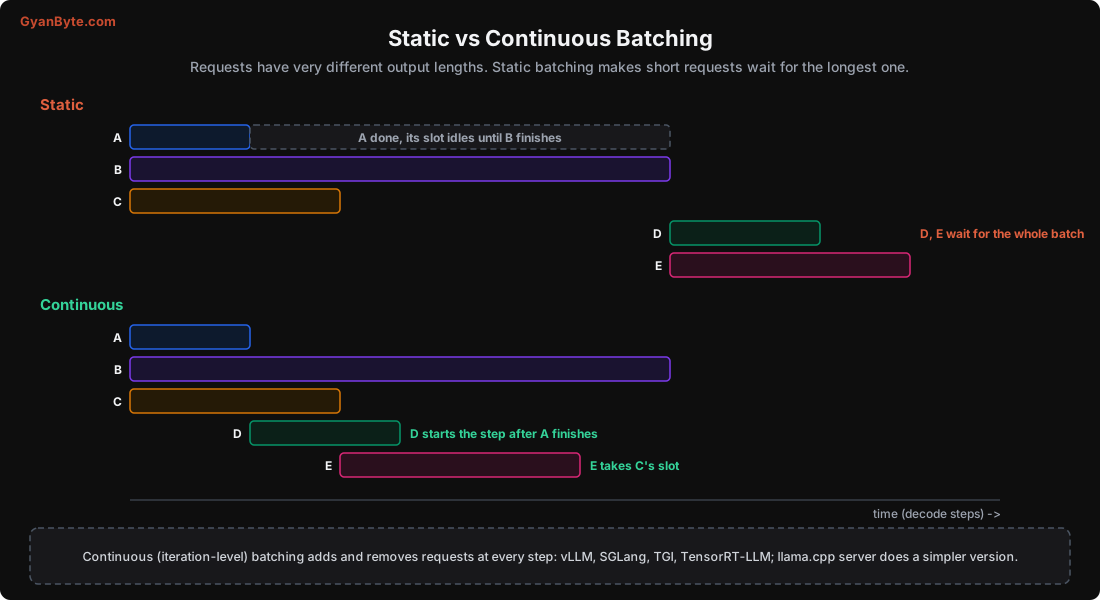
Static batching forms a batch, runs it to completion, then starts the next. The problem: the batch isn’t done until its longest request is done. A request that finishes early leaves its slot idle, wasting capacity, and new requests wait for the whole batch to clear. With varied output lengths, utilisation is poor.
Continuous batching (also called iteration-level or in-flight batching) works at the granularity of a single decode step. After each step, finished requests leave the batch and their slots are immediately filled with waiting requests. No request waits for the whole batch; no slot sits idle while others finish. This keeps the batch full and the hardware busy, and it’s one of the main reasons modern engines get such high throughput.
All the serious GPU engines (vLLM, SGLang, TGI, TensorRT-LLM) do continuous batching by default; llama.cpp’s server does a simpler version. You get it for free by using a good engine, but it’s worth understanding, because it’s why your measured throughput under realistic mixed traffic is much higher than a static-batch benchmark would suggest.
Prefill vs Decode in a Batch
One more practical wrinkle. Prefill (compute-bound) and decode (memory-bound) have different profiles, and a new request’s prefill can briefly stall the decode of everyone already in the batch (the GPU is busy doing the big prefill matmul). Engines handle this with scheduling policies, and some use chunked prefill (splitting a long prefill into pieces interleaved with decode steps) so one user’s giant prompt doesn’t freeze everyone else’s token stream. If you serve a mix of long-prompt and interactive requests, look for this feature; it smooths out the TTFT spikes (Lesson 7).
What This Means for Capacity Planning
Putting Lessons 3 and 6 together, your GPU’s capacity is bounded by two things:
- Memory: how many requests’ KV cache fit (Lesson 3). This is a hard ceiling.
- Compute/latency: how big a batch you can run while still meeting your per-user SLO (this lesson).
Whichever is smaller is your real concurrency limit. For long-context workloads, memory usually binds first; for short-context high-rate workloads, the latency-bounded batch size usually binds first. To plan: measure sustained throughput (tokens/s) at your target batch size and SLO, under realistic prompt/output lengths. That one number drives both your capacity and your cost (Lesson 8).
Pitfalls to Avoid
- Benchmarking with one request and assuming that’s your capacity. Throughput with batching is multiples higher.
- Maxing out batch size for interactive chat. You’ll blow the per-user latency SLO.
- Tiny batches for background jobs. You’re wasting throughput; push the batch as high as memory allows.
- Static batching under mixed output lengths. Short requests wait for long ones; use continuous batching.
- Ignoring prefill stalls. A long prompt entering the batch can spike everyone’s TTFT without chunked prefill.
- Quoting GPU throughput from CPU tests. CPUs understate the batching gain badly (little spare compute).
- Planning capacity on memory OR latency alone. The real limit is whichever binds first.
Quick Recap
- Decode reads the weights once per step regardless of batch size, so batching is nearly free on hardware with spare compute.
- Measured on CPU: batch 32 gave 5.4x total throughput (63 vs 11.7 tokens/s) but 6x slower per user; GPUs do far better on the throughput side.
- The trade-off is per-user latency; your SLO caps the batch size, which sets the cost per token.
- Continuous (iteration-level) batching refills finished slots every step, so short requests don’t wait for long ones; it’s standard in good engines.
- Plan capacity from sustained throughput at your target batch and SLO; the limit is whichever of memory or latency binds first.
Next lesson: latency from the user’s point of view. Time to first token, time per token, how long prompts hurt TTFT, and prefix caching, which cut TTFT by 12.5x in a real test.