A product team reduced their chatbot’s total response time by 40% and users still complained it felt slow. The total time hadn’t been the problem. The time before the first word appeared had crept up, because they’d added a large retrieved context to every prompt. People will happily watch text stream for five seconds, but a three-second blank screen before anything appears feels broken. The number that mattered was time to first token, and nobody was measuring it.
This lesson is about latency as users actually experience it, and the two biggest levers you have over it: prompt structure plus prefix caching, and speculative decoding.
The Two Numbers Users Feel
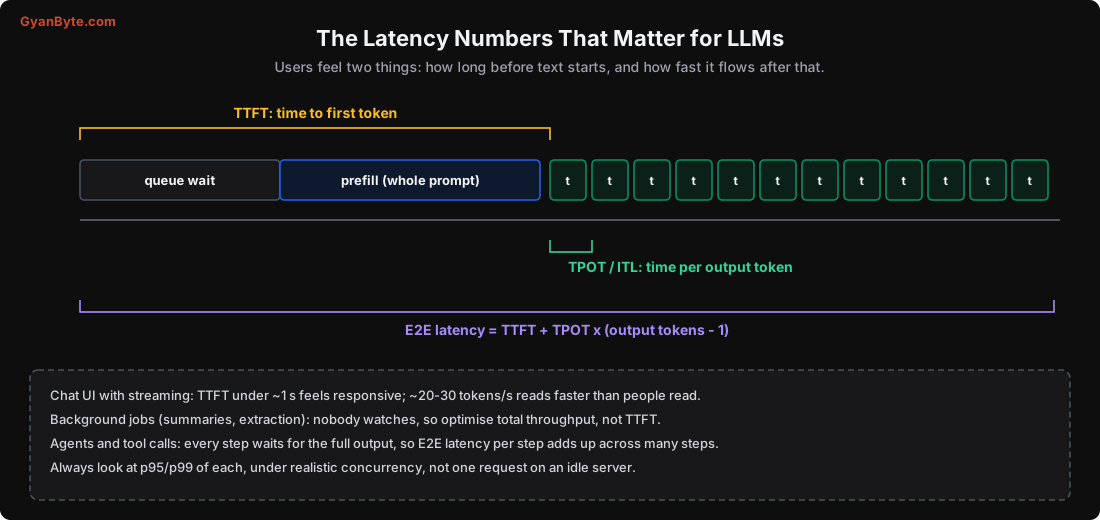
- TTFT (time to first token): from when the request arrives to when the first output token appears. It includes queue wait plus prefill (processing the whole prompt). This is what determines whether the app feels responsive.
- TPOT (time per output token), also called inter-token latency (ITL): the gap between successive output tokens during decode. This determines how fast the answer “flows”. Below the user’s reading speed (~20-30 tokens/s is plenty) it feels smooth.
- End-to-end latency = TTFT + TPOT × (output tokens − 1). The total wait.
Which one matters depends on the workload:
- Streaming chat: TTFT is king. Get the first token out fast, then stream at a comfortable rate. A TTFT under ~1 second feels instant; 20-30 tokens/s is faster than people read.
- Background jobs: nobody watches, so neither TTFT nor TPOT matters much. Optimise throughput (Lesson 6).
- Agents and tool-calling: each step must produce its whole output before the next step can run, so end-to-end latency per step matters, and it adds up across many steps. A 10-step agent where each step takes 3 seconds is a 30-second task.
And always look at p95 and p99 under realistic concurrency, not one request on an idle server. Latency under load (with a full batch, queue wait, prefill stalls) is what users actually get.
Long Prompts Kill TTFT
Since TTFT includes prefill, and prefill processes the whole prompt, TTFT grows with prompt length. I measured it on the 0.5B model on CPU:
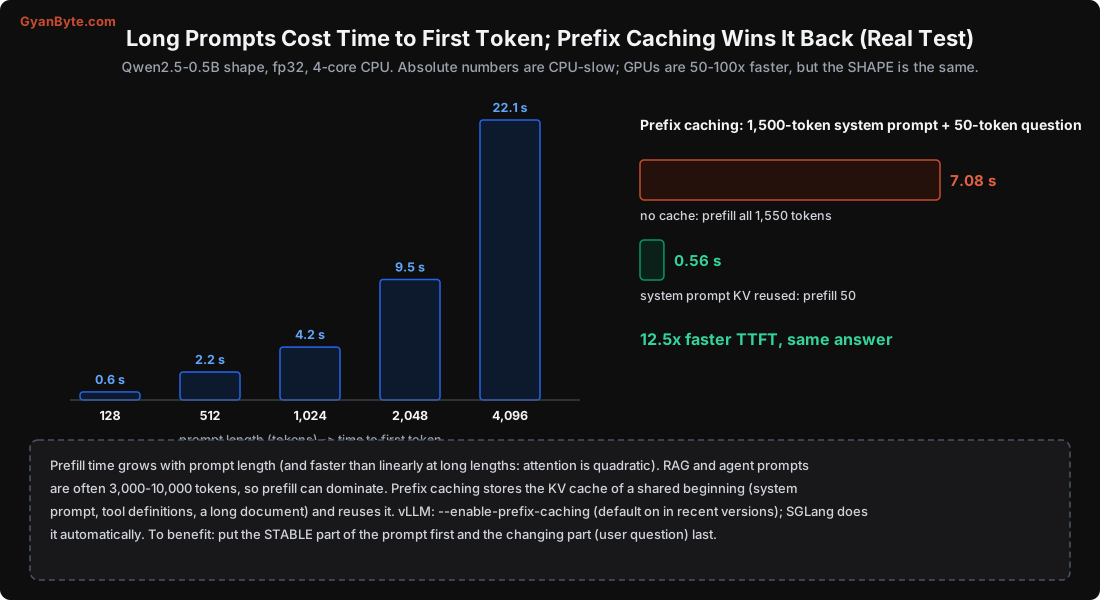
prompt   128 tokens: TTFT  0.6 s
prompt 1,024 tokens: TTFT  4.2 s
prompt 2,048 tokens: TTFT  9.5 s
prompt 4,096 tokens: TTFT 22.1 s
TTFT grows roughly with prompt length, and actually a bit faster than linearly at long lengths, because attention cost is quadratic in sequence length. The absolute numbers are CPU-slow (a GPU is 50-100x faster), but the shape is identical: a long prompt means a long wait before the first token.
This matters enormously because modern prompts are long:
- RAG: you stuff retrieved documents into the prompt. 3,000-10,000 tokens is normal.
- Agents: system prompt + tool definitions + conversation history + scratchpad. Easily 5,000+ tokens, re-sent every step.
- Few-shot prompting: several examples prepended to every request.
For these, prefill (not decode) often dominates the user’s wait. Which is exactly where the next technique helps.
Prefix Caching: The Biggest TTFT Win
Here’s the key observation: much of a long prompt is the same every time. The system prompt, the tool definitions, a long document you’re asking many questions about, the few-shot examples. Re-processing that identical prefix on every request is wasted work.
Prefix caching stores the KV cache (Lesson 3) of a prompt prefix and reuses it. When a new request shares that prefix, the engine skips straight to processing only the new part. Thanks to PagedAttention (Lesson 5), the shared prefix’s KV blocks can be reused across requests without copying.
I measured it directly. A 1,500-token system prompt, followed by a 50-token question:
no prefix cache (prefill all 1,550 tokens):      7.08 s
with cached system prompt (prefill 50 tokens):   0.56 s
12.5x faster time to first token, for the exact same answer. The engine reused the system prompt’s KV cache and only had to process the 50-token question.
To actually benefit from this, you have to structure your prompt correctly: put the stable part first and the changing part last.
GOOD (stable prefix, cacheable):
  [system prompt]  [tool definitions]  [retrieved document]  [user question]
                   ^--------- identical across requests -----^   ^-- varies --^

BAD (changing content early, breaks the cache):
  [user question]  [system prompt]  [retrieved document]
   ^-- varies, so nothing after it can be cached --------^
If the user’s question comes first, the cache can’t match anything after it, and you lose the win. This is a free speed-up you get just by ordering the prompt thoughtfully.
Turning it on: vLLM has --enable-prefix-caching (on by default in recent versions); SGLang’s RadixAttention does automatic prefix sharing across requests, which is especially powerful when many users share a system prompt or document.
Speculative Decoding: Faster TPOT
The other lever is TPOT, the decode speed. Speculative decoding attacks it cleverly.
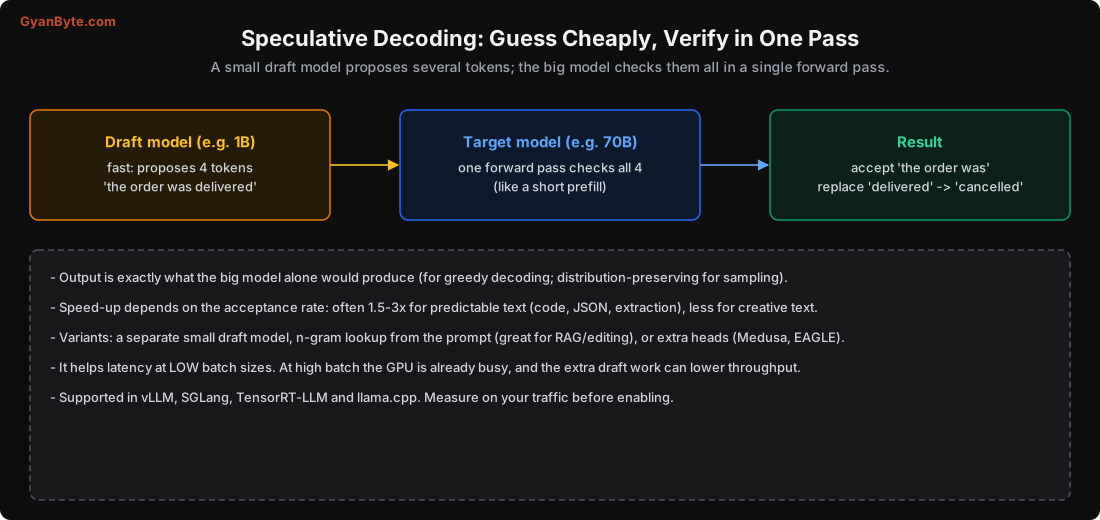
Normally decode produces one token per expensive forward pass of the big model. Speculative decoding uses a small, fast draft model to guess several tokens ahead, then the big model verifies all of them in a single forward pass (verification is like a short prefill, which is cheap per token). Every token the big model agrees with is accepted for free; at the first disagreement, it uses its own token and the draft restarts from there.
The crucial property: the output is exactly what the big model would have produced on its own (for greedy decoding; distribution-preserving for sampling). It’s not an approximation, it’s a speed-up with no quality cost.
The speed-up depends on the acceptance rate: how often the draft guesses right.
- Predictable text (code, JSON, structured extraction, boilerplate): high acceptance, often 1.5-3x faster.
- Creative or surprising text: lower acceptance, smaller gains.
Variants: a separate small draft model; n-gram / prompt lookup (guess by finding repeats in the prompt itself, great for editing and RAG where the output echoes the input); or extra prediction heads on the model (Medusa, EAGLE). It’s supported in vLLM, SGLang, TensorRT-LLM and llama.cpp.
One caveat: speculative decoding helps most at low batch sizes, where the GPU has spare compute for the verification. At high batch (the throughput regime, Lesson 6) the GPU is already busy, and the extra draft work can reduce throughput. So it’s a latency tool for low-concurrency or latency-critical paths, not a throughput tool. Measure on your traffic.
Smaller Latency Levers
- Stream, always. Send tokens as they’re generated (Server-Sent Events). Even with the same total time, streaming makes the app feel far faster because text starts appearing immediately. The LLM Engineering course covers the streaming mechanics.
- Cap
max_tokens. Don’t let a request generate 2,000 tokens when 200 will do; every extra token is TPOT you pay for. - Use stop sequences. Stop generation as soon as the answer is complete.
- Smaller or quantized model for latency-critical paths (Lessons 2, 4): fewer bytes per token = faster decode.
- Shorter prompts where you can: trim redundant context, summarise history, retrieve fewer chunks.
- Keep the model warm. A cold start (Lesson 11) adds minutes; don’t let latency-critical models scale to zero.
Pitfalls to Avoid
- Optimising total latency while ignoring TTFT. A long blank screen feels broken even if the total is fine.
- Long prompts without prefix caching. You re-process the same system prompt every request.
- Putting the changing part of the prompt first, which disables prefix caching.
- Not streaming. Streaming is the cheapest perceived-latency win there is.
- Expecting speculative decoding to help at high batch. It’s a low-concurrency latency tool.
- Measuring latency on an idle server. Report p95/p99 under realistic concurrency.
- Uncapped
max_tokens. Runaway generations hurt both latency and cost.
Quick Recap
- Users feel TTFT (time to first token) and TPOT (time per token); which matters depends on the workload.
- TTFT is dominated by prefill and grows with prompt length: measured 0.6 s at 128 tokens, 22 s at 4,096 on CPU.
- Prefix caching reuses a shared prompt’s KV cache: a real test cut TTFT from 7.08 s to 0.56 s (12.5x) for the same answer. Put stable content first, changing content last.
- Speculative decoding verifies a small model’s guesses in one pass: 1.5-3x faster TPOT for predictable text, no quality loss, best at low batch.
- Always stream, cap
max_tokens, and measure p95/p99 under load.
Next lesson: money. The real cost of self-hosting in rupees, the formula that depends entirely on your measured throughput, and when it actually beats an API.