A team moved their working single-GPU LLM service onto Kubernetes for autoscaling, and it got worse. During traffic spikes, the horizontal pod autoscaler, configured on CPU like all their other services, did nothing (the GPU pods barely use CPU), so requests queued and timed out. When they finally fixed the scaling signal, new pods took four minutes to start serving, by which time the spike was over. They’d brought standard web-service instincts to GPU serving, and almost none of them transferred.
This lesson is about the ways LLM serving on Kubernetes differs from ordinary services: the architecture, the autoscaling signal, the cold start, and serving many fine-tunes efficiently.
The Architecture
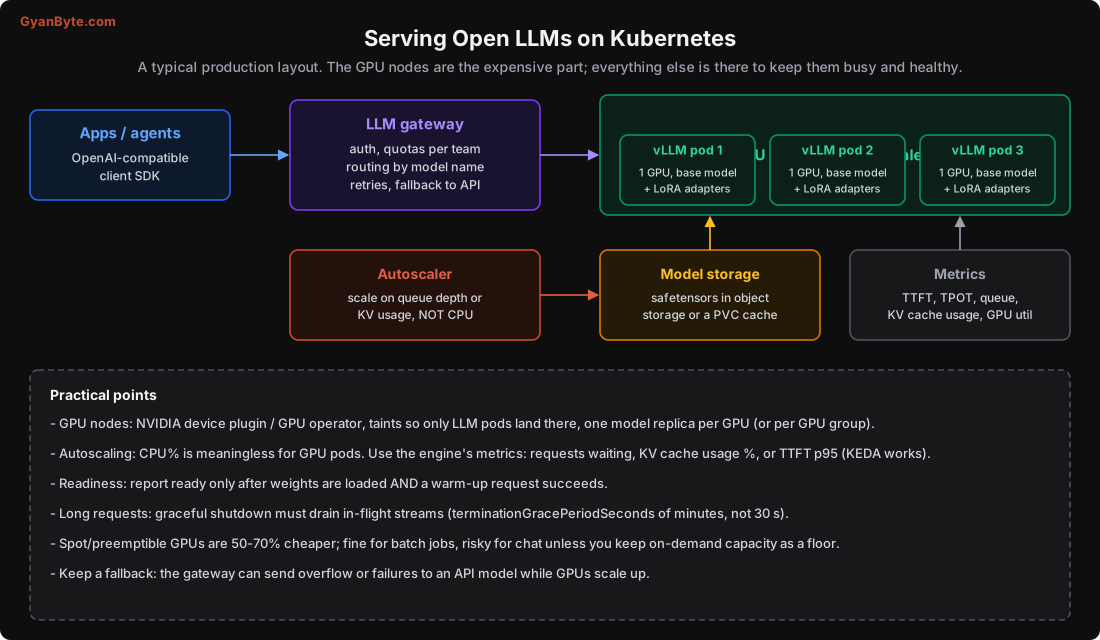
A typical production layout:
- LLM gateway in front: authentication, per-team quotas and rate limits, routing by model name (Lesson 10), retries, and fallback to an API when self-hosted capacity is exhausted or scaling up. This is where your hybrid strategy (Lesson 1) lives.
- GPU node pool, autoscaled, running the serving engine (vLLM) in pods, one model replica per GPU (or per group of GPUs for a model split across several).
- Model storage: weights in object storage or a shared volume, cached on nodes.
- Metrics: TTFT, TPOT, queue depth, KV-cache usage, GPU utilisation, feeding both your dashboards and the autoscaler.
The expensive part is the GPU pods. Everything else exists to keep them busy and healthy.
Autoscale on the Right Signal
The biggest mistake: autoscaling GPU pods on CPU utilisation. LLM serving pods use very little CPU; the work is on the GPU. CPU-based autoscaling will either never trigger, or trigger on noise. It’s the wrong sensor entirely.
Scale on signals that reflect LLM load:
- Queue depth / requests waiting: the most direct “we need more capacity” signal. The serving engine exposes it.
- KV-cache usage %: when the KV cache is near full (Lesson 3), you can’t admit more requests. A leading indicator of saturation.
- TTFT p95: when time-to-first-token rises, users are feeling the load. A good SLO-aligned signal.
- GPU utilisation: useful, but can be misleading (a pod can be “100% utilised” on a decode step that’s memory-bound with spare compute). Combine with the above.
In practice, KEDA (Kubernetes Event-Driven Autoscaling) works well here: it can scale a deployment on a custom Prometheus metric like queue depth or KV usage, including scaling to zero for dev/batch workloads. The plain HorizontalPodAutoscaler can also target custom metrics, but KEDA is more flexible for this.
Crucially, scale on a leading signal (queue starting to grow) rather than a lagging one (latency already bad), because, as we’ll see, new capacity takes minutes to arrive.
The Cold Start Is Minutes, Not Seconds
Ordinary web pods start in seconds. LLM GPU pods take minutes, and if you don’t plan for it, autoscaling is useless because capacity shows up after the spike is over.
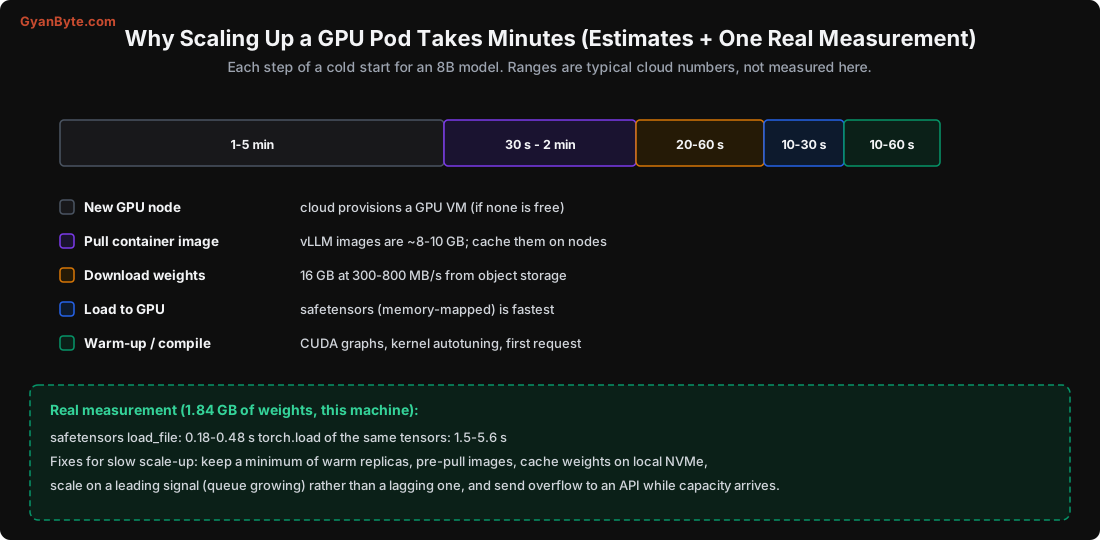
The steps, for an 8B model:
- Provision a GPU node (if none is free): 1-5 minutes, and sometimes the cloud has no GPU of that type available at all.
- Pull the container image: vLLM images are 8-10 GB. 30 seconds to 2 minutes unless cached on the node.
- Download the weights: 16 GB from object storage at 300-800 MB/s is 20-60 seconds.
- Load weights to the GPU: 10-30 seconds.
- Warm up: CUDA graph capture, kernel autotuning, the first real request. 10-60 seconds.
One piece of this I measured directly: the file format for loading weights matters. On this machine, loading 1.84 GB of tensors took 0.18-0.48 s with safetensors versus 1.5-5.6 s with the pickle-based torch.load, 3 to 30x faster (and safetensors is also safer, Lesson 12). Multiply across 16 GB and it’s a real chunk of the cold start. Use safetensors.
Because the cold start is minutes, the strategies are:
- Keep a minimum of warm replicas (don’t scale to zero for latency-critical services). The floor costs money but absorbs spikes.
- Pre-pull images onto nodes (DaemonSet or node image cache) so step 2 is instant.
- Cache weights on local NVMe so step 3 is fast, not a fresh object-storage download every time.
- Scale on a leading signal so scaling starts before you’re in trouble.
- Send overflow to an API (via the gateway) during the minutes it takes GPUs to come up. This is the hybrid safety net again.
Readiness and Graceful Shutdown
Two Kubernetes settings that are commonly wrong for LLM pods:
- Readiness: a pod must report ready only after weights are loaded AND a warm-up request succeeds, not when the process starts. Otherwise Kubernetes routes traffic to a pod that isn’t ready and requests fail. Point the readiness probe at an endpoint that checks the model is actually serving.
- Graceful shutdown: LLM responses stream for many seconds (a long generation). The default
terminationGracePeriodSecondsof 30 is too short, it kills in-flight streams, dropping users’ responses mid-sentence during a rollout or scale-down. Set it to minutes, and have the engine stop accepting new requests while draining existing ones. vLLM and others support graceful draining.
Spot GPUs: Cheaper, Riskier
Spot / preemptible GPUs are 50-70% cheaper, but the cloud can reclaim them with little notice.
- Good for: batch jobs (Lesson 6), offline eval runs, fine-tuning with checkpointing, and non-critical overflow.
- Risky for: interactive chat, unless you keep an on-demand floor of capacity and use spot only for the extra headroom. When a spot node is reclaimed, in-flight requests must drain or fail over to the floor (or the API).
A common pattern: on-demand pods for the baseline SLO, spot pods for peak absorption, and an API fallback above both.
Multi-LoRA: Many Fine-Tunes, One GPU
If you fine-tuned several adapters of the same base model (Lesson 9), you don’t need a GPU per adapter. Multi-LoRA serving keeps one base model in GPU memory and applies small adapters per request.
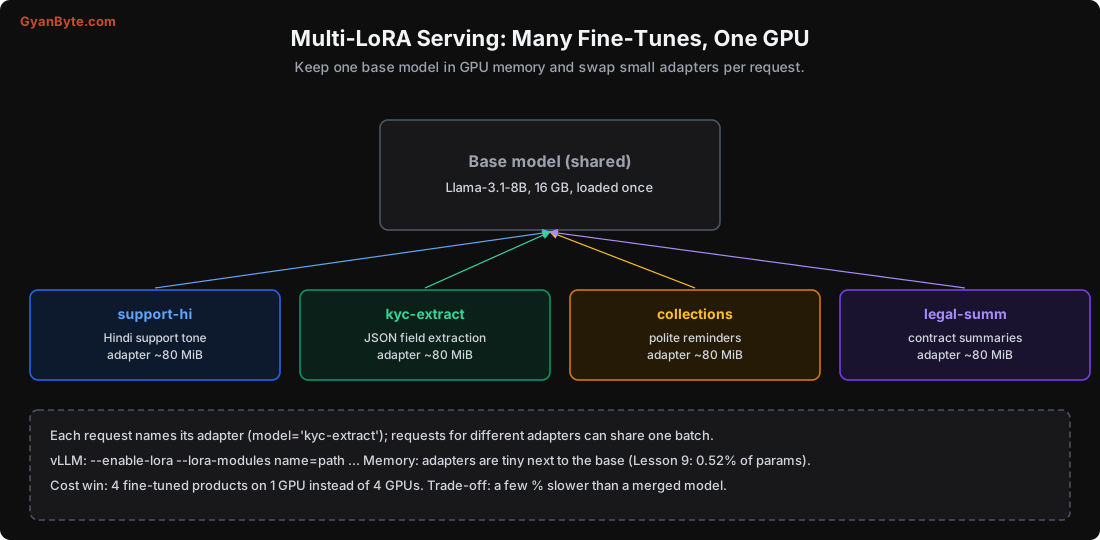
Each request names its adapter (model="kyc-extract"), and, impressively, requests for different adapters can share the same decode batch. Since adapters are tiny next to the base (0.52% of params, Lesson 9), you can hold many in memory. The win: four fine-tuned products on one GPU instead of four, a direct cost saving (Lesson 8). The trade-off is a few percent slower than a single merged model, usually worth it.
python -m vllm.entrypoints.openai.api_server \
    --model Qwen/Qwen2.5-7B-Instruct \
    --enable-lora \
    --lora-modules support-hi=/adapters/support-hi kyc-extract=/adapters/kyc \
    --max-loras 4
Pitfalls to Avoid
- Autoscaling GPU pods on CPU%. Use queue depth, KV-cache usage, or TTFT p95.
- Scaling to zero for latency-critical services. The minutes-long cold start will burn you.
- Loading weights from pickle. safetensors is 3-30x faster (measured) and safer.
- Readiness probe that passes before the model is loaded. Traffic hits a cold pod and fails.
- Default 30-second shutdown. It kills in-flight streams during rollouts and scale-downs.
- Spot GPUs for chat with no on-demand floor. A reclaim becomes an outage.
- A GPU per fine-tune. Multi-LoRA serves many adapters on one GPU.
- No API fallback. During cold starts and reclaims, overflow to an API keeps you up.
Quick Recap
- Put a gateway in front (auth, quotas, routing, API fallback); run the engine in GPU pods behind it.
- Autoscale on queue depth, KV-cache usage or TTFT p95, never CPU%; use a leading signal (KEDA works well).
- Cold starts are minutes (node, image, weights, load, warm-up); safetensors loaded 3-30x faster than pickle. Keep warm replicas, pre-pull images, cache weights, overflow to an API.
- Readiness only after weights load and a warm-up succeeds; graceful shutdown in minutes to drain streams.
- Spot GPUs are cheaper but risky for chat; multi-LoRA serves many fine-tunes on one GPU.
Next lesson, the last: security and compliance for self-hosted models, the model supply chain, prompt injection, and a capstone that applies the whole course to one real system.