A team swapped their self-hosted model from FP16 to a 4-bit quantized version to save memory. Offline, on a handful of test prompts, it looked fine, so they shipped it. A week later, support escalations were up and nobody knew why. It turned out the 4-bit model was noticeably worse at one specific thing: producing valid JSON for their extraction endpoint. They hadn’t measured that, because they didn’t have an eval set that covered it. The fix took ten minutes once they knew; finding it took a week of guessing.
The lesson: in an LLM system, quality can change silently, from changes you didn’t think were risky. This lesson is about catching those changes before users do, and rolling out new models so that if something does slip through, it’s a small, reversible blip, not an incident.
Treat Every Model Change as a Release
The first mindset shift: changing the model is not like changing a config value. It’s a release, with the same risk as a code deploy, and it needs the same gate: an eval run. And it’s not just “swapping the model” that counts. All of these silently change behaviour:
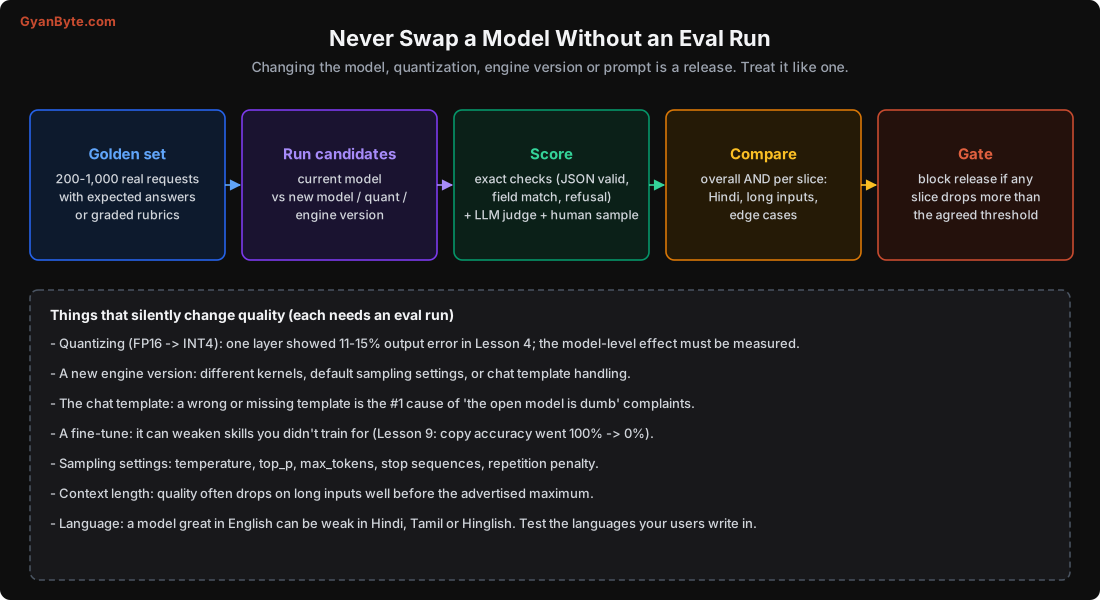
- Quantizing (Lesson 4): a different precision can shift answers; measure it.
- A new engine version: different kernels, different default sampling, different chat-template handling.
- The chat template (see below): the single most common silent quality-killer.
- A fine-tune (Lesson 9): can wreck skills you didn’t train for.
- Sampling settings: temperature, top_p, max_tokens, stop sequences, repetition penalty.
- Context length: quality often degrades on long inputs well before the advertised maximum.
- Language: a model strong in English can be weak in Hindi, Tamil or Hinglish.
Every one of these should trigger an eval run before it reaches users.
The Chat Template: The #1 Silent Killer
This deserves its own section because it catches so many people. Instruction-tuned models are trained with a specific chat template: special tokens and formatting that mark the system prompt, user turn and assistant turn (<|im_start|>, [INST], header tokens, etc., different for every model family). If you send the model plain text without its exact template, or the wrong template, it behaves far worse, rambling, ignoring instructions, refusing oddly.
“The open model is dumb compared to the API” is, more often than not, a chat-template bug. The serving engine usually applies the template from the model’s tokenizer config, but it can go wrong when you build prompts manually, use the completions endpoint instead of chat, mix a base model with an instruct template (or vice versa), or upgrade an engine that changes template handling. If an open model seems far worse than expected, check the template first. Use the tokenizer’s apply_chat_template, or the engine’s chat endpoint, rather than hand-assembling the prompt.
Building a Golden Eval Set
An eval set is a fixed collection of inputs with a way to score the outputs. Build it from real data:
- Collect 200-1,000 real requests that represent your actual traffic: common cases, important cases, and known hard/edge cases. Real user inputs (anonymised) beat invented ones.
- Define the expected result for each: an exact answer, a set of required fields, a reference output, or a rubric (what a good answer must and must not contain) for open-ended tasks.
- Cover your slices: include the languages your users write in, long inputs, short inputs, adversarial inputs, and each major category of request. You’ll score these separately.
- Version it and keep it stable, so results are comparable over time. Add new cases as you discover failures (every production bug becomes a new eval case).
Scoring: Three Layers
No single scoring method is enough. Combine:
- Exact / programmatic checks (cheapest, most reliable where they apply): Is the JSON valid? Does it have the required fields? Is the classification correct? Did it refuse when it should? Is a required phrase present/absent? Automate these; they’re your fast gate.
- LLM-as-judge (for open-ended quality): use a strong model to score answers against a rubric (“Is this summary accurate and complete? Score 1-5 with reasons”). Useful and scalable, but it has biases (it favours longer answers, its own style), so calibrate it against human judgments and don’t trust it blindly.
- Human spot-checks (the ground truth): a person reviews a sample, especially the cases the automated methods disagree on or score borderline. This keeps the automated scores honest.
The LLM Engineering course has a dedicated lesson on evaluating output quality that goes deeper into judge design and metrics.
Compare Per Slice, Not Just Overall
A single overall score hides exactly the regressions that cause incidents. A new model might score 87% overall, up from 85%, and you ship it, only to find it got better at English and worse at Hindi, which is where half your users are. Always break the score down:
- By language (English, Hindi, Tamil, Hinglish, whatever your users use).
- By input length (short vs long; long-context quality often drops first).
- By category (each task type your system handles).
- By difficulty (easy cases vs known-hard cases).
Gate on the worst slice, not the average. If any important slice drops more than your agreed threshold, block the release even if the overall number went up. That one rule prevents most “we improved the model and users complained” situations.
Rolling Out a New Model Safely
Offline evals catch most problems. Real traffic catches the rest (odd inputs you didn’t think of, interactions with the rest of the system). So expose a new model gradually:
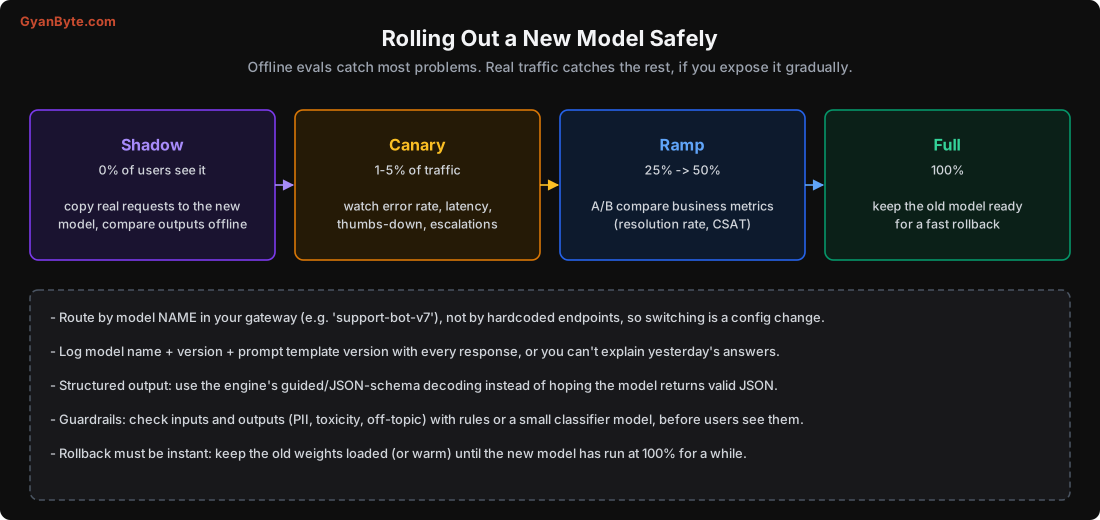
- Shadow (0% of users see it): send a copy of real production requests to the new model alongside the old one, and compare outputs offline. No user impact, real traffic. Great for catching surprises the eval set missed.
- Canary (1-5% of traffic): route a small slice of real users to the new model. Watch error rate, latency, thumbs-down, support escalations, and any task-specific metric.
- Ramp (25% → 50%): increase gradually, A/B comparing business metrics (resolution rate, CSAT, conversion), not just token-level scores. The metric that matters is the outcome, not the eval.
- Full (100%): only after the ramp looks good, and keep the old model ready for a fast rollback.
Operational Hygiene That Makes This Possible
The rollout only works if the plumbing supports it:
- Route by model name in your gateway (e.g.
support-bot-v7), not by hardcoded endpoints. Then switching models, or splitting traffic between them, is a config change. - Log the model name, version, and prompt-template version with every response. Without this, you can’t explain or reproduce yesterday’s answers, and you can’t tell which model produced a bad one.
- Use guided/structured decoding for structured output (the engine’s JSON-schema or grammar mode, Lesson 5) instead of hoping the model returns valid JSON. This removes a whole class of failures.
- Guardrails on inputs and outputs: check for PII, toxicity, prompt injection (Lesson 12) and off-topic responses, with rules or a small classifier, before the user sees anything.
- Instant rollback: keep the old weights loaded (or warm) until the new model has run at 100% for a while. Rollback should be one config change, not a redeploy.
Pitfalls to Avoid
- Shipping a model change without an eval run. Quantization, engine upgrades and templates all shift quality silently.
- Blaming the model for a chat-template bug. Check the template before concluding the model is weak.
- A single overall eval score. Gate on the worst slice; averages hide the regressions that hurt.
- Evaluating with invented prompts. Use real traffic; every production bug becomes a new eval case.
- Trusting the LLM judge blindly. Calibrate it against humans; it has biases.
- Flipping 100% of traffic to a new model at once. Shadow, canary, ramp, then full.
- No model/version/template logging. You can’t debug or roll back what you didn’t record.
Quick Recap
- Every model, quantization, engine or prompt change is a release; run evals before shipping it.
- The chat template is the #1 silent quality-killer; check it first when an open model underperforms.
- Build a golden set of 200-1,000 real requests; score with exact checks + LLM judge + human sample.
- Compare per slice (language, length, category, difficulty) and gate on the worst slice, not the average.
- Roll out shadow → canary → ramp → full, route by model name, log model+version+template, and keep the old model warm for instant rollback.
Next lesson: running this at scale. Serving open LLMs on Kubernetes, autoscaling GPU pods on the right signal, the minutes-long cold start, and multi-LoRA for serving many fine-tunes on one GPU.