

Every time I start a new service, I have the same argument with myself. Lambda or containers? Serverless or ECS? The answer is never obvious, and the “it depends” crowd isn’t wrong — it genuinely does depend. But after shipping production workloads on both sides of this divide for years, I’ve developed a mental framework that actually helps me decide.
This isn’t a theoretical comparison. It’s the decision process I use when real money, real latency, and real on-call pages are on the line.
The Two Architectures, Visualized
Before we get into tradeoffs, let’s look at what we’re actually comparing.
Serverless Architecture
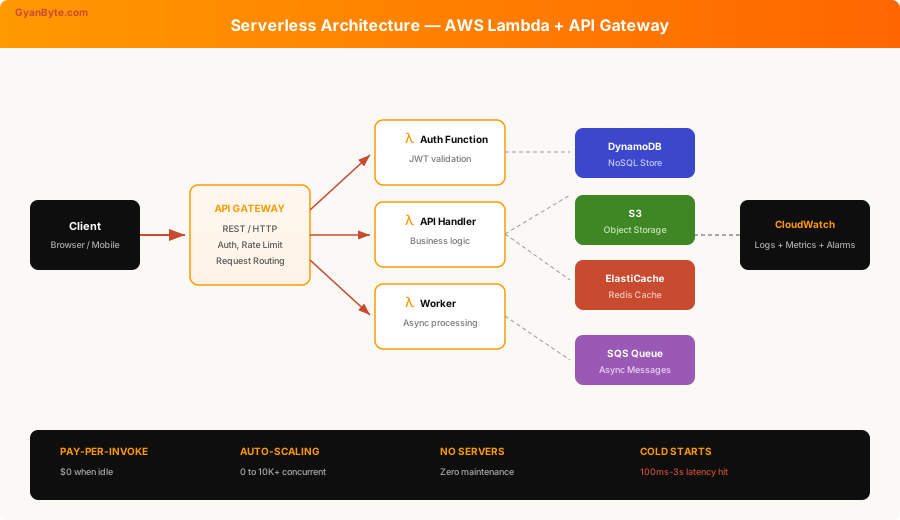
In a serverless setup, you write functions. AWS handles everything else — provisioning, scaling, patching, load balancing. Your code runs in response to events (HTTP requests, SQS messages, S3 uploads, cron schedules). You pay per invocation and per millisecond of compute.
Container Architecture
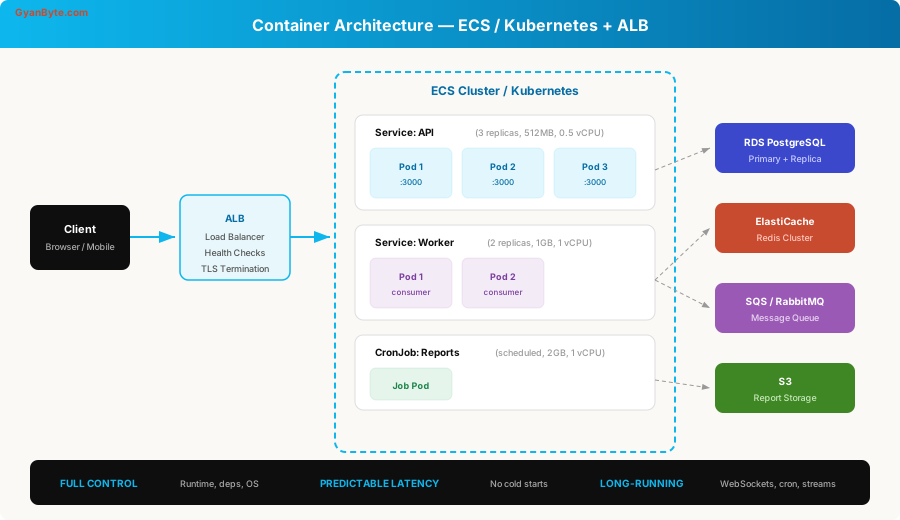
With containers, you package your application into Docker images and run them as long-lived processes. You control the runtime, the dependencies, the scaling policies, and the networking. An orchestrator (ECS, Kubernetes, or Fargate) manages placement and health checks.
The Cold Start Problem — It’s Worse Than You Think
Cold starts are the first thing everyone mentions, and for good reason. When a Lambda function hasn’t been invoked recently, AWS needs to spin up a new execution environment. This takes time.
Here’s what cold starts actually look like in production:
// Measuring cold start impact in a Lambda handler
const startTime = Date.now();

// This initialization code runs ONCE per cold start
const { DynamoDBClient } = require('@aws-sdk/client-dynamodb');
const { DynamoDBDocumentClient, GetCommand } = require('@aws-sdk/lib-dynamodb');

const client = new DynamoDBClient({ region: 'us-east-1' });
const docClient = DynamoDBDocumentClient.from(client);

const initDuration = Date.now() - startTime;
console.log(`Init duration: ${initDuration}ms`); // 200-800ms typically

exports.handler = async (event) => {
  // This runs on EVERY invocation (warm or cold)
  const handlerStart = Date.now();

  const result = await docClient.send(new GetCommand({
    TableName: 'users',
    Key: { userId: event.pathParameters.id },
  }));

  return {
    statusCode: 200,
    body: JSON.stringify({
      user: result.Item,
      handlerDuration: Date.now() - handlerStart,
      coldStartInit: initDuration, // only meaningful on first call
    }),
  };
};
Real numbers from production:
| Runtime | Cold Start (p50) | Cold Start (p99) | Warm (p50) |
|---|---|---|---|
| Node.js 20 | 180ms | 650ms | 3ms |
| Python 3.12 | 200ms | 700ms | 4ms |
| Java 21 | 1.2s | 3.8s | 5ms |
| Go | 80ms | 200ms | 1ms |
Java cold starts are brutal. If you’re running a Spring Boot app in Lambda, you’re looking at 3-5 seconds on a cold start. That’s not a blip — that’s a user staring at a spinner.
Mitigations That Actually Work
Provisioned Concurrency — keeps N instances warm. Costs money (you’re paying for idle compute, which defeats the serverless cost model), but eliminates cold starts for those instances:
# serverless.yml — provisioned concurrency config
functions:
  api:
    handler: src/handler.main
    runtime: nodejs20.x
    memorySize: 512
    provisionedConcurrency: 5  # 5 warm instances always ready
    events:
      - http:
          path: /api/{proxy+}
          method: ANY
SnapStart (Java only) — takes a snapshot of initialized JVM state. Cuts cold starts from 3s to ~200ms. Genuine game-changer for Java Lambda:
// With SnapStart, this expensive initialization is snapshot-cached
@Override
public void initialize() {
    // Spring context, DB connection pools, SDK clients
    // All initialized ONCE, then snapshot-restored on cold start
    this.applicationContext = SpringApplication.run(App.class);
    this.userService = applicationContext.getBean(UserService.class);
}
Containers don’t have this problem. Your service is always running, always warm. A request hits the ALB, gets routed to an existing container, and you get consistent sub-10ms overhead every time.
Cost — The Math Nobody Does Honestly
The serverless pitch is “pay only for what you use.” It’s true — until it isn’t.
When Serverless Wins on Cost
# Cost model: Low-traffic API
# 100K requests/month, avg 200ms duration, 512MB memory

lambda_cost_per_request = 0.0000002  # $0.20 per 1M requests
lambda_cost_per_gb_second = 0.0000166667

requests = 100_000
duration_sec = 0.2
memory_gb = 0.5

invocation_cost = requests * lambda_cost_per_request
compute_cost = requests * duration_sec * memory_gb * lambda_cost_per_gb_second
api_gw_cost = requests * 0.0000035  # API Gateway pricing

total_lambda = invocation_cost + compute_cost + api_gw_cost
# Total: ~$0.55/month

# ECS Fargate equivalent (minimum viable)
fargate_vcpu_per_hour = 0.04048
fargate_gb_per_hour = 0.004445
hours_per_month = 730

ecs_cost = (0.25 * fargate_vcpu_per_hour + 0.5 * fargate_gb_per_hour) * hours_per_month
# Total: ~$10.85/month — even at minimum size
At 100K requests/month, Lambda costs $0.55. ECS Fargate costs $10.85 — and that’s with the smallest possible task. The gap is enormous at low traffic.
When Containers Win on Cost
# Cost model: High-traffic API
# 50M requests/month, avg 150ms duration, 1GB memory

requests = 50_000_000
duration_sec = 0.15
memory_gb = 1.0

invocation_cost = requests * 0.0000002
compute_cost = requests * duration_sec * memory_gb * 0.0000166667
api_gw_cost = requests * 0.0000035

total_lambda = invocation_cost + compute_cost + api_gw_cost
# Total: ~$310/month

# ECS with 3 tasks (1 vCPU, 2GB each) handles this easily
ecs_cost = 3 * (1 * 0.04048 + 2 * 0.004445) * 730
# Total: ~$108/month
At 50M requests/month, Lambda costs $310. ECS costs $108. And with Reserved Instances or Savings Plans, the container cost drops another 30-50%.
The crossover point is typically around 1-5M requests/month, depending on duration and memory. Below that, serverless wins. Above that, containers win — and the gap widens fast.
The Decision Framework
After shipping both architectures in production, this is the decision tree I use:
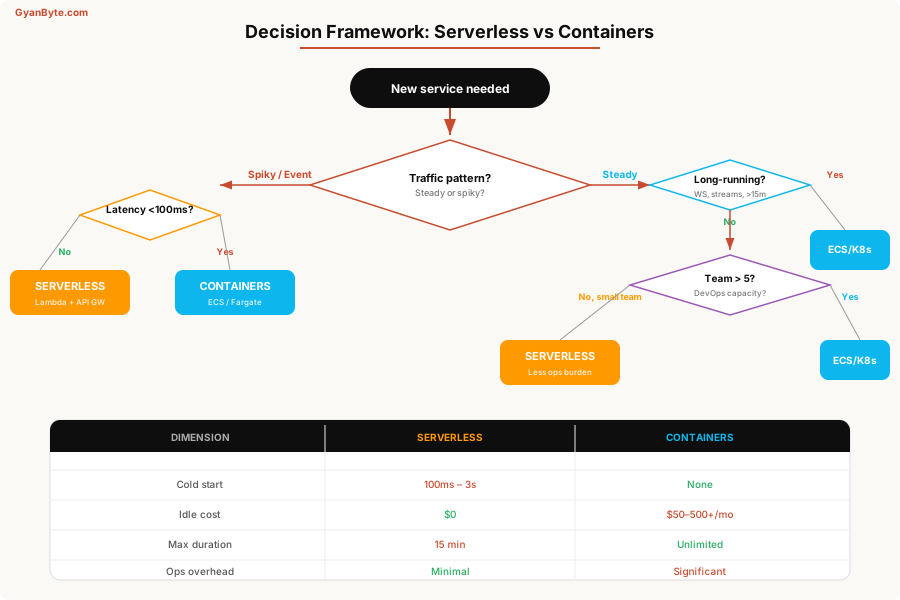
Let me walk through the key decision points.
Choose Serverless When:
1. Traffic is spiky or event-driven
If your service goes from 0 to 10,000 concurrent requests during a flash sale, then back to 0 — Lambda handles this beautifully. Scaling up is instant. Scaling down costs nothing.
# Event-driven Lambda — S3 upload triggers image processing
functions:
  processImage:
    handler: src/imageProcessor.handler
    runtime: nodejs20.x
    memorySize: 1536
    timeout: 60
    events:
      - s3:
          bucket: ${self:custom.uploadBucket}
          event: s3:ObjectCreated:*
          rules:
            - suffix: .jpg
            - suffix: .png
    environment:
      OUTPUT_BUCKET: ${self:custom.processedBucket}
      THUMBNAIL_SIZES: "150,300,600,1200"
2. You’re a small team
If your team is 2-4 engineers, the operational overhead of Kubernetes is a full-time job you can’t afford. Lambda lets you focus on business logic.
3. The service has clear boundaries
A webhook handler. A cron job that runs for 2 minutes. An API that does simple CRUD. These are serverless sweet spots.
// Perfect Lambda use case: webhook handler
import { APIGatewayProxyEvent, APIGatewayProxyResult } from 'aws-lambda';
import { SQSClient, SendMessageCommand } from '@aws-sdk/client-sqs';

const sqs = new SQSClient({ region: 'us-east-1' });

export const handler = async (event: APIGatewayProxyEvent): Promise<APIGatewayProxyResult> => {
  const signature = event.headers['x-webhook-signature'];

  if (!verifySignature(event.body, signature)) {
    return { statusCode: 401, body: 'Invalid signature' };
  }

  // Don't process inline — push to queue for async handling
  await sqs.send(new SendMessageCommand({
    QueueUrl: process.env.PROCESSING_QUEUE_URL,
    MessageBody: event.body!,
    MessageAttributes: {
      source: { DataType: 'String', StringValue: 'stripe-webhook' },
    },
  }));

  return { statusCode: 200, body: JSON.stringify({ received: true }) };
};
Choose Containers When:
1. You need consistent, low latency
If your p99 latency budget is 50ms and cold starts are unacceptable, containers are the answer. No provisioned concurrency costs, no SnapStart complexity — just warm, running processes.
2. The workload is long-running
WebSocket connections, streaming responses, video transcoding, ML inference — anything that runs longer than 15 minutes or maintains persistent connections needs containers.
// Long-running WebSocket server — impossible in Lambda
import { WebSocketServer } from 'ws';
import { createServer } from 'http';

const server = createServer();
const wss = new WebSocketServer({ server });

const clients = new Map<string, WebSocket>();

wss.on('connection', (ws, req) => {
  const userId = authenticateConnection(req);
  clients.set(userId, ws);

  ws.on('message', (data) => {
    const message = JSON.parse(data.toString());
    handleMessage(userId, message);
  });

  ws.on('close', () => {
    clients.delete(userId);
  });

  // Keep-alive ping every 30 seconds
  const interval = setInterval(() => {
    if (ws.readyState === ws.OPEN) {
      ws.ping();
    }
  }, 30000);

  ws.on('close', () => clearInterval(interval));
});

server.listen(3000, () => {
  console.log('WebSocket server running on port 3000');
});
3. You need full runtime control
Custom native libraries, GPU access, specific kernel features, precise memory management — containers give you the full Linux environment.
# Dockerfile for ML inference service
FROM nvidia/cuda:12.2.0-runtime-ubuntu22.04
# Install Python and dependencies
RUN apt-get update && apt-get install -y python3.11 python3-pip
COPY requirements.txt .
RUN pip3 install --no-cache-dir -r requirements.txt
# Copy model weights (cached in image layer)
COPY models/ /app/models/
# Copy application code
COPY src/ /app/src/
WORKDIR /app
EXPOSE 8080
# Health check for ALB
HEALTHCHECK \
CMD curl -f http://localhost:8080/health || exit 1
CMD ["python3", "src/server.py"]4. You have a platform team
If you have engineers who know Kubernetes, who can set up proper CI/CD pipelines, who can manage cluster upgrades — then the operational overhead isn’t a problem. It’s a capability.
The Hybrid Pattern — What I Actually Ship
In practice, I almost never go all-in on one approach. Most production systems I build look like this:
                    ┌──────────────────────────┐
                    │      API Gateway          │
                    │   (Route-level split)      │
                    └──────┬───────────┬────────┘
                           │           │
                    ┌──────▼──┐  ┌─────▼────────┐
                    │ Lambda   │  │ ALB → ECS     │
                    │ /auth    │  │ /api/v1/*     │
                    │ /webhook │  │ /ws           │
                    │ /cron    │  │ /stream       │
                    └──────┬──┘  └─────┬─────────┘
                           │           │
                    ┌──────▼───────────▼────────┐
                    │   Shared Data Layer         │
                    │  RDS + Redis + SQS + S3     │
                    └─────────────────────────────┘
Lambda handles:
- Authentication endpoints (low latency tolerance, simple logic)
- Webhook receivers (push to SQS, return immediately)
- Scheduled jobs under 15 minutes
- Image/file processing triggers
- Low-traffic admin APIs
Containers handle:
- Core API (high traffic, consistent latency matters)
- WebSocket connections
- Background workers (long-running queue consumers)
- Services with heavy initialization (ML models, large dependency trees)
Infrastructure as Code for the Hybrid
Here’s what the Terraform looks like for a hybrid setup:
# Lambda for lightweight endpoints
module "auth_lambda" {
  source  = "terraform-aws-modules/lambda/aws"

  function_name = "${var.project}-auth"
  handler       = "src/auth.handler"
  runtime       = "nodejs20.x"
  memory_size   = 256
  timeout       = 10

  environment_variables = {
    JWT_SECRET_ARN = aws_secretsmanager_secret.jwt.arn
    USER_TABLE     = aws_dynamodb_table.users.name
  }

  allowed_triggers = {
    APIGateway = {
      service    = "apigateway"
      source_arn = "${aws_apigatewayv2_api.main.execution_arn}/*"
    }
  }
}

# ECS service for core API
resource "aws_ecs_service" "api" {
  name            = "${var.project}-api"
  cluster         = aws_ecs_cluster.main.id
  task_definition = aws_ecs_task_definition.api.arn
  desired_count   = 3
  launch_type     = "FARGATE"

  network_configuration {
    subnets         = var.private_subnets
    security_groups = [aws_security_group.api.id]
  }

  load_balancer {
    target_group_arn = aws_lb_target_group.api.arn
    container_name   = "api"
    container_port   = 3000
  }

  # Auto-scaling based on CPU
  depends_on = [aws_lb_listener.https]
}

resource "aws_appautoscaling_target" "api" {
  max_capacity       = 20
  min_capacity       = 3
  resource_id        = "service/${aws_ecs_cluster.main.name}/${aws_ecs_service.api.name}"
  scalable_dimension = "ecs:service:DesiredCount"
  service_namespace  = "ecs"
}

resource "aws_appautoscaling_policy" "api_cpu" {
  name               = "${var.project}-api-cpu-scaling"
  policy_type        = "TargetTrackingScaling"
  resource_id        = aws_appautoscaling_target.api.resource_id
  scalable_dimension = aws_appautoscaling_target.api.scalable_dimension
  service_namespace  = aws_appautoscaling_target.api.service_namespace

  target_tracking_scaling_policy_configuration {
    predefined_metric_specification {
      predefined_metric_type = "ECSServiceAverageCPUUtilization"
    }
    target_value       = 65
    scale_in_cooldown  = 300
    scale_out_cooldown = 60
  }
}
Monitoring — The Operational Reality
This is where the choice really shows its teeth. Debugging a Lambda is fundamentally different from debugging a container.
Lambda Observability
// Structured logging in Lambda — your primary debugging tool
import { Logger } from '@aws-lambda-powertools/logger';
import { Tracer } from '@aws-lambda-powertools/tracer';
import { Metrics, MetricUnit } from '@aws-lambda-powertools/metrics';

const logger = new Logger({ serviceName: 'payment-service' });
const tracer = new Tracer({ serviceName: 'payment-service' });
const metrics = new Metrics({ serviceName: 'payment-service' });

export const handler = async (event: any) => {
  const segment = tracer.getSegment();
  const subsegment = segment?.addNewSubsegment('processPayment');

  try {
    logger.info('Processing payment', {
      orderId: event.orderId,
      amount: event.amount,
      currency: event.currency,
    });

    const result = await processPayment(event);

    metrics.addMetric('PaymentProcessed', MetricUnit.Count, 1);
    metrics.addMetric('PaymentAmount', MetricUnit.None, event.amount);

    return result;
  } catch (error) {
    logger.error('Payment failed', { error, orderId: event.orderId });
    metrics.addMetric('PaymentFailed', MetricUnit.Count, 1);
    throw error;
  } finally {
    subsegment?.close();
    metrics.publishStoredMetrics();
  }
};
Container Observability
# docker-compose.yml — local dev with observability
services:
  api:
    build: .
    ports:
      - "3000:3000"
      - "9090:9090"  # Prometheus metrics
    environment:
      - OTEL_EXPORTER_OTLP_ENDPOINT=http://jaeger:4318
      - LOG_LEVEL=info
    healthcheck:
      test: ["CMD", "curl", "-f", "http://localhost:3000/health"]
      interval: 10s

  # Prometheus for metrics
  prometheus:
    image: prom/prometheus
    volumes:
      - ./prometheus.yml:/etc/prometheus/prometheus.yml
    ports:
      - "9091:9090"

  # Jaeger for distributed tracing
  jaeger:
    image: jaegertracing/all-in-one:latest
    ports:
      - "16686:16686"  # UI
      - "4318:4318"    # OTLP HTTP
With containers, you can SSH into a running instance, attach a debugger, inspect memory, run profilers. With Lambda, you’re limited to logs, traces, and metrics. That’s fine for most cases — until it isn’t.
The Questions I Actually Ask
When I’m standing at this fork, here’s my real decision checklist:
- Will this service ever need WebSockets or long-lived connections? → Containers.
- Does it process events from SQS/SNS/S3/EventBridge? → Lambda. It’s literally built for this.
- Is the p99 latency budget under 100ms? → Containers (unless you’re paying for provisioned concurrency).
- Will traffic regularly exceed 5M requests/month? → Run the cost math. Containers probably win.
- Is the team under 5 people with no dedicated DevOps? → Serverless. The ops savings are worth the tradeoffs.
- Does it need GPU, custom binaries, or >10GB memory? → Containers.
- Is this a prototype or MVP? → Lambda. Ship it. Migrate later if needed.
The Migration Path
The best part about this decision: it’s reversible. I’ve migrated services both ways multiple times.
Lambda → Container migration path:
- Your Lambda handler already takes an event and returns a response
- Wrap it in an Express/Fastify server
- Dockerfile → ECS task definition → done
// Your Lambda handler
export const handler = async (event) => {
  const result = await processRequest(event);
  return { statusCode: 200, body: JSON.stringify(result) };
};

// Same logic, wrapped in Express for containers
import express from 'express';
const app = express();

app.use(express.json());

app.all('/api/*', async (req, res) => {
  // Translate HTTP request to Lambda-like event
  const event = {
    httpMethod: req.method,
    path: req.path,
    body: JSON.stringify(req.body),
    headers: req.headers,
    pathParameters: req.params,
    queryStringParameters: req.query,
  };

  const result = await processRequest(event);
  res.status(result.statusCode).json(JSON.parse(result.body));
});

app.listen(3000);
The key insight: keep your business logic framework-agnostic. If processRequest() doesn’t know whether it’s running in Lambda or Express, migration is trivial.
My Current Default
If you force me to pick a default, today it’s serverless-first with container escape hatches.
I start every new service as a Lambda. If it grows past the serverless sweet spot — high traffic, latency-sensitive, long-running — I migrate it to ECS Fargate. The migration is straightforward because I keep the business logic clean.
The worst mistake is over-engineering the infrastructure before you understand the workload. Ship the Lambda. Watch the metrics. Let the data tell you when to move.
The best infrastructure decision is the one you can change later. Build for today’s constraints, monitor for tomorrow’s, and keep the migration path clean.


