

Let’s cut through the noise.
If you read Twitter or LinkedIn, you’d think “AI agents” are some revolutionary new paradigm that will replace all software engineers by Tuesday. There are agent frameworks, agent platforms, agent-as-a-service startups, and an entire cottage industry of people who changed their title to “Agent Engineer.”
Here’s what an AI agent actually is:
A while loop that calls an LLM to decide what to do next.
That’s it. I’m not being reductive. I’m being precise. Let me show you.
The “Agent” Pattern in 40 Lines
def run_agent(goal: str, tools: dict, max_steps: int = 10) -> str:
    """
    This is the entire AI agent pattern.
    Everything else is details.
    """
    messages = [
        {"role": "system", "content": f"You have these tools: {list(tools.keys())}. "
                                       f"Use them to accomplish the goal. "
                                       f"Reply with DONE when finished."},
        {"role": "user", "content": goal}
    ]

    for step in range(max_steps):
        # 1. Ask the LLM what to do next
        response = call_llm(messages)

        # 2. If it says DONE, we're done
        if "DONE" in response.content:
            return response.content

        # 3. If it wants to use a tool, execute it
        if response.tool_calls:
            for tool_call in response.tool_calls:
                # This is just calling a function. That's it.
                result = tools[tool_call.name](**tool_call.arguments)

                messages.append({
                    "role": "tool",
                    "content": str(result),
                    "tool_call_id": tool_call.id
                })

        # 4. Go back to step 1 (the while loop)

    return "Max steps reached"
Read that again. There’s nothing magical here:
- A loop (step 4 goes back to step 1)
- An LLM call (step 1)
- Function execution (step 3)
- A termination condition (step 2)
You’ve been writing this pattern your entire career. You just called it something different.
You’ve Already Built This
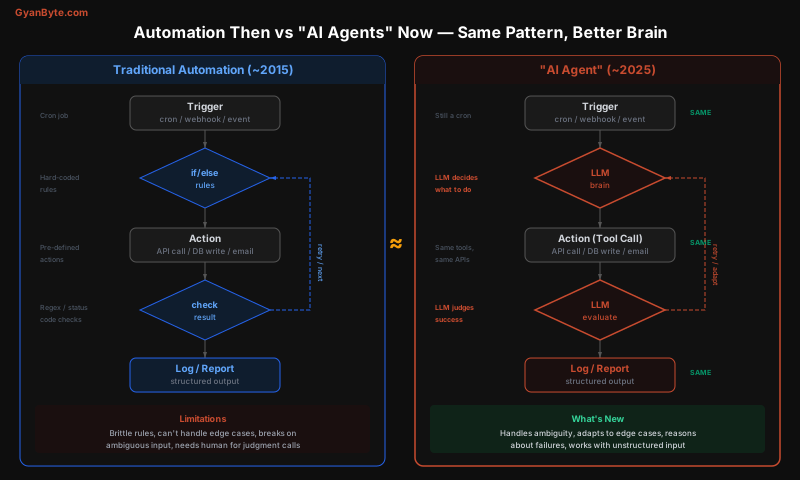
Let me show you five “agents” that you’ve already built, just without the buzzword.
The “Data Agent” (née Cron Job)
2015 version:
# cron: 0 * * * * python etl_pipeline.py

def run_etl():
    # 1. Fetch data from API
    raw_data = requests.get("https://api.vendor.com/orders").json()

    # 2. Transform (hard-coded rules)
    for record in raw_data:
        if record["status"] == "completed":
            cleaned = {
                "order_id": record["id"],
                "amount": float(record["total"]),
                "date": parse_date(record["created_at"]),
            }
            db.insert("orders", cleaned)
        elif record["status"] == "refunded":
            db.update("orders", record["id"], {"refunded": True})
        # What about "partially_refunded"? "disputed"? "pending_review"?
        # Add another elif. And another. And another.

    # 3. Send report
    send_email("[email protected]", f"Processed {len(raw_data)} orders")
2025 version (now called an “AI Agent”):
def run_data_agent():
    raw_data = requests.get("https://api.vendor.com/orders").json()

    response = client.messages.create(
        model="claude-sonnet-4-6",
        messages=[{
            "role": "user",
            "content": f"Process these orders. For each order, determine the correct "
                       f"action: insert new, update existing, flag for review, or skip. "
                       f"Handle edge cases like partial refunds, disputes, and "
                       f"unknown statuses. Return structured JSON.\n\n{raw_data}"
        }]
    )

    actions = json.loads(response.content[0].text)
    for action in actions:
        if action["type"] == "insert":
            db.insert("orders", action["data"])
        elif action["type"] == "update":
            db.update("orders", action["id"], action["data"])
        elif action["type"] == "flag":
            db.insert("review_queue", action["data"])

    send_email("[email protected]", f"Processed {len(raw_data)} orders")
What changed? The if/elif/elif/elif chain got replaced by an LLM call. The API fetch, the database writes, the email — all identical. The cron trigger — identical. The error handling — identical.
What’s actually better? The LLM handles “partially_refunded” without you writing a rule for it. It handles a new status you’ve never seen before. It handles malformed dates, weird currency formats, and vendor API changes — all without a code change.
The “Support Agent” (née Chatbot with Decision Tree)
2018 version:
def handle_message(user_message: str) -> str:
    intent = classify_intent(user_message)  # keyword matching or basic ML

    if intent == "order_status":
        order_id = extract_order_id(user_message)  # regex
        if order_id:
            order = db.get_order(order_id)
            return f"Your order {order_id} is {order.status}."
        else:
            return "I couldn't find an order number. Can you provide it?"

    elif intent == "refund":
        return "I'll connect you with our refund team. One moment."

    elif intent == "hours":
        return "We're open Monday-Friday, 9am-5pm EST."

    else:
        return "I'm not sure I understand. Can you rephrase?"
2025 “AI Agent” version:
tools = {
    "lookup_order": lambda order_id: db.get_order(order_id),
    "initiate_refund": lambda order_id, reason: refund_service.create(order_id, reason),
    "get_store_info": lambda: {"hours": "Mon-Fri 9-5 EST", "phone": "555-0123"},
    "escalate_to_human": lambda summary: ticket_system.create(summary),
}

def handle_message(user_message: str, conversation_history: list) -> str:
    response = client.messages.create(
        model="claude-sonnet-4-6",
        system="You are a customer support agent. Use the available tools "
               "to help the customer. Be concise and helpful.",
        tools=format_tools(tools),
        messages=conversation_history + [{"role": "user", "content": user_message}]
    )

    # Execute any tool calls
    while response.stop_reason == "tool_use":
        tool_results = execute_tool_calls(response.tool_calls, tools)
        response = client.messages.create(
            model="claude-sonnet-4-6",
            messages=[*conversation_history, *tool_results]
        )

    return response.content[0].text
Same components: Intent classification, order lookup, refund flow, escalation, store info retrieval.
What’s actually better: The LLM handles “Hey, I ordered those shoes last week and the box arrived crushed, can I get a replacement or refund?” — a sentence that touches order lookup, damage assessment, and refund policy simultaneously. The 2018 version would need a decision tree with 47 branches. The LLM just… understands.
The “DevOps Agent” (née CI/CD Pipeline)
# 2018: Jenkins pipeline
pipeline:
  stages:
    - checkout
    - install_dependencies
    - lint
    - test
    - build
    - deploy_staging
    - run_smoke_tests
    - deploy_production (if: smoke_tests.passed AND branch == "main")
# 2025: "AI DevOps Agent"
agent.run(
goal="Deploy the latest changes to production",
tools={
"git_checkout": git.checkout,
"run_command": shell.exec,
"read_logs": lambda: open("build.log").read(),
"deploy": kubernetes.apply,
"rollback": kubernetes.rollback,
"notify_slack": slack.post_message,
}
)The difference? The Jenkins pipeline fails if the linting step returns exit code 1 and you have to go read the log yourself. The agent reads the log, figures out it’s a formatting issue, fixes it, and continues. Same pipeline. Same tools. Better error recovery.
What’s Actually New (And What Isn’t)
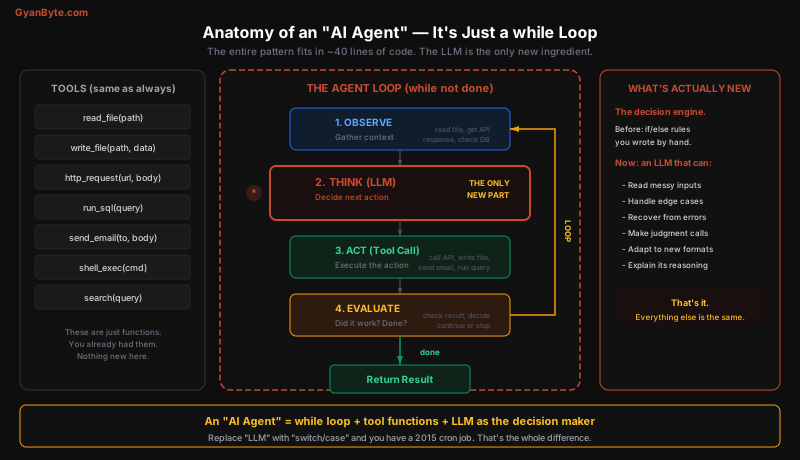
Let me be very clear about what the LLM adds and what it doesn’t.
Not New (You Already Had This)
| Component | 2015 | 2025 | Changed? |
|---|---|---|---|
| Trigger | Cron, webhook, event | Cron, webhook, event | No |
| Tools | API calls, DB queries, file I/O | API calls, DB queries, file I/O | No |
| Loop | while loop, state machine | while loop | No |
| Error handling | try/catch, retry with backoff | try/catch, retry with backoff | No |
| Output | Structured data, logs, reports | Structured data, logs, reports | No |
| Infrastructure | Queues, workers, schedulers | Queues, workers, schedulers | No |
Actually New (The LLM Brain)
| Capability | Before (Rules) | After (LLM) |
|---|---|---|
| Handling ambiguity | Fails or needs manual rule | Reasons through it |
| New formats/schemas | Breaks, needs code change | Adapts automatically |
| Error recovery | Pre-defined retry logic | Reads error, decides how to fix |
| Natural language I/O | Regex + templates | Native understanding |
| Edge cases | Each one = new if/else branch | Handles novel cases |
| Explanation | Hard to log “why” a rule fired | LLM can explain its reasoning |
The LLM is genuinely powerful. I’m not dismissing it. I’m saying it replaces one component — the decision engine — and leaves everything else untouched. Calling the whole thing an “AI agent” and pretending it’s a new paradigm is marketing, not engineering.
The Spectrum of “Agents”
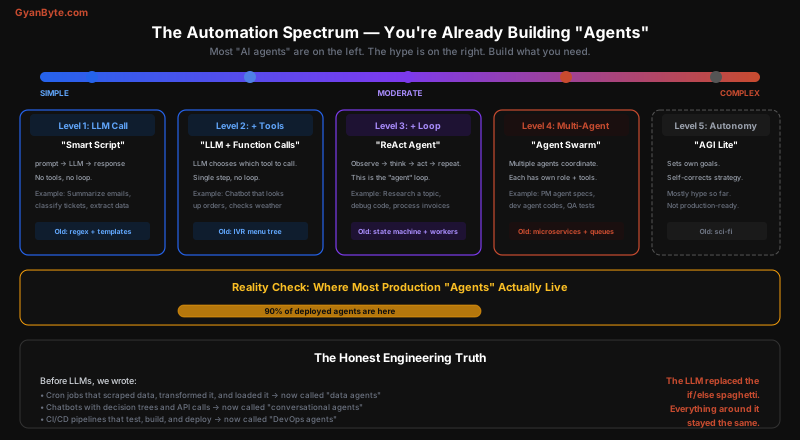
Not all “agents” are created equal. Here’s the honest spectrum:
Level 1: LLM Call (No Loop, No Tools)
# This is not an agent. It's an API call.
# But people ship products with just this and call them "AI agents."
response = client.messages.create(
    model="claude-sonnet-4-6",
    messages=[{"role": "user", "content": f"Classify this email: {email_body}"}]
)
category = response.content[0].text  # "billing", "technical", "spam"
Old equivalent: Regex rules + keyword matching. What the LLM adds: Handles sarcasm, typos, multi-topic emails, new categories.
Level 2: LLM + Tools (No Loop)
# This is function calling. One LLM call decides which tool to use.
response = client.messages.create(
    model="claude-sonnet-4-6",
    tools=[
        {"name": "get_weather", "description": "Get current weather", ...},
        {"name": "get_stock_price", "description": "Get stock price", ...},
        {"name": "search_web", "description": "Search the web", ...},
    ],
    messages=[{"role": "user", "content": "What's the weather in Tokyo?"}]
)
# LLM chooses get_weather(location="Tokyo")
Old equivalent: IVR phone menu (“Press 1 for billing, 2 for support…”). What the LLM adds: You can say “I think I got double-charged last month and I want to change my plan” and it routes to the right place.
Level 3: LLM + Tools + Loop (The “Real” Agent)
# THIS is the actual agent pattern.
# The loop is what makes it an agent.
import anthropic

client = anthropic.Anthropic()

def run_research_agent(question: str) -> str:
    tools = [
        {
            "name": "web_search",
            "description": "Search the web for information",
            "input_schema": {
                "type": "object",
                "properties": {"query": {"type": "string"}},
                "required": ["query"]
            }
        },
        {
            "name": "read_url",
            "description": "Read the contents of a URL",
            "input_schema": {
                "type": "object",
                "properties": {"url": {"type": "string"}},
                "required": ["url"]
            }
        },
        {
            "name": "save_note",
            "description": "Save a research finding",
            "input_schema": {
                "type": "object",
                "properties": {
                    "topic": {"type": "string"},
                    "finding": {"type": "string"}
                },
                "required": ["topic", "finding"]
            }
        }
    ]

    messages = [{"role": "user", "content": f"Research this question thoroughly: {question}"}]

    for step in range(15):  # Max 15 iterations
        response = client.messages.create(
            model="claude-sonnet-4-6",
            max_tokens=4096,
            system="You are a research agent. Search for information, read sources, "
                   "save key findings, and provide a comprehensive answer. "
                   "When you have enough information, give your final answer.",
            tools=tools,
            messages=messages
        )

        # Collect the response
        messages.append({"role": "assistant", "content": response.content})

        # If no tool use, we're done
        if response.stop_reason == "end_turn":
            return response.content[-1].text

        # Execute tool calls and feed results back
        tool_results = []
        for block in response.content:
            if block.type == "tool_use":
                result = execute_tool(block.name, block.input)
                tool_results.append({
                    "type": "tool_result",
                    "tool_use_id": block.id,
                    "content": str(result)
                })

        messages.append({"role": "user", "content": tool_results})

    return "Reached max steps"
Old equivalent: A state machine with workers pulling from a queue, processing items, and advancing through states.
What the LLM adds: The state machine was rigid — you had to predefine every state and transition. The LLM dynamically decides which “state” to go to next based on what it observes. It can recover from unexpected situations without you writing a handler for each one.
Level 4: Multi-Agent (Multiple LLMs Coordinating)
# Multiple agents, each with their own role and tools
planner = Agent(
    role="Project Manager",
    tools=["create_task", "assign_task", "check_status"],
    model="claude-opus-4-6"
)

researcher = Agent(
    role="Researcher",
    tools=["web_search", "read_url", "summarize"],
    model="claude-sonnet-4-6"
)

writer = Agent(
    role="Writer",
    tools=["write_draft", "edit_text", "save_file"],
    model="claude-sonnet-4-6"
)

# The planner coordinates the others
planner.run("Create a market analysis report on AI video generation")
# Planner: "Researcher, find market size data and top 5 players"
# Researcher: *searches, reads, summarizes*
# Planner: "Writer, draft the report using these findings"
# Writer: *writes, edits, saves*
Old equivalent: Microservices communicating via message queues. A coordinator service dispatches work to specialized services.
What the LLM adds: The coordinator doesn’t need a pre-defined workflow. It figures out the order of operations dynamically.
Level 5: Fully Autonomous
This is mostly hype. “Agents” that set their own goals, learn from experience, and operate indefinitely without human oversight. We’re not there yet in any reliable way. Every production deployment I’ve seen has a human in the loop or hard guardrails.
When to Use an “Agent” (and When Not To)
Use an LLM Agent When
-
The input is unstructured. Emails, support tickets, documents, natural language. If the input format is predictable, you don’t need an LLM — a parser is cheaper and faster.
-
The decision logic is complex and evolving. If your if/else chain has 200 branches and you’re adding 5 more every week, an LLM simplifies this dramatically.
-
Edge cases are common. If 80% of inputs follow the happy path but 20% are weird, the LLM handles the weird cases without custom code.
-
The task requires judgment, not just logic. “Is this support ticket urgent?” is a judgment call. “Is this number greater than 5?” is not.
Don’t Use an Agent When
-
The logic is simple and stable.
if status == "paid": mark_complete()doesn’t need an LLM. That’s a waste of $0.01 and 500ms per execution. -
You need guaranteed determinism. LLMs are non-deterministic. For financial calculations, compliance checks, or anything where the same input must always produce the same output, use regular code.
-
Latency matters. An LLM call adds 500ms-5s per step. A 10-step agent takes 5-50 seconds. If your SLA is 100ms, this isn’t going to work.
-
Cost matters at volume. Processing 1M records through an LLM costs $3,000-$15,000 at Sonnet pricing. The same logic in a Python script costs $0.10 in compute.
# DON'T do this — it's a $3,000 if/else statement
for record in million_records:
    response = client.messages.create(
        model="claude-sonnet-4-6",
        messages=[{"role": "user", "content": f"Is this record valid? {record}"}]
    )

# DO this instead
for record in million_records:
    if validate_record(record):  # Regular Python function
        process(record)
    else:
        # Only use the LLM for the ambiguous 2% that fail validation
        edge_cases.append(record)

# Batch the edge cases through the LLM
responses = process_edge_cases_with_llm(edge_cases)  # 2% of cost
Building Agents Without Framework Bloat
You don’t need LangChain, CrewAI, AutoGen, or any framework. You need:
- An LLM API call
- A list of tool functions
- A while loop
Here’s a production-quality agent in vanilla Python:
import anthropic
import json
from typing import Callable

class SimpleAgent:
    """
    A complete agent in under 60 lines.
    No framework needed.
    """
    def __init__(
        self,
        model: str = "claude-sonnet-4-6",
        tools: dict[str, Callable] = None,
        system_prompt: str = "You are a helpful assistant.",
        max_steps: int = 15
    ):
        self.client = anthropic.Anthropic()
        self.model = model
        self.tools = tools or {}
        self.system_prompt = system_prompt
        self.max_steps = max_steps

    def _format_tools(self) -> list[dict]:
        """Convert tool functions to Anthropic tool format."""
        # In production, generate this from type hints or docstrings
        return [
            {
                "name": name,
                "description": func.__doc__ or f"Execute {name}",
                "input_schema": getattr(func, 'schema', {"type": "object", "properties": {}})
            }
            for name, func in self.tools.items()
        ]

    def run(self, task: str) -> str:
        messages = [{"role": "user", "content": task}]

        for step in range(self.max_steps):
            response = self.client.messages.create(
                model=self.model,
                max_tokens=4096,
                system=self.system_prompt,
                tools=self._format_tools(),
                messages=messages
            )

            messages.append({"role": "assistant", "content": response.content})

            if response.stop_reason == "end_turn":
                # Agent is done — extract final text
                for block in response.content:
                    if hasattr(block, "text"):
                        return block.text
                return "Done"

            # Execute tool calls
            tool_results = []
            for block in response.content:
                if block.type == "tool_use":
                    try:
                        result = self.tools[block.name](**block.input)
                    except Exception as e:
                        result = f"Error: {e}"

                    tool_results.append({
                        "type": "tool_result",
                        "tool_use_id": block.id,
                        "content": str(result)
                    })

            messages.append({"role": "user", "content": tool_results})

        return "Reached maximum steps"

# Usage
agent = SimpleAgent(
    tools={
        "read_file": read_file,
        "write_file": write_file,
        "run_sql": run_sql,
        "send_email": send_email,
    },
    system_prompt="You are an operations agent. Help with data tasks."
)

result = agent.run("Check yesterday's order data for anomalies, "
                   "flag anything unusual, and email the team a summary.")
That’s it. This is a production agent. The frameworks add abstractions for memory, planning, and multi-agent coordination — but most of the time, you don’t need them. Start with the while loop and add complexity only when you hit a wall.
The Real Innovation (And It’s Worth Celebrating)
I’ve been demystifying agents to make the point that they’re not magic. But the LLM brain genuinely is remarkable. Here’s what it enables that was truly hard before:
1. Graceful degradation instead of hard failure. Old automation: unexpected input → crash → on-call page at 3am. LLM agent: unexpected input → “I haven’t seen this format before, but it looks like a partial refund. I’ll process it as such and flag it for review.”
2. Zero-code edge case handling. Every new edge case used to require a PR, code review, tests, and deployment. Now the LLM handles it at runtime. Your coverage grows without code changes.
3. Natural language interfaces for everything. The old way: build a CRUD UI with forms, dropdowns, validation. The new way: “Cancel all orders from vendor X that haven’t shipped yet” — and the agent figures out the right SQL, runs it, and confirms.
4. Self-healing workflows. When step 3 of your pipeline fails, the agent reads the error, adjusts its approach, and retries — instead of you adding another try/catch with hard-coded fallback logic.
These are real improvements. They just happen to be improvements to a pattern that’s been around for decades, not a new paradigm that requires new thinking.
Key Takeaways
-
An AI agent = while loop + LLM + tools. The LLM decides what to do. The tools execute it. The loop keeps going until done. That’s the whole pattern.
-
You’ve been building agents your entire career. Cron jobs, chatbots, CI pipelines, ETL scripts — they’re all the same pattern with a rules engine instead of an LLM.
-
The LLM replaces the if/else spaghetti. That’s the real innovation. It handles ambiguity, edge cases, and unstructured input without custom rules.
-
90% of production agents are Level 2-3 — an LLM call with a few tools and maybe a loop. The multi-agent swarm stuff is mostly demos and conference talks.
-
You don’t need a framework. 40-60 lines of Python with the Anthropic SDK is a complete agent. Add frameworks only when you need specific features like memory or multi-agent coordination.
-
Don’t use agents where regular code works. If the logic is simple and deterministic, write an if/else. It’s faster, cheaper, and predictable.
-
Use agents for the messy parts. Unstructured input, complex judgment calls, evolving requirements, error recovery — that’s where the LLM brain earns its cost.
-
The infrastructure around the LLM is the same as always. Queues, databases, APIs, monitoring, error handling, deployment — nothing changed. If you can build a web service, you can build an agent.
The next time someone pitches you an “AI agent platform,” ask them: “So… it’s a while loop with tool functions and an LLM API call?”
Because that’s what it is. And that’s fine. The LLM brain is the special part. The rest is just good engineering — the kind you’ve been doing all along.


