

Alerts without action are just noise. I’ve seen security teams drown in hundreds of “open security group” findings while the groups stay open for months. The fix isn’t more alerts — it’s automation that fixes the problem before a human even sees it.
Auto-remediation is the practice of automatically fixing security violations when they’re detected. Done right, it reduces your mean time to remediate from weeks to seconds.
Why Auto-Remediate?
The math is simple:
- Manual remediation: Alert → ticket → assign → context switch → fix → verify. Average: 14 days
- Auto-remediation: Detect → fix → notify. Average: 30 seconds
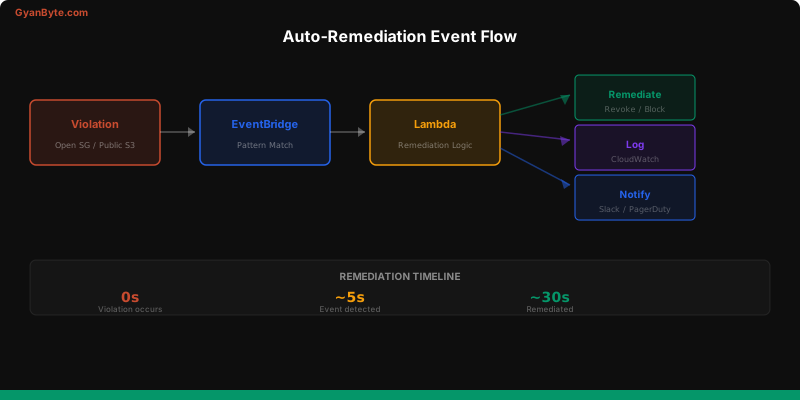
But auto-remediation isn’t “just automate everything.” You need guardrails.
EventBridge + Lambda Pattern
The core pattern: EventBridge captures AWS API events → rule matches security violations → Lambda function remediates.
# Terraform — EventBridge rule for open security groups
resource "aws_cloudwatch_event_rule" "open_sg" {
  name        = "detect-open-security-group"
  description = "Detect security group rules allowing 0.0.0.0/0"

  event_pattern = jsonencode({
    source      = ["aws.ec2"]
    detail-type = ["AWS API Call via CloudTrail"]
    detail = {
      eventSource = ["ec2.amazonaws.com"]
      eventName   = ["AuthorizeSecurityGroupIngress"]
    }
  })
}

resource "aws_cloudwatch_event_target" "remediate_sg" {
  rule = aws_cloudwatch_event_rule.open_sg.name
  arn  = aws_lambda_function.remediate_open_sg.arn
}

resource "aws_lambda_permission" "allow_eventbridge" {
  statement_id  = "AllowEventBridge"
  action        = "lambda:InvokeFunction"
  function_name = aws_lambda_function.remediate_open_sg.function_name
  principal     = "events.amazonaws.com"
  source_arn    = aws_cloudwatch_event_rule.open_sg.arn
}
Auto-Close Open Security Groups
This is the most common auto-remediation: detect when someone adds a 0.0.0.0/0 ingress rule and immediately revoke it.
# lambda/remediate_open_sg.py
import json
import boto3
import os

ec2 = boto3.client('ec2')
sns = boto3.client('sns')

DRY_RUN = os.environ.get('DRY_RUN', 'true') == 'true'
SNS_TOPIC = os.environ.get('SNS_TOPIC_ARN')

def lambda_handler(event, context):
    detail = event['detail']
    request_params = detail['requestParameters']

    sg_id = request_params['groupId']
    ip_permissions = request_params.get('ipPermissions', {}).get('items', [])

    open_rules = []
    for perm in ip_permissions:
        for ip_range in perm.get('ipRanges', {}).get('items', []):
            if ip_range.get('cidrIp') == '0.0.0.0/0':
                open_rules.append(perm)
        for ip_range in perm.get('ipv6Ranges', {}).get('items', []):
            if ip_range.get('cidrIpv6') == '::/0':
                open_rules.append(perm)

    if not open_rules:
        return {'statusCode': 200, 'body': 'No open rules found'}

    user = detail.get('userIdentity', {}).get('arn', 'unknown')

    if DRY_RUN:
        message = f"[DRY RUN] Would revoke {len(open_rules)} open rules on {sg_id} (added by {user})"
        print(message)
        notify(message)
        return {'statusCode': 200, 'body': message}

    # Revoke the open rules
    try:
        ec2.revoke_security_group_ingress(
            GroupId=sg_id,
            IpPermissions=format_permissions(open_rules)
        )
        message = f"REMEDIATED: Revoked {len(open_rules)} open ingress rules on {sg_id} (added by {user})"
        print(message)
        notify(message)
    except Exception as e:
        message = f"FAILED to remediate {sg_id}: {str(e)}"
        print(message)
        notify(message)

    return {'statusCode': 200, 'body': message}

def format_permissions(rules):
    """Convert CloudTrail format to EC2 API format"""
    formatted = []
    for rule in rules:
        perm = {
            'IpProtocol': rule['ipProtocol'],
            'FromPort': rule.get('fromPort', -1),
            'ToPort': rule.get('toPort', -1),
            'IpRanges': [{'CidrIp': '0.0.0.0/0'}]
        }
        formatted.append(perm)
    return formatted

def notify(message):
    if SNS_TOPIC:
        sns.publish(
            TopicArn=SNS_TOPIC,
            Subject='Security Auto-Remediation',
            Message=message
        )
Revoke Public S3 Buckets
# lambda/remediate_public_s3.py
import json
import boto3
import os

s3 = boto3.client('s3')
sns = boto3.client('sns')

DRY_RUN = os.environ.get('DRY_RUN', 'true') == 'true'
SNS_TOPIC = os.environ.get('SNS_TOPIC_ARN')

def lambda_handler(event, context):
    detail = event['detail']
    bucket_name = detail['requestParameters']['bucketName']
    event_name = detail['eventName']
    user = detail.get('userIdentity', {}).get('arn', 'unknown')

    if DRY_RUN:
        message = f"[DRY RUN] Would block public access on {bucket_name} ({event_name} by {user})"
        print(message)
        notify(message)
        return

    try:
        # Enable Block Public Access
        s3.put_public_access_block(
            Bucket=bucket_name,
            PublicAccessBlockConfiguration={
                'BlockPublicAcls': True,
                'IgnorePublicAcls': True,
                'BlockPublicPolicy': True,
                'RestrictPublicBuckets': True
            }
        )
        message = f"REMEDIATED: Blocked public access on {bucket_name} ({event_name} by {user})"
        print(message)
        notify(message)
    except Exception as e:
        message = f"FAILED to remediate {bucket_name}: {str(e)}"
        print(message)
        notify(message)

def notify(message):
    if SNS_TOPIC:
        sns.publish(TopicArn=SNS_TOPIC, Subject='S3 Auto-Remediation', Message=message)
AWS Config Rules + Remediation
AWS Config has built-in remediation support using SSM Automation documents.
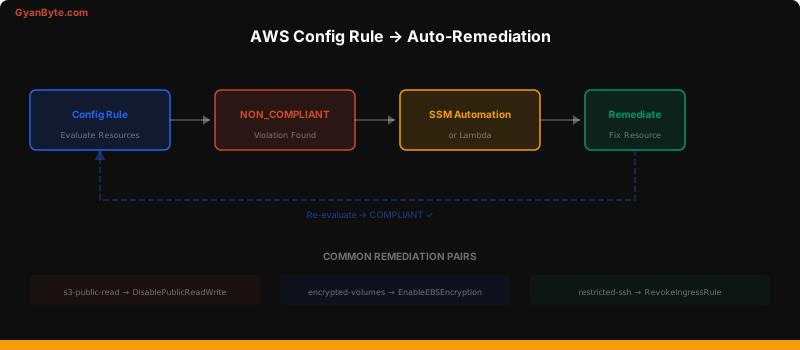
# Terraform — Config Rule with auto-remediation
resource "aws_config_config_rule" "s3_public" {
  name = "s3-bucket-public-read-prohibited"
  source {
    owner             = "AWS"
    source_identifier = "S3_BUCKET_PUBLIC_READ_PROHIBITED"
  }
}

resource "aws_config_remediation_configuration" "s3_public" {
  config_rule_name = aws_config_config_rule.s3_public.name
  target_type      = "SSM_DOCUMENT"
  target_id        = "AWS-DisableS3BucketPublicReadWrite"

  parameter {
    name           = "S3BucketName"
    resource_value = "RESOURCE_ID"
  }

  parameter {
    name         = "AutomationAssumeRole"
    static_value = aws_iam_role.config_remediation.arn
  }

  automatic                  = true
  maximum_automatic_attempts = 3
  retry_attempt_seconds      = 60
}
Dry-Run Mode
Never deploy auto-remediation in fix mode from day one. Always start with dry-run.
# Environment variable controls the mode
# Phase 1 (Week 1-2): DRY_RUN=true — log what WOULD happen
# Phase 2 (Week 3-4): DRY_RUN=true — review logs, tune false positives
# Phase 3 (Month 2): DRY_RUN=false — enable auto-fix with notificationsProgression timeline:
- Week 1-2: Alert only — understand the baseline
- Week 3-4: Dry-run — log remediation actions without executing
- Month 2: Auto-fix on high-confidence findings (open SGs, public S3)
- Month 3+: Expand to more remediation types
Handling False Positives
Not every “violation” should be auto-remediated. Some open security groups are intentional (load balancers, CDNs).
# Allowlist for intentional exceptions
ALLOWLISTED_SECURITY_GROUPS = [
    'sg-0abc123def456',  # ALB security group — needs 0.0.0.0/0 on 443
    'sg-0def456abc789',  # NAT Gateway
]

ALLOWLISTED_BUCKETS = [
    'public-website-assets',  # Static website hosting
    'public-docs',            # Public documentation
]

def should_remediate(resource_id, resource_type):
    if resource_type == 'security_group' and resource_id in ALLOWLISTED_SECURITY_GROUPS:
        return False
    if resource_type == 's3_bucket' and resource_id in ALLOWLISTED_BUCKETS:
        return False
    return True
Better approach: use tags for exceptions.
def is_excepted(resource_id):
    """Check if resource has a security exception tag"""
    tags = get_resource_tags(resource_id)
    exception = tags.get('SecurityException')
    if exception:
        expiry = tags.get('SecurityExceptionExpiry')
        if expiry and datetime.fromisoformat(expiry) > datetime.utcnow():
            return True
    return False
Key Takeaways
- Start with dry-run — always log before you fix
- EventBridge + Lambda is the core pattern for real-time remediation
- AWS Config + SSM handles compliance-based remediation
- Allowlist intentional exceptions — not every open port is a vulnerability
- Notify on every action — even (especially) automated ones
- Progress gradually — alert → dry-run → auto-fix → expand
Auto-remediation transforms security from reactive to proactive. Combined with the observability we built in the previous article, you now have a system that detects and fixes security issues faster than any human team could.


