

Generating one image with AI costs between $0.002 and $0.12. That might sound trivial — until you’re generating 10,000 images a month for an e-commerce catalog, and your bill ranges from $20 to $1,200 depending on which model you chose and how you architected the pipeline.
This guide covers every major image generation model, what each one is actually good at, what it costs, and — most importantly — the engineering strategies that can cut your costs by 5-20x without sacrificing quality.
The Model Landscape
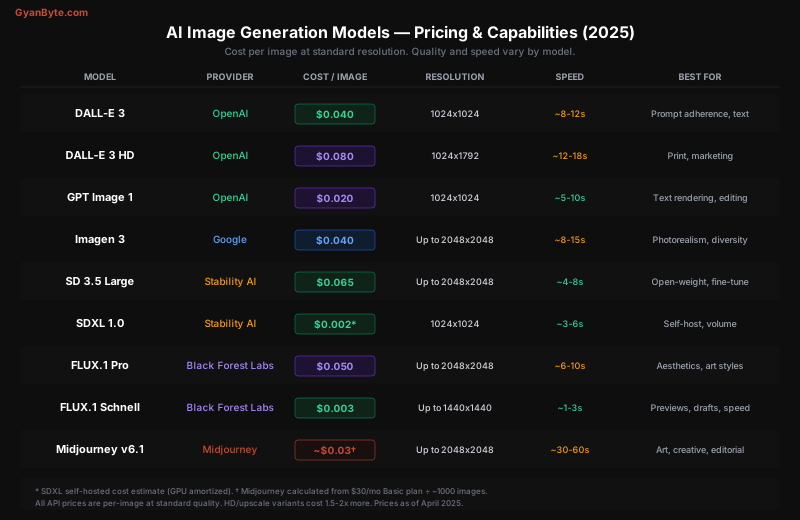
Quick Summary
| Model | Provider | Cost/Image | Speed | Best For |
|---|---|---|---|---|
| DALL-E 3 | OpenAI | $0.04 | ~10s | General purpose, prompt adherence |
| DALL-E 3 HD | OpenAI | $0.08 | ~15s | Print, marketing, high-res |
| GPT Image 1 | OpenAI | $0.02 | ~8s | Text rendering, image editing |
| Imagen 3 | $0.04 | ~12s | Photorealism, diversity | |
| SD 3.5 Large | Stability AI | $0.065 | ~6s | Open-weight, fine-tuning |
| SDXL 1.0 | Stability AI | ~$0.002* | ~4s | Self-hosted, maximum volume |
| FLUX.1 Pro | Black Forest Labs | $0.05 | ~8s | Aesthetics, art styles |
| FLUX.1 Schnell | Black Forest Labs | $0.003 | ~2s | Speed, drafts, previews |
| Midjourney v6.1 | Midjourney | ~$0.03† | ~45s | Art, creative, editorial |
* SDXL self-hosted cost (GPU amortized). † Midjourney estimated from subscription.
Model Deep Dive
OpenAI: DALL-E 3 and GPT Image 1
DALL-E 3 remains one of the best general-purpose models. Its killer feature is prompt adherence — it follows complex, detailed prompts more reliably than most competitors. OpenAI achieves this by using GPT-4 to rewrite your prompt into a more detailed version before passing it to the image model.
GPT Image 1 (gpt-image-1) is OpenAI’s newer model with two standout capabilities:
- Text rendering — it can spell words correctly in images, which sounds basic but most models still fail at
- Image editing — upload an image, describe changes, and it modifies the image coherently
import openai
import base64

client = openai.OpenAI()

# Basic generation with DALL-E 3
response = client.images.generate(
    model="dall-e-3",
    prompt="A cozy coffee shop interior with warm lighting, "
           "wooden tables, and a barista making latte art",
    size="1024x1024",
    quality="standard",  # "standard" ($0.04) or "hd" ($0.08)
    n=1
)
image_url = response.data[0].url

# GPT Image 1 — supports text in images
response = client.images.generate(
    model="gpt-image-1",
    prompt='A minimalist poster that says "SUMMER SALE 2025" '
           'in bold sans-serif font, with palm leaves and sunset gradient',
    size="1024x1024",
    quality="medium",  # "low" ($0.011), "medium" ($0.020), "high" ($0.040)
)

# GPT Image 1 — image editing (inpainting)
with open("product.png", "rb") as f:
    image_data = f.read()

response = client.images.edit(
    model="gpt-image-1",
    image=base64.b64encode(image_data).decode(),
    prompt="Change the background to a modern kitchen with marble countertops",
)
Pricing details for GPT Image 1:
Quality     1024x1024    1536x1024    Auto (varies)
──────────────────────────────────────────────────
Low         $0.011       $0.016       depends
Medium      $0.020       $0.030       depends
High        $0.040       $0.060       depends
Google: Imagen 3
Imagen 3 produces the most photorealistic output. Where DALL-E sometimes has that subtle “AI sheen,” Imagen’s images often pass for real photographs — especially for people, food, and interiors.
import google.generativeai as genai
from google.generativeai import types

client = genai.Client()

# Generate with Imagen 3
response = client.models.generate_images(
    model="imagen-3.0-generate-002",
    prompt="Professional headshot of a woman in a navy blazer, "
           "soft studio lighting, shallow depth of field, "
           "neutral gray background",
    config=types.GenerateImagesConfig(
        number_of_images=4,
        aspect_ratio="1:1",       # 1:1, 3:4, 4:3, 9:16, 16:9
        safety_filter_level="BLOCK_MEDIUM_AND_ABOVE",
    )
)

for i, image in enumerate(response.generated_images):
    with open(f"headshot_{i}.png", "wb") as f:
f.write(image.image.image_bytes)Pricing: $0.04/image standard, $0.08/image at higher resolutions. Batch pricing available at 50%+ discount for high-volume customers via Google Cloud.
Stable Diffusion (SDXL & SD 3.5)
Stable Diffusion’s biggest advantage is that it’s open-weight. You can download the model and run it on your own GPU — no API costs, no rate limits, no data leaving your servers.
SDXL 1.0 is the workhorse for self-hosted deployment. The model is mature, well-optimized, and has the largest ecosystem of LoRA fine-tunes and community models.
SD 3.5 Large is newer and higher quality, but requires more VRAM and has a more restrictive license.
# Self-hosted with diffusers library
from diffusers import StableDiffusionXLPipeline
import torch

pipe = StableDiffusionXLPipeline.from_pretrained(
    "stabilityai/stable-diffusion-xl-base-1.0",
    torch_dtype=torch.float16,
    variant="fp16"
).to("cuda")

# Enable memory optimizations
pipe.enable_xformers_memory_efficient_attention()

image = pipe(
    prompt="A sleek electric car in a showroom, "
           "dramatic lighting, reflective floor, "
           "photographic quality",
    negative_prompt="blurry, low quality, distorted",
    num_inference_steps=30,
    guidance_scale=7.5,
    width=1024,
    height=1024
).images[0]

image.save("car.png")
Self-hosting cost breakdown:
GPU Option            Cost/Hour    Images/Hour    Cost/Image
──────────────────────────────────────────────────────────────
A100 80GB (AWS)       $3.80        ~600           $0.006
A10G (AWS)            $1.20        ~200           $0.006
L4 (GCP)              $0.80        ~180           $0.004
RTX 4090 (own)        $0.15*       ~400           $0.0004
T4 (budget cloud)     $0.50        ~80            $0.006

* electricity cost only, excludes hardware amortization
With optimizations (TensorRT, batching, fp16), self-hosted SDXL costs $0.002-0.006/image — 10-20x cheaper than API models.
FLUX (Black Forest Labs)
FLUX is the new contender from the creators of the original Stable Diffusion. It comes in three variants:
- FLUX.1 Pro ($0.05/image via API) — highest quality, photorealistic + artistic
- FLUX.1 Dev (open-weight, research license) — nearly Pro quality, can self-host
- FLUX.1 Schnell ($0.003/image or self-host) — fastest model, 1-4 steps, great for drafts
FLUX is available via Replicate, fal.ai, Together AI, and BFL’s own API:
import replicate

# FLUX Pro via Replicate
output = replicate.run(
    "black-forest-labs/flux-1.1-pro",
    input={
        "prompt": "Aerial view of a Japanese garden in autumn, "
                  "koi pond reflecting red maples, zen rock patterns",
        "aspect_ratio": "16:9",
        "output_format": "webp",
        "output_quality": 90,
        "safety_tolerance": 2
    }
)
# Returns URL to generated image
# Cost: ~$0.05 per image

# FLUX Schnell — fast and cheap for drafts
output = replicate.run(
    "black-forest-labs/flux-schnell",
    input={
        "prompt": "Minimalist logo design, letter M, geometric, blue gradient",
        "num_outputs": 4,
        "output_format": "webp"
    }
)
# Cost: ~$0.003 per image, ~1-3 seconds
Midjourney v6.1
Midjourney remains the aesthetic champion. For art direction, editorial imagery, and creative work, nothing else consistently produces images that look this good.
The catch: no real API. Midjourney works through Discord, which makes programmatic access awkward. There are unofficial API wrappers, but they violate ToS. The official web interface supports generation, but rate limits are per-subscription.
Pricing (subscription-based):
Plan       Price/mo    Fast GPU hrs    Images/mo (est.)    $/Image (est.)
────────────────────────────────────────────────────────────────────────
Basic      $10         3.3 hrs         ~200                $0.050
Standard   $30         15 hrs          ~900                $0.033
Pro        $60         30 hrs          ~1,800              $0.033
Mega       $120        60 hrs          ~3,600              $0.033
When to use Midjourney: Hero images for websites, editorial content, art for print, social media content where aesthetics matter more than programmatic control. Not suitable for production pipelines that need an API.
Cost Optimization Strategies
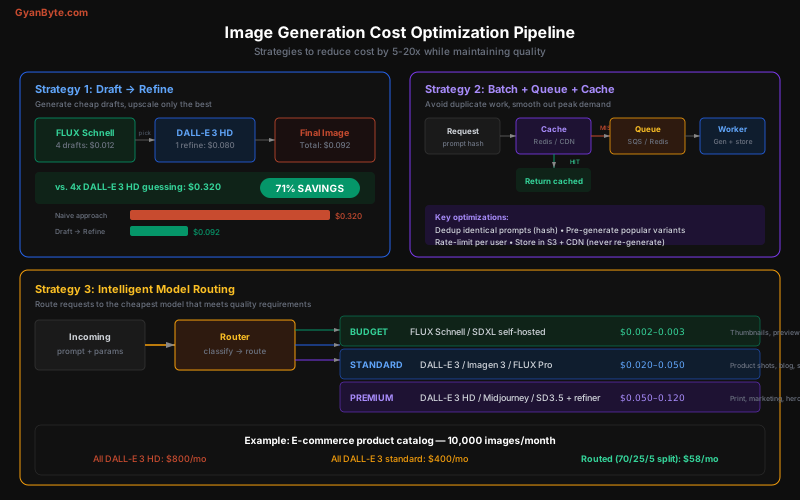
Strategy 1: Draft → Refine Pipeline
The most impactful optimization. Instead of generating expensive final images blind, generate cheap drafts first:
import replicate
import openai

client = openai.OpenAI()

def generate_with_draft_refine(prompt: str, num_drafts: int = 4) -> str:
    """
    Step 1: Generate cheap drafts with FLUX Schnell ($0.003 each)
    Step 2: Pick the best composition
    Step 3: Refine with DALL-E 3 HD ($0.08)

    Total: $0.012 (drafts) + $0.08 (final) = $0.092
    vs. $0.32 for 4x DALL-E 3 HD → 71% savings
    """

    # Step 1: Fast drafts
    drafts = replicate.run(
        "black-forest-labs/flux-schnell",
        input={
            "prompt": prompt,
            "num_outputs": num_drafts,
            "output_format": "webp"
        }
    )

    # Step 2: Use an LLM to pick the best composition
    # (or present to user for selection)
    best_draft = select_best_draft(drafts)  # Your selection logic

    # Step 3: Refine the winning concept with high-quality model
    # Use a more detailed prompt based on the draft
    refined = client.images.generate(
        model="dall-e-3",
        prompt=f"{prompt}, highly detailed, professional quality",
        size="1024x1792",
        quality="hd",
        n=1
    )

    return refined.data[0].url
Strategy 2: Prompt Hashing + CDN Cache
Never generate the same image twice:
import hashlib
import redis
import json

redis_client = redis.Redis(host="localhost", port=6379)

def generate_image_cached(
    prompt: str,
    model: str = "dall-e-3",
    size: str = "1024x1024"
) -> str:
    """Cache images by prompt hash. Hit rate of 15-40% is typical."""

    # Create deterministic cache key
    cache_key = hashlib.sha256(
        json.dumps({
            "prompt": prompt.strip().lower(),
            "model": model,
            "size": size
        }, sort_keys=True).encode()
    ).hexdigest()

    # Check cache
    cached_url = redis_client.get(f"img:{cache_key}")
    if cached_url:
        return cached_url.decode()  # Cache hit — $0.00

    # Cache miss — generate
    image_url = generate_image(prompt, model, size)

    # Store in S3 (permanent) + Redis (fast lookup, 30-day TTL)
    s3_url = upload_to_s3(image_url, key=f"generated/{cache_key}.webp")
    redis_client.setex(f"img:{cache_key}", 30 * 86400, s3_url)

    return s3_url
Strategy 3: Intelligent Model Routing
Route each request to the cheapest model that meets quality requirements:
from enum import Enum

class ImageTier(Enum):
    BUDGET = "budget"       # $0.002-0.003 — thumbnails, previews
    STANDARD = "standard"   # $0.02-0.05 — product shots, blog images
    PREMIUM = "premium"     # $0.05-0.12 — hero images, print, marketing

def route_to_model(
    use_case: str,
    needs_text: bool = False,
    needs_edit: bool = False,
    resolution: str = "1024x1024"
) -> dict:
    """Route to optimal model based on requirements."""

    # Text in image? GPT Image 1 is the only reliable option
    if needs_text:
        return {"model": "gpt-image-1", "tier": ImageTier.STANDARD, "cost": 0.020}

    # Image editing? GPT Image 1 or SD inpainting
    if needs_edit:
        return {"model": "gpt-image-1", "tier": ImageTier.STANDARD, "cost": 0.020}

    routing_table = {
        # Use case → (model, tier, cost_per_image)
        "thumbnail":     ("flux-schnell",   ImageTier.BUDGET,   0.003),
        "preview":       ("flux-schnell",   ImageTier.BUDGET,   0.003),
        "placeholder":   ("flux-schnell",   ImageTier.BUDGET,   0.003),
        "product_shot":  ("dall-e-3",       ImageTier.STANDARD, 0.040),
        "blog_image":    ("dall-e-3",       ImageTier.STANDARD, 0.040),
        "social_media":  ("flux-pro",       ImageTier.STANDARD, 0.050),
        "hero_image":    ("dall-e-3-hd",    ImageTier.PREMIUM,  0.080),
        "print":         ("dall-e-3-hd",    ImageTier.PREMIUM,  0.080),
        "marketing":     ("dall-e-3-hd",    ImageTier.PREMIUM,  0.080),
    }

    model, tier, cost = routing_table.get(
        use_case,
        ("dall-e-3", ImageTier.STANDARD, 0.040)
    )

    return {"model": model, "tier": tier, "cost": cost}

# Example: E-commerce catalog with 10,000 images/month
# 70% thumbnails (FLUX Schnell): 7,000 × $0.003 = $21
# 25% product shots (DALL-E 3):  2,500 × $0.040 = $100
# 5% hero images (DALL-E 3 HD):    500 × $0.080 = $40
# Total: $161/month
# vs. all DALL-E 3 HD: 10,000 × $0.08 = $800/month → 80% savings
Strategy 4: Batch Generation with Queue
For non-real-time use cases, batch requests to optimize throughput and manage costs:
import asyncio
from dataclasses import dataclass
from datetime import datetime

@dataclass
class ImageRequest:
    id: str
    prompt: str
    model: str
    priority: int  # 1=high, 3=low
    created_at: datetime
    callback_url: str | None = None

class ImageGenerationQueue:
    def __init__(self, max_concurrent: int = 5, budget_per_hour: float = 10.0):
        self.queue: list[ImageRequest] = []
        self.max_concurrent = max_concurrent
        self.budget_per_hour = budget_per_hour
        self.spent_this_hour = 0.0
        self.semaphore = asyncio.Semaphore(max_concurrent)

    async def add(self, request: ImageRequest):
        """Add request to priority queue."""
        self.queue.append(request)
        self.queue.sort(key=lambda r: r.priority)

    async def process(self):
        """Process queue with concurrency and budget limits."""
        while self.queue:
            if self.spent_this_hour >= self.budget_per_hour:
                await asyncio.sleep(60)  # Wait for budget to reset
                continue

            request = self.queue.pop(0)

            async with self.semaphore:
                cost = get_model_cost(request.model)
                result = await generate_image_async(
                    request.prompt,
                    request.model
                )
                self.spent_this_hour += cost

                # Store result and notify
                await store_result(request.id, result)
                if request.callback_url:
                    await notify_webhook(request.callback_url, request.id, result)

# Usage
queue = ImageGenerationQueue(max_concurrent=5, budget_per_hour=10.0)
await queue.add(ImageRequest(
    id="img_001",
    prompt="Product photo of wireless headphones on white background",
    model="dall-e-3",
    priority=1,
    created_at=datetime.now()
))
Strategy 5: Resolution Optimization
Don’t pay for pixels you won’t use:
def optimal_resolution(use_case: str) -> dict:
    """Match resolution to final display size."""

    resolutions = {
        # Use case → (generation size, final display, model quality)
        "og_image":      {"gen": "1200x630",  "quality": "standard"},  # Social previews
        "thumbnail":     {"gen": "512x512",   "quality": "low"},       # Grid views
        "blog_header":   {"gen": "1024x576",  "quality": "standard"},  # 16:9 ratio
        "product_card":  {"gen": "1024x1024", "quality": "standard"},  # Square
        "hero_banner":   {"gen": "1792x1024", "quality": "hd"},        # Wide, above fold
        "print_poster":  {"gen": "1024x1792", "quality": "hd"},        # Portrait, high-res
    }

    return resolutions.get(use_case, {"gen": "1024x1024", "quality": "standard"})

# A 256x256 thumbnail doesn't need a 2048x2048 generation
# DALL-E 3 standard (1024x1024): $0.040
# DALL-E 3 HD (1792x1024):       $0.080  ← 2x cost for hero banner
# GPT Image 1 low (1024x1024):   $0.011  ← cheapest for simple images
Which Model for Which Image?
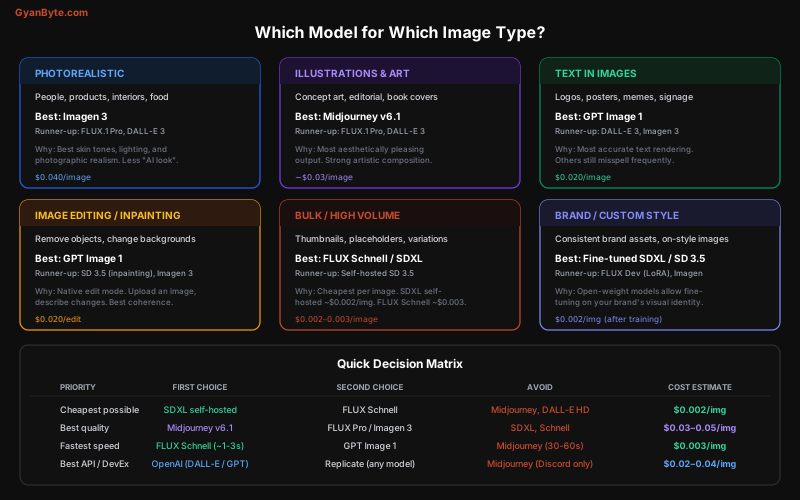
Photorealistic Images (People, Products, Interiors)
Winner: Imagen 3, then FLUX Pro, then DALL-E 3.
Imagen produces the most natural-looking photographs. Skin tones, lighting, and texture detail are noticeably better than competitors. If you’re generating product photography, food shots, or real estate imagery, start here.
Art, Illustrations, and Creative Work
Winner: Midjourney v6.1, then FLUX Pro, then DALL-E 3.
Midjourney has the strongest “artistic eye” — its default compositions, color palettes, and stylistic choices are consistently impressive. The downside is no API, so it’s not suitable for automated pipelines.
For API-accessible artistic work, FLUX Pro is the best option. It handles a wide range of styles (oil painting, watercolor, anime, concept art) better than DALL-E.
Text in Images
Winner: GPT Image 1, period.
Other models still routinely misspell words or produce garbled text. GPT Image 1 is the first model that reliably renders text — logos, posters, signs, memes, UI mockups with real text.
# GPT Image 1 handles text that would break other models
response = client.images.generate(
    model="gpt-image-1",
    prompt='A conference badge that reads:\n'
           'Name: "Sarah Chen"\n'
           'Title: "Senior Software Engineer"\n'
           'Company: "TechCorp"\n'
           'with a professional blue and white design',
    size="1024x1024",
    quality="medium"
)
# Text renders correctly — other models would scramble the names
Image Editing and Inpainting
Winner: GPT Image 1 for API-based editing. SD 3.5 for self-hosted inpainting pipelines.
GPT Image 1’s edit mode lets you upload an image and describe changes in natural language. For production inpainting pipelines (e.g., background removal and replacement at scale), self-hosted SD with ControlNet gives you more control.
Bulk Generation (1,000+ images)
Winner: Self-hosted SDXL or FLUX Schnell via API.
At volume, API costs add up fast. Self-hosted SDXL on an A100 generates ~600 images/hour at ~$0.006/image. With TensorRT optimization:
# Optimized batch generation with SDXL
from diffusers import StableDiffusionXLPipeline
import torch

pipe = StableDiffusionXLPipeline.from_pretrained(
    "stabilityai/stable-diffusion-xl-base-1.0",
    torch_dtype=torch.float16
).to("cuda")

# Compile for speed (first run is slow, subsequent runs 2-3x faster)
pipe.unet = torch.compile(pipe.unet, mode="reduce-overhead", fullgraph=True)

# Batch generation
prompts = [
    "Product photo of blue running shoes on white background",
    "Product photo of leather wallet on white background",
    "Product photo of wireless earbuds on white background",
    # ... hundreds more
]

# Process in batches of 4 (matches GPU memory)
batch_size = 4
for i in range(0, len(prompts), batch_size):
    batch = prompts[i:i + batch_size]
    images = pipe(
        prompt=batch,
        num_inference_steps=25,
        guidance_scale=7.0,
        width=1024,
        height=1024
    ).images

    for j, img in enumerate(images):
        img.save(f"output/product_{i+j:04d}.png")
Custom Brand Style
Winner: Fine-tuned SDXL or FLUX Dev with LoRA.
When you need every generated image to match your brand’s visual identity, fine-tuning is the way:
# Train a LoRA adapter on your brand images
# Using the popular kohya-ss trainer
# ~20-50 brand images needed, ~30 minutes on an A100

from diffusers import StableDiffusionXLPipeline

pipe = StableDiffusionXLPipeline.from_pretrained(
    "stabilityai/stable-diffusion-xl-base-1.0",
    torch_dtype=torch.float16
).to("cuda")

# Load your brand LoRA
pipe.load_lora_weights("./brand-style-lora/")

# Every image now matches your brand aesthetic
image = pipe(
    prompt="A branded social media post announcing a product launch, "
           "in the style of brand_style",
    num_inference_steps=30
).images[0]
Self-Hosting vs API: The Break-Even
# Break-even analysis: when does self-hosting save money?

api_cost_per_image = 0.04  # DALL-E 3 standard
gpu_cost_per_hour = 3.80   # A100 on AWS
images_per_hour = 600      # SDXL with optimizations

self_hosted_cost_per_image = gpu_cost_per_hour / images_per_hour  # $0.006

# Monthly break-even
monthly_gpu_cost = gpu_cost_per_hour * 24 * 30  # $2,736/month fixed
break_even_images = monthly_gpu_cost / api_cost_per_image

print(f"Break-even: {break_even_images:,.0f} images/month")
# Break-even: 68,400 images/month

# Below 68K images → API is cheaper (no infra overhead)
# Above 68K images → self-host saves money
# At 200K images → API: $8,000/mo vs self-hosted: $2,736/mo
Rule of thumb: Self-host when you exceed 50K images/month, or when data privacy is non-negotiable.
For medium volume (5K-50K/month), use Replicate or fal.ai — they provide serverless GPU access for open-weight models at per-second pricing without the infra burden:
# Replicate: pay-per-second GPU pricing
# No idle costs, no infra management
import replicate

output = replicate.run(
    "stability-ai/sdxl:7762fd07cf82c948538e41f63f77d685e02b063e37e496e96eefd46c929f9bdc",
    input={
        "prompt": "...",
        "width": 1024,
        "height": 1024,
        "num_inference_steps": 25
    }
)
# Cost: ~$0.003-0.008 per image (GPU-seconds pricing)
Production Architecture
For a production image generation service, combine all strategies:
class ImageGenerationService:
    """
    Production service combining all optimization strategies:
    1. Cache check (Redis + S3/CDN)
    2. Model routing (match use case to cheapest model)
    3. Draft-refine for premium images
    4. Queue + rate limiting for budget control
    5. Resolution optimization
    """

    def __init__(self):
        self.cache = RedisCache()
        self.queue = ImageQueue(max_concurrent=10)
        self.budget = BudgetTracker(daily_limit=100.0)

    async def generate(
        self,
        prompt: str,
        use_case: str = "blog_image",
        needs_text: bool = False,
        priority: int = 2
    ) -> str:
        # 1. Check cache
        cached = await self.cache.get(prompt, use_case)
        if cached:
            return cached  # $0.00

        # 2. Route to optimal model
        route = route_to_model(use_case, needs_text=needs_text)

        # 3. Check budget
        if not self.budget.can_afford(route["cost"]):
            raise BudgetExceeded(f"Daily limit reached")

        # 4. Generate (with draft-refine for premium)
        if route["tier"] == ImageTier.PREMIUM:
            result = await self.draft_refine(prompt)
        else:
            result = await self.queue.submit(prompt, route["model"], priority)

        # 5. Cache result
        await self.cache.store(prompt, use_case, result)
        self.budget.record(route["cost"])

        return result
Key Takeaways
-
GPT Image 1 is the new default for most use cases — good quality at $0.02/image, and it handles text and editing. DALL-E 3 remains strong for prompt adherence.
-
Imagen 3 wins on photorealism. If your images need to look like real photographs, start here.
-
Midjourney wins on aesthetics but has no API. Use it for creative work, not pipelines.
-
FLUX Schnell is the speed/cost champion at $0.003/image and 1-3 second generation. Use it for drafts, thumbnails, and previews.
-
Self-host SDXL for volume. Above 50K images/month, self-hosting pays for itself. Below that, use Replicate or fal.ai for serverless GPU access.
-
Model routing saves 50-80%. Don’t send every request to the same expensive model. Match the model to the use case.
-
Draft→refine saves 70%+ on premium images. Generate cheap variants, pick the best composition, then refine with an expensive model.
-
Cache everything. With prompt hashing and CDN storage, you never pay to generate the same image twice. Typical cache hit rates are 15-40%.
-
Fine-tune for brand consistency. If you need every image to match a specific style, fine-tune SDXL or FLUX Dev with 20-50 reference images.
-
Always store generated images permanently in S3/GCS + CDN. Regenerating an image costs the same as generating it the first time — storage is 1000x cheaper.


