

Choosing the right AI model is one of the most impactful decisions you’ll make when building an AI product. Pick a model that’s too expensive and your margins evaporate. Pick one that’s too weak and your users get garbage results. Pick one that’s too slow and your UX suffers.
The problem? The landscape changes every few months, and there are now dozens of models across six major providers, each with different pricing, capabilities, and sweet spots.
This guide cuts through the noise. We’ll compare every major model family, break down real pricing, and give you a clear framework for picking the right model for your specific use case.
The Current AI Model Landscape
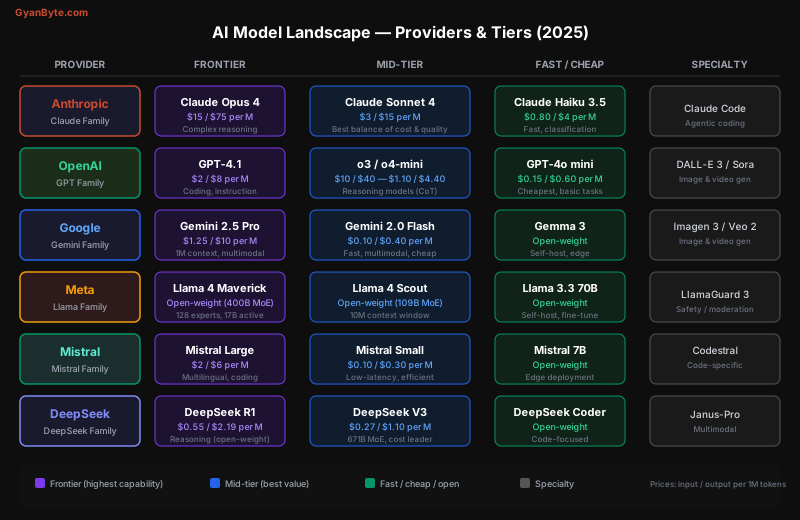
There are six major players in 2025:
| Provider | Flagship Model | Open-Weight? | Key Strength |
|---|---|---|---|
| Anthropic | Claude Opus 4 | No | Best at coding, instruction following, safety |
| OpenAI | GPT-4.1 / o3 | No | Reasoning models (o-series), ecosystem dominance |
| Gemini 2.5 Pro | No (Gemma is open) | Largest context window (1M tokens), multimodal | |
| Meta | Llama 4 Maverick | Yes | Best open-weight models, self-hostable |
| Mistral | Mistral Large | Partially | European provider, strong multilingual |
| DeepSeek | DeepSeek R1/V3 | Yes | Cost leader, competitive reasoning |
Pricing Breakdown — What Things Actually Cost
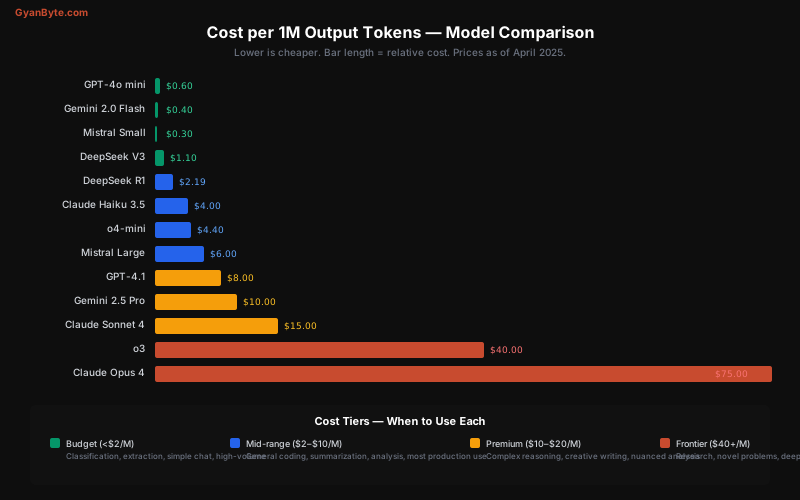
Pricing is per 1 million tokens (roughly 750,000 words). Most providers charge differently for input tokens (what you send) and output tokens (what the model generates).
Closed-Source API Pricing
Model                  Input/1M    Output/1M    Context    Notes
─────────────────────────────────────────────────────────────────
Claude Opus 4          $15.00      $75.00       200K       Best complex reasoning
Claude Sonnet 4        $3.00       $15.00       200K       Best mid-tier value
Claude Haiku 3.5       $0.80       $4.00        200K       Fast classification
GPT-4.1                $2.00       $8.00        1M         Strong coding
o3                     $10.00      $40.00       200K       Deep reasoning (CoT)
o4-mini                $1.10       $4.40        200K       Budget reasoning
GPT-4o mini            $0.15       $0.60        128K       Cheapest OpenAI
Gemini 2.5 Pro         $1.25       $10.00       1M         Largest context
Gemini 2.0 Flash       $0.10       $0.40        1M         Cheapest major model
Mistral Large          $2.00       $6.00        128K       Multilingual
Mistral Small          $0.10       $0.30        32K        Ultra-fast
DeepSeek R1            $0.55       $2.19        64K        Open-weight reasoning
DeepSeek V3            $0.27       $1.10        64K        Cost leader
What Does This Mean in Practice?
Let’s put real numbers on common scenarios:
# Cost calculator for a customer support chatbot
# Average conversation: 2,000 input tokens + 500 output tokens

conversations_per_day = 10_000

models = {
    "Claude Opus 4":    {"input": 15.00, "output": 75.00},
    "Claude Sonnet 4":  {"input": 3.00,  "output": 15.00},
    "GPT-4.1":          {"input": 2.00,  "output": 8.00},
    "GPT-4o mini":      {"input": 0.15,  "output": 0.60},
    "Gemini 2.0 Flash": {"input": 0.10,  "output": 0.40},
}

for model, prices in models.items():
    daily_input_cost = (2_000 * conversations_per_day / 1_000_000) * prices["input"]
    daily_output_cost = (500 * conversations_per_day / 1_000_000) * prices["output"]
    monthly_cost = (daily_input_cost + daily_output_cost) * 30

    print(f"{model:25s} → ${monthly_cost:>8,.2f}/month")
Output:
Claude Opus 4 → $12,150.00/month
Claude Sonnet 4 → $2,430.00/month
GPT-4.1 → $1,320.00/month
GPT-4o mini → $ 99.00/month
Gemini 2.0 Flash → $ 66.00/monthThe cheapest model is 184x less expensive than the most expensive one. That’s the difference between a $66/month hobby project and a $12K/month enterprise expense — for the exact same volume.
Prompt Caching Cuts Costs Dramatically
Most providers offer prompt caching — if you send the same system prompt repeatedly, cached tokens are 75-90% cheaper:
# Anthropic prompt caching example
import anthropic

client = anthropic.Anthropic()

response = client.messages.create(
    model="claude-sonnet-4-6",
    max_tokens=1024,
    system=[
        {
            "type": "text",
            "text": "You are a legal document analyzer...",  # Long system prompt
            "cache_control": {"type": "ephemeral"}  # Cache this block
        }
    ],
    messages=[{"role": "user", "content": "Summarize this contract..."}]
)

# First call: full price for system prompt
# Subsequent calls: 90% discount on cached tokens
# Claude Sonnet: $0.30/M cached input vs $3.00/M regular input
Model Deep Dive — Strengths and Weaknesses
Anthropic (Claude Family)
Claude Opus 4 is the current frontier model for complex, multi-step reasoning. It excels at:
- Agentic coding — Claude Code uses Opus to autonomously write, test, and debug code across entire codebases
- Nuanced instruction following — handles complex, multi-constraint prompts where other models miss edge cases
- Creative writing — produces the most natural, human-like prose
- Safety — least likely to produce harmful content while remaining helpful
Claude Sonnet 4 is the workhorse — the best balance of intelligence, speed, and cost for production systems. Use it for:
- Chatbots, customer support, content generation
- Code generation and review
- Document analysis and summarization
- Any production workload where you need quality but can’t justify Opus pricing
Claude Haiku 3.5 is the speedster — optimized for tasks where latency matters more than nuance:
- Classification and routing (is this a billing question or a technical question?)
- Entity extraction
- Simple transformations
- High-volume pipelines
# Example: Using Haiku for fast classification, Sonnet for response generation
import anthropic

client = anthropic.Anthropic()

def handle_support_ticket(ticket_text: str):
    # Step 1: Fast classification with Haiku ($0.80/M input)
    classification = client.messages.create(
        model="claude-haiku-4-5-20251001",
        max_tokens=50,
        messages=[{
            "role": "user",
            "content": f"Classify this support ticket into one of: "
                       f"billing, technical, account, other.\n\n{ticket_text}"
        }]
    )
    category = classification.content[0].text.strip().lower()

    # Step 2: Full response with Sonnet ($3/M input) — only for complex tickets
    if category == "technical":
        response = client.messages.create(
            model="claude-sonnet-4-6",
            max_tokens=1024,
            system="You are a technical support engineer...",
            messages=[{"role": "user", "content": ticket_text}]
        )
        return response.content[0].text

    # Simple tickets: keep using Haiku
    response = client.messages.create(
        model="claude-haiku-4-5-20251001",
        max_tokens=512,
        system=f"You handle {category} support tickets...",
        messages=[{"role": "user", "content": ticket_text}]
    )
    return response.content[0].text
OpenAI (GPT Family)
GPT-4.1 is OpenAI’s latest general-purpose model. Strong at:
- Coding (especially with structured output / JSON mode)
- Following complex instructions
- 1M token context window
o3 and o4-mini are reasoning models. They “think” before answering using chain-of-thought:
- Math and science problems
- Complex logical reasoning
- Formal proofs
- o4-mini gives 80% of o3’s reasoning at 1/10th the cost
GPT-4o mini is the budget workhorse:
- At $0.15/$0.60 per M tokens, it’s one of the cheapest closed-source options
- Good enough for classification, extraction, and simple chat
- Not great for complex reasoning or creative writing
// Using OpenAI's structured output for reliable JSON
import OpenAI from "openai";

const client = new OpenAI();

const response = await client.chat.completions.create({
  model: "gpt-4.1",
  response_format: {
    type: "json_schema",
    json_schema: {
      name: "product_extraction",
      schema: {
        type: "object",
        properties: {
          name: { type: "string" },
          price: { type: "number" },
          currency: { type: "string" },
          category: { type: "string", enum: ["electronics", "clothing", "food", "other"] }
        },
        required: ["name", "price", "currency", "category"]
      }
    }
  },
  messages: [{
    role: "user",
    content: "Extract product info: 'The Sony WH-1000XM5 headphones are on sale for $278'"
  }]
});

// Guaranteed valid JSON matching your schema
const product = JSON.parse(response.choices[0].message.content);
// { name: "Sony WH-1000XM5", price: 278, currency: "USD", category: "electronics" }
Google (Gemini Family)
Gemini 2.5 Pro stands out for two things:
- 1M token context window — can process entire codebases, books, or hours of video in a single prompt
- Native multimodal — processes images, video, and audio natively (not just vision bolted on)
Best use cases:
- Analyzing long documents (legal contracts, research papers)
- Video understanding (summarize a 2-hour meeting recording)
- Codebases too large for other models’ context windows
Gemini 2.0 Flash is arguably the best budget model available:
- $0.10/$0.40 per M tokens — cheaper than GPT-4o mini
- Still multimodal (can process images)
- 1M token context
- Quality is surprisingly good for the price
# Gemini's long context: analyze an entire codebase
import google.generativeai as genai

model = genai.GenerativeModel("gemini-2.5-pro-preview-05-06")

# Upload a 500KB codebase as context
with open("entire_codebase.txt", "r") as f:
    codebase = f.read()  # Could be 200K+ tokens

response = model.generate_content([
    f"Here is our entire codebase:\n\n{codebase}\n\n"
    "Find all SQL injection vulnerabilities and suggest fixes. "
    "Reference specific file names and line numbers."
])

print(response.text)
Meta (Llama Family)
Llama models are open-weight — you can download and run them yourself. No API costs, no data leaving your servers.
Llama 4 Maverick (400B parameters, MoE with 128 experts, 17B active):
- Competitive with GPT-4.1 and Claude Sonnet on many benchmarks
- Mixture-of-Experts architecture means it’s faster than its parameter count suggests
- Can be hosted on cloud GPUs for ~$2-4/hour
Llama 4 Scout (109B parameters, MoE):
- 10M token context window — the largest available
- Good for massive document processing on your own infrastructure
When to self-host Llama:
- You process sensitive data that can’t leave your VPC (healthcare, finance, legal)
- You need to fine-tune on proprietary data
- Your volume is so high that API costs exceed GPU hosting costs
- You need zero-dependency operation (no external API calls)
# Running Llama locally with Ollama
ollama pull llama4

# Simple inference
ollama run llama4 "Explain the CAP theorem in 3 sentences"

# Or via API (OpenAI-compatible)
curl http://localhost:11434/v1/chat/completions \
  -H "Content-Type: application/json" \
  -d '{
    "model": "llama4",
    "messages": [{"role": "user", "content": "Explain the CAP theorem"}]
  }'
Mistral
The European AI lab offers models optimized for multilingual use and low-latency deployment.
Mistral Large: Strong general-purpose model, excellent at French, German, Spanish, and other European languages. A good choice if you’re building multilingual products.
Mistral Small ($0.10/$0.30): One of the cheapest options — great for pipelines where you need many fast calls.
Codestral: Purpose-built for code completion. Popular as a backend for IDE plugins (Continue, VS Code extensions).
DeepSeek
The cost leader. DeepSeek models offer surprisingly strong performance at a fraction of the price.
DeepSeek R1: A reasoning model comparable to o3, but open-weight and much cheaper via API ($0.55/$2.19). The catch: longer latency due to chain-of-thought processing.
DeepSeek V3 (671B MoE): General-purpose model that punches well above its weight class at $0.27/$1.10 per M tokens.
Considerations: DeepSeek is a Chinese company. Some organizations have compliance concerns about data routing. Self-hosting the open-weight models eliminates this concern.
Which Model for Which Task?
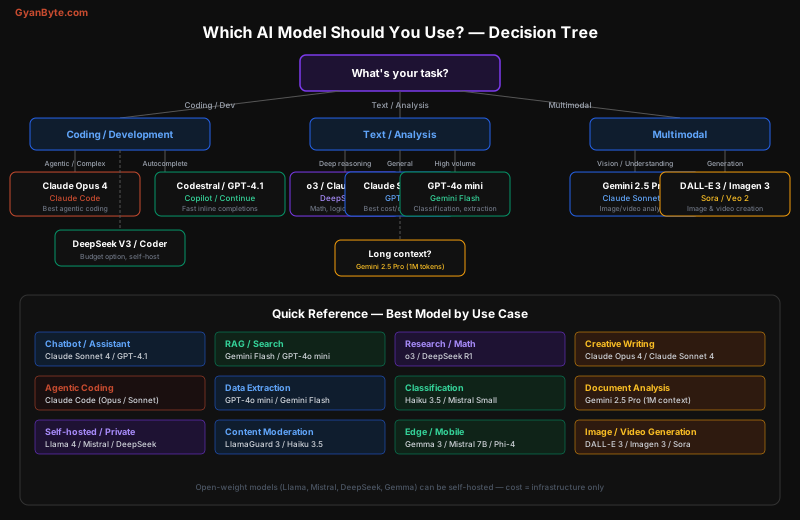
Here’s a concrete decision framework:
Customer-Facing Chatbot
Budget < $500/month  → Gemini 2.0 Flash or GPT-4o mini
Budget $500-$5,000   → Claude Sonnet 4 or GPT-4.1
Premium product      → Claude Opus 4 (or Sonnet with Opus fallback)
RAG (Retrieval-Augmented Generation)
Embedding:     text-embedding-3-small (OpenAI) — $0.02/M tokens
Retrieval:     Your vector DB (Pinecone, pgvector, Qdrant)
Generation:    Claude Sonnet 4 or GPT-4.1 for quality
               Gemini Flash for budget
Long documents: Gemini 2.5 Pro (skip chunking, send the whole document)
Code Generation & Review
Agentic (autonomous multi-file changes): Claude Code (Opus/Sonnet)
Autocomplete in IDE:                     Codestral or GPT-4.1 mini
Code review:                             Claude Sonnet 4 or GPT-4.1
Budget:                                  DeepSeek Coder (self-hosted)
Data Extraction & Classification
Simple classification:  Claude Haiku 3.5 or GPT-4o mini
Structured extraction:  GPT-4.1 (JSON mode) or Claude Sonnet
High-volume pipeline:   Gemini 2.0 Flash or Mistral Small
Sensitive data:         Self-hosted Llama 4 or Mistral
Reasoning & Research
Math/logic/proofs:      o3 or DeepSeek R1
General research:       Claude Opus 4
Budget reasoning:       o4-mini or DeepSeek R1
Scientific analysis:    Gemini 2.5 Pro (can process papers + figures)
The Multi-Model Architecture
Smart teams don’t use one model. They route requests to the right model based on complexity, cost, and latency requirements:
# Multi-model routing architecture
from enum import Enum

class ModelTier(Enum):
    CHEAP = "cheap"       # < $1/M output — Haiku, GPT-4o mini, Gemini Flash
    STANDARD = "standard" # $5-15/M output — Sonnet, GPT-4.1, Mistral Large
    PREMIUM = "premium"   # $40+/M output — Opus, o3

def select_model(task_type: str, complexity: int, budget_sensitive: bool) -> str:
    """Route to optimal model based on task requirements."""

    routing_table = {
        # Task type → (default tier, model)
        "classification":  (ModelTier.CHEAP, "claude-haiku-4-5-20251001"),
        "extraction":      (ModelTier.CHEAP, "gpt-4o-mini"),
        "chat":            (ModelTier.STANDARD, "claude-sonnet-4-6"),
        "code_generation": (ModelTier.STANDARD, "claude-sonnet-4-6"),
        "code_review":     (ModelTier.STANDARD, "gpt-4.1"),
        "research":        (ModelTier.PREMIUM, "claude-opus-4-6"),
        "math_reasoning":  (ModelTier.PREMIUM, "o3"),
        "long_document":   (ModelTier.STANDARD, "gemini-2.5-pro"),
    }

    tier, model = routing_table.get(task_type, (ModelTier.STANDARD, "claude-sonnet-4-6"))

    # Downgrade tier if budget-sensitive and complexity is low
    if budget_sensitive and complexity < 3:
        if tier == ModelTier.PREMIUM:
            model = "claude-sonnet-4-6"
        elif tier == ModelTier.STANDARD:
            model = "claude-haiku-4-5-20251001"

    return model

# Usage
model = select_model("chat", complexity=2, budget_sensitive=True)
# Returns "claude-haiku-4-5-20251001" (downgraded from Sonnet due to low complexity + budget)
Open-Weight vs Closed-Source — The Real Trade-offs
| Factor | Closed-Source (API) | Open-Weight (Self-hosted) |
|---|---|---|
| Setup | Minutes (API key) | Hours/days (GPU infra) |
| Cost at low volume | Pay-per-token | $2-8/hr GPU regardless |
| Cost at high volume | Scales linearly | Fixed infra cost |
| Data privacy | Data sent to provider | Stays in your VPC |
| Fine-tuning | Limited or expensive | Full control |
| Latency | Network round-trip | On-premise, low latency |
| Reliability | Provider outages | Your ops burden |
| Model updates | Automatic | Manual (but you control timing) |
Break-Even Analysis
# When does self-hosting Llama beat Claude Sonnet API?

# API cost (Claude Sonnet 4)
api_input_cost_per_m = 3.00
api_output_cost_per_m = 15.00

# Self-hosted cost (Llama 4 on 8x A100 instance)
gpu_hourly_cost = 25.00  # ~$25/hr for 8x A100 on AWS
gpu_monthly_cost = gpu_hourly_cost * 24 * 30  # $18,000/month
gpu_throughput_tokens_per_sec = 2000  # ~2K tokens/sec on 8x A100
gpu_monthly_output_tokens = gpu_throughput_tokens_per_sec * 3600 * 24 * 30

# Break-even: API cost per month = GPU cost per month
# Assume 3:1 input:output ratio
# API monthly cost = (input_tokens * $3 + output_tokens * $15) / 1M

# Solving: at ~1.4B output tokens/month, self-hosting breaks even
# That's roughly 47M tokens/day or ~35M words/day

break_even_output_tokens = gpu_monthly_cost / (api_output_cost_per_m / 1_000_000)
print(f"Break-even: {break_even_output_tokens/1e9:.1f}B output tokens/month")
# Break-even: 1.2B output tokens/month
Rule of thumb: If you’re spending over $15K/month on API costs, start evaluating self-hosted open-weight models.
Context Window Comparison
Context window size determines how much information you can send in a single request:
Model                    Context Window    Notes
────────────────────────────────────────────────
Llama 4 Scout            10M tokens        Largest available
Gemini 2.5 Pro           1M tokens         Largest closed-source
GPT-4.1                  1M tokens         New for 4.1
Gemini 2.0 Flash         1M tokens         Budget + long context
Claude Opus/Sonnet 4     200K tokens       ~150K words
o3 / o4-mini             200K tokens       Reasoning models
Mistral Large            128K tokens       Standard
GPT-4o mini              128K tokens       Standard
DeepSeek R1/V3           64K tokens        Shortest major model
Mistral Small            32K tokens        Shortest
Practical advice: You rarely need the full context window. RAG with a 128K context model usually outperforms stuffing everything into a 1M context window — and is much cheaper.
Benchmarks vs Real-World Performance
Benchmark scores (MMLU, HumanEval, MATH) are useful but don’t tell the whole story. Here’s what actually matters in production:
| What Benchmarks Measure | What Production Needs |
|---|---|
| Accuracy on test sets | Consistency across thousands of varied inputs |
| Single-turn performance | Multi-turn conversation coherence |
| English-only tasks | Multilingual robustness |
| Clean, well-formatted input | Messy, real-world user input |
| Speed on short prompts | Latency at scale under load |
My recommendation: Run your own eval suite. Take 100-200 real examples from your use case, run them through 3-4 candidate models, and score the outputs. This will tell you more than any benchmark leaderboard.
# Simple eval framework
import json
from dataclasses import dataclass

@dataclass
class EvalResult:
    model: str
    test_case: str
    score: float  # 0-1
    latency_ms: float
    cost_usd: float

def run_eval(models: list[str], test_cases: list[dict]) -> list[EvalResult]:
    results = []
    for model in models:
        for test in test_cases:
            start = time.time()
            response = call_model(model, test["prompt"])
            latency = (time.time() - start) * 1000

            # Score against expected output (exact match, semantic similarity, LLM-as-judge)
            score = evaluate_response(response, test["expected"])
            cost = calculate_cost(model, test["prompt"], response)

            results.append(EvalResult(model, test["id"], score, latency, cost))

    return results

# Aggregate: quality vs cost scatter plot
# Pick the model in the top-right of the quality/cost Pareto frontier
Key Takeaways
-
There is no single “best” model. The right choice depends on your task, volume, budget, and latency requirements.
-
Start with Claude Sonnet 4 or GPT-4.1. They offer the best quality-to-cost ratio for most production workloads. Optimize from there.
-
Use cheap models for simple tasks. Don’t send classification prompts to Opus. Route them to Haiku or GPT-4o mini.
-
Consider the multi-model approach. Classify complexity first (cheap model), then route to the right tier.
-
Self-host when it makes financial sense. The break-even is around $15K/month in API spend, or whenever data privacy is non-negotiable.
-
Run your own evals. Benchmarks lie. Test with your actual data.
-
Don’t forget prompt caching. It can cut costs by 75-90% if your system prompt is large and reused.
-
Context window isn’t everything. RAG + 128K context usually beats brute-forcing with 1M context.
The AI model landscape will keep evolving. New models drop every few weeks. But the framework for choosing — match the model tier to your task complexity, volume, and budget — will remain stable. Build your architecture to swap models easily, and you’ll always be able to ride the cost-performance curve down.


