

Two years ago, AI coding meant one thing: GitHub Copilot autocompleting your lines. Today, there’s an entire ecosystem of tools that range from subtle ghost text to fully autonomous agents that can build features, run tests, and open PRs — all without you touching the keyboard.
The problem isn’t whether to use AI for coding. It’s which tool for which job. An autocomplete tool and an agentic CLI solve fundamentally different problems, and choosing wrong means you’re either fighting the tool or leaving productivity on the table.
This guide compares every major AI coding assistant across architecture, pricing, capabilities, and the workflows where each one actually shines.
The Landscape
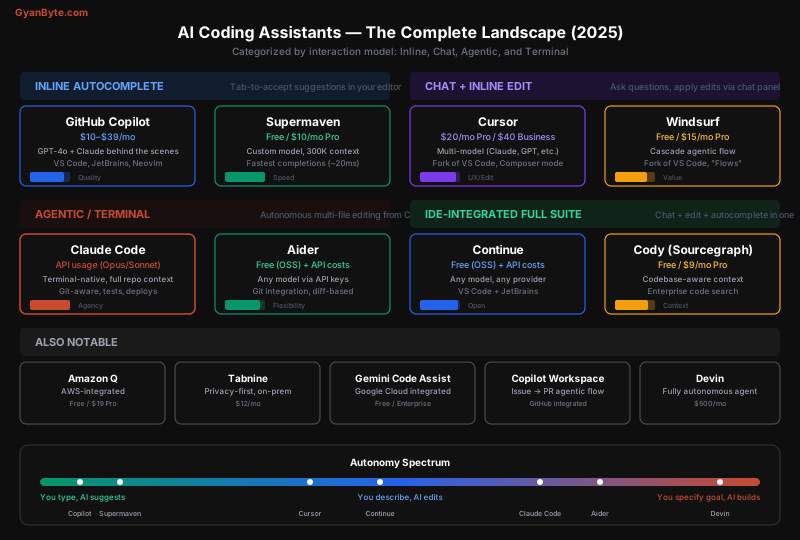
AI coding tools fall into four categories based on their interaction model:
- Inline Autocomplete — Tab-to-accept ghost text while you type (Copilot, Supermaven)
- Chat + Edit — Describe what you want in a chat panel, review diffs (Cursor, Windsurf)
- Agentic / Terminal — Give a goal, the AI autonomously edits files, runs commands (Claude Code, Aider)
- Full Autonomous — The AI works independently in its own sandbox (Devin)
These aren’t competing categories — they’re complementary. Most productive developers use two tools: one for inline flow and one for bigger tasks.
How They Work Under the Hood
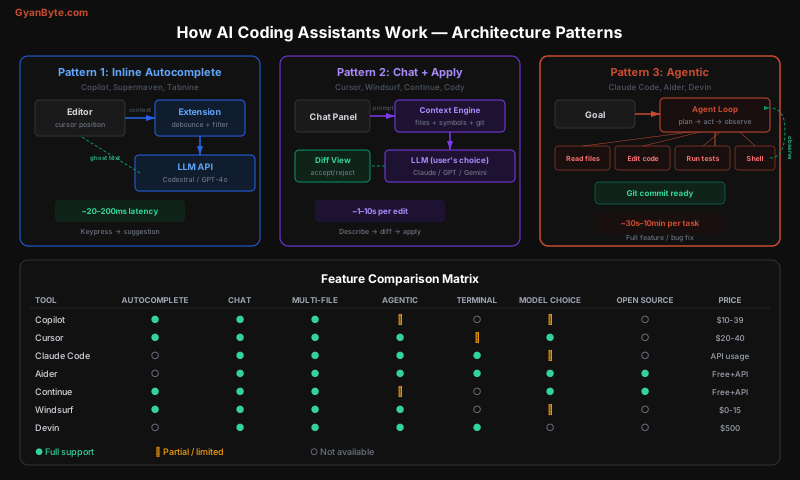
Understanding the architecture explains why each tool behaves differently:
Inline autocomplete works like aggressive auto-correct. On every keystroke (debounced), the extension sends your cursor context — the current file, open tabs, and recently edited files — to a fast model. The model returns a completion in 20-200ms, shown as ghost text. Speed is everything; quality per suggestion is lower, but volume makes up for it.
Chat + Edit tools take a different approach. You describe what you want in natural language. The tool’s context engine gathers relevant code (the open file, imported modules, symbol definitions) and sends it along with your prompt to a powerful model. The response comes back as a diff you can accept or reject. Slower per-interaction, but higher quality per edit.
Agentic tools are the most architecturally distinct. They run an agent loop: the model receives your goal, decides which tool to use (read a file, edit code, run a shell command, search the codebase), observes the result, and repeats. This loop continues until the task is done — or the model decides it’s stuck and asks for help. Claude Code, for instance, can read files, edit multiple files, run tests, grep for symbols, and interact with git — all autonomously.
Tool-by-Tool Deep Dive
GitHub Copilot
What it is: The original AI coding assistant, built into VS Code, JetBrains, Neovim, and more. Now includes chat, inline editing, and the Copilot Workspace agent.
Pricing: $10/month Individual, $19/month Business, $39/month Enterprise
Models: GPT-4o by default, Claude 3.5 Sonnet available in chat, rotating model options
Best at: Inline completions. Copilot has the largest training dataset of any tool (trained on all public GitHub code) and its suggestions have that uncanny ability to guess your next 3-5 lines. The ecosystem is the most mature — extensions for every IDE, tight GitHub integration, PR summaries.
Weaknesses: Chat quality lags behind Cursor’s multi-model approach. The agent features (Copilot Workspace) are still early compared to Claude Code or Aider. You’re locked into GitHub’s model choices.
# Copilot excels at pattern completion
# Type the first function, and it predicts the rest

def get_user_by_id(user_id: int) -> User:
    return db.query(User).filter(User.id == user_id).first()

# Copilot suggests the next function based on the pattern:
def get_user_by_email(email: str) -> User:  # ← ghost text
    return db.query(User).filter(User.email == email).first()

def get_users_by_role(role: str) -> list[User]:  # ← ghost text
    return db.query(User).filter(User.role == role).all()
Cursor
What it is: A fork of VS Code rebuilt around AI. Offers inline completions, chat, and a powerful Composer mode for multi-file edits.
Pricing: Free (limited), $20/month Pro, $40/month Business
Models: Choose between Claude Sonnet/Opus, GPT-4.1, Gemini — you pick the model per request
Best at: The Composer is Cursor’s killer feature. You describe a change in natural language, and it generates a multi-file diff that you can review and apply. It’s the best tool for medium-complexity tasks where you want to stay in the IDE:
You (in Composer):
  "Add rate limiting to the /api/upload endpoint.
   Use Redis with a sliding window counter.
   Max 10 uploads per minute per user.
   Add tests."

Cursor generates:
  ✏️ src/middleware/rateLimit.ts  (new file)
  ✏️ src/routes/upload.ts        (modified — adds middleware)
  ✏️ tests/rateLimit.test.ts     (new file)
  ✏️ docker-compose.yml          (adds Redis service)

You review each diff → Accept / Reject / EditWeaknesses: It’s a separate IDE — if you’re deeply invested in JetBrains or vanilla VS Code, switching has friction. The Cmd+K inline edit sometimes clobbers surrounding code. At $20/month, it’s pricier than Copilot for teams.
Claude Code
What it is: Anthropic’s terminal-native AI coding agent. It runs in your terminal, reads your codebase, and autonomously writes code, runs commands, and interacts with git.
Pricing: Pay-per-use via Anthropic API (Opus at $15/$75 per M tokens, Sonnet at $3/$15 per M tokens). Also available via Claude Max subscription ($100-200/month).
Models: Claude Opus 4 and Claude Sonnet 4 (auto-switches based on task complexity)
Best at: Agentic workflows — tasks where the AI needs to explore the codebase, make changes across multiple files, run tests, and iterate on failures. This is where Claude Code has no peer:
# Start Claude Code in your repo
$ claude

> Add a webhook handler for Stripe payment events.
  Handle payment_intent.succeeded, payment_intent.failed,
  and charge.refunded. Include signature verification,
  idempotency checks, and update the orders table.
  Add integration tests.

# Claude Code autonomously:
# 1. Reads your existing code structure
# 2. Finds how you handle routes and DB access
# 3. Creates src/webhooks/stripe.ts
# 4. Adds route registration in src/routes/index.ts
# 5. Creates tests/webhooks/stripe.test.ts
# 6. Runs the tests
# 7. Fixes any failures
# 8. Shows you the final diff
It’s also the best tool for debugging — you can paste a stack trace and say “fix this”, and it will trace through the code, identify the issue, apply a fix, and verify with tests.
Weaknesses: No inline autocomplete (it’s a terminal tool, not an IDE extension). Cost can be unpredictable since it’s API-based — a complex task might use $2-5 in tokens. Requires comfort with the terminal.
IDE integration: Claude Code also works inside VS Code and JetBrains as an extension, bringing its agentic capabilities into the editor — but its terminal-native experience remains its strongest mode.
Aider
What it is: An open-source terminal AI coding tool. Similar concept to Claude Code but model-agnostic — bring your own API keys.
Pricing: Free (open source). You pay for the API calls to whichever model you choose.
Models: Any model — Claude, GPT, Gemini, Llama, DeepSeek, local models via Ollama
Best at: Flexibility and control. Aider lets you pair any model with its coding agent. It uses a clever diff format (unified diff or whole-file) that models can generate reliably, and has deep git integration — every change is a commit you can revert.
# Use Aider with Claude Sonnet
$ export ANTHROPIC_API_KEY=sk-ant-...
$ aider --model claude-sonnet-4-6

# Or with a local model via Ollama
$ aider --model ollama/deepseek-coder:33b

# Or mix models: cheap for map, expensive for edit
$ aider --model claude-sonnet-4-6 --editor-model claude-haiku-4-5-20251001
Aider also maintains a public leaderboard of model performance on coding benchmarks, which is a valuable resource for picking models.
Weaknesses: Rougher UX than Claude Code — it’s a power-user tool. No hosted option (you must manage API keys and configuration). The architect/editor model split adds complexity.
Windsurf (formerly Codeium)
What it is: A VS Code fork with integrated AI. Its differentiator is Cascade — an agentic mode that handles multi-step tasks within the IDE.
Pricing: Free tier (generous), $15/month Pro
Models: Uses its own models plus partner models (Claude, GPT). The free tier uses their own smaller models.
Best at: Value for money. The free tier is genuinely usable — you get autocomplete, chat, and basic Cascade flows without paying anything. For individual developers or students, this is hard to beat. Cascade’s multi-step flows feel like a lighter version of Cursor’s Composer:
Cascade Flow:
  1. You: "Add dark mode support to the app"
  2. Cascade reads your existing theme setup
  3. Creates a theme context provider
  4. Updates all components that use colors
  5. Adds a toggle button to the header
6. Shows all changes as reviewable diffsWeaknesses: Cascade is less polished than Cursor’s Composer for complex edits. Model quality on the free tier is noticeably lower than paid alternatives. Smaller ecosystem and community.
Continue
What it is: An open-source AI coding extension for VS Code and JetBrains. Acts as a universal adapter — plug in any model from any provider.
Pricing: Free (open source). You pay for your own API costs.
Models: Anything — Claude, GPT, Gemini, Ollama, LM Studio, Azure OpenAI, AWS Bedrock, custom endpoints
Best at: Customization and model freedom. If you want to use Claude for chat, Codestral for autocomplete, and a local Llama for quick edits — Continue lets you wire it all up:
// .continue/config.json
{
  "models": [
    {
      "title": "Claude Sonnet (Chat)",
      "provider": "anthropic",
      "model": "claude-sonnet-4-6",
      "apiKey": "sk-ant-..."
    }
  ],
  "tabAutocompleteModel": {
    "title": "Codestral (Autocomplete)",
    "provider": "mistral",
    "model": "codestral-latest",
    "apiKey": "..."
  },
  "embeddingsProvider": {
    "provider": "openai",
    "model": "text-embedding-3-small"
  }
}Weaknesses: Requires more setup than turnkey solutions. The UX is good but not as polished as Cursor’s purpose-built experience. No built-in agentic mode (though it supports tool use).
Cody (Sourcegraph)
What it is: Sourcegraph’s AI assistant. Its unique advantage is codebase-aware context powered by Sourcegraph’s code search infrastructure.
Pricing: Free, $9/month Pro, Enterprise pricing
Models: Claude Sonnet (default), with GPT and Gemini options
Best at: Large codebases and enterprise. If your company uses Sourcegraph, Cody can search across all your repositories — not just the one you have open. For understanding how code works across a monorepo or many microservices, this is a significant advantage:
You: "How does the payment retry logic work across our services?"

Cody (using Sourcegraph search):
  Found relevant code in 4 repositories:
  - payments-service/src/retry.ts (main retry logic)
  - orders-service/src/webhook.ts (triggers retry)
  - shared-lib/src/backoff.ts (exponential backoff)
  - infra/terraform/sqs.tf (dead letter queue)

[Provides detailed explanation with cross-repo context]Weaknesses: Full power requires a Sourcegraph instance (self-hosted or cloud). Without it, context quality drops to file-level. Autocomplete quality is behind Copilot.
Devin
What it is: A fully autonomous AI software engineer. It works in its own cloud sandbox with a browser, terminal, and editor.
Pricing: $500/month
Models: Proprietary, multi-model system
Best at: Hands-off delegation. You assign Devin a task (a Jira ticket, a GitHub issue, a Slack message), and it works independently — reading docs, writing code, running tests, opening PRs. For well-scoped tasks that don’t need constant human feedback, this is the most autonomous option:
You (in Slack): "@devin Update the Python SDK to support
  the new /v2/search endpoint. Match the existing patterns
  in the codebase. Add tests and update the README."

Devin autonomously:
  1. Reads the API docs for /v2/search
  2. Studies the existing SDK patterns
  3. Implements the new endpoint
  4. Writes unit tests
  5. Updates README with examples
  6. Opens a PR with description
7. Posts back in Slack: "PR #142 ready for review"Weaknesses: At $500/month, it’s the most expensive option by far. Quality is inconsistent — it works well on well-defined tasks but struggles with ambiguous requirements. You lose the interactive feedback loop that makes human+AI collaboration effective.
Which Tool for Which Workflow?
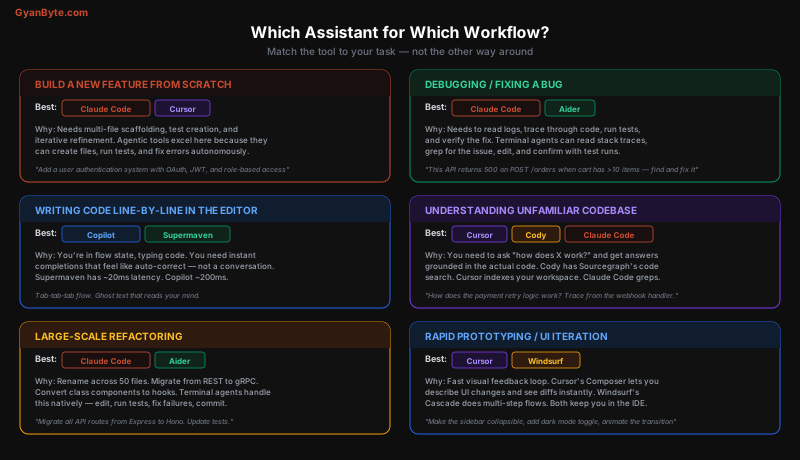
Decision Framework
What are you doing right now?
│
├─ Writing code line by line, want fast suggestions
│  └─ Copilot ($10/mo) or Supermaven (free/faster)
│
├─ Need to make a specific change to 1-3 files
│  └─ Cursor Cmd+K or Windsurf inline edit
│
├─ Building a feature that spans multiple files
│  ├─ Want to stay in the IDE → Cursor Composer
│  └─ Comfortable in terminal → Claude Code
│
├─ Debugging from a stack trace or error log
│  └─ Claude Code (paste error, say "fix this")
│
├─ Refactoring across many files
│  └─ Claude Code or Aider (git-aware, can run tests)
│
├─ Trying to understand unfamiliar code
│  ├─ Single repo → Cursor chat or Claude Code
│  └─ Multiple repos → Cody (Sourcegraph)
│
├─ Want full control over model choice
│  ├─ IDE → Continue (any model, any provider)
│  └─ Terminal → Aider (any model)
│
├─ Need to delegate and walk away
│  └─ Devin ($500/mo) or Copilot Workspace
│
└─ On a budget / student
   └─ Windsurf free tier + Aider with DeepSeek
Pricing Comparison
| Tool | Free Tier | Paid | Model Cost | Total for a Team of 5 |
|---|---|---|---|---|
| Copilot | Limited | $19/seat/mo | Included | $95/mo |
| Cursor | 2 weeks | $20/seat/mo | Included (with limits) | $100/mo |
| Windsurf | Generous | $15/seat/mo | Included | $75/mo |
| Claude Code | — | — | API: ~$50-150/dev/mo | $250-750/mo |
| Aider | Full (OSS) | — | API: ~$30-100/dev/mo | $150-500/mo |
| Continue | Full (OSS) | — | API: ~$20-80/dev/mo | $100-400/mo |
| Cody | Basic | $9/seat/mo | Included | $45/mo |
| Devin | — | $500/mo | Included | $2,500/mo |
Notes on API-based costs: Claude Code, Aider, and Continue costs vary wildly based on usage. A developer doing 2-3 major agentic tasks per day with Claude Sonnet might spend $3-5/day. Heavy Opus usage can be $10-20/day. Prompt caching reduces this significantly for repetitive workflows.
The Winning Combination
Most developers I’ve seen get the best results with two tools:
Combo 1: Copilot + Claude Code (The Pragmatic Choice)
- Copilot for inline autocomplete in the editor — always on, always suggesting
- Claude Code for anything that needs multi-file changes, debugging, or codebase exploration
- Cost: ~$10/mo + $50-150/mo API = $60-160/month
Combo 2: Cursor (All-in-One)
- Cursor does autocomplete, chat, and multi-file edits in one tool
- Good for developers who want everything inside the IDE
- Cost: $20/month (Pro tier)
Combo 3: Continue + Aider (The Open-Source Stack)
- Continue for IDE autocomplete and chat (any model)
- Aider for terminal agentic workflows (any model)
- Full control, fully open-source, bring your own keys
- Cost: API only ($30-100/month depending on model choice)
Combo 4: Budget Stack
- Windsurf free tier for IDE + chat
- Aider with DeepSeek V3 for terminal ($0.27/$1.10 per M tokens)
- Cost: $5-20/month total
What to Look for in 2025
The space is moving fast. A few trends worth tracking:
Agentic is eating everything. Copilot added Workspace. Cursor added Background Agents. Windsurf has Cascade. The endgame is every tool having an “I’ll handle it” mode. The question is which agent architecture actually works best for complex tasks.
Model choice matters less over time. As models converge in quality, the differentiator becomes the tool layer — context gathering, diff application, undo/redo, git integration, and UX polish. The model is increasingly a commodity; the tool is the product.
Terminal vs IDE is a false dichotomy. Claude Code now has IDE extensions. Cursor has terminal integration. The distinction is blurring. What matters is the interaction model: do you want to drive (inline/chat), or delegate (agentic)?
MCP (Model Context Protocol) is becoming the standard. Anthropic’s MCP lets tools plug into coding assistants in a standardized way — connect your database, CI/CD, monitoring, and docs as context sources. Tools that support MCP will have richer context and better results.
Key Takeaways
-
There is no single best tool. The best inline tool (Copilot/Supermaven) is bad at multi-file refactoring. The best agentic tool (Claude Code) doesn’t do inline autocomplete. Use two tools.
-
Match the tool to the task. Don’t use an agent when you need autocomplete. Don’t use autocomplete when you need an agent.
-
Cursor is the best all-in-one option if you want a single tool that does everything reasonably well.
-
Claude Code is the best agentic tool for complex, multi-step tasks where the AI needs to explore, edit, test, and iterate.
-
Open-source tools (Aider, Continue) give you the most control — choose your model, your provider, your data handling.
-
Cost ranges from $0 to $500/month. The free tier of Windsurf + Aider with DeepSeek gets you surprisingly far. Devin at $500/month is only worth it for specific use cases.
-
Invest time in learning your tool’s features. The difference between a developer who uses “Cursor chat” and one who masters Composer,
.cursorrules, and context management is massive — same tool, 3x the productivity.


