

Containers make deployment easy and security hard. That Dockerfile you copied from Stack Overflow? It’s probably running as root, using an unpatched base image, and exposing more ports than it needs. Multiply that by 200 microservices and a Kubernetes cluster, and you’ve got an attack surface that would make a penetration tester grin.
This article covers the practical controls that make containers production-secure — from the Dockerfile to the runtime.
Why Container Security Matters
Containers share the host kernel. A container escape gives an attacker access to every other container on the node — and potentially the entire cluster. The 2024 Leaky Vessels vulnerabilities (CVE-2024-21626) demonstrated this isn’t theoretical.
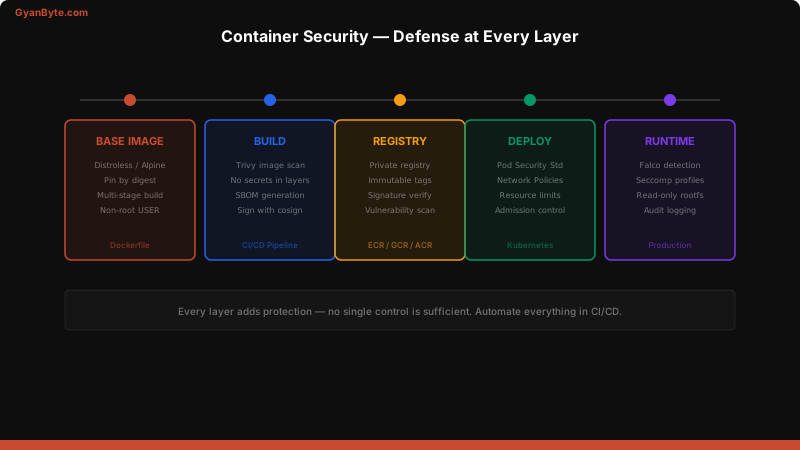
The good news: container security is very automatable. Most of it belongs in your CI/CD pipeline.
Docker Image Security
Your container is only as secure as its base image. Start here.
Choose Minimal Base Images
# ❌ Bad — full OS, 900MB, hundreds of CVEs
FROM ubuntu:22.04

# ⚠️ Better — smaller, but still has shell
FROM node:20-slim

# ✅ Best — minimal, no shell, no package manager
FROM node:20-alpine
# Or for maximum security:
FROM gcr.io/distroless/nodejs20-debian12
Distroless images contain only your application and its runtime dependencies — no shell, no package manager, no curl. If an attacker gets code execution, they can’t install tools or explore the filesystem.
Dockerfile Best Practices
# ✅ Production-ready Dockerfile
FROM node:20-alpine AS builder
WORKDIR /app
COPY package*.json ./
RUN npm ci --only=production
COPY . .
RUN npm run build
FROM gcr.io/distroless/nodejs20-debian12
WORKDIR /app
COPY /app/dist ./dist
COPY /app/node_modules ./node_modules
# Run as non-root
USER 1000
# Don't expose unnecessary ports
EXPOSE 3000
# Health check
HEALTHCHECK \
CMD ["/nodejs/bin/node", "-e", "require('http').get('http://localhost:3000/health')"]
CMD ["dist/server.js"]Key principles:
- Multi-stage builds — build dependencies don’t ship to production
- Non-root user — always
USER 1000or a named user - Pin digests —
FROM node:20-alpine@sha256:abc123...for reproducibility - No secrets in layers — never
COPY .envorARG PASSWORD .dockerignore— exclude.git,node_modules,.env, test files
Scan Images in CI
# Trivy — fast, comprehensive, free
trivy image --severity HIGH,CRITICAL --exit-code 1 myapp:latest

# Scan before push
trivy image --format sarif --output results.sarif myapp:latest

# Scan filesystem (catch issues before building)
trivy fs --severity HIGH,CRITICAL .
# GitHub Actions — scan on every build
- name: Build image
run: docker build -t myapp:${{ github.sha }} .
- name: Trivy vulnerability scan
uses: aquasecurity/trivy-action@master
with:
image-ref: 'myapp:${{ github.sha }}'
severity: 'CRITICAL,HIGH'
exit-code: '1'Kubernetes Pod Security Standards
Kubernetes defines three security profiles. Every cluster should enforce at least baseline.
# Namespace-level enforcement
apiVersion: v1
kind: Namespace
metadata:
  name: production
  labels:
    pod-security.kubernetes.io/enforce: restricted
    pod-security.kubernetes.io/audit: restricted
    pod-security.kubernetes.io/warn: restricted
Restricted Pod Security — Example
apiVersion: apps/v1
kind: Deployment
metadata:
  name: api-server
  namespace: production
spec:
  replicas: 3
  selector:
    matchLabels:
      app: api-server
  template:
    metadata:
      labels:
        app: api-server
    spec:
      securityContext:
        runAsNonRoot: true
        runAsUser: 1000
        runAsGroup: 1000
        fsGroup: 1000
        seccompProfile:
          type: RuntimeDefault
      containers:
        - name: api
          image: myapp:v1.2.3@sha256:abc123...
          securityContext:
            allowPrivilegeEscalation: false
            readOnlyRootFilesystem: true
            capabilities:
              drop: ["ALL"]
          resources:
            limits:
              cpu: "500m"
              memory: "256Mi"
            requests:
              cpu: "100m"
              memory: "128Mi"
          ports:
            - containerPort: 3000
          volumeMounts:
            - name: tmp
              mountPath: /tmp
      volumes:
        - name: tmp
          emptyDir:
            medium: Memory
            sizeLimit: 64Mi
      automountServiceAccountToken: false
Key security settings:
runAsNonRoot: true— pods must run as non-rootreadOnlyRootFilesystem: true— prevents writing to the container filesystemallowPrivilegeEscalation: false— blockssetuidbinariesdrop: ["ALL"]— remove all Linux capabilitiesautomountServiceAccountToken: false— don’t mount the service account token unless needed
Network Policies
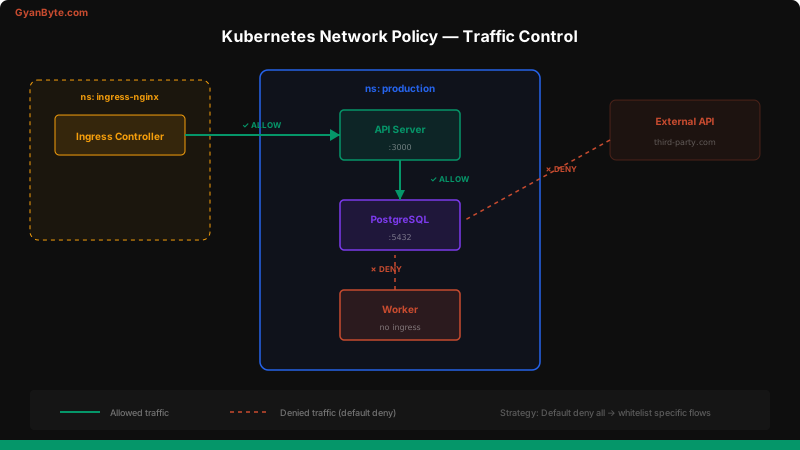
By default, every pod in Kubernetes can talk to every other pod. Network policies fix this with allowlist-based firewall rules.
# Default deny all ingress and egress
apiVersion: networking.k8s.io/v1
kind: NetworkPolicy
metadata:
  name: default-deny-all
  namespace: production
spec:
  podSelector: {}
  policyTypes:
    - Ingress
    - Egress

---
# Allow API server to receive traffic from ingress controller only
apiVersion: networking.k8s.io/v1
kind: NetworkPolicy
metadata:
  name: allow-api-ingress
  namespace: production
spec:
  podSelector:
    matchLabels:
      app: api-server
  policyTypes:
    - Ingress
  ingress:
    - from:
        - namespaceSelector:
            matchLabels:
              name: ingress-nginx
        - podSelector:
            matchLabels:
              app: ingress-controller
      ports:
        - protocol: TCP
          port: 3000

---
# Allow API server to talk to database only
apiVersion: networking.k8s.io/v1
kind: NetworkPolicy
metadata:
  name: allow-api-egress-db
  namespace: production
spec:
  podSelector:
    matchLabels:
      app: api-server
  policyTypes:
    - Egress
  egress:
    - to:
        - podSelector:
            matchLabels:
              app: postgres
      ports:
        - protocol: TCP
          port: 5432
    - to:  # Allow DNS
        - namespaceSelector: {}
          podSelector:
            matchLabels:
              k8s-app: kube-dns
      ports:
        - protocol: UDP
          port: 53
Start with default deny, then add specific allow rules. Every pod should only talk to the pods it needs.
Runtime Security with Falco
Static scanning catches known vulnerabilities. Runtime detection catches suspicious behavior — like a container suddenly spawning a shell or making network connections it never made before.
# Falco rules for container security
- rule: Shell Spawned in Container
  desc: Detect shell spawned in a container (potential breakout)
  condition: >
    spawned_process and container and
    proc.name in (bash, sh, zsh, dash, csh) and
    not proc.pname in (cron, supervisord)
  output: >
    Shell spawned in container
    (user=%user.name container=%container.name
     shell=%proc.name parent=%proc.pname
     image=%container.image.repository)
  priority: WARNING

- rule: Sensitive File Read in Container
  desc: Detect reads of sensitive files
  condition: >
    open_read and container and
    fd.name in (/etc/shadow, /etc/passwd, /proc/self/environ)
  output: >
    Sensitive file read in container
    (file=%fd.name container=%container.name image=%container.image.repository)
  priority: ERROR

- rule: Unexpected Outbound Connection
  desc: Container making connection to unexpected IP
  condition: >
    outbound and container and
    not fd.sip in (10.0.0.0/8, 172.16.0.0/12, 192.168.0.0/16)
  output: >
    Unexpected outbound connection
    (container=%container.name ip=%fd.sip port=%fd.sport)
  priority: WARNING
# Install Falco via Helm
helm repo add falcosecurity https://falcosecurity.github.io/charts
helm install falco falcosecurity/falco \
--namespace falco --create-namespace \
--set falcosidekick.enabled=true \
--set falcosidekick.config.slack.webhookurl="https://hooks.slack.com/..."Key Takeaways
- Use minimal base images — distroless or Alpine, never full Ubuntu
- Run as non-root — always
USER 1000in Dockerfile,runAsNonRootin K8s - Scan images in CI — Trivy on every build, block on CRITICAL/HIGH
- Enforce pod security standards —
restrictedprofile for production namespaces - Default deny network policies — every pod should explicitly declare its allowed traffic
- Add runtime detection — Falco catches behavior that static scanning misses
- Pin image digests — tags are mutable, digests are not
Container security is about defense in depth — every layer from the Dockerfile to the runtime adds protection. No single control is enough, but together they make container compromise significantly harder.


