

IAM is the front door to your AWS account. And most teams leave it wide open.
I’ve audited dozens of AWS accounts, and the pattern is always the same: developers start with AdministratorAccess because it’s easy, nobody tightens it up, and six months later you’ve got Lambda functions with full admin rights and service roles that can delete your production database. This article is about fixing that — not with theory, but with the actual IAM mechanisms that make least privilege enforceable.
The IAM Problem in Production
Here’s what I typically find in a production AWS account audit:
- 40% of IAM roles have
*in their Action or Resource fields - Service roles created for one Lambda function get reused by twelve others
- Nobody knows which permissions are actually being used
- Permission changes bypass code review (done in the console)
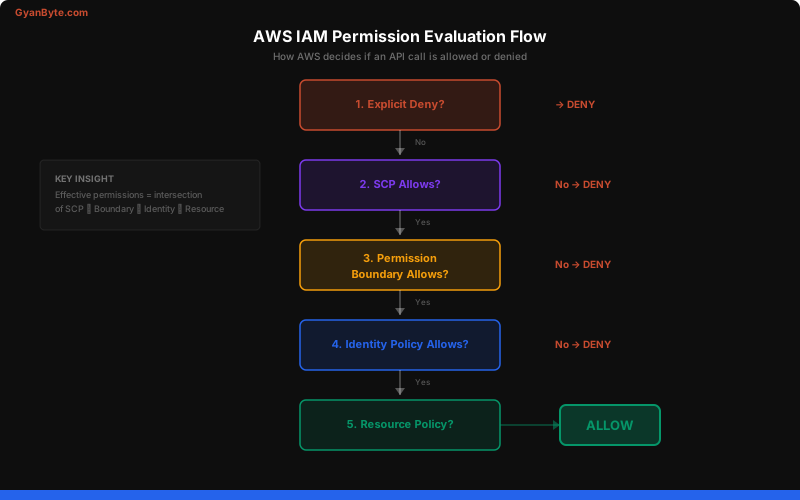
The root cause isn’t laziness — it’s that AWS IAM is genuinely complex. There are five layers of policy evaluation, and most engineers only understand two of them.
Permission Boundaries Explained
Permission boundaries are the most underused IAM feature. They set a maximum on what a role can do, regardless of what policies are attached to it.
Think of it this way: identity policies grant permissions, permission boundaries cap them. The effective permissions are the intersection of both.
// Permission boundary — max permissions for developer roles
{
  "Version": "2012-10-17",
  "Statement": [
    {
      "Effect": "Allow",
      "Action": [
        "s3:*",
        "dynamodb:*",
        "lambda:*",
        "logs:*",
        "sqs:*",
        "sns:*"
      ],
      "Resource": "*"
    },
    {
      "Effect": "Deny",
      "Action": [
        "iam:CreateUser",
        "iam:CreateRole",
        "iam:DeleteRole",
        "iam:AttachRolePolicy",
        "iam:PutRolePolicy",
        "organizations:*",
        "account:*"
      ],
      "Resource": "*"
    }
  ]
}
Even if someone attaches AdministratorAccess to a role with this boundary, they still can’t create IAM users or modify roles. The boundary wins.
# Attach permission boundary to a role
aws iam put-role-permissions-boundary \
  --role-name DevLambdaRole \
  --permissions-boundary arn:aws:iam::123456789:policy/DeveloperBoundary
When to Use Permission Boundaries
- Developer self-service — let developers create roles, but cap what those roles can do
- CI/CD pipelines — the pipeline can deploy services but can’t modify IAM or networking
- Multi-tenant environments — each tenant’s roles are bounded to their own resources
Service Control Policies (SCPs)
SCPs are the nuclear option — they apply at the AWS Organization level and override everything below them, including root account permissions.
// SCP — Deny actions outside approved regions
{
  "Version": "2012-10-17",
  "Statement": [
    {
      "Effect": "Deny",
      "Action": "*",
      "Resource": "*",
      "Condition": {
        "StringNotEquals": {
          "aws:RequestedRegion": [
            "us-east-1",
            "us-west-2",
            "eu-west-1"
          ]
        },
        "ArnNotLike": {
          "aws:PrincipalARN": "arn:aws:iam::*:role/OrganizationAdmin"
        }
      }
    }
  ]
}
// SCP — Prevent CloudTrail tampering
{
"Version": "2012-10-17",
"Statement": [
{
"Effect": "Deny",
"Action": [
"cloudtrail:StopLogging",
"cloudtrail:DeleteTrail",
"cloudtrail:UpdateTrail"
],
"Resource": "*",
"Condition": {
"ArnNotLike": {
"aws:PrincipalARN": "arn:aws:iam::*:role/SecurityAdmin"
}
}
}
]
}SCP Strategy
| SCP | Purpose | Applied To |
|---|---|---|
| Region restriction | Prevent shadow infrastructure | All accounts |
| CloudTrail protection | Prevent log tampering | All accounts |
| Root account restriction | Block root usage except billing | All non-management accounts |
| Service deny list | Block unused expensive services | Dev/staging accounts |
| IAM guardrails | Prevent privilege escalation | Developer accounts |
Cross-Account Assume Role Chains
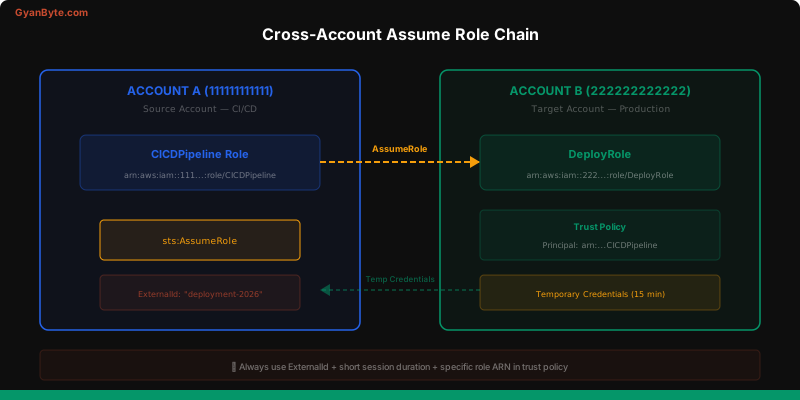
In a multi-account setup (which every serious AWS deployment should use), cross-account access happens through sts:AssumeRole.
// Trust policy on the target role (Account B)
{
  "Version": "2012-10-17",
  "Statement": [
    {
      "Effect": "Allow",
      "Principal": {
        "AWS": "arn:aws:iam::111111111111:role/CICDPipeline"
      },
      "Action": "sts:AssumeRole",
      "Condition": {
        "StringEquals": {
          "sts:ExternalId": "deployment-2026"
        }
      }
    }
  ]
}
# Assume role from Account A into Account B
CREDS=$(aws sts assume-role \
--role-arn arn:aws:iam::222222222222:role/DeployRole \
--role-session-name "ci-deploy-$(date +%s)" \
--external-id "deployment-2026" \
--duration-seconds 900)
export AWS_ACCESS_KEY_ID=$(echo $CREDS | jq -r '.Credentials.AccessKeyId')
export AWS_SECRET_ACCESS_KEY=$(echo $CREDS | jq -r '.Credentials.SecretAccessKey')
export AWS_SESSION_TOKEN=$(echo $CREDS | jq -r '.Credentials.SessionToken')
# Now commands run in Account B's context
aws s3 ls # Lists Account B's bucketsKey security practices for cross-account roles:
- Always use ExternalId — prevents confused deputy attacks
- Minimize session duration — 15 minutes for CI/CD, not 12 hours
- Include session names — makes CloudTrail attribution easier
- Restrict the trust policy — specific role ARNs, not entire accounts
Session Policies
Session policies are an underappreciated tool. They further restrict permissions for a specific session when assuming a role.
# Assume role with session policy — further restrict to one S3 bucket
aws sts assume-role \
  --role-arn arn:aws:iam::222222222222:role/DataAccessRole \
  --role-session-name "export-job" \
  --policy '{
    "Version": "2012-10-17",
    "Statement": [{
      "Effect": "Allow",
      "Action": ["s3:GetObject"],
      "Resource": "arn:aws:s3:::specific-export-bucket/*"
    }]
  }'
Even if DataAccessRole has access to all S3 buckets, this session can only read from specific-export-bucket. Use session policies when:
- Granting temporary access to contractors
- Scoping CI/CD access per deployment
- Creating fine-grained access tokens for specific operations
IAM Access Analyzer
Access Analyzer is your continuous IAM audit tool. It identifies resources shared externally and unused permissions.
# Create an analyzer for the account
aws accessanalyzer create-analyzer \
  --analyzer-name security-audit \
  --type ACCOUNT

# Find external access findings
aws accessanalyzer list-findings \
  --analyzer-arn arn:aws:access-analyzer:us-east-1:123456789:analyzer/security-audit \
  --filter '{"status": {"eq": ["ACTIVE"]}}'

# Generate policy based on actual usage (last 90 days)
aws accessanalyzer start-policy-generation \
  --policy-generation-details '{
    "principalArn": "arn:aws:iam::123456789:role/MyLambdaRole"
  }'
The start-policy-generation command is the killer feature — it analyzes CloudTrail logs to determine which permissions a role actually used and generates a least-privilege policy. Run this quarterly on every role.
Building a Least-Privilege Strategy
Here’s the practical playbook I follow:
Phase 1: Visibility (Week 1-2)
- Enable IAM Access Analyzer on all accounts
- Enable CloudTrail in all regions
- Run
aws iam generate-credential-report— find unused users and keys
Phase 2: Boundaries (Week 3-4)
- Deploy SCPs for region restriction and CloudTrail protection
- Create permission boundaries for developer and CI/CD roles
- Block root account usage via SCP
Phase 3: Right-sizing (Month 2-3)
- Use Access Analyzer to generate least-privilege policies for top 20 roles
- Replace
*in resource fields with specific ARNs - Remove unused IAM users and access keys (90+ days unused)
Phase 4: Continuous (Ongoing)
- Access Analyzer runs continuously — review findings weekly
- New roles require Terraform with mandatory permission boundaries
- Quarterly IAM review with automated reporting
# Quick IAM health check script
echo "=== IAM Health Check ==="
echo "Users with console access but no MFA:"
aws iam generate-credential-report > /dev/null 2>&1
aws iam get-credential-report --query 'Content' --output text | \
  base64 -d | \
  awk -F, '$4=="true" && $8=="false" {print $1}'

echo "\nAccess keys older than 90 days:"
aws iam get-credential-report --query 'Content' --output text | \
  base64 -d | \
  awk -F, 'NR>1 && $9!="N/A" {print $1, $9}'

echo "\nRoles with admin access:"
for role in $(aws iam list-roles --query 'Roles[].RoleName' --output text); do
  policies=$(aws iam list-attached-role-policies --role-name $role --query 'AttachedPolicies[].PolicyArn' --output text)
  if echo "$policies" | grep -q "AdministratorAccess"; then
    echo "  ⚠️  $role"
  fi
done
Key Takeaways
- Permission boundaries are your friend — cap what roles can do, regardless of attached policies
- SCPs are non-negotiable — region restriction and CloudTrail protection at minimum
- Cross-account roles need ExternalId — prevent confused deputy attacks
- Use session policies for temporary fine-grained access
- Access Analyzer generates least-privilege policies — use it quarterly on every role
- IAM is code — manage it in Terraform, not the console
IAM isn’t glamorous, but it’s the single most important security control in AWS. Get this right, and you’ve eliminated the majority of cloud security risk.


