

File Upload Architecture
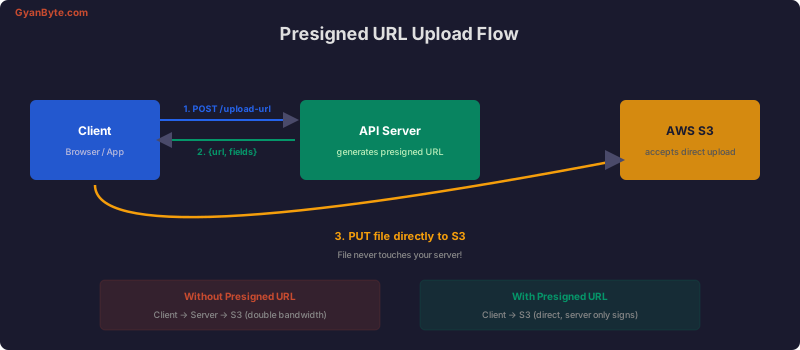
There are two main patterns for handling file uploads in Node.js APIs:
- Server-proxied — Files flow through your server to S3
- Direct upload — Client uploads directly to S3 using presigned URLs
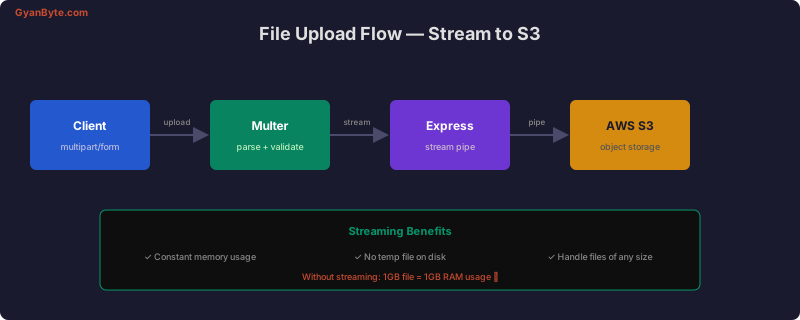
Multer — Parsing Multipart Uploads
Multer handles multipart/form-data parsing in Express.
Basic Setup
const multer = require('multer');
const path = require('path');

// File filter — only allow images
const fileFilter = (req, file, cb) => {
  const allowedTypes = ['image/jpeg', 'image/png', 'image/webp', 'image/gif'];

  if (allowedTypes.includes(file.mimetype)) {
    cb(null, true);
  } else {
    cb(new Error(`File type ${file.mimetype} not allowed`), false);
  }
};

// Memory storage (for streaming to S3)
const upload = multer({
  storage: multer.memoryStorage(),
  limits: {
    fileSize: 10 * 1024 * 1024, // 10MB max
    files: 5,                    // Max 5 files per request
  },
  fileFilter,
});

// Single file upload
app.post('/api/avatar', upload.single('avatar'), async (req, res) => {
  // req.file contains the uploaded file in memory
  const { buffer, mimetype, originalname, size } = req.file;
  // ... process and upload to S3
});

// Multiple files
app.post('/api/gallery', upload.array('photos', 10), async (req, res) => {
  // req.files is an array of files
  const urls = await Promise.all(
    req.files.map(file => uploadToS3(file))
  );
  res.json({ urls });
});
Streaming Uploads to S3
Never buffer large files in memory. Stream them directly to S3.
const { S3Client, PutObjectCommand } = require('@aws-sdk/client-s3');
const { v4: uuid } = require('uuid');

const s3 = new S3Client({ region: process.env.AWS_REGION });
const BUCKET = process.env.S3_BUCKET;

async function uploadToS3(file) {
  const key = `uploads/${uuid()}${path.extname(file.originalname)}`;

  await s3.send(new PutObjectCommand({
    Bucket: BUCKET,
    Key: key,
    Body: file.buffer,
    ContentType: file.mimetype,
    Metadata: {
      originalName: file.originalname,
    },
  }));

  return {
    key,
    url: `https://${BUCKET}.s3.amazonaws.com/${key}`,
    size: file.size,
  };
}

// Express route
app.post('/api/upload',
  upload.single('file'),
  async (req, res, next) => {
    try {
      const result = await uploadToS3(req.file);
      res.status(201).json(result);
    } catch (err) {
      next(err);
    }
  }
);
Streaming Without Buffering (using multer-s3)
const multerS3 = require('multer-s3');

const upload = multer({
  storage: multerS3({
    s3,
    bucket: BUCKET,
    metadata: (req, file, cb) => {
      cb(null, { originalName: file.originalname });
    },
    key: (req, file, cb) => {
      const key = `uploads/${uuid()}${path.extname(file.originalname)}`;
      cb(null, key);
    },
    contentType: multerS3.AUTO_CONTENT_TYPE,
  }),
  limits: { fileSize: 50 * 1024 * 1024 }, // 50MB
  fileFilter,
});

app.post('/api/upload', upload.single('file'), (req, res) => {
  res.status(201).json({
    key: req.file.key,
    url: req.file.location,
    size: req.file.size,
  });
});
Presigned URLs — Direct Client Upload
For large files, let the client upload directly to S3. Your server only generates a signed URL.
const { PutObjectCommand, GetObjectCommand } = require('@aws-sdk/client-s3');
const { getSignedUrl } = require('@aws-sdk/s3-request-presigner');

// Generate upload URL
app.post('/api/upload-url', authenticateJWT, async (req, res) => {
  const { filename, contentType } = req.body;

  // Validate content type
  const allowed = ['image/jpeg', 'image/png', 'application/pdf'];
  if (!allowed.includes(contentType)) {
    return res.status(400).json({ error: 'File type not allowed' });
  }

  const key = `uploads/${req.user.id}/${uuid()}${path.extname(filename)}`;

  const command = new PutObjectCommand({
    Bucket: BUCKET,
    Key: key,
    ContentType: contentType,
    Metadata: {
      uploadedBy: req.user.id.toString(),
    },
  });

  const uploadUrl = await getSignedUrl(s3, command, {
    expiresIn: 300, // URL valid for 5 minutes
  });

  res.json({ uploadUrl, key });
});

// Generate download URL
app.get('/api/download-url/:key', authenticateJWT, async (req, res) => {
  const command = new GetObjectCommand({
    Bucket: BUCKET,
    Key: req.params.key,
  });

  const downloadUrl = await getSignedUrl(s3, command, {
    expiresIn: 3600, // 1 hour
  });

  res.json({ downloadUrl });
});
Client-Side Direct Upload
// Step 1: Get presigned URL from your API
const { uploadUrl, key } = await fetch('/api/upload-url', {
  method: 'POST',
  headers: { 'Content-Type': 'application/json', Authorization: `Bearer ${token}` },
  body: JSON.stringify({ filename: file.name, contentType: file.type }),
}).then(r => r.json());

// Step 2: Upload directly to S3
await fetch(uploadUrl, {
  method: 'PUT',
  body: file,
  headers: { 'Content-Type': file.type },
});

// Step 3: Notify your API that upload is complete
await fetch('/api/files', {
  method: 'POST',
  headers: { 'Content-Type': 'application/json', Authorization: `Bearer ${token}` },
  body: JSON.stringify({ key, originalName: file.name }),
});
Multipart Upload for Large Files
For files over 100MB, use S3’s multipart upload API.
const {
  CreateMultipartUploadCommand,
  UploadPartCommand,
  CompleteMultipartUploadCommand,
  AbortMultipartUploadCommand,
} = require('@aws-sdk/client-s3');
const fs = require('fs');

async function multipartUpload(filePath, key) {
  const PART_SIZE = 10 * 1024 * 1024; // 10MB chunks
  const fileSize = fs.statSync(filePath).size;
  const numParts = Math.ceil(fileSize / PART_SIZE);

  // Start multipart upload
  const { UploadId } = await s3.send(new CreateMultipartUploadCommand({
    Bucket: BUCKET,
    Key: key,
  }));

  try {
    const parts = [];

    for (let i = 0; i < numParts; i++) {
      const start = i * PART_SIZE;
      const end = Math.min(start + PART_SIZE, fileSize);

      const stream = fs.createReadStream(filePath, { start, end: end - 1 });

      const { ETag } = await s3.send(new UploadPartCommand({
        Bucket: BUCKET,
        Key: key,
        UploadId,
        PartNumber: i + 1,
        Body: stream,
        ContentLength: end - start,
      }));

      parts.push({ PartNumber: i + 1, ETag });
      console.log(`Uploaded part ${i + 1}/${numParts} (${Math.round((i + 1) / numParts * 100)}%)`);
    }

    // Complete the upload
    await s3.send(new CompleteMultipartUploadCommand({
      Bucket: BUCKET,
      Key: key,
      UploadId,
      MultipartUpload: { Parts: parts },
    }));

    console.log('Upload complete');
  } catch (err) {
    // Abort on failure (clean up incomplete parts)
    await s3.send(new AbortMultipartUploadCommand({
      Bucket: BUCKET,
      Key: key,
      UploadId,
    }));
    throw err;
  }
}
Image Processing with Sharp
const sharp = require('sharp');

async function processAndUpload(file) {
  // Resize and optimize
  const processed = await sharp(file.buffer)
    .resize(800, 800, { fit: 'inside', withoutEnlargement: true })
    .webp({ quality: 80 })
    .toBuffer();

  // Generate thumbnail
  const thumbnail = await sharp(file.buffer)
    .resize(200, 200, { fit: 'cover' })
    .webp({ quality: 70 })
    .toBuffer();

  const key = `images/${uuid()}`;

  const [imageResult, thumbResult] = await Promise.all([
    uploadBuffer(processed, `${key}.webp`, 'image/webp'),
    uploadBuffer(thumbnail, `${key}-thumb.webp`, 'image/webp'),
  ]);

  return {
    image: imageResult.url,
    thumbnail: thumbResult.url,
  };
}
Security Checklist
// 1. Validate file types by content, not just extension
const fileType = require('file-type');

async function validateFileContent(buffer) {
  const type = await fileType.fromBuffer(buffer);
  if (!type || !ALLOWED_MIMES.includes(type.mime)) {
    throw new Error('Invalid file type');
  }
  return type;
}

// 2. Set strict size limits per endpoint
const avatarUpload = multer({ limits: { fileSize: 2 * 1024 * 1024 } });  // 2MB
const docUpload = multer({ limits: { fileSize: 50 * 1024 * 1024 } });     // 50MB

// 3. Sanitize filenames
function sanitizeFilename(name) {
  return name.replace(/[^a-zA-Z0-9._-]/g, '_').substring(0, 255);
}

// 4. Use private S3 buckets + presigned URLs (never public)
// 5. Scan files for malware in production (ClamAV)
Key Takeaways
- Stream to S3 — don’t buffer entire files in memory
- Presigned URLs — offload upload bandwidth from your server
- Multipart upload — for files >100MB, upload in chunks
- Validate content — check file magic bytes, not just extensions
- Process images with Sharp before storing (resize, compress, convert to webp)


