

WebSocket vs HTTP
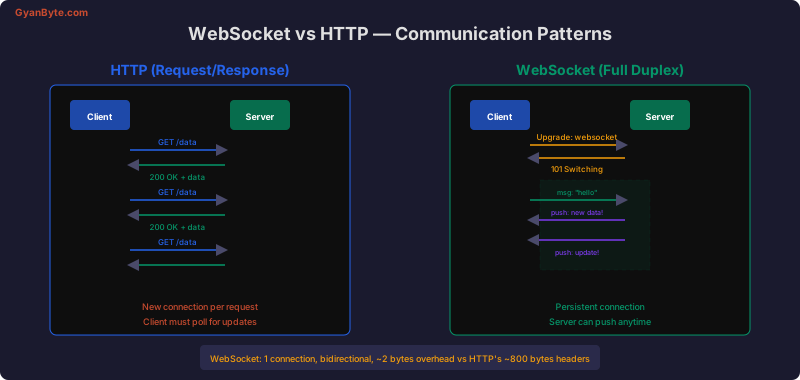
Traditional HTTP follows a request/response model — the client always initiates. WebSocket provides a persistent, bidirectional connection where the server can push data to clients at any time.
Socket.io Server Setup
const express = require('express');
const { createServer } = require('http');
const { Server } = require('socket.io');

const app = express();
const httpServer = createServer(app);

const io = new Server(httpServer, {
  cors: {
    origin: process.env.FRONTEND_URL,
    methods: ['GET', 'POST'],
  },
  pingInterval: 25000,  // Heartbeat every 25s
  pingTimeout: 20000,   // Disconnect if no pong in 20s
});

httpServer.listen(3000, () => {
  console.log('Server running on port 3000');
});
Events and Communication
io.on('connection', (socket) => {
  console.log(`Client connected: ${socket.id}`);

  // Listen for events from this client
  socket.on('chat:message', (data) => {
    console.log(`Message from ${socket.id}:`, data);

    // Emit to the sender only
    socket.emit('chat:message:received', { id: data.id, status: 'delivered' });

    // Broadcast to everyone EXCEPT the sender
    socket.broadcast.emit('chat:message', {
      ...data,
      sender: socket.id,
      timestamp: Date.now(),
    });
  });

  // Emit to ALL connected clients (including sender)
  socket.on('announcement', (data) => {
    io.emit('announcement', data);
  });

  socket.on('disconnect', (reason) => {
    console.log(`Client disconnected: ${socket.id}, reason: ${reason}`);
  });
});
Rooms and Namespaces
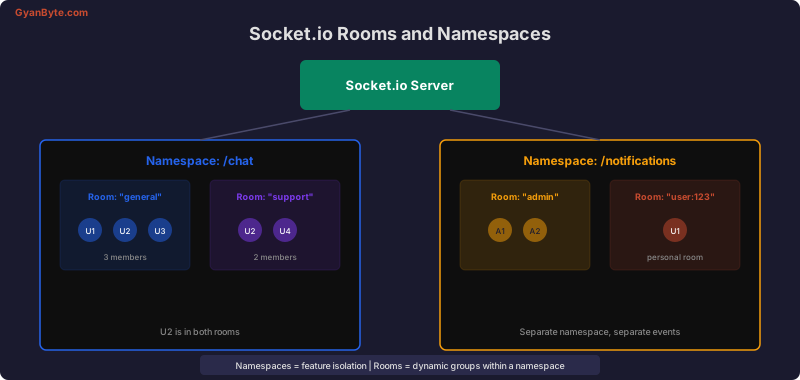
Rooms and namespaces let you organize connections for targeted messaging.
Rooms
io.on('connection', (socket) => {
  // Join a room
  socket.on('room:join', async (roomId) => {
    socket.join(roomId);
    console.log(`${socket.id} joined room: ${roomId}`);

    // Notify others in the room
    socket.to(roomId).emit('room:user-joined', {
      userId: socket.data.userId,
      roomId,
    });

    // Send room history to the joining user
    const history = await getChatHistory(roomId);
    socket.emit('room:history', history);
  });

  // Send message to a room
  socket.on('room:message', (data) => {
    io.to(data.roomId).emit('room:message', {
      ...data,
      sender: socket.data.userId,
      timestamp: Date.now(),
    });
  });

  // Leave a room
  socket.on('room:leave', (roomId) => {
    socket.leave(roomId);
    socket.to(roomId).emit('room:user-left', {
      userId: socket.data.userId,
    });
  });
});
Namespaces
// Chat namespace
const chatNsp = io.of('/chat');
chatNsp.on('connection', (socket) => {
  // Only chat events here
  socket.on('message', handleChatMessage);
});

// Notifications namespace
const notifyNsp = io.of('/notifications');
notifyNsp.on('connection', (socket) => {
  // Only notification events here
  socket.join(`user:${socket.data.userId}`);
});

// Send notification to a specific user
function notifyUser(userId, notification) {
  notifyNsp.to(`user:${userId}`).emit('notification', notification);
}
Authentication Middleware
const jwt = require('jsonwebtoken');

// Authentication middleware — runs before 'connection' event
io.use(async (socket, next) => {
  const token = socket.handshake.auth.token
    || socket.handshake.headers.authorization?.replace('Bearer ', '');

  if (!token) {
    return next(new Error('Authentication required'));
  }

  try {
    const payload = jwt.verify(token, process.env.JWT_SECRET);
    const user = await db.users.findById(payload.sub);

    if (!user) {
      return next(new Error('User not found'));
    }

    socket.data.userId = user.id;
    socket.data.userName = user.name;
    socket.data.role = user.role;
    next();
  } catch (err) {
    next(new Error('Invalid token'));
  }
});
Building a Real-Time Chat
io.on('connection', (socket) => {
  const { userId, userName } = socket.data;

  // Track online users
  onlineUsers.set(userId, socket.id);
  io.emit('users:online', Array.from(onlineUsers.keys()));

  // Typing indicators
  socket.on('typing:start', (roomId) => {
    socket.to(roomId).emit('typing:start', { userId, userName });
  });

  socket.on('typing:stop', (roomId) => {
    socket.to(roomId).emit('typing:stop', { userId });
  });

  // Messages with persistence
  socket.on('message:send', async (data) => {
    const message = await db.messages.create({
      roomId: data.roomId,
      senderId: userId,
      content: data.content,
      type: data.type || 'text',
    });

    io.to(data.roomId).emit('message:new', {
      id: message.id,
      sender: { id: userId, name: userName },
      content: message.content,
      type: message.type,
      createdAt: message.createdAt,
    });
  });

  // Read receipts
  socket.on('message:read', async ({ messageId, roomId }) => {
    await db.readReceipts.upsert({ messageId, userId });
    socket.to(roomId).emit('message:read', { messageId, userId });
  });

  socket.on('disconnect', () => {
    onlineUsers.delete(userId);
    io.emit('users:online', Array.from(onlineUsers.keys()));
  });
});
Scaling with Redis Adapter
When running multiple server instances, use the Redis adapter so events are broadcast across all nodes.
const { createAdapter } = require('@socket.io/redis-adapter');
const { createClient } = require('redis');

const pubClient = createClient({ url: process.env.REDIS_URL });
const subClient = pubClient.duplicate();

await Promise.all([pubClient.connect(), subClient.connect()]);

io.adapter(createAdapter(pubClient, subClient));

// Now io.emit() reaches clients connected to ANY server instance
Client-Side Connection
import { io } from 'socket.io-client';

const socket = io('http://localhost:3000', {
  auth: { token: accessToken },
  reconnection: true,
  reconnectionDelay: 1000,
  reconnectionAttempts: 10,
  transports: ['websocket', 'polling'], // Prefer WebSocket
});

socket.on('connect', () => {
  console.log('Connected:', socket.id);
});

socket.on('connect_error', (err) => {
  if (err.message === 'Authentication required') {
    // Redirect to login
  }
});

socket.on('disconnect', (reason) => {
  if (reason === 'io server disconnect') {
    // Server forced disconnect — reconnect manually
    socket.connect();
  }
  // Otherwise, socket.io auto-reconnects
});

// Send messages
socket.emit('message:send', {
  roomId: 'general',
  content: 'Hello everyone!',
});

// Listen for messages
socket.on('message:new', (message) => {
  addToChat(message);
});
Key Takeaways
- Use rooms for dynamic groups (chat rooms, game lobbies) and namespaces for feature isolation
- Always add authentication middleware before the connection event
- Scale horizontally with the Redis adapter — events broadcast across all server instances
- Handle reconnection gracefully — replay missed events from a database
- Use
socket.datato store per-connection user context - Set appropriate heartbeat intervals to detect stale connections


