

Profiling First, Optimize Second
Never optimize blindly. Always profile to find the actual bottleneck.
Chrome DevTools Profiling
# Start with inspector
node --inspect server.js

# For production: connect only when needed
node --inspect=0.0.0.0:9229 server.js
Open chrome://inspect in Chrome, connect to your Node.js instance, and use the Performance and Memory tabs.
Clinic.js — Automated Diagnostics
npm install -g clinic

# Doctor: detect common issues (event loop delay, I/O, GC)
clinic doctor -- node server.js

# Flame: CPU flame graph (find what's burning CPU time)
clinic flame -- node server.js

# Bubbleprof: async flow visualization
clinic bubbleprof -- node server.js
Memory Leak Detection
Heap Snapshot Comparison
// Take heap snapshots at intervals
const v8 = require('v8');
const fs = require('fs');

function takeHeapSnapshot() {
  const snapshotStream = v8.writeHeapSnapshot();
  console.log(`Heap snapshot written to: ${snapshotStream}`);
}

// Expose via admin endpoint (protected!)
app.post('/admin/heap-snapshot', requireAdmin, (req, res) => {
  const filename = takeHeapSnapshot();
  res.json({ filename });
});
Common Memory Leak Patterns
// LEAK 1: Growing arrays/maps that are never cleaned
const cache = new Map();
app.get('/data/:id', async (req, res) => {
  const data = await fetchData(req.params.id);
  cache.set(req.params.id, data); // Grows forever!
  res.json(data);
});

// FIX: Use LRU cache with max size
const LRU = require('lru-cache');
const cache = new LRU({ max: 500, ttl: 1000 * 60 * 5 });

// LEAK 2: Event listeners not removed
class DataStream {
  subscribe(source) {
    source.on('data', this.handleData); // Never removed!
  }
  // FIX: Always remove listeners
  unsubscribe(source) {
    source.off('data', this.handleData);
  }
}

// LEAK 3: Closures holding references
function createHandler() {
  const hugeBuffer = Buffer.alloc(100 * 1024 * 1024); // 100MB

  return (req, res) => {
    // hugeBuffer is held in closure memory even if not used
    res.json({ status: 'ok' });
  };
}
Memory Monitoring
// Track memory usage over time
setInterval(() => {
  const usage = process.memoryUsage();
  logger.info({
    heapUsed: Math.round(usage.heapUsed / 1024 / 1024),
    heapTotal: Math.round(usage.heapTotal / 1024 / 1024),
    rss: Math.round(usage.rss / 1024 / 1024),
    external: Math.round(usage.external / 1024 / 1024),
  }, 'Memory usage (MB)');
}, 30000);
Cluster Mode
Use all CPU cores with the cluster module or PM2.
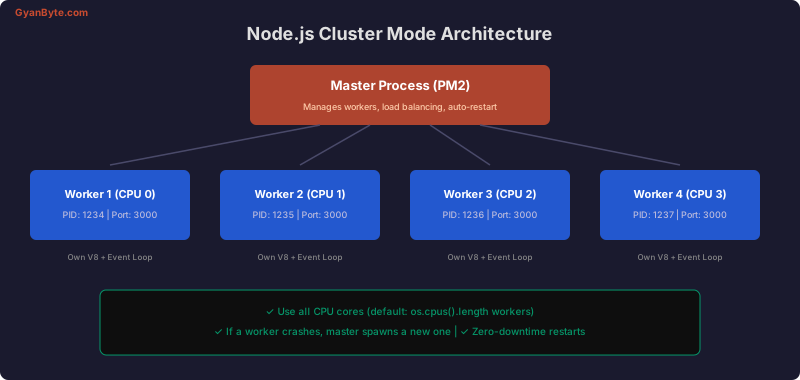
Native Cluster
const cluster = require('cluster');
const os = require('os');

if (cluster.isPrimary) {
  const numWorkers = os.cpus().length;
  console.log(`Master starting ${numWorkers} workers`);

  for (let i = 0; i < numWorkers; i++) {
    cluster.fork();
  }

  cluster.on('exit', (worker, code) => {
    console.log(`Worker ${worker.process.pid} died (code: ${code}), restarting...`);
    cluster.fork();
  });
} else {
  require('./server'); // Each worker runs the full server
}
PM2 (Recommended for Production)
// ecosystem.config.js
module.exports = {
  apps: [{
    name: 'api',
    script: './server.js',
    instances: 'max',        // Use all CPUs
    exec_mode: 'cluster',
    max_memory_restart: '1G',
    env_production: {
      NODE_ENV: 'production',
      PORT: 3000,
    },
  }],
};
pm2 start ecosystem.config.js --env production
pm2 reload api # Zero-downtime restart
pm2 monit # Monitor in terminalWorker Threads
For CPU-intensive tasks that would block the event loop.
// worker.js
const { parentPort, workerData } = require('worker_threads');

function fibonacci(n) {
  if (n <= 1) return n;
  return fibonacci(n - 1) + fibonacci(n - 2);
}

const result = fibonacci(workerData.n);
parentPort.postMessage(result);

// main.js
const { Worker } = require('worker_threads');

function runInWorker(n) {
  return new Promise((resolve, reject) => {
    const worker = new Worker('./worker.js', { workerData: { n } });
    worker.on('message', resolve);
    worker.on('error', reject);
  });
}

app.get('/fibonacci/:n', async (req, res) => {
  const result = await runInWorker(parseInt(req.params.n));
  res.json({ result });
});
Worker Thread Pool
const { StaticPool } = require('node-worker-threads-pool');

const pool = new StaticPool({
  size: 4,
  task: './heavy-computation.js',
});

app.get('/process', async (req, res) => {
  const result = await pool.exec(req.body.data);
  res.json(result);
});
Streams for Memory Efficiency
// BAD: Loads entire file into memory
app.get('/export', async (req, res) => {
  const data = await db.query('SELECT * FROM orders'); // 1M rows = huge memory
  res.json(data.rows);
});

// GOOD: Stream the response
const { Transform } = require('stream');
const QueryStream = require('pg-query-stream');

app.get('/export', async (req, res) => {
  const client = await pool.connect();

  const query = new QueryStream('SELECT * FROM orders ORDER BY id');
  const dbStream = client.query(query);

  res.setHeader('Content-Type', 'application/json');
  res.write('[');

  let first = true;
  const transform = new Transform({
    objectMode: true,
    transform(row, encoding, callback) {
      const prefix = first ? '' : ',';
      first = false;
      callback(null, prefix + JSON.stringify(row));
    },
    flush(callback) {
      callback(null, ']');
    },
  });

  dbStream.pipe(transform).pipe(res);

  dbStream.on('end', () => client.release());
});
Common Performance Anti-Patterns
// 1. Synchronous operations in request handlers
app.get('/config', (req, res) => {
  const config = fs.readFileSync('config.json'); // BLOCKS event loop
  res.json(JSON.parse(config));
});
// FIX: Read async or cache at startup

// 2. Not using database indexes
// SELECT * FROM orders WHERE user_id = ? AND status = ?
// FIX: CREATE INDEX idx_orders_user_status ON orders(user_id, status);

// 3. N+1 queries
// FIX: Use JOINs, populate(), or DataLoader

// 4. Not compressing responses
const compression = require('compression');
app.use(compression()); // Gzip responses

// 5. Parsing large JSON on the main thread
// FIX: Use streaming JSON parsers for large payloads

// 6. Creating regex in hot paths
// BAD: new RegExp() on every request
// FIX: Compile regex once, reuse
Event Loop Monitoring
const { monitorEventLoopDelay } = require('perf_hooks');

const histogram = monitorEventLoopDelay({ resolution: 20 });
histogram.enable();

// Expose metrics endpoint
app.get('/metrics', (req, res) => {
  res.json({
    eventLoop: {
      min: (histogram.min / 1e6).toFixed(2),
      max: (histogram.max / 1e6).toFixed(2),
      mean: (histogram.mean / 1e6).toFixed(2),
      p50: (histogram.percentile(50) / 1e6).toFixed(2),
      p99: (histogram.percentile(99) / 1e6).toFixed(2),
    },
    memory: process.memoryUsage(),
    uptime: process.uptime(),
  });
});
Performance Checklist
- Profile before optimizing — use clinic.js or Chrome DevTools
- Use cluster mode — leverage all CPU cores
- Stream large data — never buffer entire datasets in memory
- Cache aggressively — Redis for shared cache, LRU for in-process
- Compress responses — gzip reduces payload 60-80%
- Add database indexes — check slow query logs
- Monitor in production — event loop lag, memory, response times
- Use connection pooling — for databases, Redis, HTTP clients


