

Why Docker for Node.js
Docker eliminates “works on my machine” problems by packaging your Node.js app with its exact runtime, dependencies, and configuration into a portable container.
Basic Dockerfile
FROM node:20-alpine

WORKDIR /app

# Copy package files first (layer caching)
COPY package*.json ./
RUN npm ci --only=production

COPY . .

EXPOSE 3000

CMD ["node", "server.js"]
Multi-Stage Build (Production)
Multi-stage builds dramatically reduce image size by separating build dependencies from the runtime.
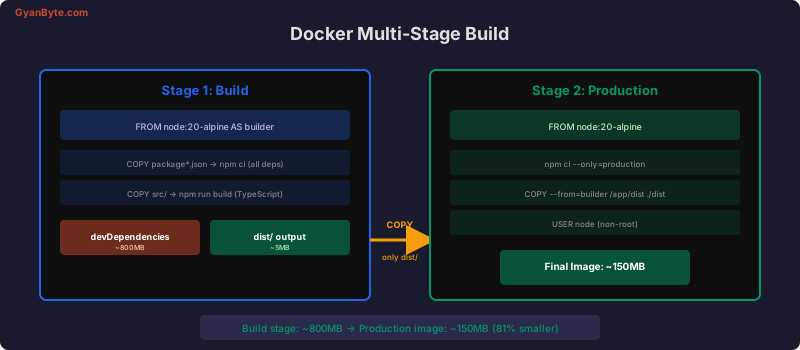
# Stage 1: Build
FROM node:20-alpine AS builder
WORKDIR /app
COPY package*.json ./
RUN npm ci
COPY tsconfig.json ./
COPY src/ ./src/
RUN npm run build
RUN npm prune --production
# Stage 2: Production
FROM node:20-alpine
# Security: run as non-root user
RUN addgroup -g 1001 appgroup && \
adduser -u 1001 -G appgroup -s /bin/sh -D appuser
WORKDIR /app
# Copy only what we need from build stage
COPY /app/dist ./dist
COPY /app/node_modules ./node_modules
COPY /app/package.json ./
USER appuser
EXPOSE 3000
# Health check
HEALTHCHECK \
CMD wget --no-verbose --tries=1 --spider http://localhost:3000/health || exit 1
CMD ["node", "dist/server.js"].dockerignore
node_modules
npm-debug.log
.git
.env
.env.*
dist
coverage
.nyc_output
*.md
.vscode
.idea
docker-compose*.yml
Dockerfile*
.github
tests
__tests__
Docker Compose for Development
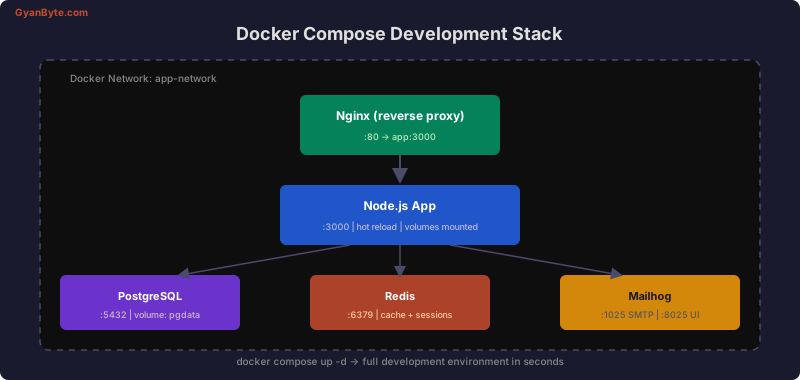
# docker-compose.yml
version: '3.8'

services:
  app:
    build:
      context: .
      dockerfile: Dockerfile.dev
    ports:
      - '3000:3000'
      - '9229:9229'  # Node.js debugger
    volumes:
      - .:/app
      - /app/node_modules  # Don't mount node_modules
    environment:
      NODE_ENV: development
      DATABASE_URL: postgres://postgres:postgres@db:5432/myapp_dev
      REDIS_URL: redis://redis:6379
    depends_on:
      db:
        condition: service_healthy
      redis:
        condition: service_started
    command: npx nodemon --inspect=0.0.0.0:9229 src/server.ts

  db:
    image: postgres:16-alpine
    ports:
      - '5432:5432'
    environment:
      POSTGRES_USER: postgres
      POSTGRES_PASSWORD: postgres
      POSTGRES_DB: myapp_dev
    volumes:
      - pgdata:/var/lib/postgresql/data
    healthcheck:
      test: ['CMD-SHELL', 'pg_isready -U postgres']
      interval: 5s
      timeout: 5s
      retries: 5

  redis:
    image: redis:7-alpine
    ports:
      - '6379:6379'
    volumes:
      - redisdata:/data

  mailhog:
    image: mailhog/mailhog
    ports:
      - '1025:1025'  # SMTP
      - '8025:8025'  # Web UI

volumes:
  pgdata:
  redisdata:
Development Dockerfile
# Dockerfile.dev
FROM node:20-alpine

WORKDIR /app

COPY package*.json ./
RUN npm install  # Include devDependencies

COPY . .

EXPOSE 3000 9229

CMD ["npx", "nodemon", "src/server.ts"]
Health Checks
// health endpoint in your Express app
app.get('/health', async (req, res) => {
  const checks = {
    uptime: process.uptime(),
    timestamp: Date.now(),
    database: 'unknown',
    redis: 'unknown',
  };

  try {
    await db.query('SELECT 1');
    checks.database = 'healthy';
  } catch (err) {
    checks.database = 'unhealthy';
  }

  try {
    await redis.ping();
    checks.redis = 'healthy';
  } catch (err) {
    checks.redis = 'unhealthy';
  }

  const isHealthy = checks.database === 'healthy' && checks.redis === 'healthy';
  res.status(isHealthy ? 200 : 503).json(checks);
});
Security Best Practices
# 1. Use specific version tags (not :latest)
FROM node:20.11.1-alpine3.19

# 2. Run as non-root user
USER node

# 3. Use minimal base images (alpine = ~5MB vs debian = ~120MB)

# 4. Don't store secrets in the image
# Use environment variables or secret managers at runtime

# 5. Scan for vulnerabilities
# docker scout cves myimage:latest
Layer Caching Optimization
# Order matters! Least-changing layers first

# 1. Base image (rarely changes)
FROM node:20-alpine

WORKDIR /app

# 2. Dependencies (changes when package.json changes)
COPY package*.json ./
RUN npm ci --only=production

# 3. Application code (changes most frequently)
COPY . .
If you only change application code, Docker reuses cached layers for steps 1-2 — builds go from minutes to seconds.
Environment Variables and Secrets
# docker-compose.yml — development secrets
services:
  app:
    environment:
      - DATABASE_URL=postgres://user:pass@db:5432/myapp
    env_file:
      - .env.development

# Production: use AWS Secrets Manager or Docker secrets
# NEVER bake secrets into the Docker image
Useful Commands
# Build and tag
docker build -t myapp:1.0.0 .

# Run with environment variables
docker run -p 3000:3000 --env-file .env myapp:1.0.0

# Compose commands
docker compose up -d          # Start all services
docker compose logs -f app    # Follow app logs
docker compose exec app sh    # Shell into container
docker compose down -v        # Stop and remove volumes

# Check image size
docker images myapp

# Multi-platform build (for ARM + x86)
docker buildx build --platform linux/amd64,linux/arm64 -t myapp:latest .
Production vs Development Config
| Setting | Development | Production |
|---|---|---|
| Base image | node:20-alpine |
node:20-alpine (multi-stage) |
| Dependencies | All (dev + prod) | Production only |
| Volumes | Source code mounted | No mounts |
| Debugger | Port 9229 exposed | Not exposed |
| Restart policy | No | unless-stopped |
| Logging | Console (pretty) | JSON to stdout |
| Image size | ~400MB | ~150MB |
Docker transforms deployment from a manual, error-prone process into a repeatable, versioned, and testable pipeline.


