

Two Paths to Building APIs
Express.js and Nest.js represent two philosophies for building Node.js APIs. Express gives you a minimal foundation and lets you choose your own structure. Nest.js provides an opinionated framework with built-in patterns borrowed from Angular.
Both are battle-tested in production — the right choice depends on your team size, project complexity, and preference for convention vs freedom.
Express.js — The Minimal Approach
Basic Server Setup
const express = require('express');
const cors = require('cors');
const helmet = require('helmet');

const app = express();

// Global middleware
app.use(helmet());              // Security headers
app.use(cors());                // CORS handling
app.use(express.json());        // Parse JSON bodies
app.use(express.urlencoded({ extended: true }));

// Routes
app.use('/api/users', require('./routes/users'));
app.use('/api/products', require('./routes/products'));

// 404 handler
app.use((req, res) => {
  res.status(404).json({ error: 'Route not found' });
});

// Global error handler
app.use((err, req, res, next) => {
  console.error(err.stack);
  res.status(err.status || 500).json({
    error: err.message || 'Internal Server Error'
  });
});

app.listen(3000, () => console.log('Server running on port 3000'));
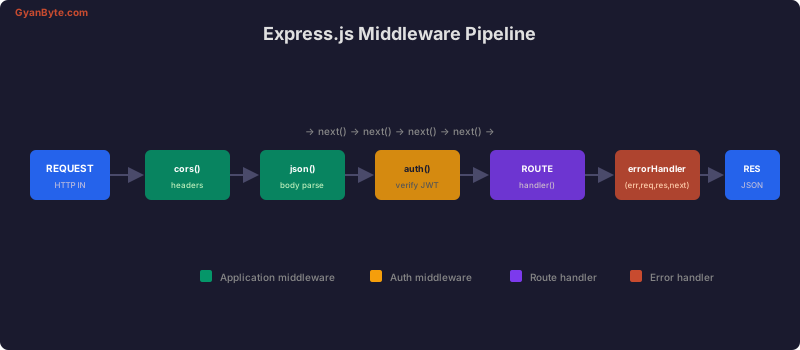
The Middleware Pipeline
Every request flows through a chain of middleware functions before reaching the route handler. Each middleware calls next() to pass control to the next function in the chain.
Building CRUD Routes
const express = require('express');
const router = express.Router();
const { validate } = require('../middleware/validate');
const { createUserSchema, updateUserSchema } = require('../schemas/user');

// GET /api/users
router.get('/', async (req, res, next) => {
  try {
    const { page = 1, limit = 20 } = req.query;
    const users = await UserService.findAll({
      page: parseInt(page),
      limit: parseInt(limit)
    });
    res.json(users);
  } catch (err) {
    next(err);
  }
});

// GET /api/users/:id
router.get('/:id', async (req, res, next) => {
  try {
    const user = await UserService.findById(req.params.id);
    if (!user) {
      return res.status(404).json({ error: 'User not found' });
    }
    res.json(user);
  } catch (err) {
    next(err);
  }
});

// POST /api/users
router.post('/', validate(createUserSchema), async (req, res, next) => {
  try {
    const user = await UserService.create(req.body);
    res.status(201).json(user);
  } catch (err) {
    next(err);
  }
});

// PUT /api/users/:id
router.put('/:id', validate(updateUserSchema), async (req, res, next) => {
  try {
    const user = await UserService.update(req.params.id, req.body);
    if (!user) {
      return res.status(404).json({ error: 'User not found' });
    }
    res.json(user);
  } catch (err) {
    next(err);
  }
});

// DELETE /api/users/:id
router.delete('/:id', async (req, res, next) => {
  try {
    await UserService.delete(req.params.id);
    res.status(204).send();
  } catch (err) {
    next(err);
  }
});

module.exports = router;
Request Validation with Zod
const { z } = require('zod');

const createUserSchema = z.object({
  body: z.object({
    name: z.string().min(2).max(100),
    email: z.string().email(),
    password: z.string().min(8).max(128),
    role: z.enum(['user', 'admin']).default('user'),
  })
});

// Validation middleware factory
function validate(schema) {
  return (req, res, next) => {
    const result = schema.safeParse({
      body: req.body,
      query: req.query,
      params: req.params,
    });

    if (!result.success) {
      return res.status(400).json({
        error: 'Validation failed',
        details: result.error.issues.map(i => ({
          path: i.path.join('.'),
          message: i.message,
        })),
      });
    }

    // Replace with parsed (and coerced) data
    req.body = result.data.body;
    next();
  };
}
Nest.js — The Structured Approach
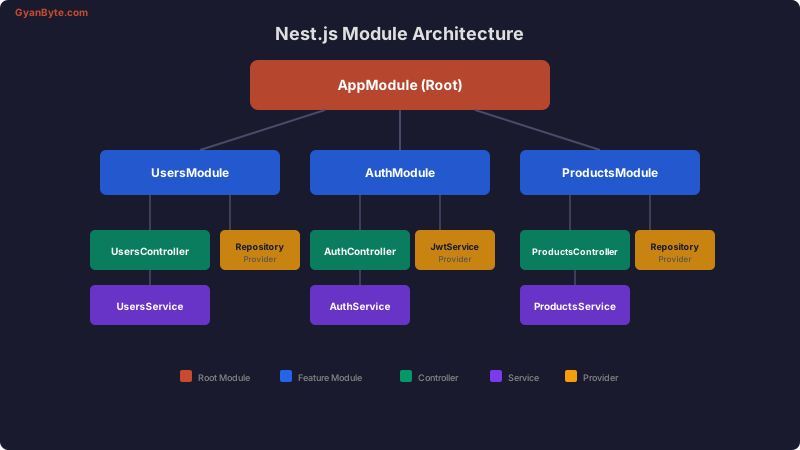
Nest.js uses TypeScript decorators, modules, and dependency injection to enforce a consistent architecture across large codebases.
Module Architecture
Project Setup
npm i -g @nestjs/cli
nest new my-api
Creating a Module with Controller and Service
// users.module.ts
import { Module } from '@nestjs/common';
import { TypeOrmModule } from '@nestjs/typeorm';
import { UsersController } from './users.controller';
import { UsersService } from './users.service';
import { User } from './entities/user.entity';

@Module({
  imports: [TypeOrmModule.forFeature([User])],
  controllers: [UsersController],
  providers: [UsersService],
  exports: [UsersService], // Available to other modules
})
export class UsersModule {}
Controller with Decorators
// users.controller.ts
import {
  Controller, Get, Post, Put, Delete,
  Body, Param, Query, HttpCode, HttpStatus,
  ParseIntPipe, ValidationPipe
} from '@nestjs/common';
import { UsersService } from './users.service';
import { CreateUserDto } from './dto/create-user.dto';
import { UpdateUserDto } from './dto/update-user.dto';
import { PaginationDto } from '../common/dto/pagination.dto';

@Controller('api/users')
export class UsersController {
  constructor(private readonly usersService: UsersService) {}

  @Get()
  findAll(@Query(ValidationPipe) pagination: PaginationDto) {
    return this.usersService.findAll(pagination);
  }

  @Get(':id')
  findOne(@Param('id', ParseIntPipe) id: number) {
    return this.usersService.findOne(id);
  }

  @Post()
  @HttpCode(HttpStatus.CREATED)
  create(@Body(ValidationPipe) createUserDto: CreateUserDto) {
    return this.usersService.create(createUserDto);
  }

  @Put(':id')
  update(
    @Param('id', ParseIntPipe) id: number,
    @Body(ValidationPipe) updateUserDto: UpdateUserDto,
  ) {
    return this.usersService.update(id, updateUserDto);
  }

  @Delete(':id')
  @HttpCode(HttpStatus.NO_CONTENT)
  remove(@Param('id', ParseIntPipe) id: number) {
    return this.usersService.remove(id);
  }
}
Service with Dependency Injection
// users.service.ts
import { Injectable, NotFoundException } from '@nestjs/common';
import { InjectRepository } from '@nestjs/typeorm';
import { Repository } from 'typeorm';
import { User } from './entities/user.entity';
import { CreateUserDto } from './dto/create-user.dto';

@Injectable()
export class UsersService {
  constructor(
    @InjectRepository(User)
    private usersRepository: Repository<User>,
  ) {}

  async findAll({ page, limit }: { page: number; limit: number }) {
    const [items, total] = await this.usersRepository.findAndCount({
      skip: (page - 1) * limit,
      take: limit,
      order: { createdAt: 'DESC' },
    });

    return {
      items,
      total,
      page,
      totalPages: Math.ceil(total / limit),
    };
  }

  async findOne(id: number): Promise<User> {
    const user = await this.usersRepository.findOne({ where: { id } });
    if (!user) {
      throw new NotFoundException(`User #${id} not found`);
    }
    return user;
  }

  async create(dto: CreateUserDto): Promise<User> {
    const user = this.usersRepository.create(dto);
    return this.usersRepository.save(user);
  }

  async update(id: number, dto: Partial<CreateUserDto>): Promise<User> {
    const user = await this.findOne(id);
    Object.assign(user, dto);
    return this.usersRepository.save(user);
  }

  async remove(id: number): Promise<void> {
    const user = await this.findOne(id);
    await this.usersRepository.remove(user);
  }
}
DTOs with class-validator
// dto/create-user.dto.ts
import { IsString, IsEmail, MinLength, MaxLength, IsEnum, IsOptional } from 'class-validator';

export class CreateUserDto {
  @IsString()
  @MinLength(2)
  @MaxLength(100)
  name: string;

  @IsEmail()
  email: string;

  @IsString()
  @MinLength(8)
  @MaxLength(128)
  password: string;

  @IsEnum(['user', 'admin'])
  @IsOptional()
  role?: string = 'user';
}
API Versioning
Express — URL Prefix
const v1Router = express.Router();
const v2Router = express.Router();

v1Router.get('/users', v1UserController.list);
v2Router.get('/users', v2UserController.list); // New response format

app.use('/api/v1', v1Router);
app.use('/api/v2', v2Router);
Nest.js — Built-in Versioning
// main.ts
app.enableVersioning({
  type: VersioningType.URI,
  prefix: 'api/v',
});

// controller
@Controller({ path: 'users', version: '2' })
export class UsersV2Controller { /* ... */ }
Express vs Nest.js — When to Use Each
| Factor | Express | Nest.js |
|---|---|---|
| Learning curve | Low | Medium-High |
| Project structure | You decide | Convention-based |
| TypeScript | Optional | First-class |
| Team size | Small teams, solo | Large teams |
| Flexibility | Maximum | Opinionated |
| Boilerplate | Minimal | More upfront |
| Testing | Manual setup | Built-in DI makes it easy |
| Microservices | DIY | Built-in transport layer |
Choose Express when you want maximum control, are building a simple API or microservice, or your team prefers choosing their own patterns.
Choose Nest.js when you have a large team, want enforced structure, are building a complex domain-driven application, or need built-in microservice support.
Production Checklist
Regardless of which framework you choose:
// Rate limiting
const rateLimit = require('express-rate-limit');
app.use('/api/', rateLimit({
  windowMs: 15 * 60 * 1000, // 15 minutes
  max: 100,
}));

// Request ID for tracing
const { v4: uuid } = require('uuid');
app.use((req, res, next) => {
  req.id = req.headers['x-request-id'] || uuid();
  res.setHeader('x-request-id', req.id);
  next();
});

// Graceful shutdown
process.on('SIGTERM', async () => {
  console.log('SIGTERM received, shutting down gracefully');
  server.close(() => {
    db.close();
    process.exit(0);
  });
});
Both Express and Nest.js can power production APIs serving millions of requests. The best framework is the one your team can maintain, test, and deploy confidently.


