

What We’re Building
A production-ready Task Management API that demonstrates every concept from this series. This is the kind of API you’d actually ship to production.
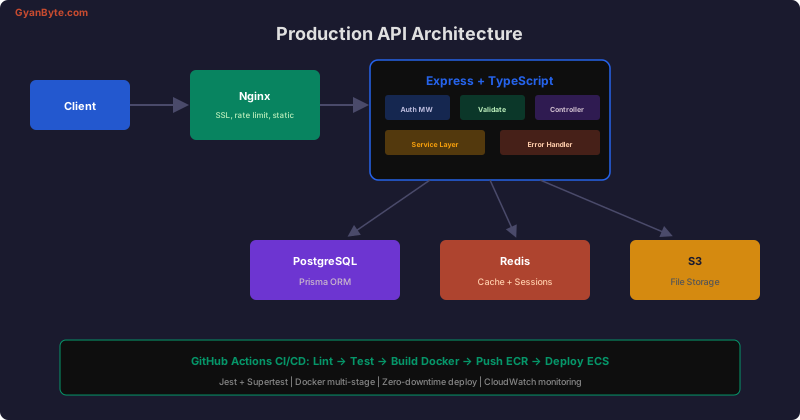
Tech stack: Express + TypeScript, Prisma + PostgreSQL, Redis, JWT auth, Zod validation, Jest + Supertest, Docker, GitHub Actions.
Project Structure
src/
├── config/
│   ├── database.ts        # Prisma client
│   ├── redis.ts           # Redis client
│   └── env.ts             # Environment validation
├── middleware/
│   ├── auth.ts            # JWT authentication
│   ├── validate.ts        # Zod validation
│   ├── rateLimit.ts       # Redis rate limiter
│   ├── requestId.ts       # Correlation ID
│   └── errorHandler.ts    # Centralized error handling
├── modules/
│   ├── auth/
│   │   ├── auth.controller.ts
│   │   ├── auth.service.ts
│   │   ├── auth.routes.ts
│   │   └── auth.schema.ts
│   └── tasks/
│       ├── tasks.controller.ts
│       ├── tasks.service.ts
│       ├── tasks.routes.ts
│       └── tasks.schema.ts
├── errors/
│   └── index.ts           # Custom error classes
├── utils/
│   └── logger.ts          # Pino logger
├── app.ts                 # Express app setup
└── server.ts              # HTTP server + graceful shutdown
Step 1: Project Setup
mkdir task-api && cd task-api
npm init -y
npm install express @prisma/client ioredis jsonwebtoken bcrypt zod pino helmet cors
npm install -D typescript @types/express @types/node @types/jsonwebtoken @types/bcrypt
npm install -D prisma jest @types/jest ts-jest supertest @types/supertest
npx tsc --init
npx prisma init
Step 2: Database Schema
// prisma/schema.prisma
generator client {
  provider = "prisma-client-js"
}

datasource db {
  provider = "postgresql"
  url      = env("DATABASE_URL")
}

model User {
  id        String   @id @default(uuid())
  name      String   @db.VarChar(100)
  email     String   @unique @db.VarChar(255)
  password  String   @db.VarChar(255)
  role      Role     @default(USER)
  tasks     Task[]
  createdAt DateTime @default(now()) @map("created_at")
  updatedAt DateTime @updatedAt @map("updated_at")

  @@map("users")
}

model Task {
  id          String     @id @default(uuid())
  title       String     @db.VarChar(255)
  description String?
  status      TaskStatus @default(TODO)
  priority    Priority   @default(MEDIUM)
  dueDate     DateTime?  @map("due_date")
  user        User       @relation(fields: [userId], references: [id])
  userId      String     @map("user_id")
  createdAt   DateTime   @default(now()) @map("created_at")
  updatedAt   DateTime   @updatedAt @map("updated_at")

  @@index([userId, status])
  @@index([dueDate])
  @@map("tasks")
}

enum Role {
  USER
  ADMIN
}

enum TaskStatus {
  TODO
  IN_PROGRESS
  DONE
}

enum Priority {
  LOW
  MEDIUM
  HIGH
  URGENT
}
Step 3: Authentication
// src/modules/auth/auth.service.ts
import bcrypt from 'bcrypt';
import jwt from 'jsonwebtoken';
import { prisma } from '../../config/database';
import { redis } from '../../config/redis';
import { AuthenticationError, ConflictError } from '../../errors';

const ACCESS_SECRET = process.env.JWT_ACCESS_SECRET!;
const REFRESH_SECRET = process.env.JWT_REFRESH_SECRET!;

export class AuthService {
  async register(name: string, email: string, password: string) {
    const existing = await prisma.user.findUnique({ where: { email } });
    if (existing) throw new ConflictError('Email already registered');

    const passwordHash = await bcrypt.hash(password, 12);
    const user = await prisma.user.create({
      data: { name, email, password: passwordHash },
      select: { id: true, name: true, email: true, role: true },
    });

    return this.generateTokens(user);
  }

  async login(email: string, password: string) {
    const user = await prisma.user.findUnique({ where: { email } });
    if (!user || !(await bcrypt.compare(password, user.password))) {
      throw new AuthenticationError('Invalid credentials');
    }

    return this.generateTokens({
      id: user.id, name: user.name, email: user.email, role: user.role,
    });
  }

  async refresh(refreshToken: string) {
    const payload = jwt.verify(refreshToken, REFRESH_SECRET) as { sub: string };

    // Check if token is blacklisted
    const isBlacklisted = await redis.get(`blacklist:${refreshToken}`);
    if (isBlacklisted) throw new AuthenticationError('Token revoked');

    const user = await prisma.user.findUnique({
      where: { id: payload.sub },
      select: { id: true, name: true, email: true, role: true },
    });

    if (!user) throw new AuthenticationError('User not found');

    // Blacklist old refresh token
    await redis.set(`blacklist:${refreshToken}`, '1', 'EX', 7 * 24 * 3600);

    return this.generateTokens(user);
  }

  private generateTokens(user: { id: string; name: string; email: string; role: string }) {
    const accessToken = jwt.sign(
      { sub: user.id, role: user.role },
      ACCESS_SECRET,
      { expiresIn: '15m' },
    );
    const refreshToken = jwt.sign(
      { sub: user.id },
      REFRESH_SECRET,
      { expiresIn: '7d' },
    );
    return { user, accessToken, refreshToken };
  }
}
Step 4: Task CRUD with Caching
// src/modules/tasks/tasks.service.ts
import { prisma } from '../../config/database';
import { redis } from '../../config/redis';
import { NotFoundError, ForbiddenError } from '../../errors';
import { TaskStatus, Priority } from '@prisma/client';

export class TasksService {
  async list(userId: string, filters: {
    status?: TaskStatus;
    priority?: Priority;
    page?: number;
    limit?: number;
  }) {
    const { status, priority, page = 1, limit = 20 } = filters;

    const cacheKey = `tasks:${userId}:${status || 'all'}:${priority || 'all'}:${page}`;
    const cached = await redis.get(cacheKey);
    if (cached) return JSON.parse(cached);

    const where = {
      userId,
      ...(status && { status }),
      ...(priority && { priority }),
    };

    const [items, total] = await Promise.all([
      prisma.task.findMany({
        where,
        orderBy: { createdAt: 'desc' },
        skip: (page - 1) * limit,
        take: limit,
      }),
      prisma.task.count({ where }),
    ]);

    const result = { items, total, page, totalPages: Math.ceil(total / limit) };
    await redis.set(cacheKey, JSON.stringify(result), 'EX', 60);

    return result;
  }

  async getById(taskId: string, userId: string) {
    const task = await prisma.task.findUnique({ where: { id: taskId } });
    if (!task) throw new NotFoundError('Task');
    if (task.userId !== userId) throw new ForbiddenError();
    return task;
  }

  async create(userId: string, data: {
    title: string;
    description?: string;
    priority?: Priority;
    dueDate?: Date;
  }) {
    const task = await prisma.task.create({
      data: { ...data, userId },
    });
    await this.invalidateCache(userId);
    return task;
  }

  async update(taskId: string, userId: string, data: Partial<{
    title: string;
    description: string;
    status: TaskStatus;
    priority: Priority;
    dueDate: Date;
  }>) {
    await this.getById(taskId, userId); // Verify ownership
    const task = await prisma.task.update({ where: { id: taskId }, data });
    await this.invalidateCache(userId);
    return task;
  }

  async delete(taskId: string, userId: string) {
    await this.getById(taskId, userId);
    await prisma.task.delete({ where: { id: taskId } });
    await this.invalidateCache(userId);
  }

  private async invalidateCache(userId: string) {
    const keys = await redis.keys(`tasks:${userId}:*`);
    if (keys.length) await redis.del(...keys);
  }
}
Step 5: Request Validation with Zod
// src/modules/tasks/tasks.schema.ts
import { z } from 'zod';

export const createTaskSchema = z.object({
  body: z.object({
    title: z.string().min(1).max(255),
    description: z.string().max(5000).optional(),
    priority: z.enum(['LOW', 'MEDIUM', 'HIGH', 'URGENT']).optional(),
    dueDate: z.string().datetime().optional(),
  }),
});

export const updateTaskSchema = z.object({
  body: z.object({
    title: z.string().min(1).max(255).optional(),
    description: z.string().max(5000).optional(),
    status: z.enum(['TODO', 'IN_PROGRESS', 'DONE']).optional(),
    priority: z.enum(['LOW', 'MEDIUM', 'HIGH', 'URGENT']).optional(),
    dueDate: z.string().datetime().nullable().optional(),
  }),
});

export const listTasksSchema = z.object({
  query: z.object({
    status: z.enum(['TODO', 'IN_PROGRESS', 'DONE']).optional(),
    priority: z.enum(['LOW', 'MEDIUM', 'HIGH', 'URGENT']).optional(),
    page: z.coerce.number().int().positive().default(1),
    limit: z.coerce.number().int().positive().max(100).default(20),
  }),
});
Step 6: Error Handling Middleware
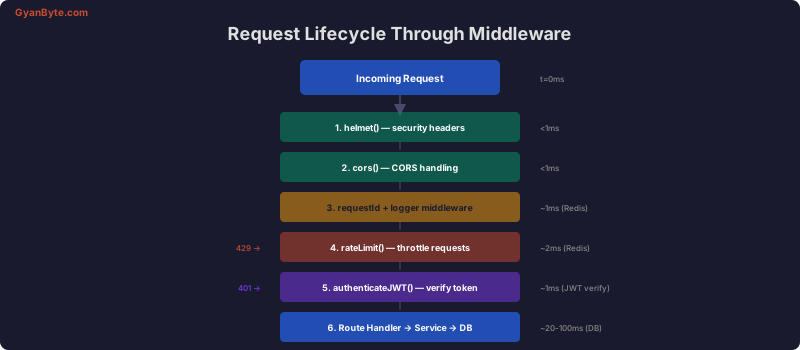
// src/middleware/errorHandler.ts
import { Request, Response, NextFunction } from 'express';
import { AppError } from '../errors';

export function errorHandler(err: Error, req: Request, res: Response, next: NextFunction) {
  if (err instanceof AppError) {
    req.log.warn({ err }, err.message);
    return res.status(err.statusCode).json({
      error: { code: err.code, message: err.message },
      requestId: req.id,
    });
  }

  // Unexpected error
  req.log.error({ err }, 'Unhandled error');
  res.status(500).json({
    error: { code: 'INTERNAL_ERROR', message: 'Something went wrong' },
    requestId: req.id,
  });
}
Step 7: Testing
// __tests__/tasks.integration.test.ts
import request from 'supertest';
import { createApp } from '../src/app';

describe('Tasks API', () => {
  let app: Express.Application;
  let authToken: string;

  beforeAll(async () => {
    app = await createApp();
    const res = await request(app)
      .post('/api/auth/register')
      .send({ name: 'Test', email: '[email protected]', password: 'pass1234' });
    authToken = res.body.accessToken;
  });

  it('POST /api/tasks — creates a task', async () => {
    const res = await request(app)
      .post('/api/tasks')
      .set('Authorization', `Bearer ${authToken}`)
      .send({ title: 'Build API', priority: 'HIGH' })
      .expect(201);

    expect(res.body).toMatchObject({
      title: 'Build API',
      priority: 'HIGH',
      status: 'TODO',
    });
  });

  it('GET /api/tasks — requires authentication', async () => {
    await request(app).get('/api/tasks').expect(401);
  });

  it('GET /api/tasks — returns user tasks', async () => {
    const res = await request(app)
      .get('/api/tasks')
      .set('Authorization', `Bearer ${authToken}`)
      .expect(200);

    expect(res.body.items).toBeInstanceOf(Array);
    expect(res.body).toHaveProperty('total');
  });
});
Step 8: Docker Setup
# Dockerfile
FROM node:20-alpine AS builder
WORKDIR /app
COPY package*.json ./
RUN npm ci
COPY . .
RUN npx prisma generate
RUN npm run build
RUN npm prune --production
FROM node:20-alpine
RUN addgroup -g 1001 app && adduser -u 1001 -G app -s /bin/sh -D app
WORKDIR /app
COPY /app/dist ./dist
COPY /app/node_modules ./node_modules
COPY /app/package.json ./
COPY /app/prisma ./prisma
USER app
EXPOSE 3000
HEALTHCHECK CMD wget -q --spider http://localhost:3000/health || exit 1
CMD ["sh", "-c", "npx prisma migrate deploy && node dist/server.js"]Step 9: GitHub Actions CI/CD
name: CI/CD
on:
  push:
    branches: [main]
  pull_request:
    branches: [main]

jobs:
  test:
    runs-on: ubuntu-latest
    services:
      postgres:
        image: postgres:16
        env:
          POSTGRES_DB: test
          POSTGRES_PASSWORD: test
        ports: ['5432:5432']
      redis:
        image: redis:7
        ports: ['6379:6379']
    steps:
      - uses: actions/checkout@v4
      - uses: actions/setup-node@v4
        with: { node-version: 20, cache: npm }
      - run: npm ci
      - run: npm run lint
      - run: npx prisma migrate deploy
        env:
          DATABASE_URL: postgres://postgres:test@localhost:5432/test
      - run: npm test
        env:
          DATABASE_URL: postgres://postgres:test@localhost:5432/test
          REDIS_URL: redis://localhost:6379
          JWT_ACCESS_SECRET: test-secret
          JWT_REFRESH_SECRET: test-refresh

  deploy:
    needs: test
    if: github.ref == 'refs/heads/main'
    runs-on: ubuntu-latest
    steps:
      - uses: actions/checkout@v4
      - name: Build and deploy
        run: echo "Deploy to ECS (see deploying-nodejs-aws article)"
Production Checklist
- HTTPS everywhere (TLS termination at load balancer)
- Rate limiting on auth endpoints (10 req/15min)
- Request correlation IDs for tracing
- Structured JSON logging (Pino)
- Health check endpoint
- Graceful shutdown handling (SIGTERM)
- Database connection pooling
- Redis caching with TTL
- Input validation on all endpoints (Zod)
- JWT with refresh token rotation
- Error responses never expose stack traces
- Docker multi-stage build (non-root user)
- CI/CD with automated testing
- Database migrations in deployment pipeline
- CloudWatch alerts for 5xx errors and latency
This project ties together every concept from the Node.js Backend Engineering series into a cohesive, production-ready application.


