
Choosing Your Deployment Strategy
| Service | Best For | Scaling | Cold Start |
|---|---|---|---|
| ECS Fargate | Containerized APIs, microservices | Auto-scaling tasks | None |
| Lambda | Event-driven, short-lived functions | Automatic, per-request | ~200-500ms |
| Elastic Beanstalk | Quick deploys, small teams | Auto-scaling EC2 | None |
ECS Fargate — Containerized APIs
Fargate runs your Docker containers without managing servers.
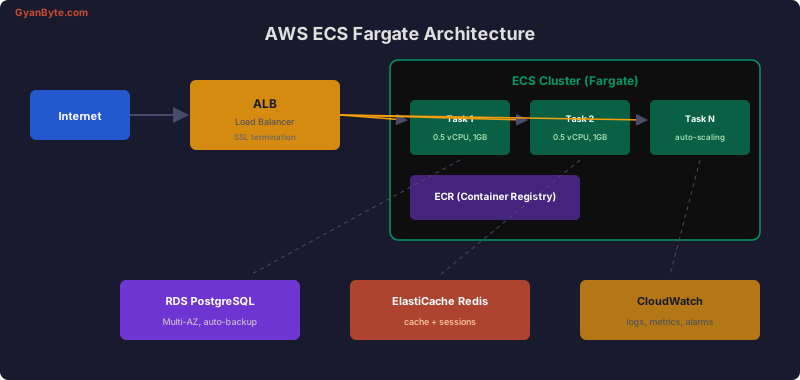
Task Definition
{
  "family": "api-service",
  "networkMode": "awsvpc",
  "requiresCompatibilities": ["FARGATE"],
  "cpu": "512",
  "memory": "1024",
  "executionRoleArn": "arn:aws:iam::role/ecsTaskExecutionRole",
  "taskRoleArn": "arn:aws:iam::role/ecsTaskRole",
  "containerDefinitions": [
    {
      "name": "api",
      "image": "123456789.dkr.ecr.us-east-1.amazonaws.com/my-api:latest",
      "portMappings": [
        { "containerPort": 3000, "protocol": "tcp" }
      ],
      "environment": [
        { "name": "NODE_ENV", "value": "production" },
        { "name": "PORT", "value": "3000" }
      ],
      "secrets": [
        {
          "name": "DATABASE_URL",
          "valueFrom": "arn:aws:ssm:us-east-1::parameter/prod/database-url"
        }
      ],
      "healthCheck": {
        "command": ["CMD-SHELL", "wget -q --spider http://localhost:3000/health || exit 1"],
        "interval": 30,
        "timeout": 5,
        "retries": 3,
        "startPeriod": 60
      },
      "logConfiguration": {
        "logDriver": "awslogs",
        "options": {
          "awslogs-group": "/ecs/api-service",
          "awslogs-region": "us-east-1",
          "awslogs-stream-prefix": "api"
        }
      }
    }
  ]
}
Auto-Scaling
# Target tracking: maintain 70% CPU utilization
aws application-autoscaling register-scalable-target \
  --service-namespace ecs \
  --resource-id service/my-cluster/api-service \
  --scalable-dimension ecs:service:DesiredCount \
  --min-capacity 2 \
  --max-capacity 10

aws application-autoscaling put-scaling-policy \
  --service-namespace ecs \
  --resource-id service/my-cluster/api-service \
  --scalable-dimension ecs:service:DesiredCount \
  --policy-name cpu-tracking \
  --policy-type TargetTrackingScaling \
  --target-tracking-scaling-policy-configuration '{
    "TargetValue": 70.0,
    "PredefinedMetricSpecification": {
      "PredefinedMetricType": "ECSServiceAverageCPUUtilization"
    },
    "ScaleInCooldown": 300,
    "ScaleOutCooldown": 60
  }'
AWS Lambda with Node.js
Lambda Handler
// handler.js
const { DynamoDBClient, GetItemCommand } = require('@aws-sdk/client-dynamodb');

const dynamodb = new DynamoDBClient({});

// Reuse connections outside handler (warm start optimization)
exports.handler = async (event) => {
  try {
    const { pathParameters, httpMethod, body } = event;

    switch (httpMethod) {
      case 'GET': {
        const result = await dynamodb.send(new GetItemCommand({
          TableName: 'Users',
          Key: { id: { S: pathParameters.id } },
        }));

        if (!result.Item) {
          return { statusCode: 404, body: JSON.stringify({ error: 'Not found' }) };
        }

        return {
          statusCode: 200,
          headers: { 'Content-Type': 'application/json' },
          body: JSON.stringify(result.Item),
        };
      }

      default:
        return { statusCode: 405, body: 'Method not allowed' };
    }
  } catch (err) {
    console.error('Error:', err);
    return {
      statusCode: 500,
      body: JSON.stringify({ error: 'Internal server error' }),
    };
  }
};
Reducing Cold Starts
// 1. Keep functions warm with provisioned concurrency
// 2. Minimize package size — use esbuild/webpack to bundle
// 3. Initialize SDK clients OUTSIDE the handler
// 4. Use ARM64 (Graviton2) — 20% cheaper, often faster

// serverless.yml
// functions:
//   api:
//     handler: dist/handler.handler
//     runtime: nodejs20.x
//     architecture: arm64
//     memorySize: 256
//     timeout: 10
//     provisionedConcurrency: 2
CI/CD with GitHub Actions
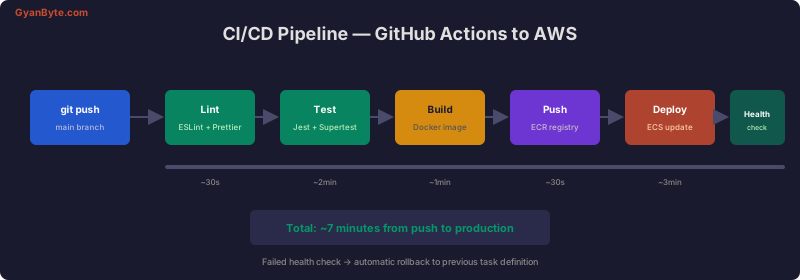
# .github/workflows/deploy.yml
name: Deploy to ECS

on:
  push:
    branches: [main]

env:
  AWS_REGION: us-east-1
  ECR_REPOSITORY: my-api
  ECS_CLUSTER: production
  ECS_SERVICE: api-service
  TASK_DEFINITION: api-service

jobs:
  deploy:
    runs-on: ubuntu-latest
    permissions:
      id-token: write
      contents: read

    steps:
      - uses: actions/checkout@v4

      - uses: actions/setup-node@v4
        with:
          node-version: 20
          cache: npm

      - name: Install and test
        run: |
          npm ci
          npm run lint
          npm test

      - name: Configure AWS credentials
        uses: aws-actions/configure-aws-credentials@v4
        with:
          role-to-assume: arn:aws:iam::role/GitHubActionsRole
          aws-region: ${{ env.AWS_REGION }}

      - name: Login to ECR
        id: ecr-login
        uses: aws-actions/amazon-ecr-login@v2

      - name: Build and push Docker image
        env:
          ECR_REGISTRY: ${{ steps.ecr-login.outputs.registry }}
          IMAGE_TAG: ${{ github.sha }}
        run: |
          docker build -t $ECR_REGISTRY/$ECR_REPOSITORY:$IMAGE_TAG .
          docker push $ECR_REGISTRY/$ECR_REPOSITORY:$IMAGE_TAG

      - name: Update ECS task definition
        id: task-def
        uses: aws-actions/amazon-ecs-render-task-definition@v1
        with:
          task-definition: task-definition.json
          container-name: api
          image: ${{ steps.ecr-login.outputs.registry }}/${{ env.ECR_REPOSITORY }}:${{ github.sha }}

      - name: Deploy to ECS
        uses: aws-actions/amazon-ecs-deploy-task-definition@v1
        with:
          task-definition: ${{ steps.task-def.outputs.task-definition }}
          service: ${{ env.ECS_SERVICE }}
          cluster: ${{ env.ECS_CLUSTER }}
          wait-for-service-stability: true
Environment Management
# Store secrets in AWS SSM Parameter Store
aws ssm put-parameter \
  --name "/prod/database-url" \
  --type "SecureString" \
  --value "postgres://user:pass@rds-host:5432/myapp"

aws ssm put-parameter \
  --name "/prod/jwt-secret" \
  --type "SecureString" \
  --value "your-jwt-secret-here"
CloudWatch Monitoring
// Custom CloudWatch metrics
const { CloudWatchClient, PutMetricDataCommand } = require('@aws-sdk/client-cloudwatch');
const cw = new CloudWatchClient({});

async function publishMetric(name, value, unit = 'Count') {
  await cw.send(new PutMetricDataCommand({
    Namespace: 'MyApp/API',
    MetricData: [{
      MetricName: name,
      Value: value,
      Unit: unit,
      Timestamp: new Date(),
    }],
  }));
}

// Track response times
app.use((req, res, next) => {
  const start = Date.now();
  res.on('finish', () => {
    publishMetric('ResponseTime', Date.now() - start, 'Milliseconds');
    if (res.statusCode >= 500) {
      publishMetric('5xxErrors', 1);
    }
  });
  next();
});
Cost Optimization
- Use Fargate Spot for non-critical workloads (up to 70% cheaper)
- Right-size tasks — start with 0.25 vCPU / 512MB and scale up based on metrics
- Use ARM64 (Graviton) instances — 20% cheaper than x86
- Set up auto-scaling to scale down during off-peak hours
- Use CloudWatch Logs Insights instead of a dedicated logging service
ECS Fargate provides the best balance of simplicity and control for production Node.js APIs. Lambda shines for event-driven workloads with sporadic traffic.