

In 2024, a single malicious contributor nearly compromised every Linux system on the planet. The xz utils backdoor (CVE-2024-3094) was a multi-year social engineering attack that planted a backdoor in a critical compression library used by SSH. It was caught by accident — a Microsoft engineer noticed SSH was 500ms slower than usual.
That’s supply chain security: your software is only as secure as its weakest dependency, and your weakest dependency might be maintained by one overworked volunteer.
The Supply Chain Problem
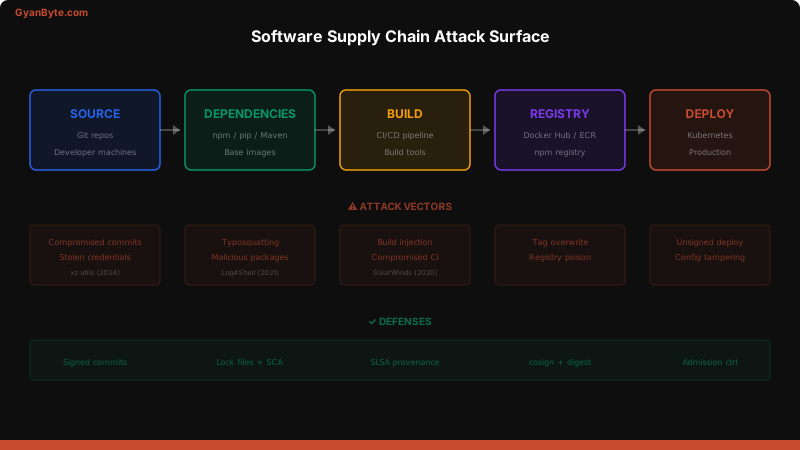
Every piece of software you ship includes code from hundreds of sources:
- Open-source libraries (npm, pip, Maven)
- Base container images (Docker Hub)
- CI/CD tools (GitHub Actions, build tools)
- Infrastructure modules (Terraform providers)
Each one is a trust decision. Each one can be compromised.
Real Attack Case Studies
SolarWinds (2020)
Attack vector: Build system compromise. Attackers injected malicious code into the SolarWinds Orion build pipeline. The signed, legitimate update contained a backdoor. Impact: 18,000+ organizations, including US government agencies. Lesson: Signing doesn’t help if the build system itself is compromised.
Log4Shell (2021)
Attack vector: Zero-day in a ubiquitous dependency. Log4j was embedded (transitively) in almost every Java application. Impact: Virtually every Java-based organization. Many didn’t even know they used Log4j. Lesson: You need an SBOM to know what’s in your software.
xz utils (2024)
Attack vector: Social engineering of a maintainer. Over two years, an attacker gained commit access to xz utils and planted a backdoor targeting SSH. Impact: Caught before wide deployment, but would have compromised most Linux servers. Lesson: Trust in open source is a human problem, not just a technical one.
SLSA Framework
SLSA (Supply-chain Levels for Software Artifacts) is a framework for supply chain integrity. Think of it as a maturity model.
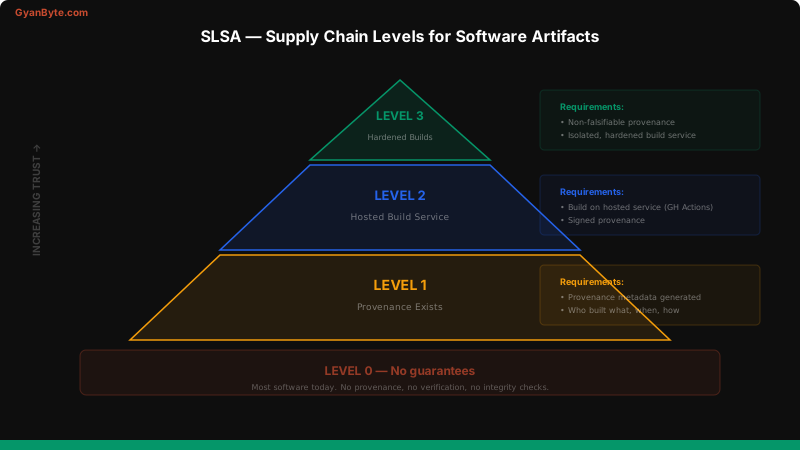
| Level | Requirements | What It Prevents |
|---|---|---|
| Level 0 | No guarantees | Nothing |
| Level 1 | Provenance exists (who built what, when) | Untracked builds |
| Level 2 | Hosted build service, signed provenance | Compromised developer machines |
| Level 3 | Hardened build platform, non-falsifiable provenance | Compromised build systems |
Generating SLSA Provenance
# GitHub Actions — SLSA provenance generation
name: Build with Provenance

on:
  push:
    tags: ['v*']

jobs:
  build:
    runs-on: ubuntu-latest
    permissions:
      id-token: write
      contents: read
      attestations: write

    steps:
      - uses: actions/checkout@v4

      - name: Build artifact
        run: npm ci && npm run build

      - name: Generate SLSA provenance
        uses: actions/attest-build-provenance@v1
        with:
          subject-path: 'dist/**'
Dependency Pinning and Lock Files
Unpinned dependencies are a supply chain attack waiting to happen. A compromised maintainer publishes a malicious patch version, and your next build pulls it automatically.
// package.json — ❌ Unpinned (vulnerable to malicious patches)
{
  "dependencies": {
    "express": "^4.18.0",
    "lodash": "~4.17.0"
  }
}

// package.json — ✅ Pinned to exact versions
{
  "dependencies": {
    "express": "4.18.2",
    "lodash": "4.17.21"
  }
}
But pinning in package.json isn’t enough — you need the lock file:
# Always commit your lock file
git add package-lock.json  # npm
git add yarn.lock          # Yarn
git add pnpm-lock.yaml     # pnpm

# In CI, use frozen installs
npm ci                     # Uses exact versions from lock file
yarn install --frozen-lockfile
pnpm install --frozen-lockfile
Pin GitHub Actions by SHA
# ❌ Tag-based — can be overwritten
- uses: actions/checkout@v4

# ✅ SHA-pinned — immutable
- uses: actions/checkout@b4ffde65f46336ab88eb53be808477a3936bae11  # v4.1.1
Pin Docker Images by Digest
# ❌ Tag-based — mutable
FROM node:20-alpine

# ✅ Digest-pinned — immutable
FROM node:20-alpine@sha256:a1b2c3d4e5f6...
Reproducible Builds
A reproducible build produces the same output from the same input, every time. This lets you verify that a binary was built from the source code it claims to be.
# Reproducible Docker build
FROM node:20-alpine@sha256:abc123... AS builder
WORKDIR /app
# Copy only dependency files first (layer caching)
COPY package.json package-lock.json ./
RUN npm ci --ignore-scripts
# Copy source and build
COPY . .
RUN npm run build
# Production image
FROM gcr.io/distroless/nodejs20-debian12@sha256:def456...
COPY /app/dist /app/dist
COPY /app/node_modules /app/node_modules
WORKDIR /app
CMD ["dist/server.js"]Key practices:
- Pin all base images by digest
- Use
npm ciinstead ofnpm install— respects the lock file exactly - Disable post-install scripts in CI —
npm ci --ignore-scripts - Set deterministic timestamps —
SOURCE_DATE_EPOCHfor consistent outputs
Securing Your CI/CD Pipeline
Your CI/CD pipeline is a high-value target. If an attacker compromises it, they can inject code into every build.
# Hardened GitHub Actions workflow
name: Secure Build

on:
  push:
    branches: [main]

# Minimal permissions
permissions:
  contents: read
  packages: write

jobs:
  build:
    runs-on: ubuntu-latest
    steps:
      # Pin by SHA, not tag
      - uses: actions/checkout@b4ffde65f46336ab88eb53be808477a3936bae11

      # Verify dependency integrity
      - run: npm ci --ignore-scripts
      - run: npm audit signatures  # Verify npm provenance

      # Build
      - run: npm run build

      # Sign the artifact
      - name: Sign with cosign
        run: |
          cosign sign-blob --yes \
            --oidc-issuer https://token.actions.githubusercontent.com \
            dist/app.tar.gz
CI/CD hardening checklist:
- Minimal permissions —
permissions:block with only what’s needed - Pin all actions by SHA — tags are mutable
- No secrets in logs — mask outputs, use OIDC instead of long-lived tokens
- Ephemeral runners — don’t reuse CI environments between builds
- Branch protection — require reviews for changes to CI workflows
Key Takeaways
- Pin everything by hash — dependencies, Docker images, GitHub Actions
- Commit your lock files — and use
ci/frozen-lockfilein builds - Generate SBOMs — know what’s in your software before the next zero-day
- Adopt SLSA incrementally — Level 1 (provenance) is achievable today
- Harden your CI/CD — it’s a security-critical system, treat it like one
- Verify provenance — don’t just trust, verify the supply chain
$ subscribe --weekly
One deep dive a week, in your inbox
System design, AI engineering, trading systems and interview prep. Tested code, real numbers. Free, and you can unsubscribe any time.
or read it on gyanbyte.substack.com


