

In the last article I wrote about reviewing AI code before it goes in. This one is about the moment after — when some AI-written code is already running and now it is misbehaving, and you have to find out why. And I will be honest: debugging AI code is a bit harder than debugging your own, in a way that took me a while to put my finger on.
Why it is harder: you have no mental model
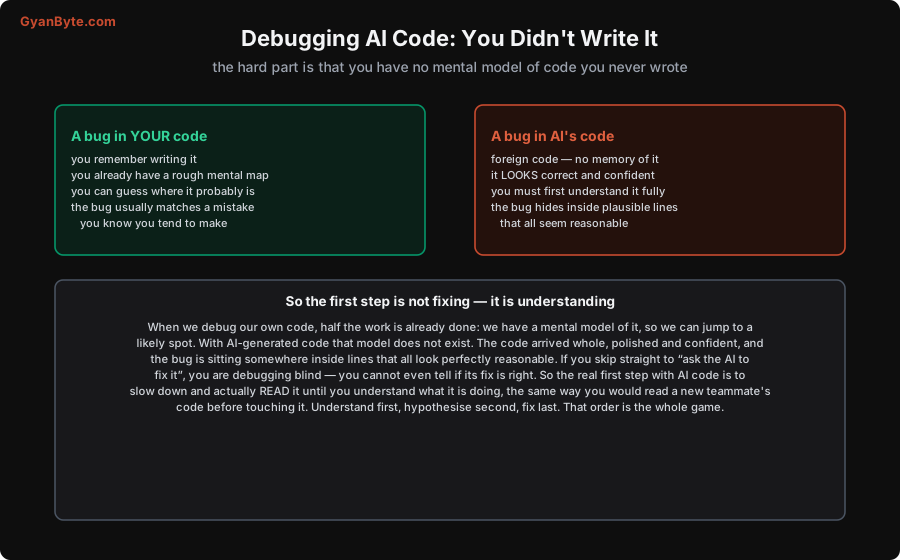
Think about how you debug your own code. Half the work is already done before you even start, because you have a mental model of it. You remember writing that function, you know roughly where things live, and the bug usually turns out to be a mistake of a kind you know you tend to make. You can jump almost straight to a likely spot.
Now AI code. That mental model simply does not exist. The code arrived whole, polished, confident — and the bug is sitting somewhere inside lines that all look perfectly reasonable. You cannot jump to a likely spot because you never built the map. This is exactly why “just paste the error and ask the AI to fix it” fails so often: you are debugging blind, and you cannot even judge whether the AI’s fix is correct, beacuse you do not understand the code it is fixing.
So the single most important shift is this: with AI code, understanding the code is the first real step, not an optional one. Read it like you would read a new teamate’s code before touching it. Understand first, hypothesise second, fix last.
The method
Once you accept that, the rest is just classic debugging done with discipline.
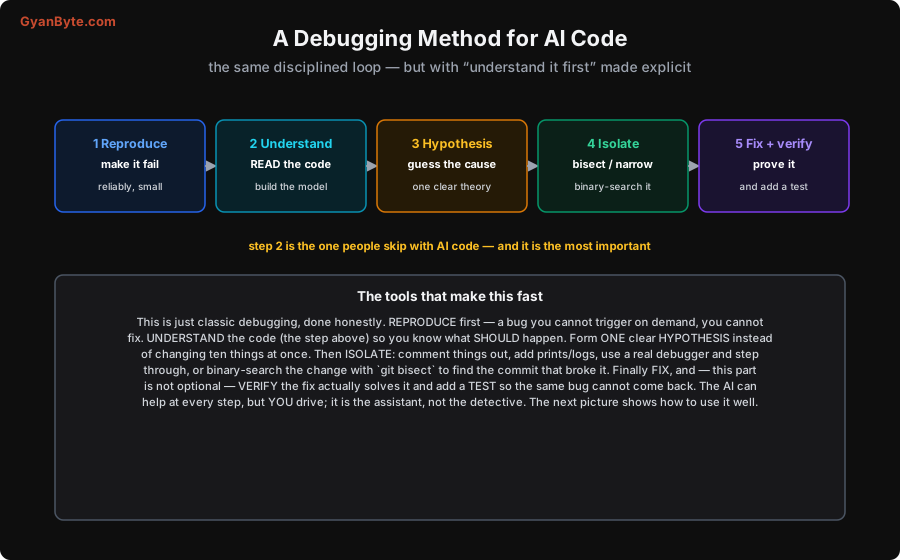
- Reproduce it. A bug you cannot trigger on demand, you cannot fix. Make it fail reliably, and as small as possible — one input, one path.
- Understand the code. The step above. Read the relevant part until you know what it is supposed to do. Only then can you spot where reality differs.
- Form one hypothesis. Resist the urge to change ten things at once. Pick the single most likely cause and test that.
- Isolate it. Comment things out, add prints or structured logs, use a real debugger and step through line by line, or — my favourite for “it worked yesterday” —
git bisectto find the exact commit that introduced it. Narrow the space until the bug has nowhere to hide. - Fix and verify — and add a test. Confirm the fix actually solves the reproduction, not just makes the symptom disappear. Then write a test so this bug can never silently return. This last part is not optional.
None of this is new. It is the same loop good engineers always used. The only change for AI code is that step 2 is now explicit and non-negotiable.
The AI bugs that catch you out
After doing this a while, you start to recognise the flavour of AI bugs. They tend to cluster:
- The silent wrong assumption. The AI assumed your data looked a certain way — sorted, non-empty, a particular key present — and it is subtly not. The code runs fine until the one input that breaks the assumption.
- The hallucinated call that no-ops. It called a method or passed a flag that does not quite do what it thinks, so the code runs without error but silently does nothing useful. These are nasty because there is no exception to follow.
- Copied-but-not-adapted. A pattern lifted from a common example (a tutorial-shaped solution) that does not quite fit your situation — right shape, wrong details.
- The off-by-one and the edge case. The classic. The happy path is flawless; the boundary is wrong.
- Version mismatch. The AI used an API from a different version of a library than the one you actually have installed.
Knowing these flavours makes step 3 — forming a hypothesis — much faster, because you have a shortlist of usual suspects.
Use the AI to help — but you stay the detective
Here is the irony: the AI is genuinely useful for debugging its own code — but only if you keep it on a tight leash.
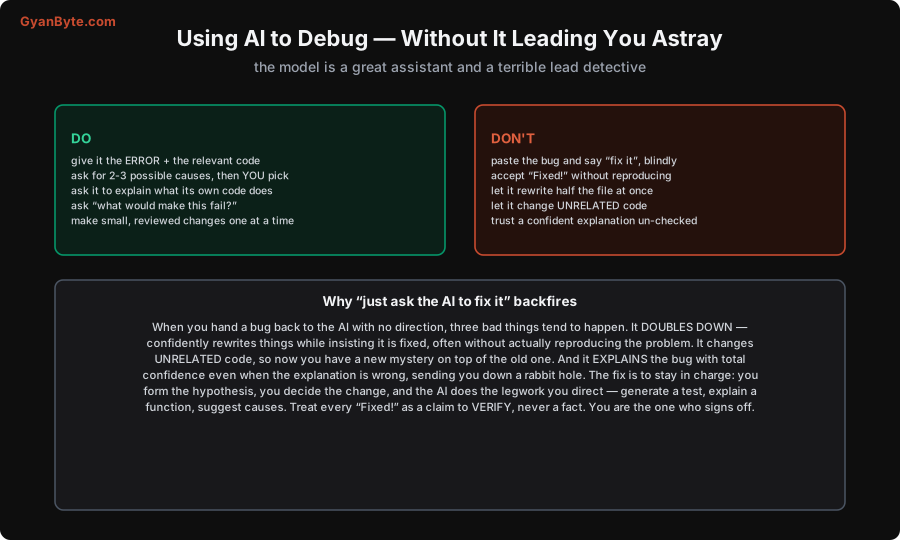
The DO list works because it keeps you in charge: give the model the error and the relevant code, ask it for two or three possible causes (and you decide which to chase), ask it to explain what a confusing function actually does, ask “what input would make this fail?“. Used like this it is a brilliant, fast assistant.
The DON’T list is where people get burnt. Hand a bug back to the AI with no direction — “it’s broken, fix it” — and three bad things tend to happen, every time:
- It doubles down — confidently rewrites code while insisting it is fixed, usually without ever reproducing the actual problem.
- It changes unrelated code — so now you have a brand new mystery stacked on top of the original one.
- It explains the bug with total confidence even when the explanation is wrong — and off you go down a rabbit hole chasing a cause that was never real.
So the rule is simple: you form the hypothesis, you decide the change, and the AI does the specific legwork you direct — generate a test, explain this function, suggest causes for this symptom. And treat every cheerful “Fixed!” as a claim to be verified, never a fact. You are the one who reproduces it, and you are the one who signs off.
Takeaways
- Debugging AI code is harder because you have no mental model of code you didn’t write — the bug hides in plausible-looking lines.
- So understand the code first — reading it is step one, not optional. Then reproduce, hypothesise, isolate, fix, verify, add a test.
- Learn the flavours of AI bugs: silent wrong assumptions, hallucinated no-op calls, copied-but-not-adapted patterns, off-by-ones, version mismatches.
- Use AI to help, but stay the detective: give it the error + context, ask for causes, make small verified changes. Never hand it the bug blindly — it doubles down, touches unrelated code, and explains wrong things confidently.
- Every “Fixed!” is a claim to verify. You reproduce, you sign off, you own it.
This pairs with how to review AI-generated code. For the wider picture, see the future of software engineering and the playbook to stay valuable. And to sharpen the raw debugging muscle itself, the Observability & Production Debugging course is the best investment you can make.


