

A commit is the smallest unit of a project’s history, and it is written far more often than it’s thought about. Yet git log and git blame are read constantly — when debugging, when onboarding, when deciding whether a line is safe to change. A commit is really a message to the future, and the AI era makes getting it right more important, not less, because assistants now produce code faster than anyone can carelessly commit it. This is the first of three on engineering hygiene in the AI era, alongside pull requests and code review.
What a good commit looks like
The fundamentals haven’t changed, and they’re worth stating plainly.
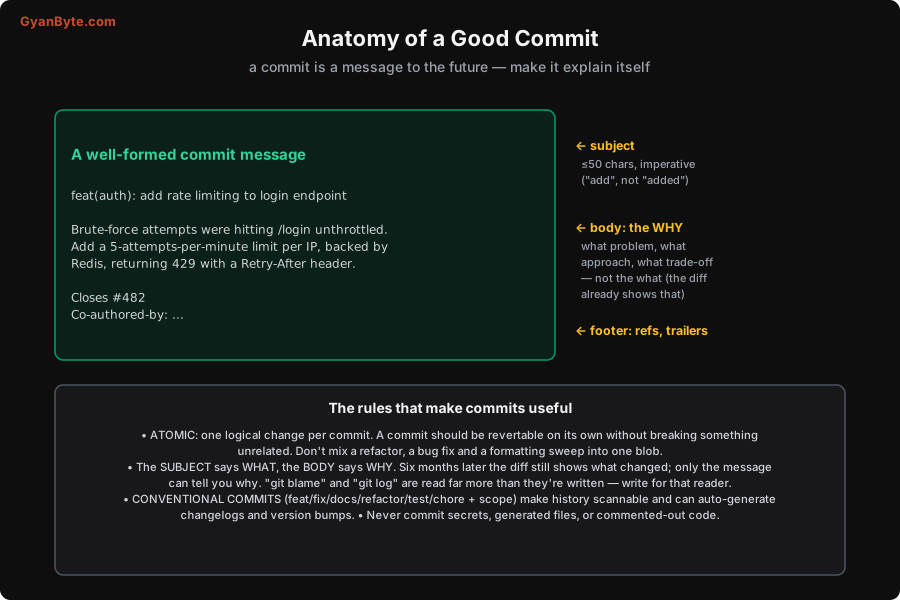
- Atomic commits. One logical change per commit. A commit should be revertable on its own without breaking something unrelated. Don’t bundle a refactor, a bug fix, and a formatting sweep into one blob — if you can’t describe it in a single sentence without saying “and,” it should be more than one commit.
- Subject says what, body says why. The subject line (≤50 characters, imperative mood — “add rate limiting,” not “added”) is the scannable headline. The body is where the value is: why this change, what problem it solves, what trade-off you made. Six months later the diff still shows exactly what changed; only the message can tell you why. Write for the person running
git blameon your line at 2 a.m. - Conventional commits. A small prefix convention —
feat,fix,docs,refactor,test,chore, plus an optional scope likefeat(auth):— makes history scannable and can auto-generate changelogs and drive semantic version bumps. Cheap to adopt, pays off immediately. - Never commit secrets, credentials, large generated files, or commented-out code. These are the things you can’t easily take back once pushed.
None of this is new. What’s new is how the code arrives before you commit it.
The AI-era rule: you own the commit
AI coding assistants are brilliant at producing a diff in seconds — and that speed is precisely the trap. A diff you didn’t read is a diff you don’t understand, and committing it makes you responsible for code you can’t explain.
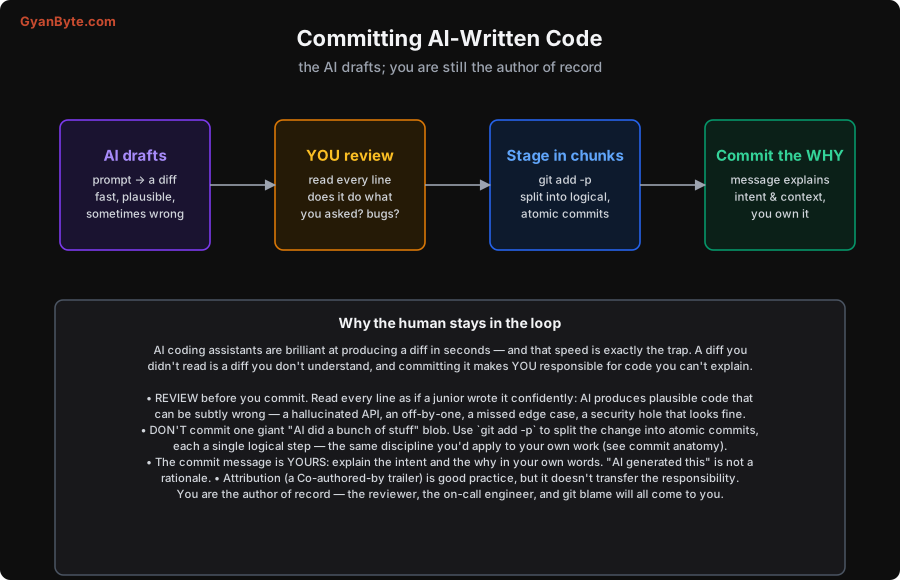
The workflow that keeps you honest:
- Review before you commit. Read every line as if a confident junior wrote it — because, effectively, one did. AI produces plausible code that can be subtly wrong: a hallucinated API, an off-by-one, a missed edge case, a security hole that looks perfectly normal. Passing the type-checker is not the same as being correct.
- Split it into atomic commits. Don’t commit one giant “AI implemented the feature” blob. Use
git add -pto stage the change in logical hunks and make several small, atomic commits — the same discipline you’d apply to your own work. A reviewer (and a future bisect) will thank you. - Write the why in your own words. The commit message is yours. “AI generated this” is not a rationale; explain the intent and the trade-off as you would for anything you wrote. If you can’t explain why the change is correct, you’re not ready to commit it.
- Attribute, but don’t abdicate. A
Co-authored-by:trailer for the assistant is good, honest practice. But attribution doesn’t transfer responsibility. You are the author of record — the reviewer’s questions, the on-call page, andgit blameall land on you, not the model.
The through-line: AI changed who types the code, not who is accountable for it. The commit is where that accountability is recorded, so treat it as yours.
Takeaways
- Keep commits atomic — one logical, independently-revertable change each.
- Subject = what (≤50 chars, imperative); body = why (the diff already shows the what). Write for the future reader of
git blame. - Use conventional commits for scannable history and automated changelogs; never commit secrets or generated junk.
- For AI-written code: review every line before committing, split the diff into atomic commits with
git add -p, write the why yourself, and remember aCo-authored-bytrailer doesn’t move the responsibility off you.
Next in the series: pull request best practices in the AI era — why small, self-reviewed PRs matter even more now that AI can generate a 500-line diff in seconds.


