

Most engineers think about security the way they think about flossing — they know they should do it, they occasionally feel guilty about not doing it, and they mostly rely on someone else to worry about it. That’s how breaches happen.
After years of building and breaking cloud systems, I’ve learned that security isn’t a tool you install or a sprint you schedule. It’s a way of thinking about every line of code, every API endpoint, every IAM role. This article is about building that mental model.
What Is a Security Mindset?
A security mindset means looking at every system and asking: “How could this be abused?” Not just “Does it work?” or “Is it fast?” — but “What happens if someone with bad intentions gets access to this?”
It’s the difference between:
- “This API returns user data” → “This API returns user data — what if someone enumerates user IDs?”
- “This Lambda has S3 access” → “This Lambda has S3 access — what if the function is compromised via event injection?”
- “We store the API key in an env var” → “We store the API key in an env var — who can read the environment?”
The security mindset isn’t paranoia. It’s engineering discipline applied to adversarial scenarios.
Threat Modeling with STRIDE
Threat modeling is the systematic process of identifying what can go wrong. The most practical framework I’ve used is STRIDE, developed by Microsoft.
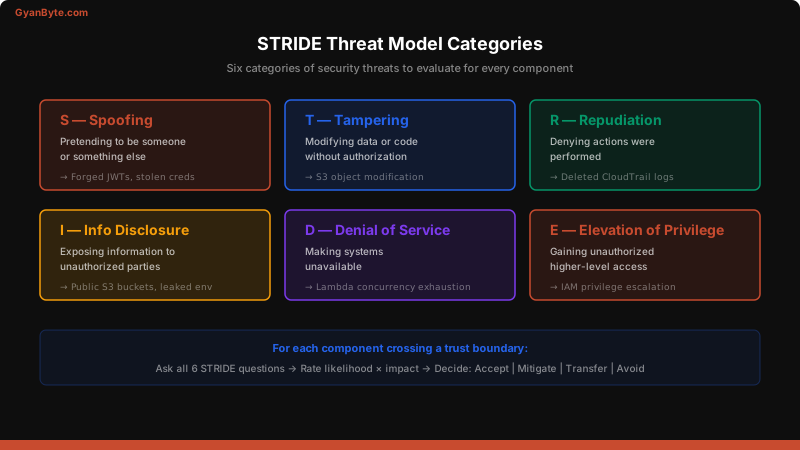
Each letter represents a category of threat:
| Threat | Description | Cloud Example |
|---|---|---|
| Spoofing | Pretending to be someone else | Forged JWT tokens, stolen IAM credentials |
| Tampering | Modifying data or code | Altering S3 objects, modifying Lambda code |
| Repudiation | Denying actions were taken | Deleting CloudTrail logs, no audit trail |
| Information Disclosure | Exposing sensitive data | Public S3 buckets, leaked env vars |
| Denial of Service | Making systems unavailable | Lambda concurrency exhaustion, API flooding |
| Elevation of Privilege | Gaining unauthorized access | IAM privilege escalation, container escape |
How to Run a STRIDE Session
For every new feature or service, I walk through these steps:
- Draw the data flow diagram — users, services, data stores, trust boundaries
- For each component crossing a trust boundary, ask all six STRIDE questions
- Rate each threat — likelihood × impact
- Decide on mitigations — accept, mitigate, transfer, or avoid
# Example: Threat model for a user profile API
component: GET /api/users/:id
trust_boundary: Internet → API Gateway → Lambda → DynamoDB

threats:
  spoofing:
    risk: high
    scenario: "Attacker uses stolen JWT to access other users' profiles"
    mitigation: "Validate JWT issuer + audience, check sub claim matches :id"

  information_disclosure:
    risk: high
    scenario: "IDOR — attacker changes :id to enumerate other users"
    mitigation: "Authorization check: requesting user must own the resource"

  denial_of_service:
    risk: medium
    scenario: "Attacker floods endpoint to exhaust Lambda concurrency"
    mitigation: "API Gateway throttling, per-user rate limits"
Attack Surface Analysis
Your attack surface is everything an attacker can reach. In cloud systems, it’s much larger than most engineers realize.
Every arrow in that diagram is a potential attack vector. To reduce your attack surface:
- Remove unused endpoints — that
/debugroute you forgot about is a gift to attackers - Minimize public exposure — put services behind VPCs, use private subnets
- Reduce permissions — every IAM role should have the minimum permissions needed
- Audit third-party integrations — each external dependency is a trust decision
Defense in Depth
No single security control is enough. Defense in depth means layering multiple controls so that if one fails, others still protect you.
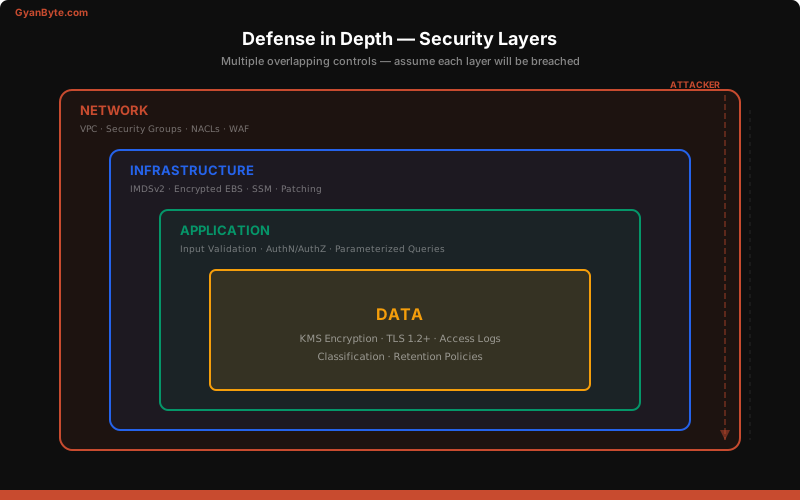
The Four Layers
Layer 1: Network
- VPC with private subnets
- Security groups (allowlist, not denylist)
- NACLs for subnet-level control
- WAF on API Gateway / CloudFront
Layer 2: Infrastructure
- Encrypted volumes (EBS, RDS)
- IMDSv2 required (blocks SSRF credential theft)
- Systems Manager instead of SSH
- Patch management automation
Layer 3: Application
- Input validation on all external data
- Parameterized queries (never string concatenation for SQL)
- Output encoding (prevent XSS)
- Authentication + authorization on every endpoint
Layer 4: Data
- Encryption at rest (KMS)
- Encryption in transit (TLS 1.2+)
- Access logging on S3 buckets
- Data classification and retention policies
The key insight: assume each layer will be breached. Design the next layer to contain the damage.
Principle of Least Privilege
This is the single most violated security principle in cloud engineering. The pattern I see constantly:
// ❌ The "just make it work" IAM policy
{
  "Version": "2012-10-17",
  "Statement": [
    {
      "Effect": "Allow",
      "Action": "*",
      "Resource": "*"
    }
  ]
}
This gives full admin access. If this Lambda function is compromised, the attacker owns your entire AWS account. Instead:
// ✅ Least privilege — only what's needed
{
  "Version": "2012-10-17",
  "Statement": [
    {
      "Effect": "Allow",
      "Action": [
        "dynamodb:GetItem",
        "dynamodb:PutItem",
        "dynamodb:Query"
      ],
      "Resource": "arn:aws:dynamodb:us-east-1:123456789:table/UserProfiles"
    },
    {
      "Effect": "Allow",
      "Action": [
        "s3:GetObject"
      ],
      "Resource": "arn:aws:s3:::profile-avatars/*"
    }
  ]
}
Practical Least Privilege Strategy
- Start with zero permissions and add as needed
- Use IAM Access Analyzer to find unused permissions
- Scope to specific resources — never use
Resource: "*"in production - Use conditions — restrict by source IP, VPC, or time of day
- Review quarterly — permissions accumulate like technical debt
# Find unused IAM permissions with Access Analyzer
aws accessanalyzer list-findings \
  --analyzer-arn arn:aws:access-analyzer:us-east-1:123456789:analyzer/my-analyzer \
  --filter '{"status": {"eq": ["ACTIVE"]}}'
Real-World Cloud Example: The S3 Breach Pattern
Let me walk through how these concepts connect using the most common cloud breach pattern I’ve seen.
The setup: A web application stores user documents in S3. A Lambda function generates pre-signed URLs for downloads.
What goes wrong:
- No security mindset → Developer sets the S3 bucket to public because “it’s easier for testing” and forgets to revert
- No threat model → Nobody asked “What if the pre-signed URL parameters are tampered with?”
- No defense in depth → The Lambda has
s3:*permissions, so a compromised function can read ANY bucket - No least privilege → The bucket policy allows
s3:GetObjectforPrincipal: "*"
The fix with a security mindset:
// S3 bucket policy — deny all public access
{
  "Version": "2012-10-17",
  "Statement": [
    {
      "Effect": "Deny",
      "Principal": "*",
      "Action": "s3:GetObject",
      "Resource": "arn:aws:s3:::user-documents/*",
      "Condition": {
        "Bool": {
          "aws:SecureTransport": "false"
        }
      }
    }
  ]
}
# Enable S3 Block Public Access at the account level
aws s3control put-public-access-block \
--account-id 123456789012 \
--public-access-block-configuration \
BlockPublicAcls=true,\
IgnorePublicAcls=true,\
BlockPublicPolicy=true,\
RestrictPublicBuckets=trueKey Takeaways
- Security is a mindset, not a sprint — ask “How could this be abused?” at every design decision
- Use STRIDE for threat modeling — it’s structured enough to be useful, lightweight enough to actually do
- Map your attack surface — you can’t defend what you don’t know exists
- Layer your defenses — assume each layer will be breached
- Enforce least privilege ruthlessly — start with zero permissions and add only what’s needed
- Automate security checks — humans forget, pipelines don’t
This is the foundation for everything else in this course. In the next article, we’ll apply these principles specifically to AWS IAM — the most important (and most misconfigured) security control in the cloud.
$ subscribe --weekly
One deep dive a week, in your inbox
System design, AI engineering, trading systems and interview prep. Tested code, real numbers. Free, and you can unsubscribe any time.
or read it on gyanbyte.substack.com


