

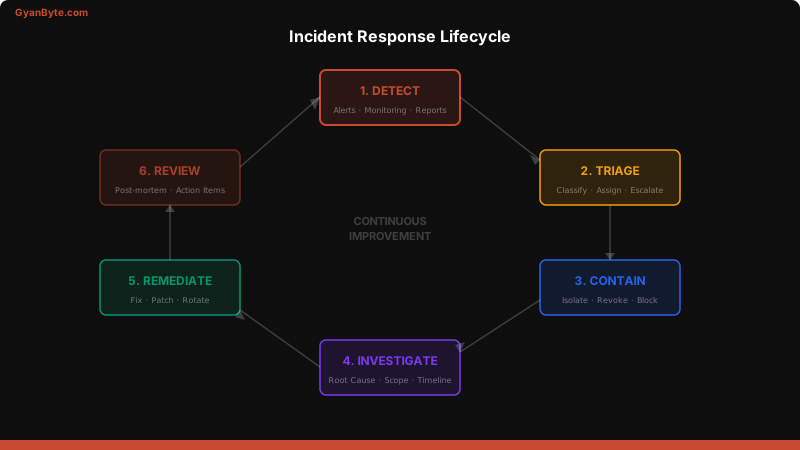
The worst time to figure out your incident response process is during an incident. I learned this the hard way when a credential leak hit production at 2 AM and we spent the first 45 minutes arguing about who should do what. That 45 minutes could have been containment time.
This article covers building an incident response process that works when everything is on fire.
Why Incident Response Matters
Security incidents are inevitable. The question isn’t if, but when. What separates good teams from bad ones is how fast they detect, contain, and recover.
Key metrics:
- MTTD (Mean Time to Detect) — industry average: 197 days
- MTTC (Mean Time to Contain) — industry average: 69 days
- MTTR (Mean Time to Remediate) — your target: hours, not days
Incident Classification (P1-P4)
Every incident needs a severity level that drives the response urgency.
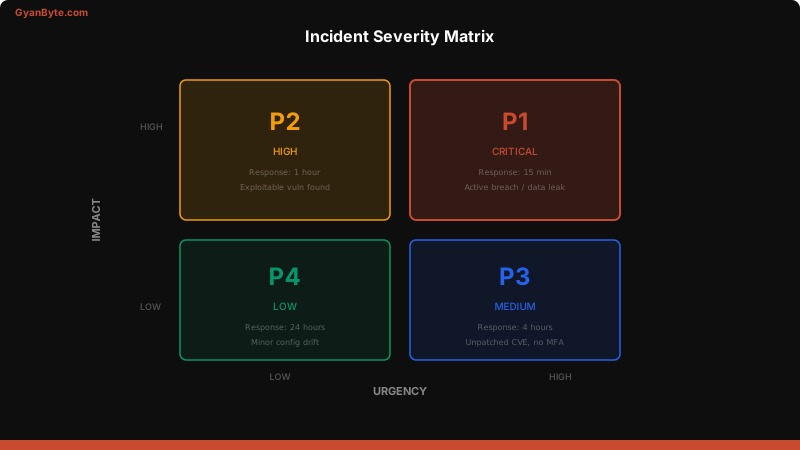
| Severity | Definition | Response Time | Examples |
|---|---|---|---|
| P1 — Critical | Active breach, data exfiltration, system compromise | 15 min | Credential leak in production, ransomware, active attacker |
| P2 — High | Exploitable vulnerability, unauthorized access attempt | 1 hour | Open security group on production DB, suspicious IAM activity |
| P3 — Medium | Potential vulnerability, policy violation | 4 hours | Unpatched critical CVE, MFA not enabled on admin account |
| P4 — Low | Minor policy deviation, informational | 24 hours | Expired SSL cert (non-prod), minor config drift |
# incident_classification.yml
severity_matrix:
  P1_critical:
    impact: "Data breach, system compromise, active attacker"
    response_time: "15 minutes"
    war_room: true
    executive_notification: true
    responders: ["security-lead", "on-call-engineer", "engineering-manager"]

  P2_high:
    impact: "Exploitable vulnerability, unauthorized access"
    response_time: "1 hour"
    war_room: false
    executive_notification: false
    responders: ["security-team", "on-call-engineer"]

  P3_medium:
    impact: "Potential vulnerability, policy violation"
    response_time: "4 hours"
    war_room: false
    executive_notification: false
    responders: ["security-team"]

  P4_low:
    impact: "Minor deviation, informational"
    response_time: "24 hours"
    war_room: false
    executive_notification: false
    responders: ["security-team"]
Building Runbooks
A runbook is a step-by-step guide for responding to a specific type of incident. It removes decision-making from crisis moments.
# runbooks/credential_leak.yml
name: "Credential Leak Response"
severity: P1
trigger: "API key, access key, or password found in public repo/logs"

steps:
  - name: "Immediate (0-5 min)"
    actions:
      - "Revoke the leaked credential immediately"
      - "Check CloudTrail for usage of the credential"
      - "Open war room Slack channel: #incident-YYYY-MM-DD"
      - "Page security lead and on-call engineer"

  - name: "Contain (5-30 min)"
    actions:
      - "Identify all services using the credential"
      - "Rotate the credential on all affected services"
      - "Check for lateral movement (unusual API calls, new resources)"
      - "Block source IP if identified"

  - name: "Investigate (30-120 min)"
    actions:
      - "Run Athena query: all API calls with leaked credential"
      - "Check for data access (S3 GetObject, DynamoDB scans)"
      - "Check for persistence (new IAM users, access keys, roles)"
      - "Document timeline in incident ticket"

  - name: "Recover"
    actions:
      - "Verify all credential rotations are complete"
      - "Remove any resources created by attacker"
      - "Enable additional monitoring for 72 hours"
      - "Schedule post-incident review within 48 hours"

  - name: "Prevention"
    actions:
      - "Add Gitleaks pre-commit hook to affected repo"
      - "Enable GitHub secret scanning"
      - "Review and tighten IAM permissions"
Ticketing Workflow
Every security incident should create a ticket automatically. Here’s a PagerDuty → Jira integration:
# webhook/incident_to_ticket.py
"""PagerDuty webhook → Jira ticket creation"""
import json
import requests
from datetime import datetime

JIRA_URL = "https://company.atlassian.net"
JIRA_TOKEN = "..."  # From Secrets Manager

def create_security_ticket(incident):
    severity = incident['severity']
    title = incident['title']
    description = incident.get('description', '')

    priority_map = {
        'P1': '1',  # Highest
        'P2': '2',  # High
        'P3': '3',  # Medium
        'P4': '4',  # Low
    }

    ticket = {
        "fields": {
            "project": {"key": "SEC"},
            "summary": f"[{severity}] {title}",
            "description": {
                "type": "doc",
                "version": 1,
                "content": [{
                    "type": "paragraph",
                    "content": [{"type": "text", "text": description}]
                }]
            },
            "issuetype": {"name": "Security Incident"},
            "priority": {"id": priority_map.get(severity, '3')},
            "labels": ["security-incident", severity.lower()],
            "customfield_10100": datetime.utcnow().isoformat(),  # Detection time
        }
    }

    response = requests.post(
        f"{JIRA_URL}/rest/api/3/issue",
        json=ticket,
        headers={
            "Authorization": f"Basic {JIRA_TOKEN}",
            "Content-Type": "application/json"
        }
    )
    return response.json()['key']
War Room Protocol
For P1 incidents, you need a structured war room:
Roles:
- Incident Commander — owns the timeline, makes decisions, keeps things moving
- Technical Lead — hands on keyboard, investigating and remediating
- Communications Lead — updates stakeholders, manages external comms if needed
- Scribe — documents everything in the incident timeline
Rules of the war room:
- Start a shared document for the timeline — every action gets timestamped
- Update stakeholders every 30 minutes (even if the update is “still investigating”)
- Don’t fix and investigate simultaneously — contain first, then investigate
- Record every command you run — you’ll need this for the post-mortem
Communication Templates
Pre-written templates save precious minutes during incidents.
## Internal Update (every 30 min)

**Incident:** [Brief description]
**Severity:** P[X]
**Status:** [Investigating / Containing / Remediated / Resolved]
**Impact:** [What's affected, who's affected]
**Current Actions:** [What we're doing right now]
**Next Update:** [Time of next update]
**War Room:** #incident-YYYY-MM-DD

---

## Executive Summary (for P1/P2)

**What happened:** [1-2 sentences]
**Customer impact:** [Yes/No, scope]
**Current status:** [Contained/Investigating/Resolved]
**Root cause:** [If known, or "Under investigation"]
**ETA to resolution:** [Best estimate or "TBD"]
Post-Incident Review
Every P1 and P2 gets a post-incident review within 48 hours. The key: blameless.
# post_incident_template.yml
incident_id: "SEC-2026-042"
date: "2026-04-04"
severity: "P1"
duration: "2 hours 15 minutes"

timeline:
  - time: "02:15 UTC"
    event: "GuardDuty alert: unusual API calls from IAM user 'deploy-bot'"
  - time: "02:20 UTC"
    event: "On-call paged, acknowledged"
  - time: "02:25 UTC"
    event: "War room opened, investigation started"
  - time: "02:35 UTC"
    event: "Identified: access key leaked in public GitHub repo"
  - time: "02:37 UTC"
    event: "Access key deactivated"
  - time: "02:50 UTC"
    event: "CloudTrail audit shows 23 S3 GetObject calls to customer data"
  - time: "03:30 UTC"
    event: "All affected credentials rotated"
  - time: "04:30 UTC"
    event: "Incident resolved, monitoring elevated"

root_cause: "Access key was hardcoded in a config file committed to a public repository"

what_went_well:
  - "GuardDuty detected unusual activity within 10 minutes"
  - "On-call responded in 5 minutes"
  - "Credential was revoked within 20 minutes of detection"

what_went_wrong:
  - "No pre-commit hook to catch secrets"
  - "Access key had broader permissions than needed"
  - "Took 45 minutes to identify all affected services"

action_items:
  - owner: "security-team"
    action: "Deploy Gitleaks pre-commit hooks to all repos"
    due: "2026-04-11"
  - owner: "platform-team"
    action: "Reduce deploy-bot permissions to least privilege"
    due: "2026-04-11"
  - owner: "security-team"
    action: "Add automated credential rotation for all service accounts"
    due: "2026-04-25"
Key Takeaways
- Classify by severity — P1-P4 drives response time and escalation
- Write runbooks before incidents — remove decision-making from crisis moments
- Automate ticket creation — alerts should create tickets without human intervention
- War room protocol for P1s — Incident Commander, Tech Lead, Comms Lead, Scribe
- Blameless post-mortems — focus on systems and processes, not individuals
- Practice your response — tabletop exercises quarterly, game days annually
$ subscribe --weekly
One deep dive a week, in your inbox
System design, AI engineering, trading systems and interview prep. Tested code, real numbers. Free, and you can unsubscribe any time.
or read it on gyanbyte.substack.com


