

The average application has over 200 transitive dependencies. Each one is code written by someone you don’t know, running in your production environment with your access permissions. When Log4Shell hit, teams spent weeks figuring out which of their services even used Log4j. That’s the dependency vulnerability problem — and it only gets harder at scale.
The Dependency Problem
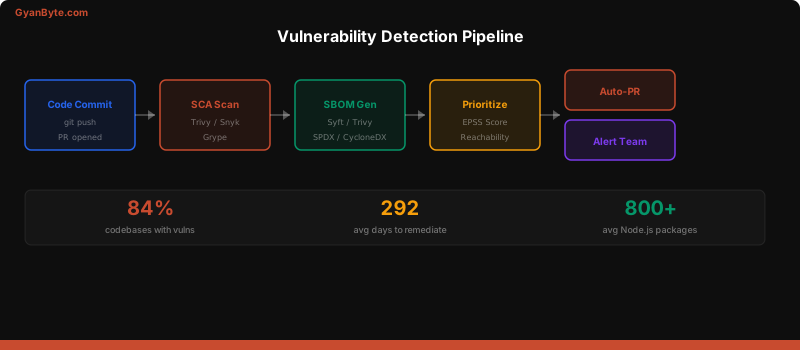
Modern software is mostly dependencies. A typical Node.js application installs 800+ packages. A Python service pulls in 150+. Most of your running code wasn’t written by you.
The numbers are sobering:
- 84% of codebases contain at least one known vulnerability (Synopsys, 2024)
- 48% contain high-severity vulnerabilities
- The average vulnerability exists in production for 292 days before remediation
SCA Tools Compared
Software Composition Analysis (SCA) tools scan your dependencies against vulnerability databases. Here’s what I’ve used in production:
| Tool | Best For | Speed | False Positives | Cost |
|---|---|---|---|---|
| Dependabot | Auto-PRs for GitHub repos | Fast | Low | Free |
| Renovate | Multi-platform, configurable | Fast | Low | Free (OSS) |
| Trivy | Image + filesystem scan | Very fast | Low | Free |
| Snyk | Deep analysis + fix PRs | Medium | Medium | Free tier + paid |
| Grype | CLI-first, Syft integration | Fast | Low | Free |
Dependabot Configuration
# .github/dependabot.yml
version: 2
updates:
  - package-ecosystem: "npm"
    directory: "/"
    schedule:
      interval: "weekly"
      day: "monday"
    open-pull-requests-limit: 10
    reviewers:
      - "security-team"
    labels:
      - "dependencies"
      - "security"
    ignore:
      - dependency-name: "@types/*"
        update-types: ["version-update:semver-minor"]

  - package-ecosystem: "docker"
    directory: "/"
    schedule:
      interval: "weekly"

  - package-ecosystem: "github-actions"
    directory: "/"
    schedule:
      interval: "weekly"
Trivy in CI
# GitHub Actions — Trivy SCA scan
- name: Trivy filesystem scan
  uses: aquasecurity/trivy-action@master
  with:
    scan-type: 'fs'
    scan-ref: '.'
    severity: 'CRITICAL,HIGH'
    exit-code: '1'
    format: 'table'

- name: Trivy SBOM generation
  run: |
    trivy fs --format spdx-json --output sbom.spdx.json .
    trivy sbom sbom.spdx.json --severity CRITICAL,HIGH
SBOM Generation
A Software Bill of Materials (SBOM) is a complete inventory of every component in your software. When the next Log4Shell hits, an SBOM lets you answer “Are we affected?” in minutes instead of weeks.
# Syft — generate SBOM from source
syft dir:. -o spdx-json > sbom.spdx.json

# Syft — generate SBOM from Docker image
syft myapp:latest -o cyclonedx-json > sbom.cyclonedx.json

# Scan SBOM for vulnerabilities
grype sbom:sbom.spdx.json --only-fixed --fail-on high
# GitHub Actions — SBOM generation + attestation
- name: Generate SBOM
run: syft dir:. -o spdx-json > sbom.spdx.json
- name: Attest SBOM
uses: actions/attest-sbom@v1
with:
subject-path: 'sbom.spdx.json'
- name: Upload SBOM artifact
uses: actions/upload-artifact@v4
with:
name: sbom
path: sbom.spdx.jsonVulnerability Prioritization
Here’s the uncomfortable truth: you can’t fix everything. A typical scan across 50 repos will surface 500+ vulnerabilities. You need a prioritization strategy.
CVSS vs EPSS vs Reachability
- CVSS (Common Vulnerability Scoring System) — how bad could it be. Theoretical severity.
- EPSS (Exploit Prediction Scoring System) — how likely is it to be exploited in the wild. Probability.
- Reachability — does your code actually use the vulnerable function?
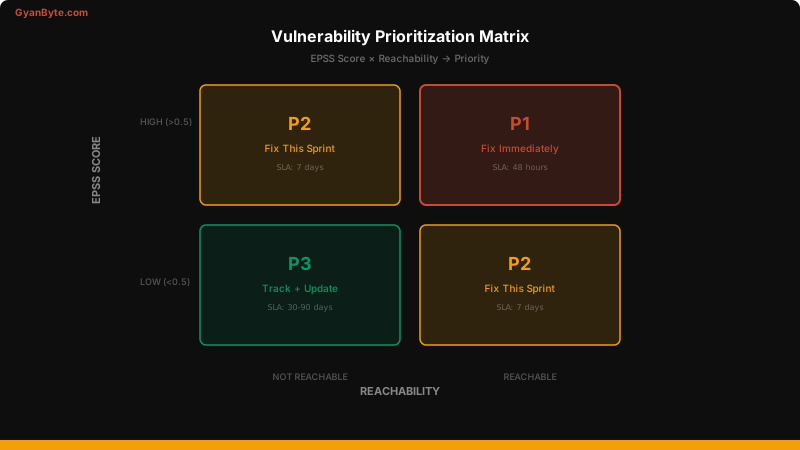
The priority matrix:
| EPSS Score | Reachable | Priority | Action |
|---|---|---|---|
| High (>0.5) | Yes | 🔴 P1 | Fix immediately |
| High (>0.5) | No | 🟡 P2 | Fix this sprint |
| Low (<0.5) | Yes | 🟡 P2 | Fix this sprint |
| Low (<0.5) | No | 🟢 P3 | Track, fix with next update |
# Check EPSS score for a CVE
curl -s "https://api.first.org/data/v1/epss?cve=CVE-2024-21626" | \
  jq '.data[0] | {cve, epss, percentile}'

# Output:
# {
#   "cve": "CVE-2024-21626",
#   "epss": "0.94521",
#   "percentile": "0.99834"
# }
Automated Remediation
The goal: vulnerable dependency detected → PR created → tests run → merge (if tests pass).
# .github/workflows/auto-remediation.yml
name: Auto-Remediate Vulnerabilities

on:
  schedule:
    - cron: '0 8 * * 1'  # Monday 8am
  workflow_dispatch:

jobs:
  scan-and-fix:
    runs-on: ubuntu-latest
    steps:
      - uses: actions/checkout@v4

      - name: Setup Node
        uses: actions/setup-node@v4
        with:
          node-version: '20'

      - name: Audit and fix
        run: |
          npm audit --json > audit-results.json || true
          CRITICAL=$(jq '.metadata.vulnerabilities.critical' audit-results.json)
          HIGH=$(jq '.metadata.vulnerabilities.high' audit-results.json)

          if [ "$CRITICAL" -gt 0 ] || [ "$HIGH" -gt 0 ]; then
            npm audit fix
            if git diff --quiet package-lock.json; then
              echo "No auto-fixable vulnerabilities"
            else
              echo "FIXED=true" >> $GITHUB_ENV
            fi
          fi

      - name: Create PR
        if: env.FIXED == 'true'
        run: |
          git checkout -b security/auto-fix-$(date +%Y%m%d)
          git add package-lock.json
          git commit -m "fix: auto-remediate npm vulnerabilities"
          git push origin HEAD
          gh pr create \
            --title "Security: Auto-fix npm vulnerabilities" \
            --body "Automated fix for critical/high npm audit findings" \
            --label "security,automated"
        env:
          GH_TOKEN: ${{ secrets.GITHUB_TOKEN }}
Scaling Across Repos
When you have 50+ repositories, manual vulnerability management breaks down. You need a centralized view.
Key practices at scale:
- Central SBOM repository — every build publishes its SBOM to a central S3 bucket or registry
- Organization-wide Dependabot/Renovate — configure once, applies to all repos
- Vulnerability SLA by severity — Critical: 48h, High: 7 days, Medium: 30 days, Low: 90 days
- Exception process — can’t fix it? Document the risk, set a review date, get security sign-off
- Weekly vulnerability digest — automated report to engineering leads
Key Takeaways
- SCA in every CI pipeline — Trivy or Snyk on every build, block on critical
- Generate SBOMs — know what’s in your software before the next Log4Shell
- Prioritize by EPSS + reachability — not all CVEs are equal
- Automate remediation — Dependabot/Renovate for auto-PRs, audit-fix for auto-merge
- Set vulnerability SLAs — Critical=48h, High=7d, Medium=30d
- Central visibility — you can’t manage 500 vulns across 50 repos without a dashboard
$ subscribe --weekly
One deep dive a week, in your inbox
System design, AI engineering, trading systems and interview prep. Tested code, real numbers. Free, and you can unsubscribe any time.
or read it on gyanbyte.substack.com


