

You can’t secure what you can’t see. That sounds like a bumper sticker, but it’s the root cause of most cloud security incidents I’ve investigated. The breach happened weeks ago, nobody noticed, and when they finally looked — there were no logs to review.
Security observability isn’t about collecting every log. It’s about knowing what to watch, when to alert, and how to investigate when something goes wrong.
Why Security Observability Matters
The average time to detect a breach is 197 days (IBM Cost of a Data Breach Report). That’s over six months of an attacker moving through your infrastructure. Security observability closes that gap.
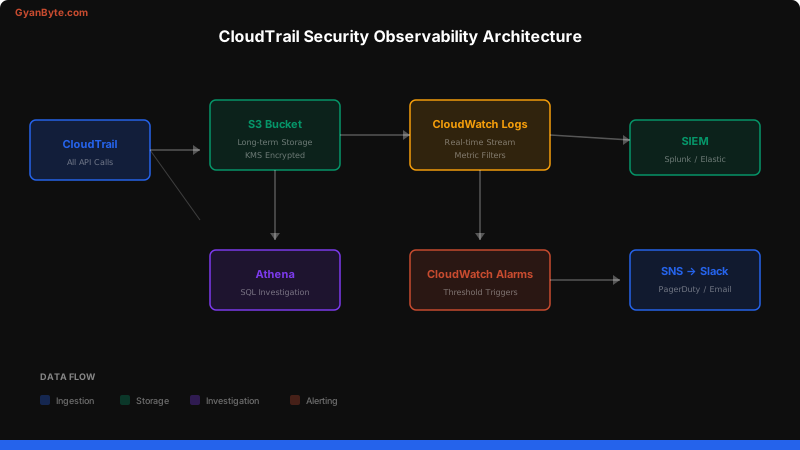
The three pillars of security observability:
- Audit Logging — who did what, when, from where
- Real-time Alerting — notify on suspicious patterns immediately
- Investigation Capability — query historical data to understand scope
CloudTrail Deep Dive
AWS CloudTrail records every API call made in your AWS account. It’s your security audit log and the single most important AWS security service.
What CloudTrail Records
Every API call includes:
- Who — the IAM principal (user, role, service)
- What — the API action (
s3:PutObject,iam:CreateUser) - When — timestamp in UTC
- Where — source IP address and AWS region
- How — console, CLI, SDK, or service-to-service
{
  "eventVersion": "1.08",
  "userIdentity": {
    "type": "AssumedRole",
    "principalId": "AROA3XFRBF23:dev-session",
    "arn": "arn:aws:sts::123456789:assumed-role/DevRole/dev-session",
    "accountId": "123456789"
  },
  "eventTime": "2026-04-04T14:30:00Z",
  "eventSource": "s3.amazonaws.com",
  "eventName": "PutBucketPolicy",
  "awsRegion": "us-east-1",
  "sourceIPAddress": "203.0.113.50",
  "requestParameters": {
    "bucketName": "sensitive-data-bucket",
    "bucketPolicy": {
      "Version": "2012-10-17",
      "Statement": [{
        "Effect": "Allow",
        "Principal": "*",
        "Action": "s3:GetObject",
        "Resource": "arn:aws:s3:::sensitive-data-bucket/*"
      }]
    }
  }
}
That log entry shows someone just made a bucket public. Without CloudTrail, you’d never know.
Multi-Region, Multi-Account Setup
A common mistake is only enabling CloudTrail in your primary region. Attackers know this — they’ll create resources in regions you’re not monitoring.
# Terraform — Multi-region CloudTrail with organization trail
resource "aws_cloudtrail" "org_trail" {
  name                          = "org-security-trail"
  s3_bucket_name                = aws_s3_bucket.cloudtrail_logs.id
  is_organization_trail         = true
  is_multi_region_trail         = true
  enable_log_file_validation    = true
  include_global_service_events = true

  cloud_watch_logs_group_arn = "${aws_cloudwatch_log_group.cloudtrail.arn}:*"
  cloud_watch_logs_role_arn  = aws_iam_role.cloudtrail_cloudwatch.arn

  event_selector {
    read_write_type           = "All"
    include_management_events = true

    data_resource {
      type   = "AWS::S3::Object"
      values = ["arn:aws:s3"]
    }
  }

  tags = {
    Environment = "security"
    ManagedBy   = "terraform"
  }
}

resource "aws_s3_bucket" "cloudtrail_logs" {
  bucket = "org-cloudtrail-logs-123456789"

  versioning {
    enabled = true
  }

  server_side_encryption_configuration {
    rule {
      apply_server_side_encryption_by_default {
        sse_algorithm     = "aws:kms"
        kms_master_key_id = aws_kms_key.cloudtrail.arn
      }
    }
  }
}
Key configuration decisions:
- Organization trail — captures all accounts automatically
- Multi-region — don’t leave blind spots
- Log file validation — detect tampered logs
- S3 + CloudWatch — long-term storage and real-time processing
Querying with Athena
When you need to investigate an incident, Athena lets you run SQL queries directly against CloudTrail logs in S3. No ETL, no data pipeline — just query.
-- Create the Athena table for CloudTrail logs
CREATE EXTERNAL TABLE cloudtrail_logs (
    eventVersion STRING,
    userIdentity STRUCT<
        type: STRING,
        principalId: STRING,
        arn: STRING,
        accountId: STRING,
        invokedBy: STRING,
        accessKeyId: STRING,
        userName: STRING,
        sessionContext: STRUCT<
            attributes: STRUCT<mfaAuthenticated: STRING, creationDate: STRING>,
            sessionIssuer: STRUCT<type: STRING, principalId: STRING, arn: STRING, accountId: STRING, userName: STRING>
        >
    >,
    eventTime STRING,
    eventSource STRING,
    eventName STRING,
    awsRegion STRING,
    sourceIPAddress STRING,
    userAgent STRING,
    errorCode STRING,
    errorMessage STRING,
    requestParameters STRING,
    responseElements STRING
)
ROW FORMAT SERDE 'org.apache.hive.hcatalog.data.JsonSerDe'
LOCATION 's3://org-cloudtrail-logs-123456789/AWSLogs/';
Investigation Queries
-- Find all root account usage (should be near zero)
SELECT eventTime, eventName, sourceIPAddress, userAgent
FROM cloudtrail_logs
WHERE userIdentity.type = 'Root'
  AND eventTime > '2026-04-01'
ORDER BY eventTime DESC;

-- Find IAM policy changes in the last 24 hours
SELECT eventTime, userIdentity.arn, eventName,
       requestParameters
FROM cloudtrail_logs
WHERE eventSource = 'iam.amazonaws.com'
  AND eventName LIKE '%Policy%'
  AND eventTime > date_format(date_add('hour', -24, now()), '%Y-%m-%dT%H:%i:%sZ')
ORDER BY eventTime DESC;

-- Find API calls from unusual IP addresses
SELECT sourceIPAddress, COUNT(*) as call_count,
       array_agg(DISTINCT eventName) as actions
FROM cloudtrail_logs
WHERE eventTime > '2026-04-01'
GROUP BY sourceIPAddress
HAVING COUNT(*) > 100
ORDER BY call_count DESC;

-- Find security group changes
SELECT eventTime, userIdentity.arn, eventName,
       requestParameters
FROM cloudtrail_logs
WHERE eventName IN (
  'AuthorizeSecurityGroupIngress',
  'AuthorizeSecurityGroupEgress',
  'RevokeSecurityGroupIngress',
  'CreateSecurityGroup',
  'DeleteSecurityGroup'
)
ORDER BY eventTime DESC
LIMIT 50;
CloudWatch Alarms for Security
Real-time alerting on high-risk API calls is critical. Here are the alarms every AWS account should have:
# CloudWatch metric filter + alarm for root account usage
resource "aws_cloudwatch_log_metric_filter" "root_usage" {
  name           = "RootAccountUsage"
  pattern        = "{ $.userIdentity.type = \"Root\" && $.userIdentity.invokedBy NOT EXISTS && $.eventType != \"AwsServiceEvent\" }"
  log_group_name = aws_cloudwatch_log_group.cloudtrail.name

  metric_transformation {
    name      = "RootAccountUsageCount"
    namespace = "SecurityMetrics"
    value     = "1"
  }
}

resource "aws_cloudwatch_metric_alarm" "root_usage" {
  alarm_name          = "root-account-usage"
  comparison_operator = "GreaterThanOrEqualToThreshold"
  evaluation_periods  = 1
  metric_name         = "RootAccountUsageCount"
  namespace           = "SecurityMetrics"
  period              = 300
  statistic           = "Sum"
  threshold           = 1
  alarm_description   = "Root account was used - investigate immediately"
  alarm_actions       = [aws_sns_topic.security_alerts.arn]
}
Essential Security Alarms
| Alarm | Pattern | Severity |
|---|---|---|
| Root account login | userIdentity.type = "Root" |
P1 — Critical |
| IAM policy changes | eventName = "Put*Policy" OR "Attach*Policy" |
P2 — High |
| Security group 0.0.0.0/0 | AuthorizeSecurityGroupIngress + 0.0.0.0/0 |
P1 — Critical |
| CloudTrail stopped | eventName = "StopLogging" |
P1 — Critical |
| Console login without MFA | ConsoleLogin + MFAUsed = "No" |
P2 — High |
| Failed console logins | ConsoleLogin + errorMessage |
P3 — Medium |
| S3 bucket policy change | PutBucketPolicy or DeleteBucketPolicy |
P2 — High |
SIEM Integration
For production environments, ship CloudTrail to a SIEM (Security Information and Event Management) system for correlation and advanced detection.
Common SIEM correlation rules:
- Impossible travel — same user logs in from two countries within minutes
- Privilege escalation — user attaches admin policy to themselves
- Data exfiltration — unusual volume of S3 GetObject calls
- Persistence — new IAM user or access key created outside normal workflow
Building Security Dashboards
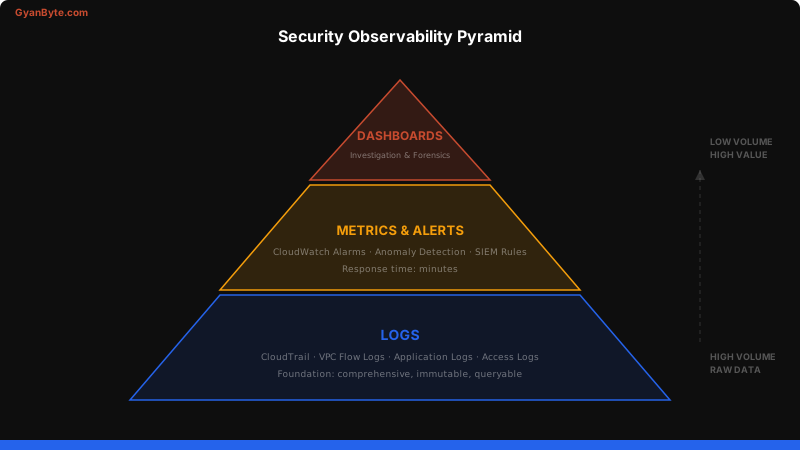
A security dashboard should answer three questions at a glance:
- Are we being attacked right now? — real-time alerts and anomalies
- What changed recently? — IAM changes, security group changes, new resources
- Are we compliant? — MFA adoption, encryption coverage, public resource count
# Quick CLI dashboard — top 10 API callers today
aws athena start-query-execution \
  --query-string "
    SELECT userIdentity.arn, COUNT(*) as calls
    FROM cloudtrail_logs
    WHERE eventTime > '$(date -u +%Y-%m-%d)'
    GROUP BY userIdentity.arn
    ORDER BY calls DESC
    LIMIT 10
  " \
  --result-configuration OutputLocation=s3://athena-results/
Key Takeaways
- Enable CloudTrail everywhere — multi-region, multi-account, with log validation
- Ship to S3 AND CloudWatch — long-term storage plus real-time alerting
- Set up the essential alarms — root usage, IAM changes, security group changes, CloudTrail tampering
- Use Athena for investigations — SQL queries directly against S3 logs, no infrastructure needed
- Protect your logs — encrypted S3 bucket, restricted access, separate account if possible
- Alert on log tampering — if someone stops CloudTrail, that’s a P1 incident
Security observability isn’t optional. In the next article, we’ll take this further and build auto-remediation that responds to these alerts automatically.
$ subscribe --weekly
One deep dive a week, in your inbox
System design, AI engineering, trading systems and interview prep. Tested code, real numbers. Free, and you can unsubscribe any time.
or read it on gyanbyte.substack.com


