

“Should we use RabbitMQ or Kafka?” is one of the most common — and most muddled — architecture questions. People reach for them interchangeably, call them both “message brokers,” and then get surprised when Kafka doesn’t behave like a queue or a queue can’t replay history. The confusion is understandable, because they look similar on the surface: producers send messages, consumers receive them. But underneath they’re built on two fundamentally different models, and picking the wrong one leads to real pain. This article makes the difference crisp, then gives you a one-line test for choosing.
The Core Difference: Delete vs Keep
Everything flows from one design decision: what happens to a message when it’s consumed?
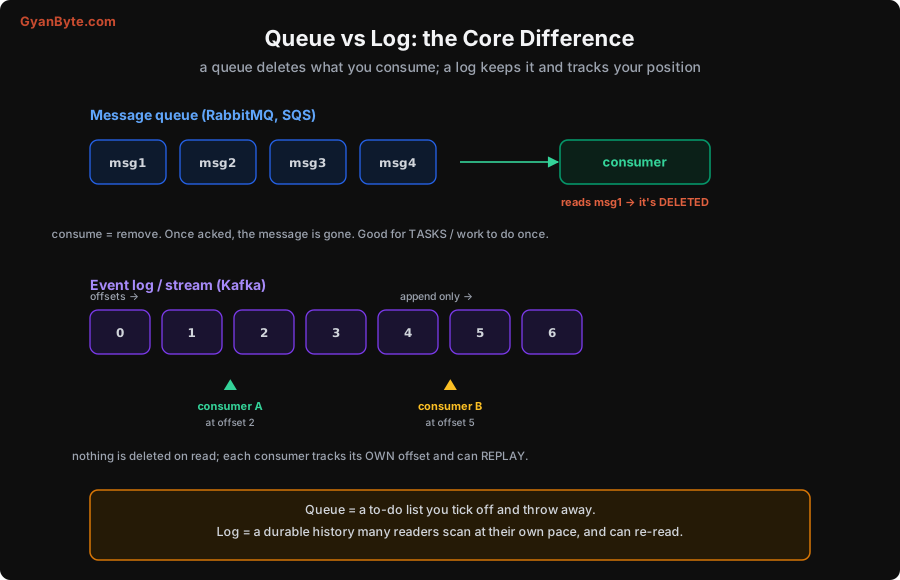
A message queue (RabbitMQ, Amazon SQS, Redis queues) is consume-and-delete. A message sits in the queue until a consumer reads it and acknowledges it — and then it’s gone. The queue is like a to-do list: a worker takes the top task, does it, and crosses it off (removes it). The message existed to get one piece of work done once; after that, there’s no reason to keep it. This is perfect for tasks: “send this email,” “resize this image,” “process this payment job.”
An event stream or log (Apache Kafka, AWS Kinesis, Pulsar) is append-and-keep. Events are appended to an ordered, immutable log and retained (for days, weeks, or forever) regardless of who has read them. Instead of deleting on read, each consumer tracks its own offset — its position in the log — and advances it as it reads. Because the data stays and the position is per-consumer, two different consumers can be at different points in the same log, and any consumer can rewind and replay from an earlier offset. The log is like a durable history book that many readers scan at their own pace and can re-read.
That single difference — delete vs keep, shared-position vs per-consumer-offset — drives everything else. Let me unpack the consequences, because they’re what actually bite you.
Scaling Consumers: Competing Workers vs Partitions
Both models let you add more consumers for throughput, but how they distribute work is completely different.
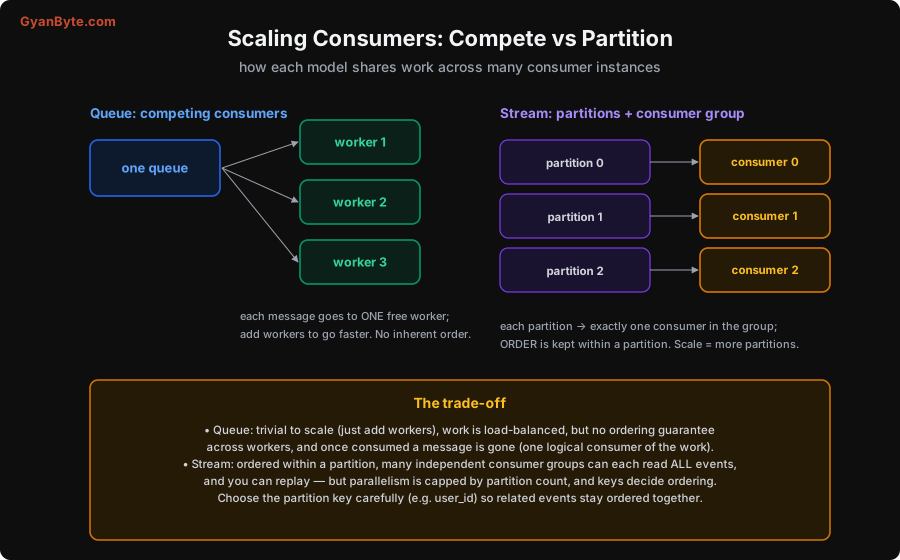
In a queue, you attach multiple competing consumers to the same queue. Each message goes to exactly one free worker, load-balanced automatically. Need to go faster? Add more workers; the queue spreads the messages across them. It’s beautifully simple to scale. The cost: because any worker can grab any message, there’s no ordering guarantee across workers — message 1 and message 2 might be processed simultaneously by different workers, finishing in either order.
In a stream, the log is split into partitions, and consumers form a consumer group where each partition is read by exactly one consumer in the group. Parallelism comes from having multiple partitions: 10 partitions means up to 10 consumers working in parallel. The crucial property is that ordering is preserved within a partition — all events in partition 3 are read in the exact order they were written. You control what goes into which partition via a partition key (e.g. user_id), so all events for one user land in one partition and stay strictly ordered, while different users spread across partitions for parallelism.
There are two more differences that matter enormously:
- Many independent consumers. In a stream, you can have multiple consumer groups each independently reading the entire log. Your analytics pipeline, your search indexer, and your notification service can all consume every order event, at their own pace, without interfering. In a plain queue, once a message is consumed by one worker it’s gone — there’s one logical consumer of the work. (Queues add “fanout” via exchanges/topics, but the retention and replay model is still different.)
- Replay. Because the stream keeps everything, a new or fixed consumer can reprocess history from any offset — reindex all data, rebuild a cache, recover from a bug by replaying. A queue, having deleted consumed messages, can’t give you back what’s already been processed.
The trade-off in one breath: queues are trivially scalable and load-balanced but unordered and consume-once; streams are ordered-per-partition, replayable, and multi-consumer, but parallelism is capped by partition count and you must choose partition keys thoughtfully.
Delivery and Ordering, Briefly
A couple of guarantees people often ask about, in this framing:
- Delivery. Both typically give at-least-once delivery — they’ll redeliver on failure rather than lose data, which means your consumers can see duplicates. (This is exactly why you make consumers idempotent — see the companion article on idempotency.) Neither gives true exactly-once delivery; you get exactly-once effect by combining at-least-once delivery with idempotent processing.
- Ordering. A queue gives no cross-consumer ordering (and even a single consumer can lose order on redelivery). A stream gives strict ordering within a partition, which is the main reason to choose it when sequence matters (e.g. “account credited” must be processed before “withdrawal”).
Which Should You Use?
Here’s the decision, and a test that resolves most cases in seconds.
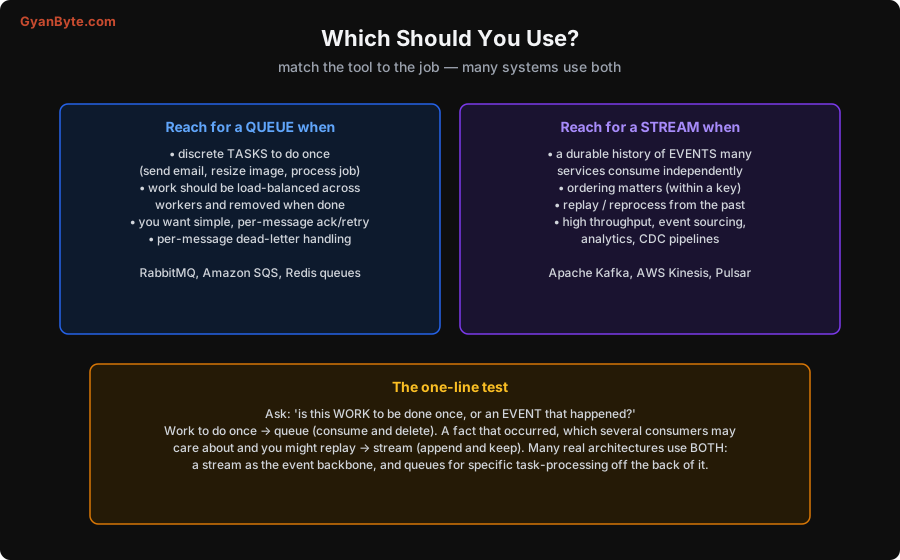
Reach for a queue when:
- You have discrete tasks to do once — send an email, resize an image, run a background job.
- Work should be load-balanced across workers and removed when done.
- You want simple per-message acknowledgement, retry, and dead-letter handling (a message that keeps failing goes to a dead-letter queue for inspection).
- Tools: RabbitMQ, Amazon SQS, Redis-based queues.
Reach for a stream when:
- You need a durable history of events that many services consume independently.
- Ordering matters (within a key), and you want replay / reprocessing from the past.
- You have high throughput, or you’re doing event sourcing, analytics, or change-data-capture (CDC) pipelines.
- Tools: Apache Kafka, AWS Kinesis, Apache Pulsar.
And the one-line test that cuts through it: “Is this WORK to be done once, or an EVENT that happened?”
- Work to be done once → queue. “Resize this image” is a task; one worker does it, then it’s done and gone.
- A fact that occurred, which several consumers may care about and you might replay → stream. “User placed order #1234” is an event; your fulfilment, analytics, email, and fraud systems may all care, now and later.
Reframing a message as either a command to do something (queue) or a notification that something happened (stream) usually makes the choice obvious. And note the two aren’t exclusive: many real architectures use both — a Kafka stream as the event backbone that records everything, with queues hanging off it to process specific tasks. Use the event log as the source of truth, and queues where you need simple, load-balanced task execution.
Pitfalls to Avoid
- Treating Kafka like a queue (or vice versa). They have different models; forcing one to behave like the other leads to pain. Pick based on consume-and-delete vs append-and-keep.
- Using a stream for simple task distribution. If you just need “do this job once, load-balanced,” a queue is simpler. A stream’s partitions and offsets are overhead you don’t need.
- Using a queue when you need replay or multiple independent consumers. Once a queue message is consumed, it’s gone; you can’t reprocess history or let five services each read everything. That’s a stream’s job.
- Ignoring partition keys in a stream. Ordering is only guaranteed within a partition. Put related events (same
user_id) in the same partition, or you lose the ordering you came for. - Assuming exactly-once delivery. Both are at-least-once; expect duplicates and make consumers idempotent.
- Over-partitioning or under-partitioning. Too few partitions caps your parallelism; too many adds overhead. Size partitions to your throughput and consumer count.
- Forgetting dead-letter handling (queues). A poison message that always fails will loop forever without a dead-letter queue to catch it.
Quick Recap
- Queue (RabbitMQ, SQS) = consume-and-delete: a to-do list of tasks, load-balanced across competing workers, no ordering across them, gone once done.
- Stream (Kafka, Kinesis) = append-and-keep: a durable, ordered (per-partition) log; each consumer tracks its own offset, many consumer groups can read everything, and you can replay.
- Queues scale by adding workers; streams scale by partitions, with ordering preserved within a partition (choose keys carefully).
- The test: “work to do once?” → queue; “an event that happened?” → stream. Both are at-least-once, so make consumers idempotent.
- Many systems use both: a stream as the event backbone, queues for task processing.
Get this distinction right and a whole class of architecture decisions becomes clear. When someone asks “RabbitMQ or Kafka?”, you no longer guess — you ask whether they’re dealing with tasks or events, and the answer follows.


