

“Vector database” sounds intimidating, and the explanations usually jump straight to HNSW graphs and cosine distance without saying what problem any of it solves. Let’s fix that. Underneath the jargon, vector databases do one simple, powerful thing: they let you ask “what’s most similar to this?” across millions of items, fast. They’re the engine behind semantic search, recommendations, and the retrieval half of RAG (retrieval-augmented generation). This article builds the idea from the ground up — embeddings first, then the search that makes them useful, then the honest question of whether you even need a dedicated database for it.
What an Embedding Actually Is
Everything starts with the embedding. An embedding is what you get when a model reads a piece of text (or an image, or audio) and outputs a vector — a fixed-length list of numbers, often a few hundred to a couple of thousand of them. The magic isn’t the numbers themselves; it’s a property the model is trained to give them: things with similar meaning get vectors that are close together, and unrelated things get vectors that are far apart.
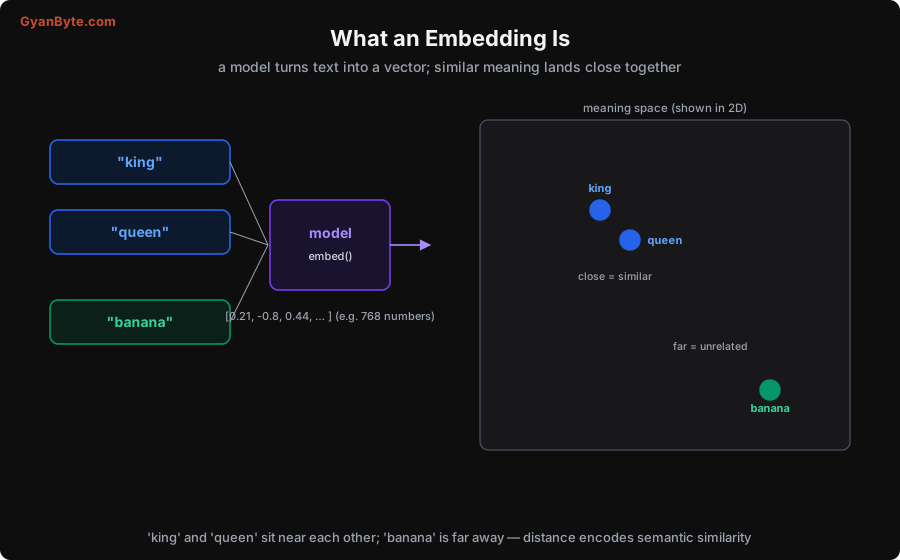
Picture the vectors as points in space (the diagram shows a 2D cartoon; real embeddings live in hundreds of dimensions, but the intuition is identical). The words “king” and “queen” land near each other because they’re semantically related; “banana” lands far away because it has nothing to do with royalty. The model learned this during training on huge amounts of text — you don’t hand-craft it.
Why this is such a big deal: it turns the fuzzy, human problem of “find me things that mean something similar” into a precise, geometric problem of “find me the nearest points.” Keyword search matches exact words — searching “car” misses a document that only says “automobile.” Embedding (semantic) search matches meaning — “car” and “automobile” have nearby vectors, so one finds the other. That’s the whole appeal: search by what text means, not the literal characters.
So the pipeline for semantic search is: embed all your documents into vectors once (and store them), then at query time embed the query into a vector and find the stored vectors nearest to it. The nearest vectors are the most semantically similar documents. Everything a vector database does is in service of that last step — finding nearest vectors — quickly, at scale.
The Search Problem: Exact vs Approximate
Finding the nearest vectors sounds easy, and for small collections it is. The naive method — exact k-nearest-neighbour (kNN) — compares your query vector against every single stored vector, computes the distance, and returns the closest k. It’s perfectly accurate. It’s also hopeless at scale.
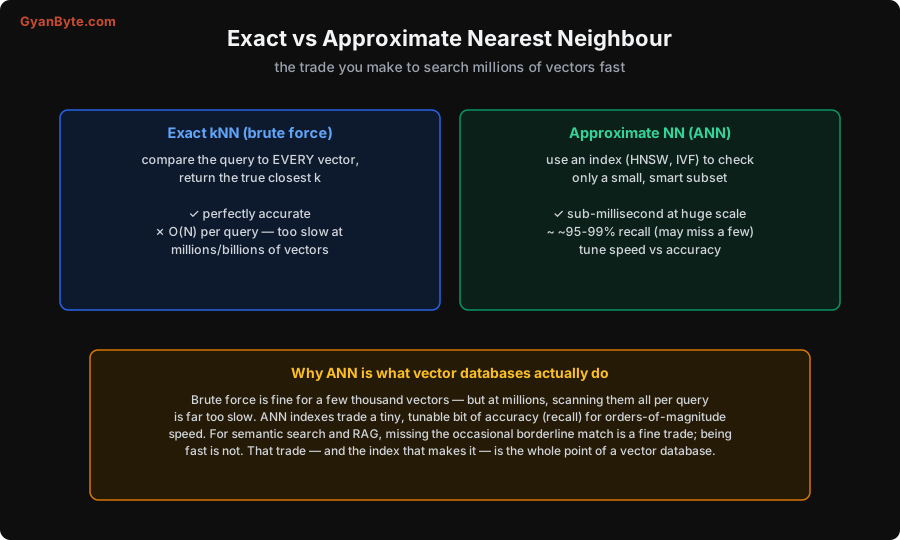
The problem is that exact kNN is O(N) per query: with a million vectors you do a million distance computations for every search, and with a billion you do a billion. At real scale that’s far too slow for an interactive search or a RAG lookup that needs to return in milliseconds.
So vector databases use approximate nearest-neighbour (ANN) search instead. An ANN index is a clever data structure that lets you check only a small, smart subset of the vectors — the ones likely to be nearest — and skip the rest. The trade-off is in the name: approximate. You might occasionally miss a borderline match, so instead of 100% accuracy you get, say, 95–99% recall (the fraction of true nearest neighbours you actually find), tunable up or down. In exchange, you get sub-millisecond queries at massive scale.
For the use cases that matter — semantic search, recommendations, RAG — this is an excellent trade. Missing one borderline-similar document out of the top results almost never matters; being 1000× faster always does. That trade, and the index that enables it, is the entire reason vector databases exist. If you only ever had a few thousand vectors, you wouldn’t need one — you’d just brute-force it.
How HNSW Works (the Index Behind Most Vector DBs)
The most popular ANN index — used by Qdrant, Weaviate, Milvus, pgvector and others — is HNSW (Hierarchical Navigable Small World). The name is a mouthful; the idea is intuitive once you see it.
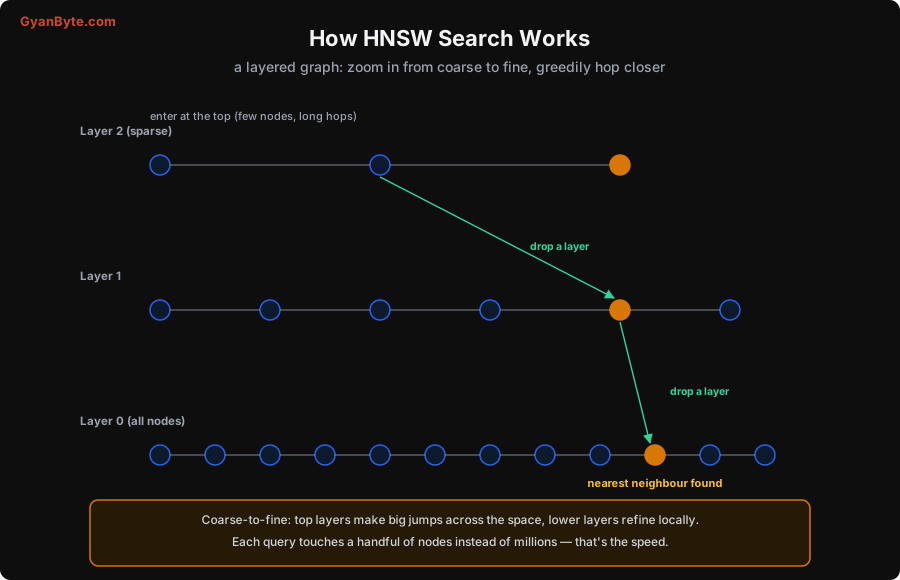
HNSW builds a layered graph of your vectors:
- The bottom layer (Layer 0) contains every vector, each connected to its nearby neighbours.
- Each layer above contains a sparse random sample of the layer below — fewer nodes, with longer-range connections across the space.
To search, you enter at the top (the sparsest layer) and greedily hop toward the query: from your current node, move to whichever neighbour is closest to the query vector, repeating until you can’t get closer. Then you drop down a layer and repeat, now with more nodes and finer resolution. You keep descending until, at the bottom layer, you’ve zeroed in on the actual nearest neighbours.
The analogy is finding a house by first flying over the country (top layer, huge jumps), then driving through the city (middle layer), then walking down the street (bottom layer). The upper layers get you roughly there with a few big jumps; the lower layers refine locally. The payoff: each query touches only a handful of nodes following the graph, instead of comparing against millions. That’s where the sub-millisecond speed comes from.
You don’t need to implement HNSW — your vector database does — but understanding it demystifies the two knobs you’ll actually tune: parameters that trade index build time and memory against search speed and recall. More connections and deeper search = higher recall, slower and more memory; fewer = faster and lighter, slightly lower recall. Knowing why those knobs exist (you’re tuning how much of the graph to explore) makes them far less mysterious.
Do You Actually Need a Vector Database?
Here’s the part the hype skips: you almost always want embeddings, but you don’t always need a dedicated vector database. They’re different decisions, and conflating them leads to over-engineering.
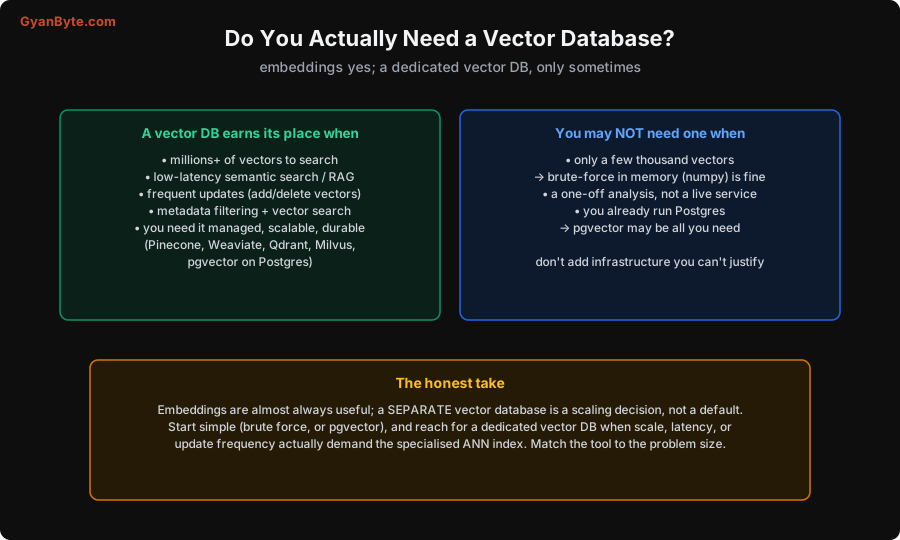
A dedicated vector database earns its place when you have:
- Millions or more vectors to search (where brute force is too slow and you need a real ANN index).
- Low-latency requirements — interactive semantic search, production RAG serving many users.
- Frequent updates — adding, deleting and re-indexing vectors continuously (not just a static set).
- Metadata filtering alongside vector search — “find similar documents written after 2024 by this author,” which good vector DBs handle efficiently.
- A need for it to be managed, scalable and durable — which is what Pinecone, Weaviate, Qdrant, Milvus (and pgvector on Postgres) provide.
But you may not need one when:
- You have only a few thousand vectors — brute-force cosine similarity in memory (a bit of NumPy) is simple, exact, and plenty fast. Adding a vector database here is pure overhead.
- It’s a one-off analysis, not a live service.
- You already run PostgreSQL — the pgvector extension adds vector search to Postgres, so you get similarity search without operating a whole new system. For many apps this is the sweet spot: no new infrastructure, good-enough scale.
The honest take: embeddings are nearly always useful; a separate vector database is a scaling decision, not a default. Start simple — brute force for small sets, or pgvector if you’re already on Postgres — and reach for a dedicated vector DB when scale, latency, or update frequency genuinely demand the specialised ANN index. Match the tool to the size of the problem, rather than reaching for the most impressive-sounding option.
A Few Practical Notes
- Distance metric matters. Cosine similarity (angle between vectors) is the common default for text embeddings; some setups use dot product or Euclidean distance. Use whatever your embedding model was trained for — mismatching it quietly hurts quality.
- Embeddings must match. You have to embed your queries with the same model you embedded your documents with; vectors from different models aren’t comparable.
- Chunking is upstream and crucial. For RAG, how you split documents into chunks before embedding often matters more than the vector DB choice — too big and retrieval is vague, too small and it loses context.
- Re-embedding is a migration. Changing embedding models means re-embedding everything, which is a real operational cost at scale — factor it in before committing to a model.
Pitfalls to Avoid
- Confusing embeddings with a vector database. You need embeddings to do semantic search; you need a dedicated vector DB only at scale. Don’t over-engineer small problems.
- Reaching for a vector DB with a few thousand vectors. Brute force (NumPy) or pgvector is simpler and fast enough. Add infrastructure only when scale demands it.
- Expecting exact results from ANN. ANN trades a little recall for speed; it may miss a borderline match. That’s usually fine for search/RAG — but know it’s approximate.
- Mismatching the distance metric. Use the metric your embedding model expects (often cosine). A wrong metric silently degrades results.
- Embedding queries and documents with different models. Their vectors aren’t comparable. Use one consistent model for both.
- Ignoring chunking for RAG. Retrieval quality often hinges on chunk strategy more than on the vector DB. Get chunking right first.
- Forgetting re-embedding cost. Switching embedding models means re-processing everything — a real migration at scale.
Quick Recap
- An embedding is a vector a model produces so that similar meaning = nearby points; semantic search becomes “find the nearest vectors.”
- Exact kNN is accurate but O(N) — too slow at millions. ANN indexes check a smart subset, trading a little recall for huge speed.
- HNSW is the common ANN index: a layered graph you traverse coarse-to-fine, touching a handful of nodes instead of millions.
- You almost always want embeddings; a dedicated vector DB (Pinecone/Weaviate/Qdrant/Milvus/pgvector) is a scaling decision — start with brute force or pgvector, scale up when millions of vectors, low latency, or frequent updates demand it.
- Mind the practical details: distance metric, consistent embedding model, chunking, and re-embedding cost.
Vector databases aren’t magic — they’re a fast answer to “what’s most similar?”, built on embeddings and an approximate-search index. Understand those two ideas and the whole ecosystem, from RAG pipelines to recommendation systems, stops being a buzzword and starts being a tool you can reason about.


