So far, everything has assumed pods are disposable: lose one, get an identical blank replacement. That’s perfect for stateless services and completely wrong for anything that holds data. A database pod isn’t interchangeable, it is its data, and a blank replacement is a disaster. This lesson covers how Kubernetes handles persistent storage and stateful workloads, and it ends with the most important practical advice in the whole course about databases: often, don’t run them on Kubernetes at all.
Pod Storage Is Ephemeral by Default
A container’s filesystem is ephemeral. Write a file inside a running container, and it’s gone when the pod restarts or is replaced, back to the image’s contents. That’s by design: pods are cattle, not pets. For a stateless API, that’s exactly what you want.
For anything that must keep data across restarts, a database, a file store, a queue, you need storage that outlives the pod. Kubernetes provides this through volumes, and specifically persistent volumes backed by real disks.
How Persistent Storage Works
The flow has three objects, and the clever part is that the pod never names the real disk directly:
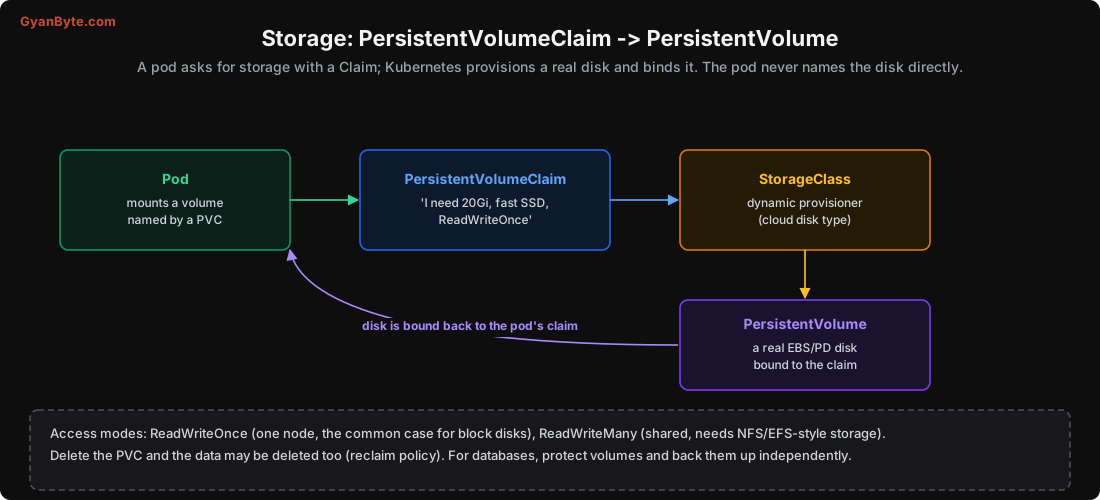
- The pod mounts a volume, referenced by a PersistentVolumeClaim (PVC), not a disk name.
- The PVC is a request: “I need 20Gi, fast SSD, ReadWriteOnce.” It’s the abstraction your app depends on.
- A StorageClass is a dynamic provisioner that knows how to create real disks of a given type (e.g. AWS
gp3, GCPpd-ssd). When a PVC appears, the StorageClass provisions a matching PersistentVolume (PV), a real cloud disk (EBS, Persistent Disk), and binds it to the claim.
The pod only ever references the PVC. This decoupling means the same manifest works on any cloud, the StorageClass handles the provider-specific details. You just ask for storage; Kubernetes gets you a disk.
# PVC: the request
apiVersion: v1
kind: PersistentVolumeClaim
metadata: {name: data}
spec:
  accessModes: [ReadWriteOnce]
  storageClassName: gp3
  resources: {requests: {storage: 20Gi}}
Two things to know:
- Access modes: ReadWriteOnce (mounted read-write by one node, the normal case for block disks like EBS), ReadWriteMany (shared read-write by many nodes, needs file storage like NFS/EFS/Filestore, not plain block disks). Most databases use ReadWriteOnce.
- Reclaim policy: what happens to the disk when you delete the PVC.
Delete(default for dynamic volumes) deletes the data too;Retainkeeps it. For anything important, understand this, deleting a PVC can delete your database. Back up independently.
Why a Deployment Isn’t Enough for State
A Deployment (Lesson 4) assumes pods are interchangeable: random names, no stable identity, share nothing, a dead pod replaced by a fresh blank one. For a database cluster, every one of those assumptions is wrong:
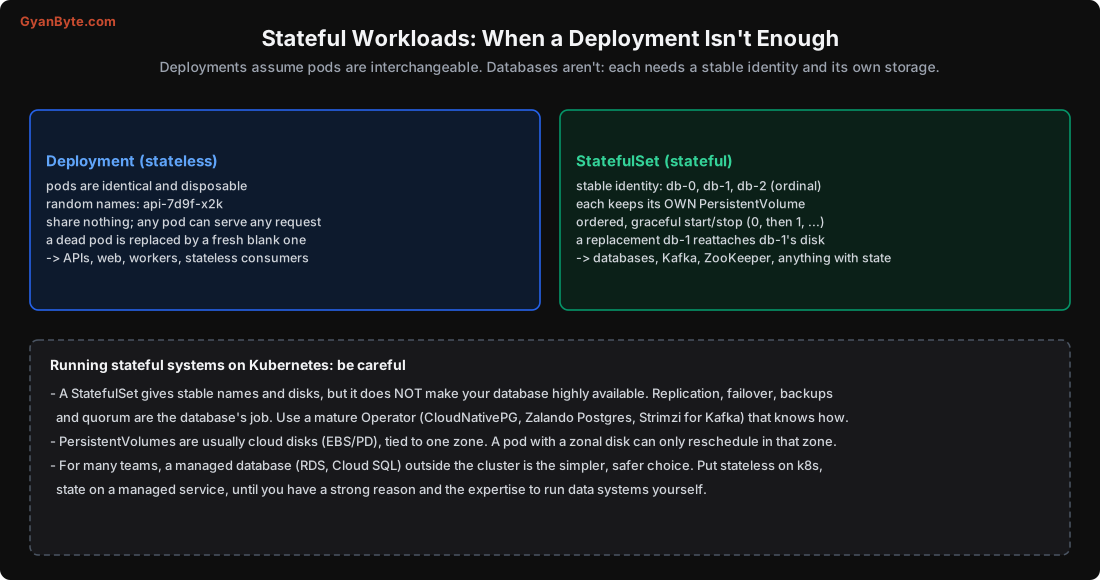
A database pod needs a stable identity (so replicas know who the primary is), its own data (that follows it across restarts), and ordered startup (bring up the primary before the replicas). That’s what a StatefulSet provides:
- Stable names: pods are
db-0,db-1,db-2(an ordinal), not random. The name persists across restarts. - Per-pod storage: each pod gets its own PVC/PV, and a replacement
db-1reattachesdb-1’s disk, so it keeps its data. - Ordered, graceful lifecycle: pods start in order (0, then 1, then 2) and stop in reverse, which clustered systems often need.
- A headless Service (Lesson 7) gives each pod its own DNS name (
db-0.db.default.svc) so clients can reach specific pods.
Use StatefulSets for databases, Kafka, ZooKeeper, Elasticsearch, anything with identity and state.
The Honest Advice About Databases on Kubernetes
Here’s the part I most want you to take away, because it saves teams a lot of pain:
A StatefulSet gives you stable names and disks. It does not make your database highly available.
Replication, leader election, failover, backups, quorum, point-in-time recovery, all of that is the database’s job, not Kubernetes’s. A StatefulSet will faithfully restart db-0, but it won’t promote db-1 to primary when db-0 dies, or ensure the replica was caught up, or take backups. Running a production database on Kubernetes safely means running a mature Operator that encodes this knowledge: CloudNativePG or Zalando’s operator for PostgreSQL, Strimzi for Kafka, and so on. These handle failover, backups and upgrades correctly. Running a bare StatefulSet of a database yourself, without an operator, is how people lose data.
There are also hard constraints from storage:
- Cloud block disks are zonal. An EBS/PD volume lives in one availability zone, so a pod bound to it can only reschedule in that zone. This complicates multi-zone high availability, your replicas and their disks must be spread across zones deliberately.
- Backups are separate. The PV is not a backup; it’s one copy. Back up the data independently and test restores (see the Database Internals backup lesson).
So the practical recommendation for most teams: run stateless workloads on Kubernetes, and keep state in a managed database outside the cluster (RDS, Cloud SQL, Aurora, managed Kafka). You get the cloud provider’s replication, failover, backups and patching, done by specialists, and your cluster stays simpler. Connect to it with short-lived credentials (IRSA/Workload Identity, Lesson 8). Run stateful systems on Kubernetes only when you have a strong reason (cost at scale, portability, a capable platform team) and you use a proven operator. This isn’t a knock on Kubernetes; it’s recognising that data systems are hard, and the managed option is usually the safer default.
Pitfalls to Avoid
- Storing data in a pod’s container filesystem. It’s ephemeral, lost on restart. Use a PersistentVolume.
- A Deployment for a database. No stable identity or storage; use a StatefulSet.
- A bare StatefulSet for a production database. It doesn’t do failover or backups. Use an Operator.
- Assuming a StatefulSet makes your DB highly available. Replication and failover are the database’s job.
- Ignoring the reclaim policy. Deleting a PVC can delete the data; use
Retainfor important volumes and back up. - Forgetting disks are zonal. A pod is pinned to its volume’s zone; plan multi-zone HA deliberately.
- Running your own database on k8s without the expertise. For most teams, a managed database is simpler and safer.
Quick Recap
- Pod filesystems are ephemeral; persistent storage comes from a PVC (request) bound to a PV (real disk) via a StorageClass.
- Deployments assume interchangeable, shared-nothing pods, wrong for databases.
- StatefulSets give stable names (db-0), per-pod storage that reattaches, and ordered startup, for databases, Kafka, etc.
- A StatefulSet does NOT make a database highly available; replication, failover and backups are the database’s job, so use an Operator.
- For most teams: stateless on Kubernetes, state in a managed database outside it, until you have a strong reason and the expertise.
Next lesson, the last: making it production-ready. Security (RBAC, network policies, pod security), observability, and a capstone that deploys a real application with every lesson applied.